Cascading or Otherwise Aligned Windows

I have a macro that spawns a window of a fixed size and positions itself in the centre of the screen.

The challenge I have is that the macro can run multiple instances concurrently which means that the windows end up on top of each other, not good!

The solution is to cascade or otherwise arrange the subsequent windows from the multiple instances.

To do this I thought that I could / would create a Global variable that is a pseudo array of 10 slots with each slots set at 0 (off) or 1 (on). When a macro is about to spawn a window it:

  1. Read the array

  2. Set the first position / slot that is 0 to 1 (i.e., no other instance can grab it and use that position / slot)

  3. Set Local_windowPosition to the position / slot in 2 above

  4. Spawns the window (as we know there is not another window in that location)

  5. Grabs the spawned window ID

  6. If spawned synchronously then when the window closes set the slot to 0 so the next window can grab it and if spawned async then poll the window ID for when the window closes and when and, when it does, then set the slot to 0 so the next window can grab it,

Questions:

  1. Is there a better / easier way to do this as the above seems like lot of work.

  2. What is the best practice for this situation.

  3. Worth noting I am open to AppleScript, Shell Script, etc. to solve this.

Thank you.

Have you tried solving this using a semaphore lock?

Appreciate the response but a semaphore is exactly what I don't want. I want the windows to spawn so I can see the different activity and information in real time.

I will admit I haven't thought this through very well yet, but couldn't you just use two global variables for the window location? To make my example simple, let's say that's at 100,100, stored in x_loc and y_loc.

The macro runs the first time, and sets the first window at 100,100. The macro then checks if either variable is at a limit - say 300. If it is, it sets both variables to 100. If it's not, it adds 20 to each variable then exits.

The next time the macro is run, the window will be at 120,120. Nine more runs, and it's at 300,300 and so resets to 100,100.

I'm probably missing something, but that's the first approach I thought of when reading your question.

-rob.

What windows. Engine windows, Custom HTML Prompts, application windows, something else?

I understand what you want, and I see why you would think semaphores would not help you. But actually, ten separate semaphores could act as ten separate variables to help you know which locations are “used”. I have no idea if that’s what @kevinb meant or not. He may say, “Um, yes that’s exactly what I meant.”

I’m sure your own approach could work, (although your method might have difficulties if the window creation process is performed by asynchronous macros, which you didn’t clarify) but for the fun of it I want to talk about how you could use ten semaphores to protect ten screen locations. In my mind, a semaphore is to protect a shared resource, which could be a mouse, or a global variable, or a tenth of the screen’s real estate. Assuming you have ten regions on the screen (perhaps an array of 5 x 2 window locations?)

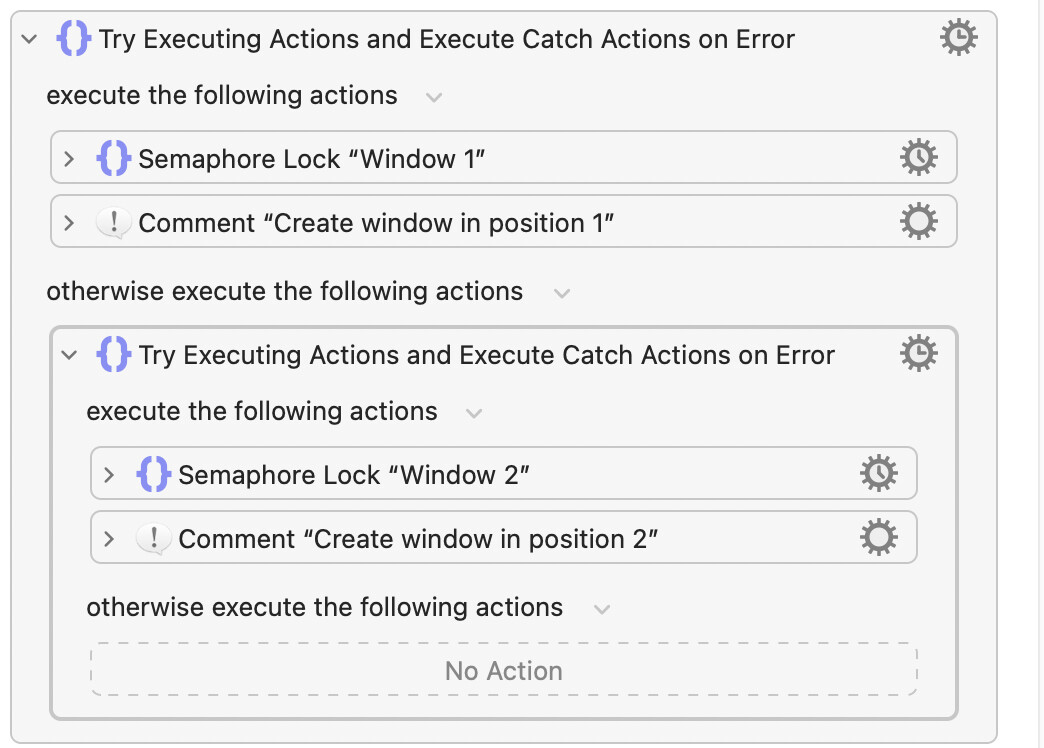
You didn’t mention how you are creating windows, but I don’t think it matters for this solution, as long as your windows are not running asynchronously. When you want to create a window, you would need to check which location is free, by testing the semaphores, something like this: (using ten nested blocks of code)

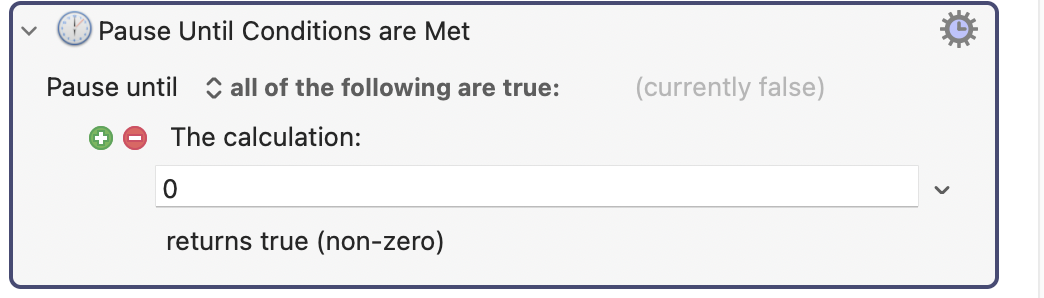
Notice that you would have ten nested Try Blocks. Each block is responsible for checking a uniquely named semaphore (with a timeout of 1/100 seconds, and no checkboxes checked), and if that check fails (because a window in that position is busy) then it runs the otherwise clause to test the next window location. Eventually it finds a semaphore that isn’t locked and creates a window in the location reserved by that semaphore. The trick to all this occurs at the end of this macro, because you can’t have the macro terminate, or else the semaphore automatically unlocks and subsequent tests will think the location is free. So you must have something at the end of your window-creation macro that never terminates, perhaps this: (make sure the flag Reduce CPU usage is turned on for this action:)

The upside to this approach is that when the (synchronous) window closes, the macro will terminate, automatically freeing up the semaphore that was locking it in place. For this to work, I’m assuming that your window is not running asynchronously, (which you didn’t clarify) because this method uses the fact that the window’s own closing continues the macro that created it, which then closes the macro and unlocks the semaphore.

The downside to this method is that if you ever “terminate all macros” the semaphores will be reset and you will need to close all the windows manually, because the locked semaphores were what reserved the screen locations. But if you do it this way, the macro itself (as long as you execute it asynchronously!!) will lock one of ten screen regions because it locks a semaphore corresponding to the location that it chose.

P.S. If all ten locations are used (all ten semaphores are locked) you will have to handle that case in the final Try statement. Perhaps make a beep sound? Or just place the new window on a random screen location, which is what I would do.

P.S. I didn’t actually test this code. I just happen to have a fair understanding of how semaphores work. So if there’s something wrong above, I’ll help fix it.

P.S. You don’t have to use my approach. I just enjoy promoting semaphores. This is an interesting case study showing how they can be useful. I think I would use this solution to solve your problem, because in my mind it’s a really clean solution, not requiring global variables.
1 Like

Appreciated and agree that will work.

The nuance between your method and mine is that mine will reclaim any previous position(s) that are no longer used so the spawned windows are always as central as possible and don't go "running off" when there are empty slots.

Apologies, I should have been clearer, engine windows and/or Custom HTML Prompt windows.

And do you only want to "arrange" windows with specific names (or part thereof), or all the windows? For example, if you already have a "Display Text" window up and you run your macro that pops a Custom Prompt, should that "Display Text" window be considered?

In my long post I asked if those were asynchronous or not. Custom HTML can be either. Which engine windows? Some are asynchronous, and some are not. This matters.

It also matters if your code can open this windows asynchronously or not. I also mentioned this in my post.

@DocOck

Appreciated and something to consider.

I think your approach will work though I would need to test it.

I am trying to find a portable (easy to use elsewhere) and surgical (elegant) way of doing this.

In terms of async windows I have handled this in the past either by auto closing said windows (using AppleScript and the window ID) or polling the window ID.

Very busy at work today so any testing will need to wait until late tonight / tomorrow.

Will keep you informed, stay tuned!

Thanks. Indeed, your question got me thinking about whether I should be using this approach, as I’m getting a little tired of alert windows opening in random places.

I have all my alert windows -- other than debug -- opening where I want them to, I just need to deal with the multiple instance problem in this thread.

I will add the auto close capability I built is a nice feature.

Oh, so you do have asynch windows. My method was designed to handle only synchronous windows.

Yes, I do...

Hmm. The problem with async is that there needs to be some method of getting information back from the closed windows. You said you like to use polling. Semaphores only work when the macro that locked them can continue until the window closes, which isn’t entirely incompatible with async windows, but complicates the matter. Did you know that some async windows (like Custom HTML) can trigger a new KM macro when they close? That might help in this case. For example, you could design your Custom HTML windows to send a signal that they are releasing their region of the screen. But you can’t do that with other Engine windows. There are too many unknowns here for me to be able to give a solution. (1) exactly which windows are you trying to create; (2) do you have a single macro instance creating them, or could you have asynchronous macros trying to create windows?

:slight_smile: No, I wouldn’t pretend either to have given the matter in-depth thought; I simply felt that it might be useful to first establish whether or not the use of semaphores had been ruled out as irrelevant; it was not clear to me at the time whether or not “The challenge I have is that the macro can run multiple instances” referred to something that was intended behaviour. Carry on… :saluting_face:

Absent an answer to:

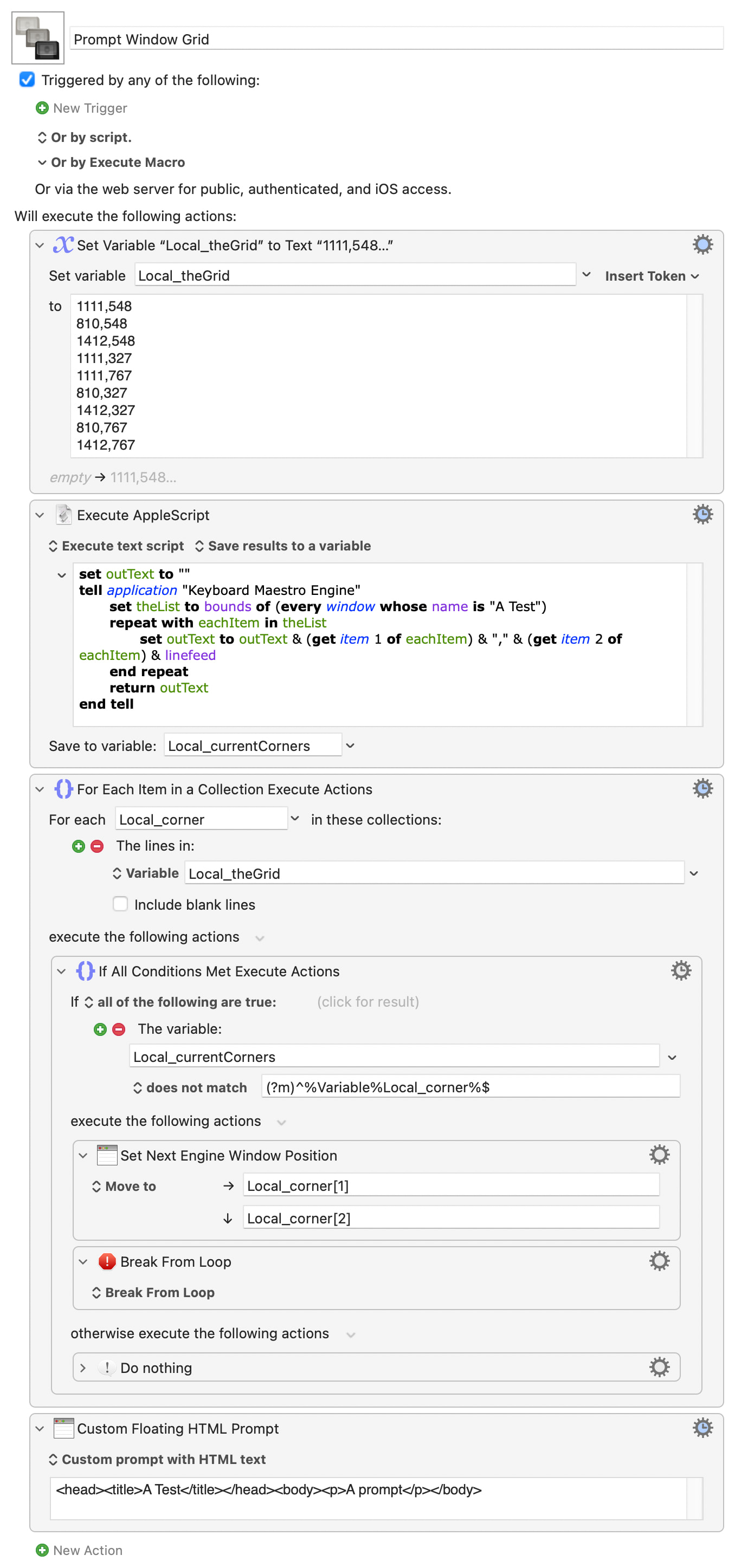
Say you've got a 3x3 grid to fill, centred on the centre of your screen. Each cell can be defined by its top-left corner -- conveniently, the same top-left corner that we position windows with :wink:

Get a list of current window top-corners, compare each cell in turn to the list, when there's no match the cell is empty and that's your next window position.

Doing it that way round lets you fill in the gaps after you close windows, plus you can order your grid to suit how you want the cells filled -- for example, the following demo should fill in this order:

6  4  7
2  1  3
8  5  9

Demo:
Prompt Window Grid.kmmacros (14.4 KB)

Appreciated, I am well aware. In fact, I have at the tail end of developing a system of HTML Prompts to enhance Display Text, Prompt for Input, Prompt for List and Progress that are them variable and extremely flexible, lost of bells and whistles.

I will be sharing them shortly, likely next week. It has been a huge undertaking!

I need to study it a bit more but I get the gist of it! I will give it a go!

Brilliant!

PS. I wish I had your creativity at solving these things!