Do you always go from C back to B? If so, you can use the native SD profile button.
If not, I'm sure we could figure something out, but I'd have to give it some thought.
Do you always go from C back to B? If so, you can use the native SD profile button.
If not, I'm sure we could figure something out, but I'd have to give it some thought.
Thank you for making me think a little more deeply about what I'm actually trying to do here.
My holy grail was to have a "Return" button at the top left position of each profile that would step back through the 3-4 previous profiles, regardless of the path taken. I now realize that that's much more complex (and probably more maintenance intensive) than I need.
So, I've charted the various pathways through which I might navigate these profiles and in each lower level I’ve identified its 3-4 possible preceding profiles. Now I will just use your idea of the native SD profile action, and add a button for each possible preceding profile on those lower level pages. No sense making it more complicated than it needs to be.
That will involve some button shuffling, since I want to have the set of "Back" buttons in the same position on every profile so I'll have a consistent UI.
Today the "return to previous" stopped working in both my Adobe Lightroom and Photoshop macros. I restarted the Mac just in case there was some weird little thing happening, and then spent a couple of hours reviewing the original macros and the changes I had made to the variable names. (I need to separately track the profiles for Adobe Lightroom and Photoshop.)
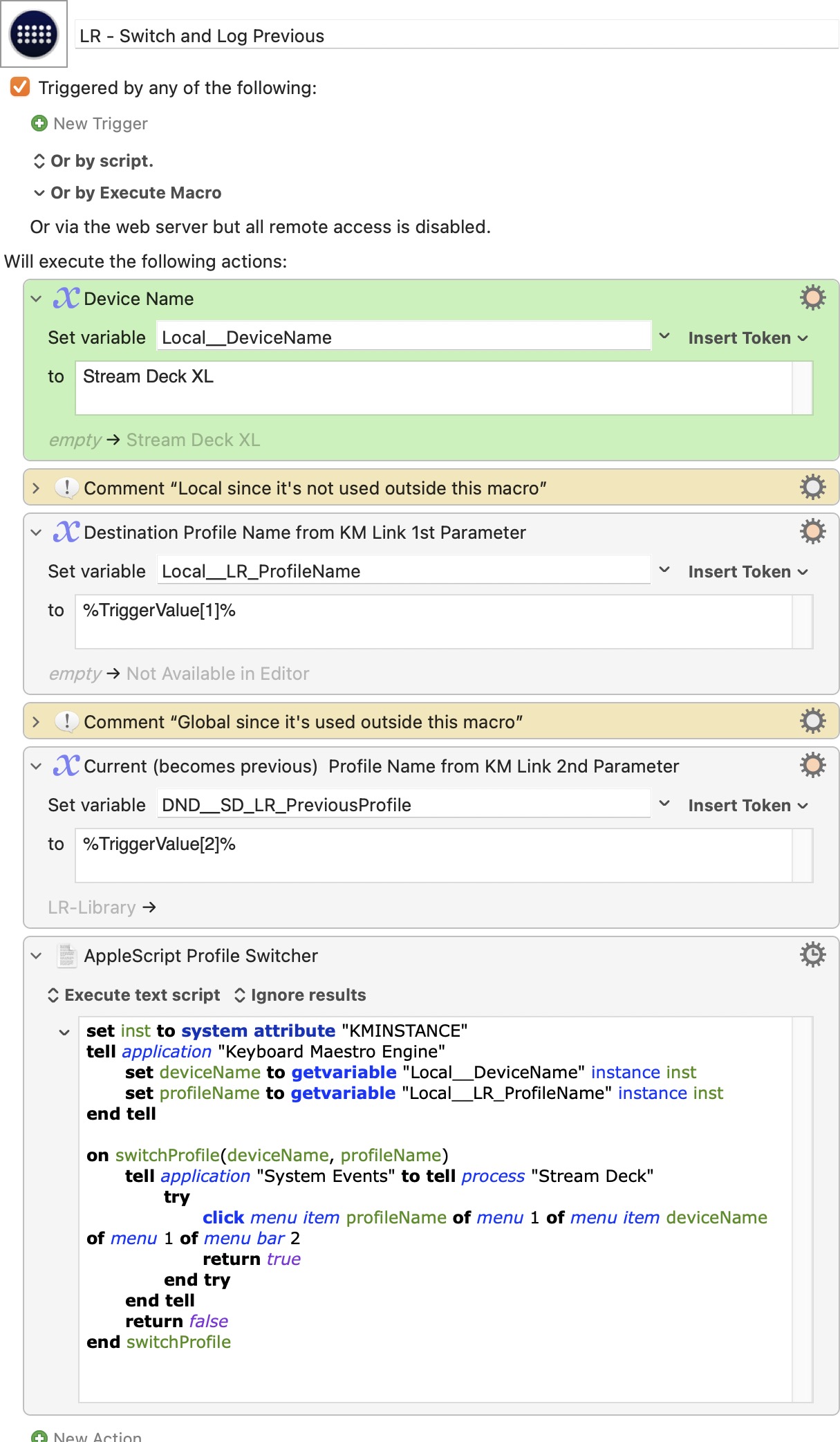
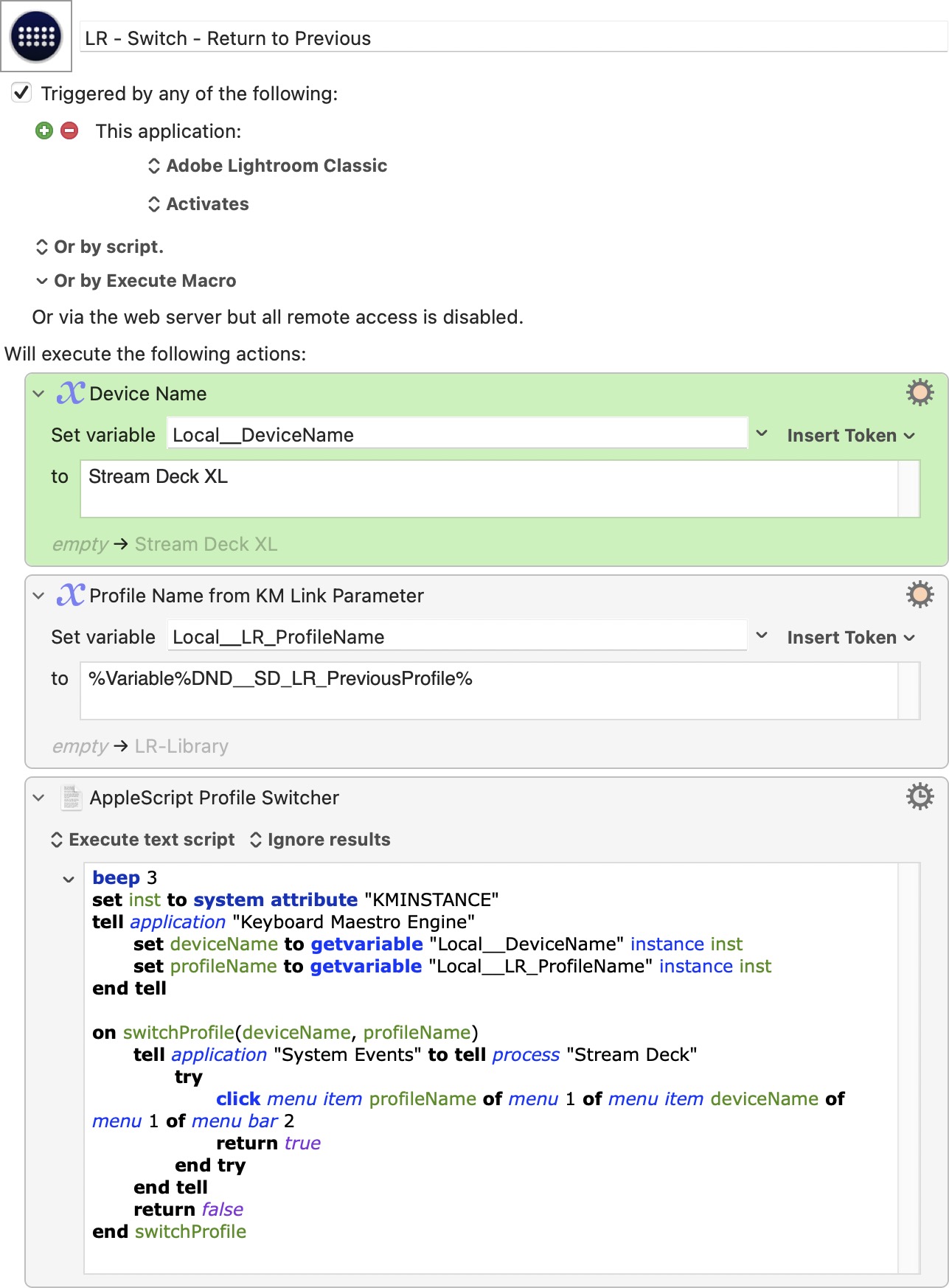
Here are screenshots of the "switch and log previous" and the "return to previous" macros. For testing, I inserted a beep command in the "Return" AppleScript just to be sure the script was actually running – and when I pressed the Stream Deck button I heard the beeps.
If you have a few minutes, please let me know if you see anything wrong here, or what else I might check?
Thanks,
Russell
I'm away from home for another few days so I can't really help at the moment. It looks okay to me. It's the SD menu bar icon available? Maybe double-check it's element position with this and make sure it matches the Applescript. Otherwise, maybe someone else can help as it's not the most complex macro.
Thanks. I’ll check those things.
While noisneil is away, if anyone has any ideas, please let me know.
I did notice that Stream Deck was the second item in Bartender's "shown items" list. I moved it to the first position, but it didn't make any difference. Shouldn't it be in the first position?
If I manually change the profile by mousing into the Stream Deck status menu, it works fine, so I think it must have something to do with the AppleScript..
Thanks,
Russell
Did you check the macro I linked to earlier?
Ahhh! I didn’t see the little "1" in the light gray circle that was a link. Thanks for pointing that out! I downloaded the “UI Browser Lite” macro, hovered over the LR-Develop profile, ran the macro, and got:
activate application "Elgato Stream Deck"
tell application "System Events"
	tell process "Stream Deck"
		click menu item "LR-Develop" of menu "Stream Deck XL" of menu item "Stream Deck XL" of menu 1 of menu bar item 1 of menu bar 2
	end tell
end tell
This doesn’t have the "try" structure. (As you can tell, I don't know much about AppleScript, so I don't know if this is significant or not,)
When I run this script, Stream Deck switches to the LR-Develop profile. However, when I put the "click" line into the profile switcher macro, it doesn't work. (For testing, I left it choosing the LR_Develop profile, rather than the variable.):
set inst to system attribute "KMINSTANCE"
tell application "Keyboard Maestro Engine"
	set deviceName to getvariable "Local__DeviceName" instance inst
	set profileName to getvariable "Local__ProfileName" instance inst
end tell

on switchProfile(deviceName, profileName)
	tell application "System Events" to tell process "Stream Deck"
		try
			click menu item "LR-Develop" of menu "Stream Deck XL" of menu item "Stream Deck XL" of menu 1 of menu bar item 1 of menu bar 2
			return true
		end try
	end tell
	return false
end switchProfile
So the click command works when it's in a macro by itself, but doesn't when inserted into the Return macro.
I’m baffled!
Yeah that macro I linked to is just to check the element tree. I'm on holiday and had a few  . I'll be happy to help you when I'm back on Thurs but maybe someone else can help in the meantime, as I'm sure it's a simple AS thing.
Thanks, Neil. Enjoy your trip. I’m leaving Saturday for a week. If I don't get it figured out before then, that's fine.
It looks like I've got it fixed by just rebuilding the macros from scratch. Unfortunately, I don't know what was causing the problem!
Best,
Russell
Glad to hear it!