I did comb through the forums a bit, and did try to experiment, but need a little help. I’m using audio software. There is a certain reverb I like to use. When it pops up, it pops up at a random place each time - it’s like a mini window, per se. I would like to be able to click on very specific places on it whenever it pops up in order to configure it.
I have things down to “found image”, and I’m good to go there. I’m just a bit lost on how to cilck on an exact location within that window - assuming this is easy enough to figure out : ) Any help is massively appreciated.
As for assistance with the Find Image action, you would have to show the window for me to be able to help. I use Find Image a lot and I can probably recommend an image that would be reliable to search for.
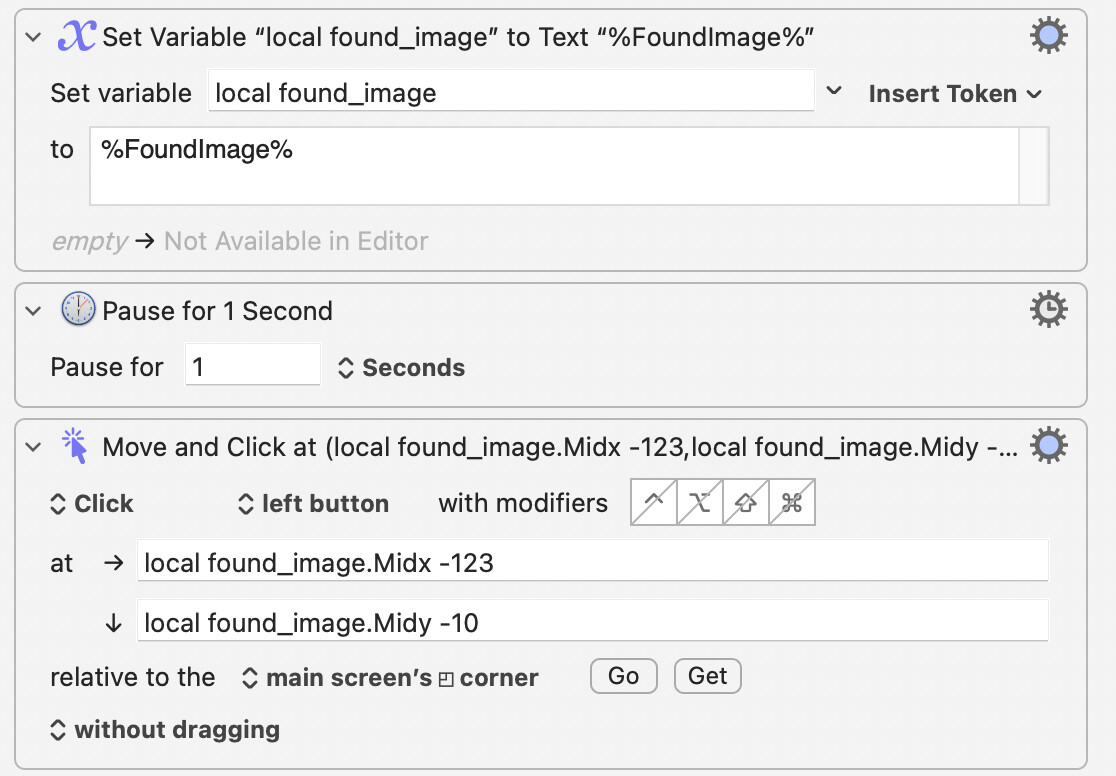
Find Image returns coordinates of the image, and you can calculate offsets from that image to then get the Move and Click Mouse action to click on the location you need. This probably needs to be done manually, but there are tools available to help, like the KM Mouse Display window. (CMD-5 by default.)
Once you have found the image, its co-ordinates will be stored in the token %FoundImage%. Set a variable to that token, and you can then refer to various properties such as the horizontal position of its centre or vertical position of its upper left corner.
it sounds a bit annoying to have the window pop up in random places. Try using the Move a window action to position the window in the same place each time. If it works (it might not, depending on how windowy the window really is!), you won’t need to use image detection at all, because the co-ordinates will be fixed, and you can move the mouse position to those every time.
I wonder if, in your unnamed audio software, it is possible to save settings and call them up (I am thinking of things such as channel strips in Logic, I suppose). Depending on what features are offered, you might then not even need to open the reverb plug-in, at least not directly. But we can only guess.
The first place I would like to click, when this window opens, is “Factory/Default”, which then goes into a few other submenus that I would also like to click.
This is incredibly helpful! “Move a window” is a massive step in the right direction, as I would actually love to have these plug ins relocate to a specific place as it is. Brilliant! From there, I’m guessing it would just be a matter of programming clicks to happen at specific places within that window?
Oh, it’s not a secret, per se. The software is Digital Performer. They have a surprisingly NOT intuitive flow with things. It’s brilliant for the actual composing process, but a bit tough for routine things like this and a bit complicated. Thank you for this!!
Yes. In the Move or click mouse action, set the mode to “relative to the front window’s corner” (or else main screen’s top left corner) and then use the “Get” button to fill in co-ordinates.
I remember when windows like that in DP had a tab sticking out the top!
One thing I would add is that you don't actually need to click relative to a found image once you've identified that the correct plugin window has appeared. A static click relative to that window's corner will do the trick, as the location of the elements within it won't change.
Yes, that’s a good point, for a “real” window. Hopefully it would be possible to just check the name of the front window using the %WindowName%1%. I was taking a “defensive” approach because I couldn’t, as I put it, be sure how windowy the “window” actually was in what was, at the time, an unidentified audio application.
The window name doesn't tell you which plugin it is, so clicking via a found image probably is the (simplest) solution if there are multiple windows open, but I just thought it might be worth pointing out anyway.