I put together a small macro that watches the %SystemClipboard% for the string Hawaii-Aleutian Standard Time and quietly swaps it for Hawaii Standard Time (HST).
I doubt many people need this exact use case, but the pattern might be useful if you want to auto-clean or normalize anything that lands on your clipboard.
Why bother?
No one living in the State of Hawaii actually calls our time zone “Hawaii-Aleutian Standard Time.” That name comes from 15 U.S. Code § 263, and it is technically correct but practically confusing: the Aleutian Islands observe Daylight Saving Time, while Hawaii does not. So when the rest of the U.S. is springing forward or falling back, we are staying put—and we simply call it “Hawaii Standard Time” or “HST.”
Because of that, a date - time request including the longer time zone format looks like:
%ICUDateTime%EEEE, LLLL dd, YYYY 'at' HH:mm:ss zzzz%
you end up with: Saturday, January 03, 2026 at 15:43:23 Hawaii-Aleutian Standard Time
That longer time zone name can imply DST might be involved, which is never true for Hawaii, so I prefer to normalize it to plain “Hawaii Standard Time.”
What the macro does
Trigger: Fires whenever the system clipboard changes.
Check: Looks for the string Hawaii-Aleutian Standard Time in the clipboard.
Action: If found, it replaces that string with Hawaii Standard Time and updates the clipboard.
Cleanup: Clears temporary variables when it is done.
So any time an app copies “Hawaii-Aleutian Standard Time” to the clipboard, the macro quietly changes it to “Hawaii Standard Time” before you paste.
Why share this?
This is not a particularly sophisticated macro, and it is very narrowly focused, but the Keyboard Maestro forum has been incredibly helpful to me. I have learned a lot already from other people’s examples and comments, so this is my small way of giving something back.
If someone can adapt the idea—whether for cleaning up time zones, normalizing formatting, or fixing a pet peeve string on the clipboard—then this little macro will have done its job.
More generally -- if want a "temporary" variable that's only used within the macro, use a "Local" variable. Locals are automatically deleted when the macro ends, so you don't need those %Delete% Actions.
In fact, it's good practice to use Local variables by default, only using variables with greater "scope" when you need to. You can read more about KM variables and their scope in this section of the manual.
None of which is to dis your macro -- the main concern with any macro is "Does it work?", and yours does. Nice job!
Mahalo nui loa for your kōkua — thank you very much for your help!
I truly appreciate your feedback and kind words. They encouraged me to keep refining my approach.
I initially tried using the action you recommended, but the macro kept running repeatedly in a kind of “clipboard recursion,” and I had to use “Cancel All Macros” to break out of the loop. Rather than continue troubleshooting that behavior, I decided to switch to using variables instead.
I’ve now modified my macro to use local variables; thanks again for the recommendation.
There's nothing so funny as when a smart-arse gets it wrong
Apologies for that, but it does illustrate an important point. The macro triggers on any clipboard change -- you get the "clipboard recursion" because even an unsuccessful search-and-replace updates the clipboard.
There's a couple of ways round this. The first is what you did in your original macro -- check the clipboard for the value and only "Search and Replace" if it is there:
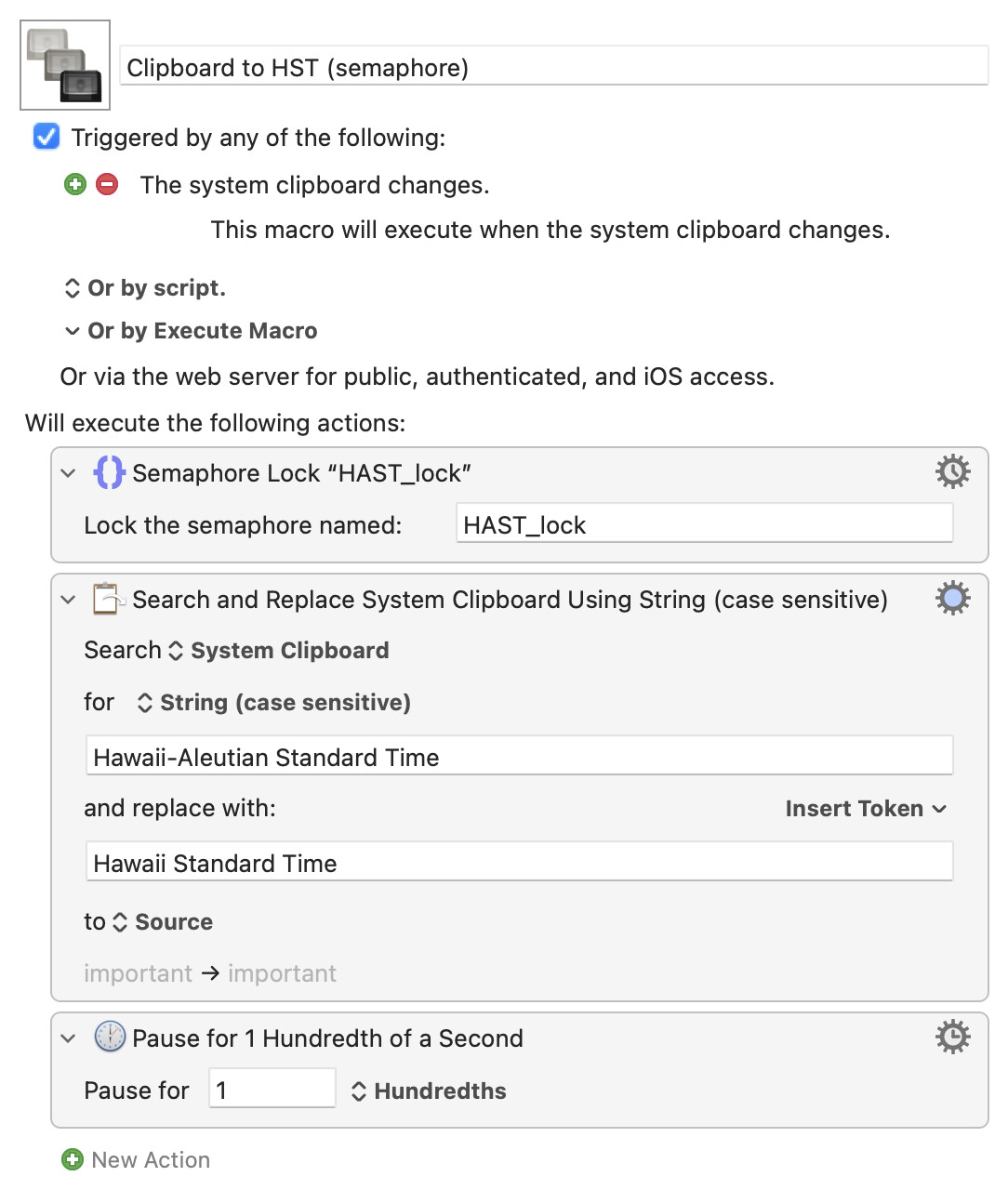
The second is to use a "Semaphore Lock" and a tiny delay at the end of the macro so that the first executing instance is still running when the second instance (triggered by the search-and-replace clipboard change) starts -- the second instance sees the lock is taken and insta-quits without doing anything:
The main issue when using KM variables for this is that it converts your text to plain text, removing any formatting. Of course, that may be a bonus in your use-case! But if you do want to retain formatting you'll need to work with the clipboard.