Within Media Copmposer
I want to copy and paste scene numbers of my timeline in a bin.
Those scene numbers can single digit, two digits or three digits and depending on that I want to paste substrings of my clipboard; for the single digit only the first number, for the two digits the first two and for the three digit case the first three.
I tried a switch case with three named clipboards but that does not work.
Hi Peter,
Thanks for getting back to me.
I have a selected-bin with highlights of each scene (meaning sequences with scene numbers) and the whole movie in a seperate sequence. I want to have access to the specific highlights sequence (within the selected-bin) directly out of the movie sequence.
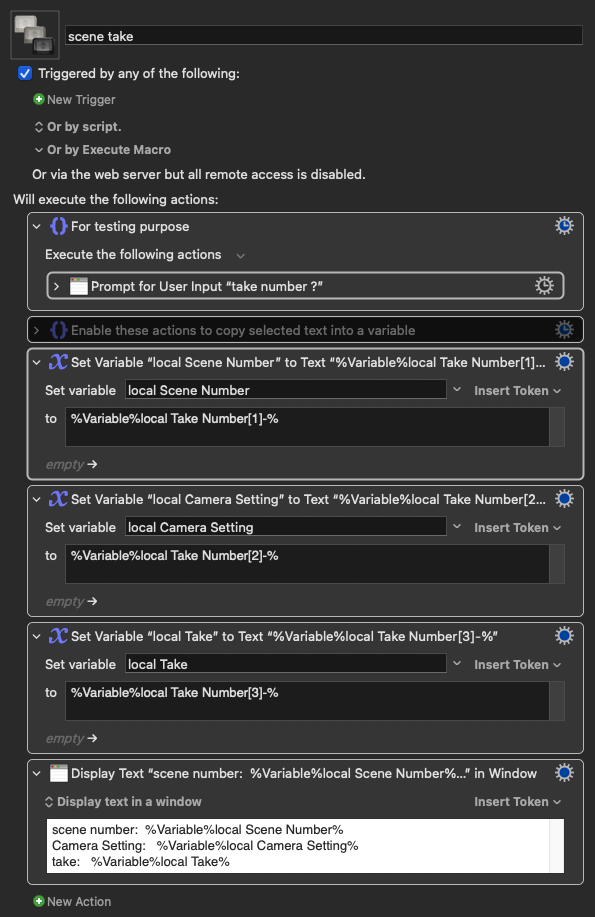
This means KM grabs the name of the take (format: scenenumer-camerasetting-take) where the postion of the player head is within the whole movie sequence, filters out the scene number (by substring), copies this in the clipboard and pastes it in the find window.
As said the only problem is that the scenenumber can be one digit (scene 1-9), two digits (10-99) or three digits (100+).
For those of us who don't have your editor (me!), can you just post an example of what that string can look like? You described it as "scenenumer-camerasetting-take," but what does that look like in practice?
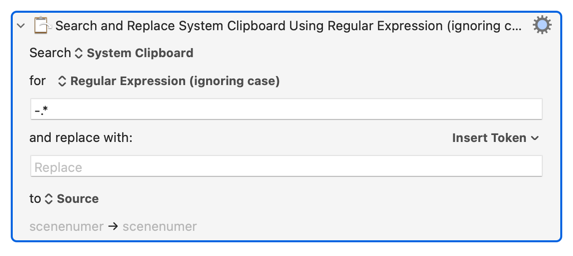
I think you could do all of this with a regular expression in one pass, but I have no idea what the string looks like.
The second field, with the greyed-out "Replace", is actually empty of text.
The regex is "a - followed by zero, one, or more of any character" and since the * is "greedy" and will match as much as it can you'll match, and then replace with nothing, everything from the first - to the end of the line.
You can use @Joseki's "pseudo array" method if you want to keep all the "bits" of the string for later.