I use the Clipboard History Switcher daily.
And now I just noticed that when using the arrow keys to scroll the list, it does not scroll to the item selected.
I seem to remember it did that before.
See this video: https://d.pr/v/Q2BsQM
When you notice it not working, check the window state: Is it frontmost? The easiest way to tell is whether the window control buttons are colored or gray. I've had it happen where the switcher opens in the background at times, though I can't figure out why. When that's the case, the arrows won't work until you make that window frontmost.
I'm getting the same behaviour (macOS 15.4.1; KM v11.0.4). I don't know if it used to or not though because I don't heavily use the clipboard switchers, and when I do use them, I tend to use the cursor.
It must be or the selection highlight wouldn't be visible.
Whoops, my bad—I mismatched the video, and didn't catch it was just scrolling out past the bottom of the window. I'm seeing the same thing here (latest macOS15 + KM 11.0.4); I think this is a new issue in 11.04 — @peternlewis can you replicate?
It's a weird consequence of the Apple change to the default for clipToBounds. Basically, Keyboard Maestro scrolls to the new location if the selection has no visible area. But when clipToBounds is disabled (as happens in the Keyboard Maestro compiled with the new SDK), then the visible area includes the are on the screen that is miles off the area of the selected item, cuz why wouldn't it.
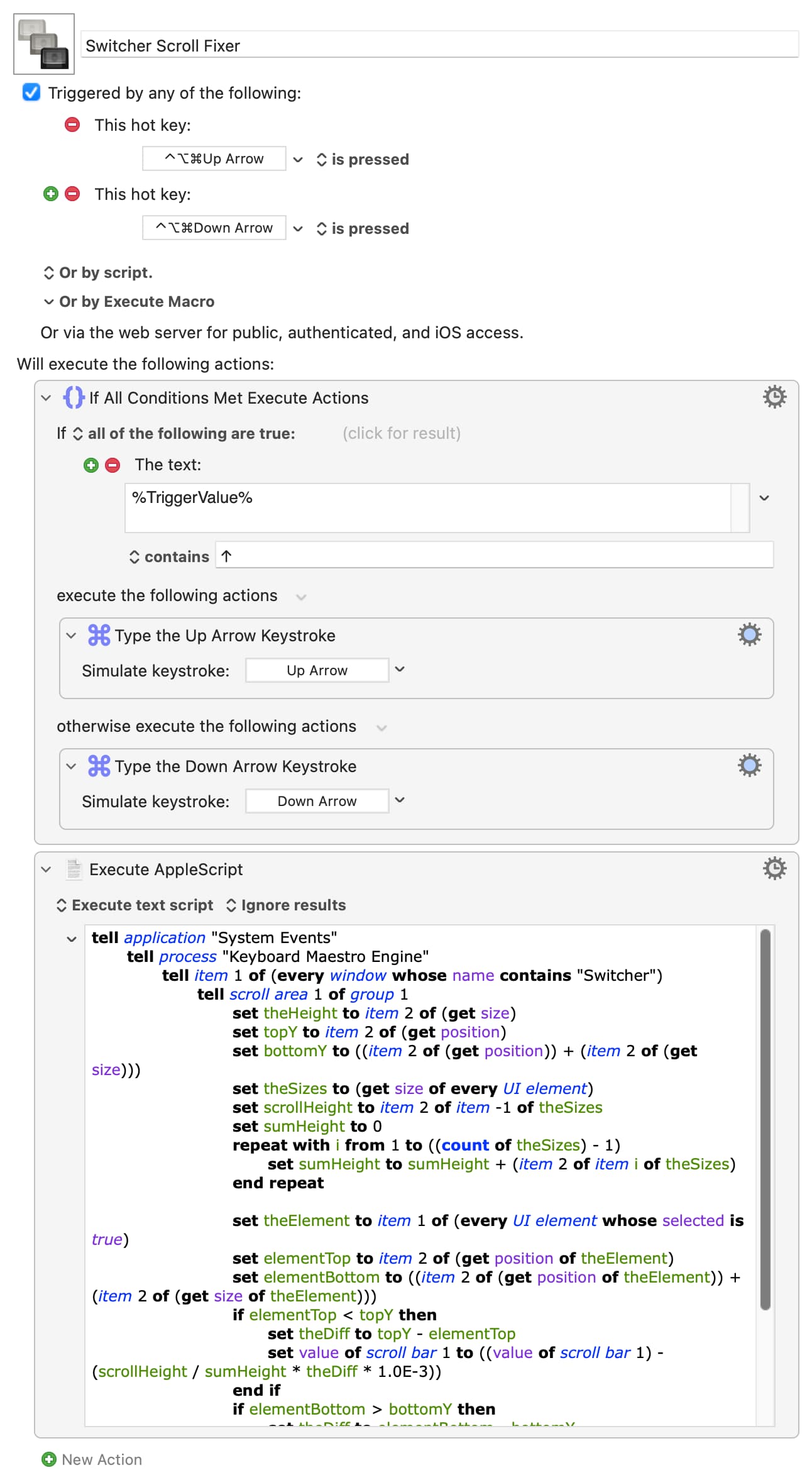
tell application "System Events"
	tell process "Keyboard Maestro Engine"
		tell item 1 of (every window whose name contains "Switcher")
			tell scroll area 1 of group 1
				set theHeight to item 2 of (get size)
				set topY to item 2 of (get position)
				set bottomY to ((item 2 of (get position)) + (item 2 of (get size)))
				set theSizes to (get size of every UI element)
				set scrollHeight to item 2 of item -1 of theSizes
				set sumHeight to 0
				repeat with i from 1 to ((count of theSizes) - 1)
					set sumHeight to sumHeight + (item 2 of item i of theSizes)
				end repeat

				set theElement to item 1 of (every UI element whose selected is true)
				set elementTop to item 2 of (get position of theElement)
				set elementBottom to ((item 2 of (get position of theElement)) + (item 2 of (get size of theElement)))
				if elementTop < topY then
					set theDiff to topY - elementTop
					set value of scroll bar 1 to ((value of scroll bar 1) - (scrollHeight / sumHeight * theDiff * 1.0E-3))
				end if
				if elementBottom > bottomY then
					set theDiff to elementBottom - bottomY
					set value of scroll bar 1 to ((value of scroll bar 1) + (scrollHeight / sumHeight * theDiff * 1.0E-3))
				end if
			end tell
		end tell
	end tell
end tell
macOS 15.7.7. KM 11.0.4 - scroll issue has been happening for 1-2 years, which is about as long as I have been on 15.x.
Thanks! On the macbook Fn+arrow does follow the cursor jump. On usb keyboard it works with page up/down.