Just use the "Manipulate a Window" Action after activating the Switcher:
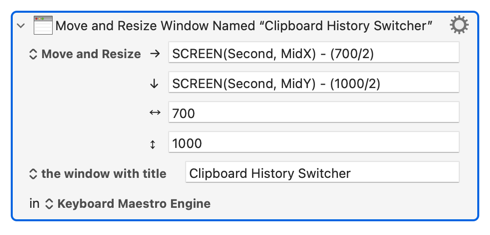
The trick is to make an alias of the Engine so you can select it from the "Other..." dialog. To make the alias:
- Open a Finder window
- ⇧⌘G or select "Go to Folder..." from the Go menu
- Paste in
/Applications/Keyboard Maestro.app/Contents/MacOS/ - Hit Return
- ⌥⌘-drag the Keyboard Maestro Engine icon to your Applications folder (or wherever makes sense to you)