You can specify the script to be executed either by reference to a file or as text entered directly in the Execute Action. After pasting or typing script text into the Execute Script Action, press the Enter key to compile and format the script.
but in myMacBook M1 the combination of fn-Return doesn’t work.
Additionally with Mac Mini and Logitech Mini MX (without Apple fn key) it obviously also doesn’t work (even when I connected full Logitech with keypad, where Enter exists - it still doesn’t work).
Is any other method to recompile the script embedded in KM editor window?
Create a hot-keyed macro that simply sends the Enter keystroke?
But I'd also be looking at why Fn-Return wasn't working on your M1's keyboard, sounds like something is intercepting it -- I find Enter too useful to give up!
OK - got it - after restart BTT - it works (but to get Enter key code I have to have keyboard with keypad ). Anyway maybe some additional option for compiling scripts in KM window @peternlewis?
So have something like F9 as the trigger for a macro that sends the Enter keystroke. The bit you might be missing is that you can select a key that you might not have on your keyboard from the dropdown menu:
Are you old adept of Borland C++ ?
F9 - Make
Alt-F9 Compile
… old good times
OK - my mapping in BTT works, I bypassed KM solution because somewhere I read that some part of KM macros don’t work with KM editor, but probably it is in key snippets only.
You can happily use hotkey, typed string, and other triggers in the KM Editor. You're probably thinking of typed string triggers in Engine-spawned "Prompt for User Input" dialogs and similar, which don't work -- as I understand it, the Engine can't see "inside" itself to parse what you're typing for trigger strings.

 ). Anyway maybe some additional option for compiling scripts in KM window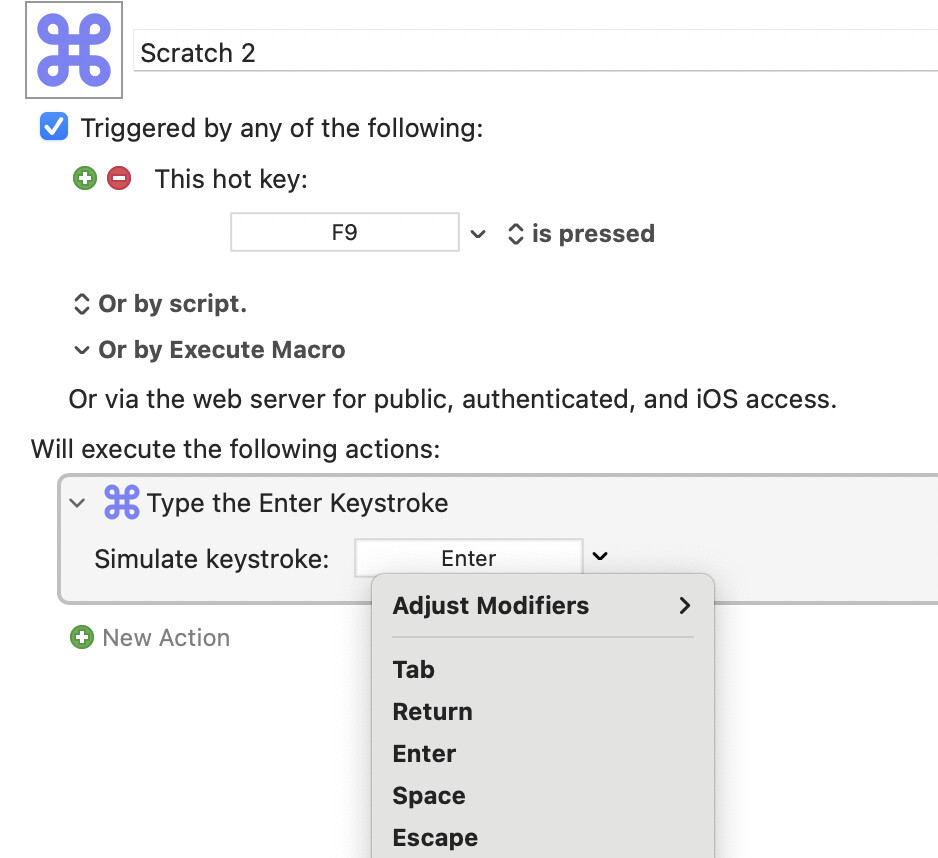
 ?
?