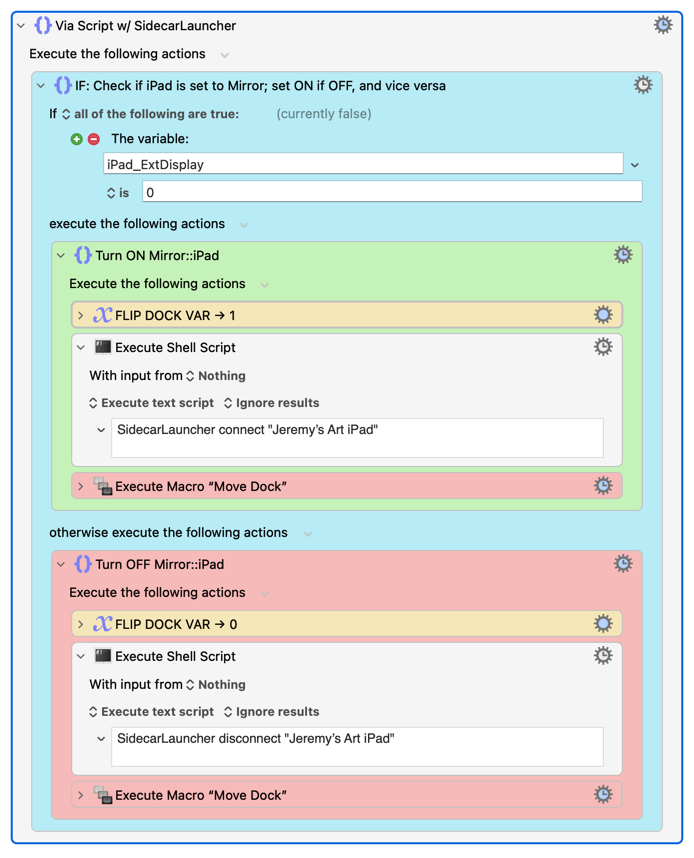
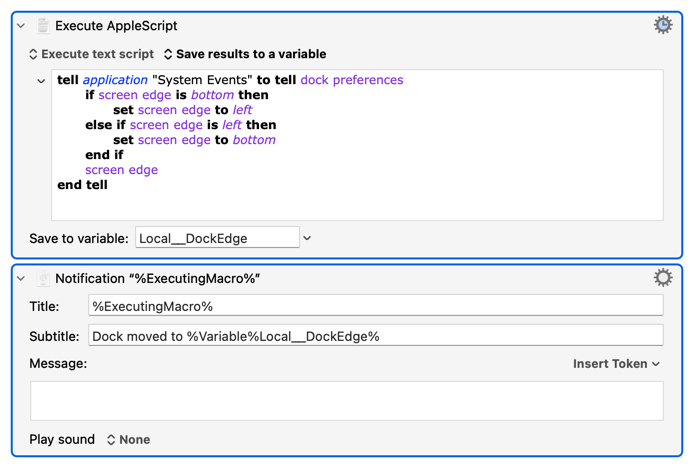
I recently found and tested a script called SidecarLauncher[1] that connects to iPad as a Sidecar display via the command line, which makes for a much more seamless connection experience than other solutions I’ve used and tried.[2] I’m also pasting an image of my “move dock” script that repositions my dock, as I have my iPad as a display beneath my MacBook, which causes the Dock and unfortunately also the ⌘Tab switcher to move with it.
Macro: Connect to Sidecar
Download: Displays > Mirror (iPad Sidecar).kmmacros (53.7 KB)
Macro: Move Dock
Download: Move Dock.kmmacros (3.4 KB)
for anyone who might need it
I added this to my /usr/local/bin/ folder—as a non-dev who’s just technical enough to be dangerous, if this was bad practice on my end please let me know! ↩︎
I was previously opening Display Preferences in System Settings, pushing the “+” (add display) button, then typing my iPad name, then pressing Enter. It worked 99% of the time, but would fail when settings didn’t open quickly enough, and relied on no close matches to my device’s name. ↩︎