Continued- KM differences Migration Sequoia to Golden Gate

I wanted to follow up on my recent post about KM macros breaking when moving from Sequoia to Golden Gate. Here's a clear example.
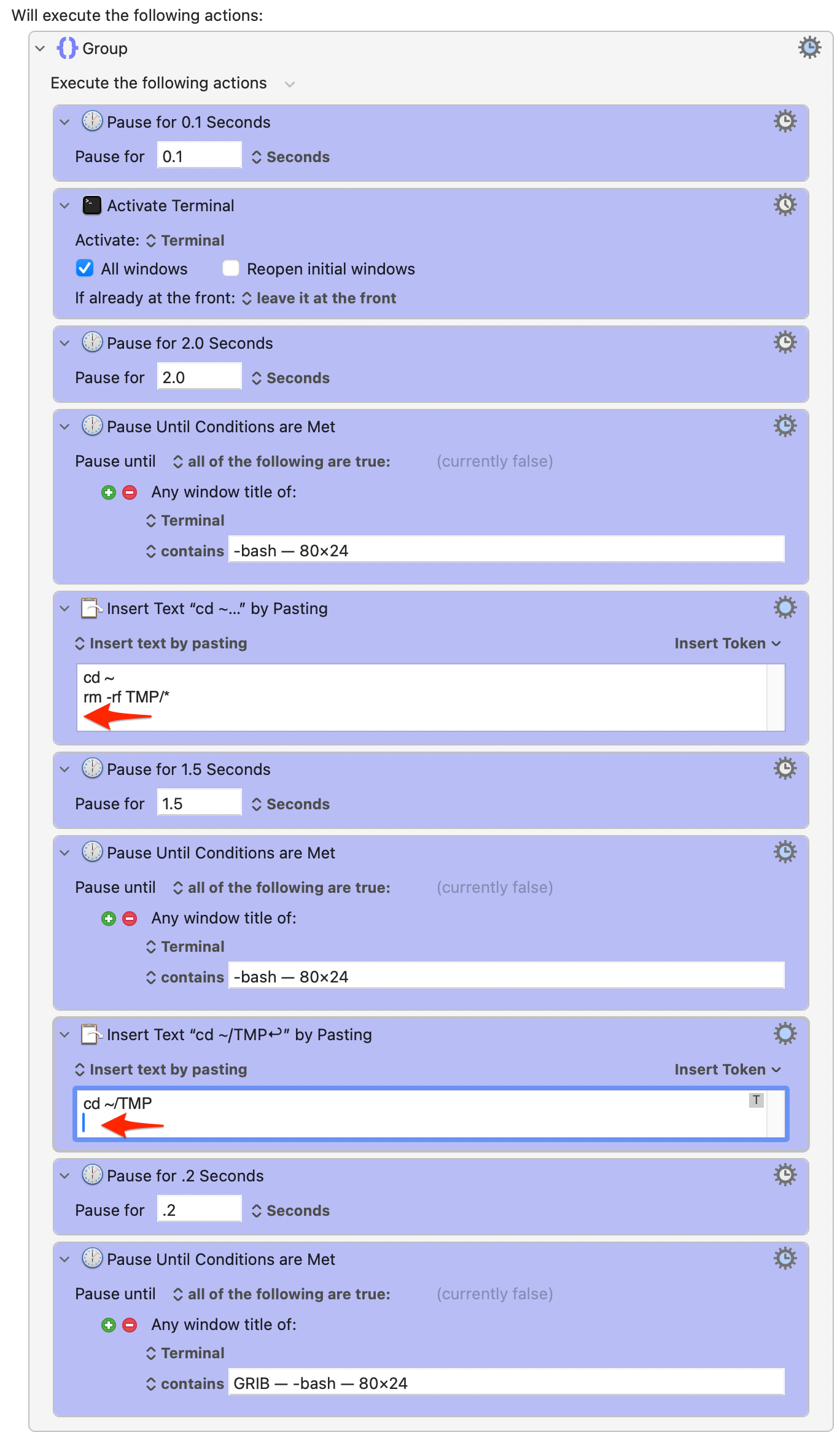
For years, I could put a carriage return in a pasted text box and it would work in KM. I've attached a sample KM macro to illustrate. There are two text boxes where I paste a simple command

cd ~/TMP

The command is followed by an invisible carriage return (my screen capture shows the cursor only in the second text box.) But I use red arrows to show where they are.
I created this macro is Sequoia. It always executed in Terminal with the carriage return as part of the pasted text.

If you take the attached macro and open it in Golden Gate, the carriage return is missing from these text boxes. In Sequoia, they are present. This change is breaking numerous of my macros.

Please import this Sequoia macro into Golden Gate and see that the carriage return is missing.

Any thoughts?

Glenn

TEST Carriag Returns.kmmacros (7.5 KB)

TEST Carriage Returns.kmmacros (7.5 KB)

The problem is the pasting of the text, for whatever reason. I can replicate the problem, though I had to modify your demo macro, because...

Please don't distribute test macros with dangerous commands in them!

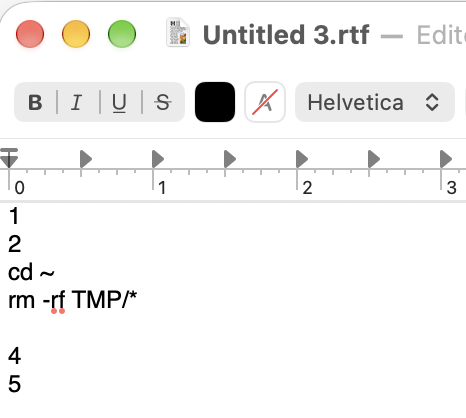
Your demo macro includes rm -rf /TMP/*. Who knows, perhaps someone has a TMP folder filled with their most important files :), and if your macro had worked, they would have lost it all in a split second, without any warning or ability to say no.

So when preparing a macro to share for testing, replace any potentially dangerous commands with simple ones, like ls or echo, etc.

Anyway, I can confirm that the paste action fails to work with the embedded line breaks. I even tried using tokens for Returns and Line Feeds, but that didn't work either. I'm wondering if Apple upped the "paste protection" in Terminal in Golden Gate?

I don't think this is anything @peternlewis will be able to fix, if that's the case—the protections are at the OS level, so you can't work around them.

However, if you change the action to insert by typing, not pasting, then everything works fine.

I'm curious as to why you're doing it this way, instead of just putting the commands in an Execute Shell Script action (where the Returns also work fine). Do you have a need to see Terminal doing the things it's doing?

-rob.

No, the "carriage return" is still there. There does appear to be an issue with clicking to put the insertion point into that last, empty, line but you can move to it using the down-arrow key.

So there is an UI bug (KM v11.1.1, macOS 27.0.1).

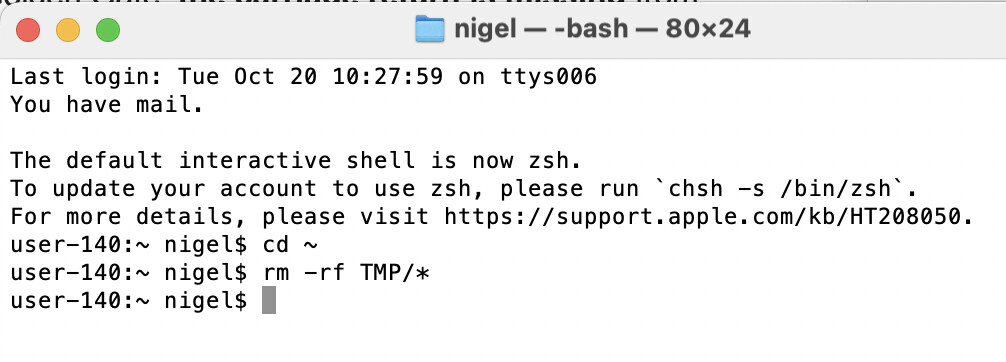
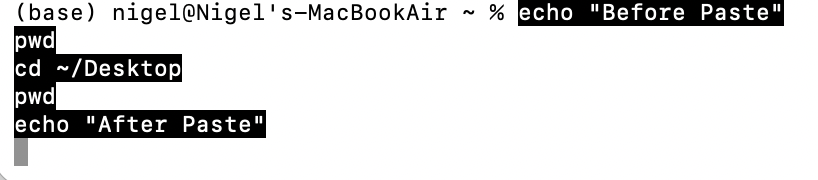
The problem when executing the macro is the previously-mentioned change to how paste works in Terminal. Line-feeds are not interpreted as "execute this line" commands any more, instead the Pasted block is "queued" until the Return key is pressed. You'll see what happens if you manually Paste the following into Terminal:

echo "Before Paste"
pwd
cd ~/Desktop
pwd
echo "After Paste"

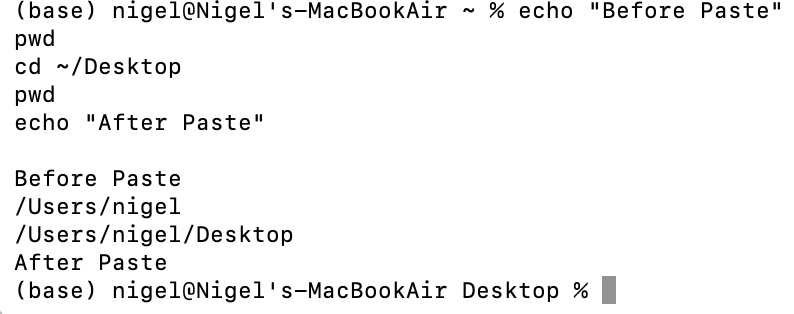
After Paste but before hitting Return:

Press Return and:

The same happens in Tahoe, giving even more weight to this being part of the Tahoe-introduced Terminal paste protection.

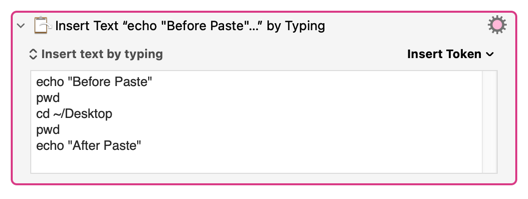
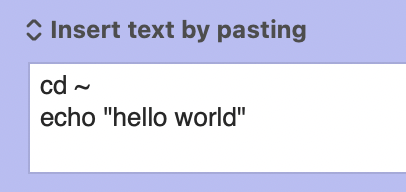
What does work is KM's "Insert Text by Typing" Action, with:

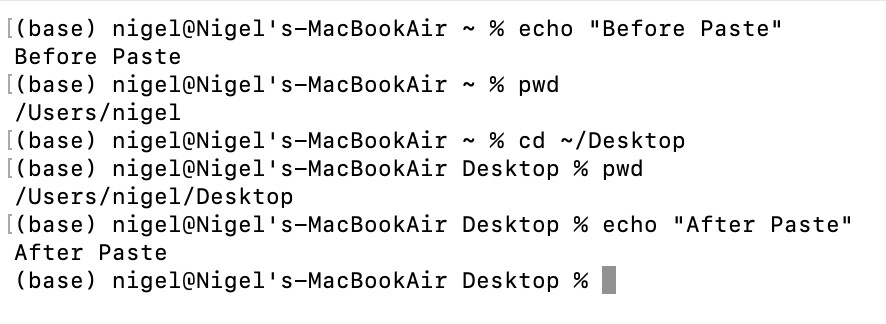
...resulting in:

(Which also proves it isn't the line-feed in the KM Action that's the problem here.)

So changing the "...by Pasting" Actions to "...by Typing" could be a work-round for you.

Rob,

Very sorry about that. And an excellent point that I will follow carefully in the future.

I simply copied what I use. I never thought that anyone would RUN the macro since the point I was making was viewing the paste box missing carriage return. It's a good thing I didn't have the directory for forced erase being ~/Documents.

Glenn

Nige,

Thank you for your response. The idea that paste into Terminal is protected in Tahoe and Golden Gate at first glance sounded logical. But here’s where it falls through. (I’m replying via iPhone so I can’t double test this now).

If you add a carriage return to the text in Golden Gate (where it had deleted it in the transfer from Sequoia), it will execute as before.

Even stranger, if you take the now-modified macro with the carriage return added back in GG export the macro. Then import it back into Sequoia, the macro now has TWO carriage returns.

Something else is going on here.

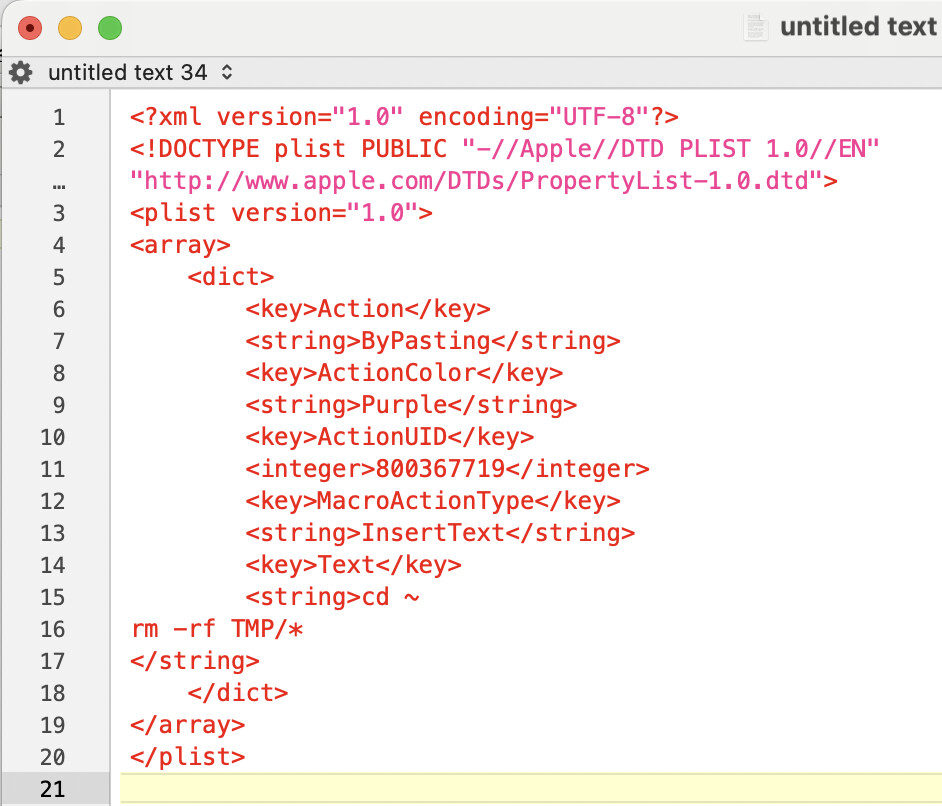
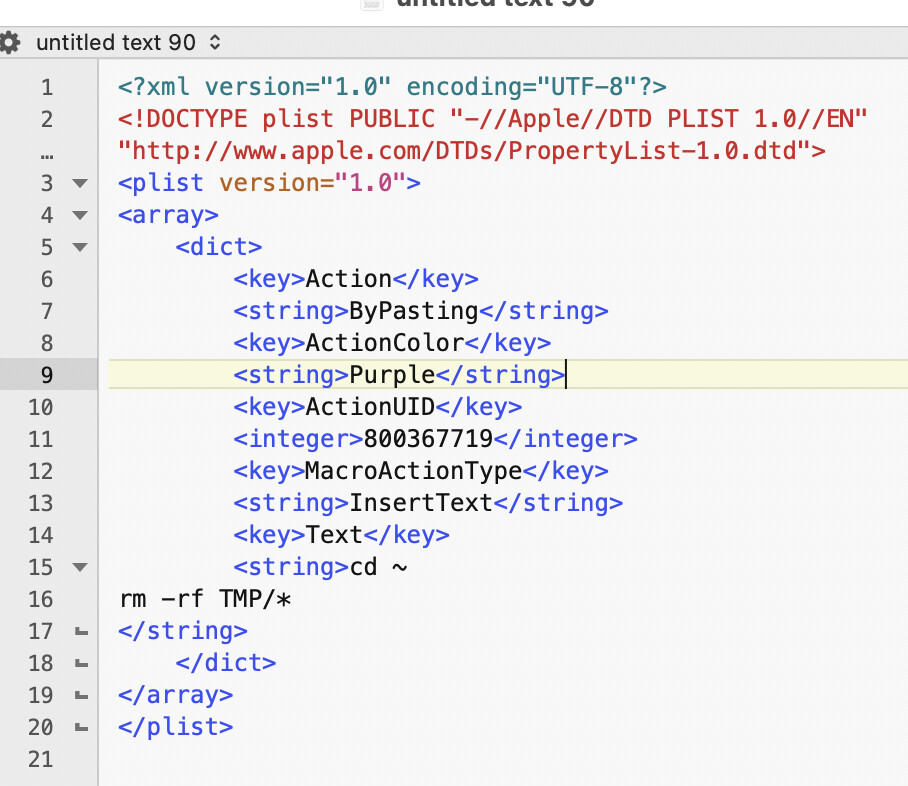
Here's a screenshot of the XML of first annotated Action of your above macro, on a Sequoia machine, in BBEdit:

Your trailing newline (not a carriage return) is what puts </string> onto line 17, instead of it immediately following the *.

Here's a screenshot of the same Action's XML, this time from a machine running GG:

So no, there's no across-the-board difference between importing in Sequoia vs GG. If you examine the XML and see something different you'll need to troubleshoot your own system because it doesn't seem widely reproducible.

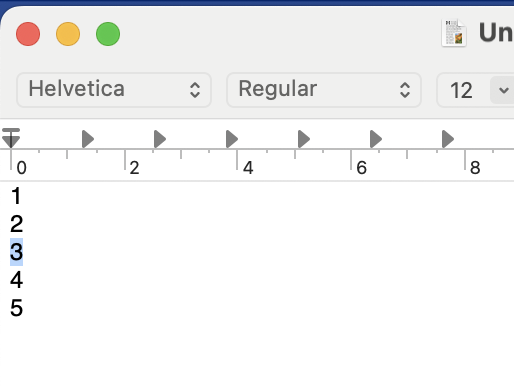
Further more, for a TextEdit document with the middle line selected:

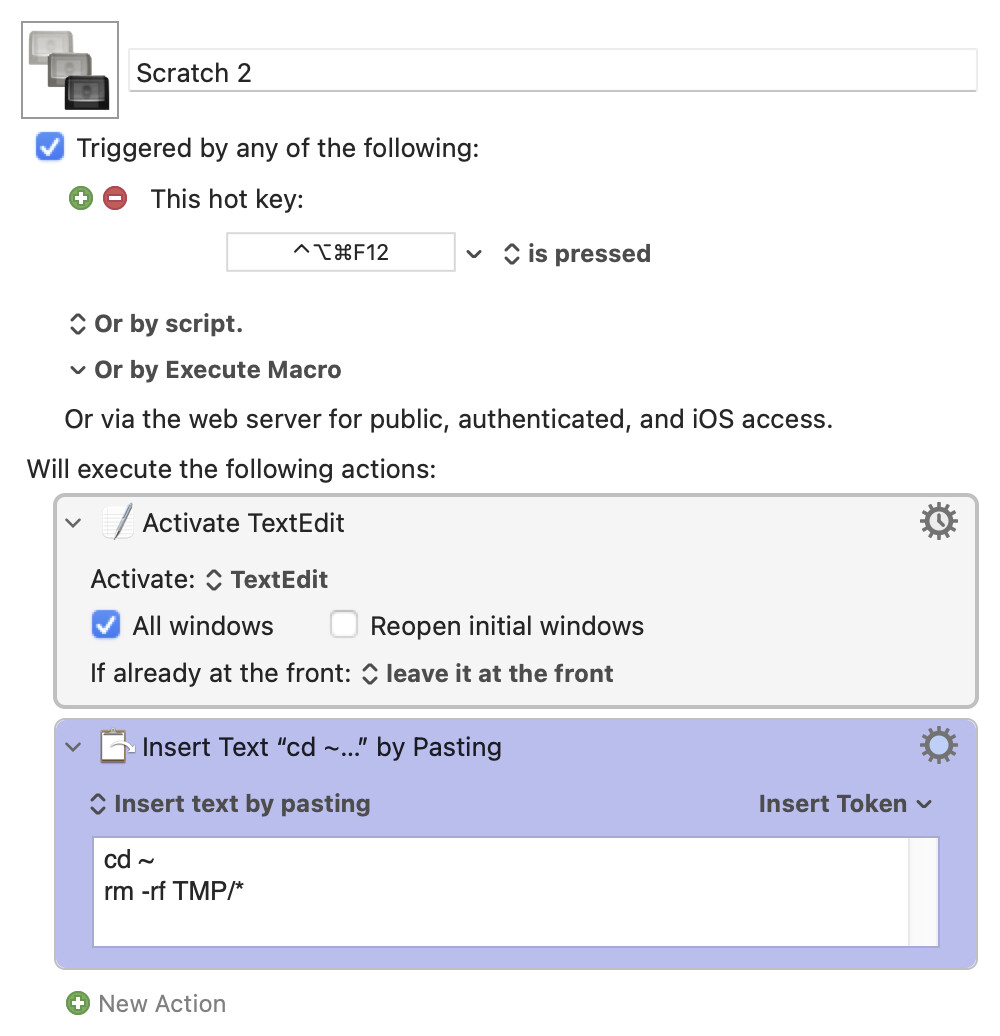
...and macro made by Copying your first annotated Action after a TextEdit activation:

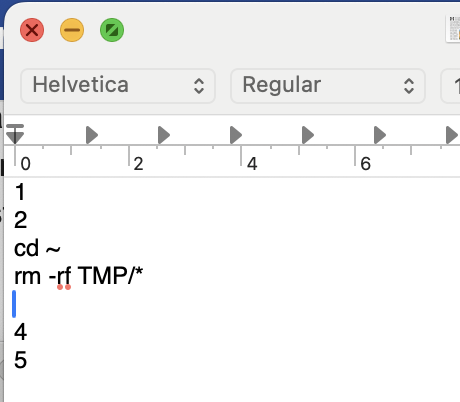
...the result on Sequoia is:

...and on GG:

Exactly as expected.

Change the activation so Terminal is the Paste target and on Sequoia:

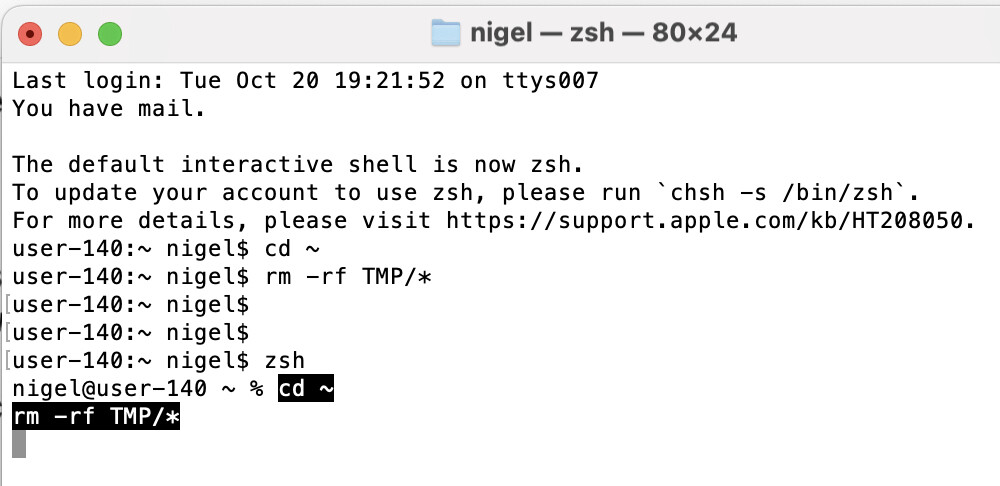
BUT change the shell to zsh (still on the Sequoia machine) and:

So I think we're both wrong :wink:

It's your change to using the zsh shell that's the problem (or, if you are using zsh on the Sequoia machine, a non-default setting that hasn't carried over), not Paste protection or KM itself.

The two obvious work-rounds are to change to "Insert Text by Typing" or to change your shell to bash.

After a bit of Googling...

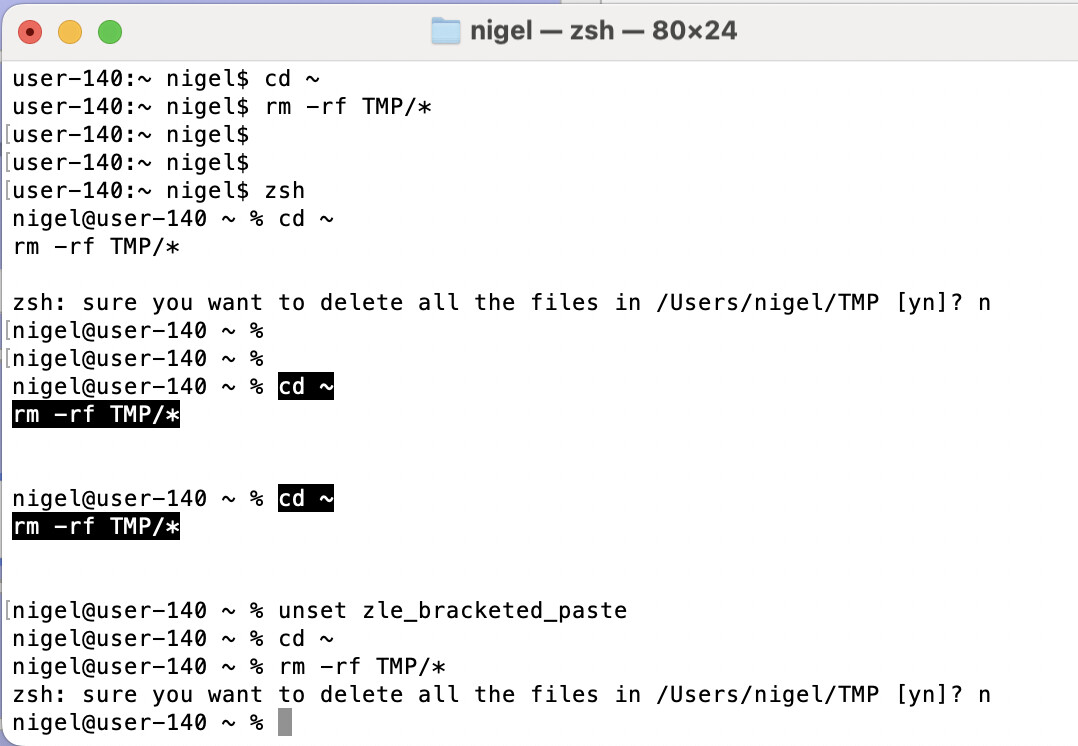
This is down to a zsh setting "bracketed paste mode", which is on by default. See the "Bracketed-paste" Wikipedia page and this blog post for more info. The good news is that you can unset that to go back to what you are used to with bash -- still using the previous macro and Terminal:

...and you'll see, near the bottom, the unset command followed by the macro's Paste working as it does for you on your Sequoia machine.

I hesitate to recommend you put the unset command in your .zprofile -- I don't know enough about the pros and cons of having it unset by default and have to assume it is set for ${important_reasons}. So exercise due diligence before changing anything.

That was fun! Thank you for leading me into an area I'd never even heard of :wink:

Hi Nige,

I appreciate the detective work you've done, and I should have looked at the XML of my macro itself as you did. An excellent approach.

However, you've made a small wrong assumption here. I am using BASH, not zsh. More importantly, I'm using the default BASH shell that comes with the Apple System OS (version 3.2x) not the BASH that Homebrew installs (BASH 5.2x). Bash 5.2 uses "bracketed text" (like zsh) as a default. Bash 3.2 doesn't have bracketed text.

BTW, I tried BASH 5.2 with and without bracketed text and it had its own issues with what I do with Terminal Paste. So I uninstalled it, confirmed with several tests and I'm on the default Apple bash 3.2.
$ sed -i '' 's/enable-bracketed-paste off/enable-bracketed-paste on/' ~/.inputrc

To be certain, I have modified my .bash_profile to have bracketed text set to off, even though Bash 3.2 has it as its only option and will ignore this setting.

Maybe I'm not understanding this properly but the fact that Simple Text shows the raw xml to be same in both cases, yet KM displays it (and executes it) differently on each system again suggests to me that it's not system-related but perhaps KM related (?)

I use bash because many of my routines use a meteorological utility called wgrib2 that runs on bash. (It might run on zsh, but wgrib2 is tricky executable to compile and any online documentation, of which there has been very little for running on MacOS, always refers to bash. I never look to make my life harder than it needs to be.)

As for why I was running these things as a Terminal paste, rather than an external script, I've put these macro routines together over many years and

  1. it always worked in the past on past systems and past versions of KM
  2. I like to see where things go wrong and having it display in Terminal in real-time is very helpful.

Finally, "Type into Terminal" is slow and sometimes it starts executing before it's done typing.

That said I am moving larger bash text scripts and python scripts that I had previously directly pasted in Terminal and converting them to external scripts.

But for small Terminal commands, paste in Terminal works if I add the carriage return in GG (but if I retrograde to Sequoia) there will be 2 carriage returns in the paste. I'm wondering if Peter Lewis will chime in on what he's read here.
I just checked Golden Gate, Keyboard Maestro, Insert Text by Pasting into the Terminal with multiple line commands (just a sequence of echo commands), and that worked fine.

So whatever is breaking the paste, it is not simply Apple blocking multi-line commands.

I tried this macro with the commands changed to

cd ~
cd Documents

and

cd ~/Downloads

(including trailing returns)

and it worked fine for me, all the commands were executed.

That is interesting, so you are seeing what, the last command not being executed and left on a line?

OK -- that is Important Information, briefly mentioned in your other thread but my bad for forgetting.

You're already away from a default Golden Gate setup so this is going to be more difficult for others to replicate. Who knows what other changes have been made? So you're going to have to test for yourself.

Start with the basics. Open a new Terminal window and, if necessary, set it to use bash (we don't know if you manually switch shells or globally default to bash, which could make a difference).

Copy the following by using the code block's "Copy" button (to make sure you get all the line-endings):

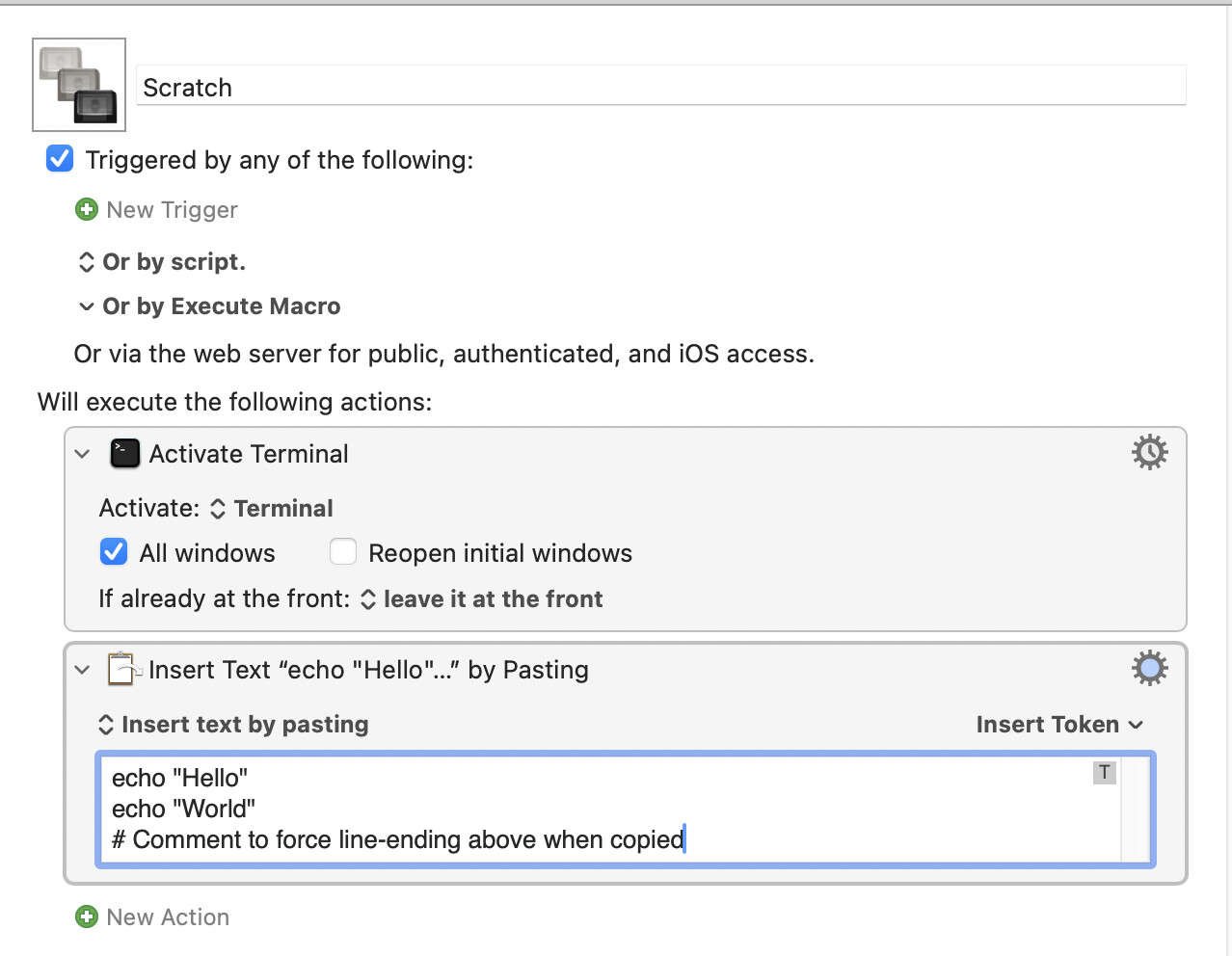
echo "Hello"
echo "World"
# Comment to force line-ending above when copied

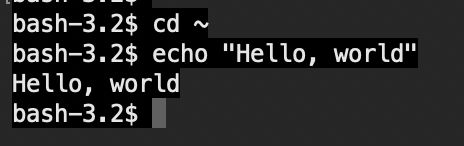
Go back to Terminal and Edit->Paste (to make sure you aren't overriding ⌘V somehow). Regardless of what happens, press the Return key once. Screenshot the result.

Make a new KM macro (to avoid any import nonsense), add an "Activate a Specific Application" Action set to activate Terminal then add an "Insert Text by Pasting" Action and Paste in the code block from above:

Run the macro using the Editor's "Run" button then, in Terminal and regardless of what's happened, press the Return key once. Screenshot the result.

Still in Terminal, run the following:

tail -5 ~/Library/Logs/Keyboard\ Maestro/Engine.log

...and Copy the five lines output by that -- a quick check that no macros are changing the Clipboard contents.

Edit to add:
Also in Terminal, run:

bind -V | grep editing-mode

...and Copy the output.

Upload the screenshots plus the tail and bind outputs to the thread so people can look for clues.

Apologies for the long-winded (and rather condescending) nature of the above. But we all need to be following the same steps if we're to work out why your setup is behaving differently.

I see what @Nige_S sees, as shown in an earlier post here, which is that no commands are executed, you just see a block of selected text on-screen in Terminal. If I then manually press Return, I get an error, as it's trying to make the thing one long command.

-rob.

What happens if you switch your Terminal to bash before running the macro? (I assume you're a Thoroughly Modern Millie and have switched to the default zsh...)

As expected after catching up on reading here :), it works as expected:

-rob.

Hi Griffman, I've read through the responses and I'm not clear where the dust has settled on this issue? Is there a display issue with the carriage returns being present but not displaying ? Is this a Golden Gate issue? Does it work with Bash 3.2 but not Bash 5.x?

Regardless of where this ends up, I've been spurred on to get rid of the paste-in routines I've used for years and transition them over to KM in-line scripts. This is going to keep me very busy! :slight_smile:

There doesn't seem to be—they display fine here in Golden Gate:

There is an issue trying to click on the last empty line, as @Nige_S pointed out, but the lines do display.

It does not appear to be a Golden Gate issue, other than this: Apple switched the default shell to zsh, and in zsh, again as pointed out by @Nige_S, you can't do multi-line pastes.

Yes. I tested with bash 5.x tonight, and it does not work, at least not completely: I have to manually press Enter inside Terminal to make it work. I even tried a separate action to paste the extra Enter, but that didn't work.

It does work with bash 3.2, which is what Apple still ships with macOS. If you want to use newer bash or zsh, you'll have to make the changes detailed in @Nige_S' post.

-rob.

bash apparently supports bracketed pasted as well.

Check if it is enabled:

bind -v 2> /dev/null | grep enable-bracketed-paste

See: https://docs.cyberark.com/pam-self-hosted/latest/en/content/pasimp/psm_for_ssh_multiline-input.htm

Not, unfortunately, the creaky old version of bash that still ships with Golden Gate.

Thank you, again, GPL version 3, for that :).

-rob.