I have created the below PDF Compression Macro which has three triggers which provide (for me) a good blend of efficiency and flexibility:
⌥⌘C to compress Finder selected files.
⌥⌘E to compress and encrypt Finder selected files.
⌥⌘U fo compress, encrypt, overwrite, etc. the Finder selected files based on user input.
I would like to incorporate / use the macro in other macros that call for PDF file compression (i.e., the Hazel like macro that I previously built).
In reviewing the macro for use in other macros the stumbling block that I ran into was the macros use of %FinderSelection% as this is a token and cannot be assigned values.
In the interest of completing the Hazel like macros refactoring I "converted" the PDF Compression macro into a PDF Compression subroutine my making a few minimal changes:
Changed %FinderSelections% to Local_FinderSelections which passes / provides the files;
Changed %TriggerValue% to Local_TriggerValue which passes C, E or U.
While i) there are minimal differences between the macro and the subroutine and ii) this approach works, it somewhat defeats the purpose in that I have to maintain two "macros" when improving the workflow.
Would appreciate guidance and help as to a better way to repurpose / use the macro in the Hazel like subroutine noting that to do so I need to i) pass the trigger type (i.e., C, E or U) and ii) replace the %FinderSelections%.
There's an %ExecutingMacro% token that tells you who called the macro currently running; could you check that to see if it's being used standalone or as a subroutine?
Also, it seems tough to remember and use three keyboard shortcuts for variations on the exact same thing. Have you considered a single shortcut with a Prompt With List with just Compress, Encrypt+Compress, and Encyrpt+Compress+Overwrite on it?
Then you could launch all three with one shortcut plus a single key and Return. I find this much easier than remembering multiple keyboard shortcuts, especially when they're all calling the same macro. Just a thought :).
How are you calling this macro from other "places"?
For the future, it's trivial to test how the macro's trigger and then proceed accordingly. You don't need to make a sub routine here, just test %TriggerValue% -- if it is a path then the macro has been called with a path parameter and you can use that instead of %FinderSelection%.
I'm not saying you shouldn't make this a sub routine, just that it isn't necessary unless you want to easily return a value.
Apologies but to what end, how would that help (I must be missing something)?
Appreciated and yes, I have thought of that approach but prefer the three trigger approach to maximize speed and minimize the number of keystrokes.
PS. And as long as my memory is capable of remembering all three keystrokes I am sticking with it! Just saying aging is not graceful so will take the victories where I can!
I understand that the current process of launching the macro is i) to select one or more files in Finder and ii) press one of the three hot keys. I understand that the %TriggerValue% is the hot key value (i.e., ⌥⌘C).
I understand that I can call the macro with the file path as the parameter (in an Execute Macro action) as use the file path in place of %FinderSelections% but I would still need to pass one of a C, E or U to tell the macro which "branch" to travel within the macro.
This is where I am stuck as the Execute Macro action can only pass one parameter (as I read the WiKi) while a subroutine can pass multiple parameters which is why I created a subroutine derivative of the macro.
I do not need to return a value, I just need it to compress and/or encrypt the file, as appropriate.
I do not see -- based on the above -- how I can use the macro as I need to pass two parameters (i..e, the file path and one of C / E / U to tell the macro which branch to travel).
What method / solution / workaround do you have in mind, as it escape me?
++++++++++++++++++++++++
I suppose that the alternative would be to keep the subroutine as the “one workhouse to maintain” and build a separate “trigger macro” for when in Finder.
You can only pass one parameter -- but that single parameter can be structured data that your sub macro can split into parts.
In this particular example, you're highly unlikely to included a tab in a file path, so you could send
c\t/path/to/file
...which your sub could process out to "option c and path /path/to/file. Or, since your options are all single characters, you could send the simpler
c/path/to/file
...and use "Substring" to put the first character into Local_option and the rest of the string into Local_path.
You can pass really, really, complicated data structures to sub macros using JSON -- your imagination is the limit!
A sub routine is often the better choice, and well-chosen parameter names can make that part of the macro self-documenting. But sometimes there's more work needed than benefit gained to properly convert a sub macro to a sub routine, compared to chucking a a "split parameter and 'Switch/Case'" routine at the top. And sometimes you need to use a sub macro -- asynchronous execution, for example.
If I understand correctly, you want to use one macro, but have it react differently based on how it's called. If you check the %ExecutingMacro% token, it'll tell you who called the macro. The answer will either be itself (it was run on its own) or some other macro (it was called). Branch on the value of %ExecutingMacro% and you can set whatever use-case-specific things you need to set.
But @Nige_S' method is even better, so that's the route I'd head.
Yours is definitely faster, agreed. Mine requires less (human) memory usage, and most importantly for me, minimizes key assignments. And as the macro count grows, that's incredibly important. I reached a point where I simply had no more good, memorable keyboard shortcuts to use for new macros.
I went back and grouped my macros better by functionality, and switched a huge number of them to Prompt With List. Now I have a set of easily-memorized keys that access hundreds of macros, instead of one shortcut per macro.
Just something to consider as your collection grows :).
I pass one parameter with the appropriate delimiter that has both the Local_Option and the Local_Path, have the sub-macro parse it and carry on from there.
I would have to modify the macro somewhat to assign Local_Option and Local_Path depending on whether the macro was triggered by i) Execute Macro call or ii) Hot Key but that is doable without too much work.
Is my understanding of this correct?
Appreciated and understood (including the bit that only macro can be run asynchronously) with two follow ups:
As the macro and subroutine have both been built which one would you recommend and why?
In point of fact I could combine @Nige_S ' suggestion with yours by i) using the %ExecutingMacro% token to determine how the macro was triggered and ii) when called by a parent macro parse the incoming parameter into the two bits.
This may be the best of all worlds in that i) I will have only one macro to maintain and ii) I will have the ability to run asynchronously when needed!
Will make a final decision once I better understand the macro versus subroutine prose and cons as asked / posted above.
I agree and hear you on the human limit to memorizing keyboard shortcuts. I was very concerned about this when starting on this journey and spent about a week thinking through i) a keyboard shortcut assignment algorithm to match to ii) a macro grouping and naming convention / nomenclature.
I am sure that it can be improved upon but it works and I have had no problem -- touch wood -- using the keystrokes with little to no effort to memorize the keyboard shortcut (i.e., instead, I memorized the simple algorithm which is much easier).
If you are interested le me know as I would be happy to share it.
With the number of macros I have, no system will really help—I have more macros I want on the keyboard than I have memorizable and logical shortcuts :).
So now I've grouped most of them on the numeric keypad, with modifiers that launch different prompt with list (and/or palette) collections of macros.
But the key (see what I did there?) is that you've found a system that works for you :).
This seems to be needless complexity for little gain.
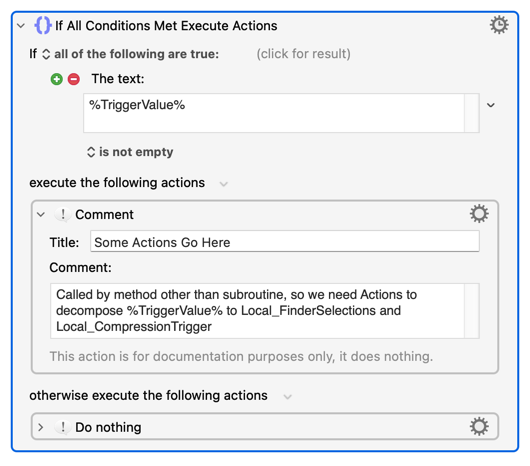
You don't (or, more accurately, the macro doesn't) care how the macro was triggered. What's important are the values passed to it -- when called as a sub macro, or via script/URL/command line, %TriggerValue% will contain the passed parameter and Local_ parameters will be empty, when called as a subroutine %TriggerValue% will be empty and the Local_ parameters will (if called correctly!) both contain values. So all you need is a new first Action:
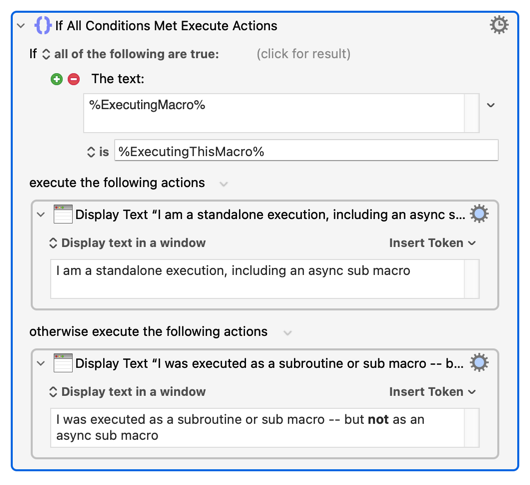
And %ExecutingMacro% will not distinguish in the way you think -- @griffman's suggestion was to use it to differentiate between running the macro itself as a standalone and calling it from another macro:
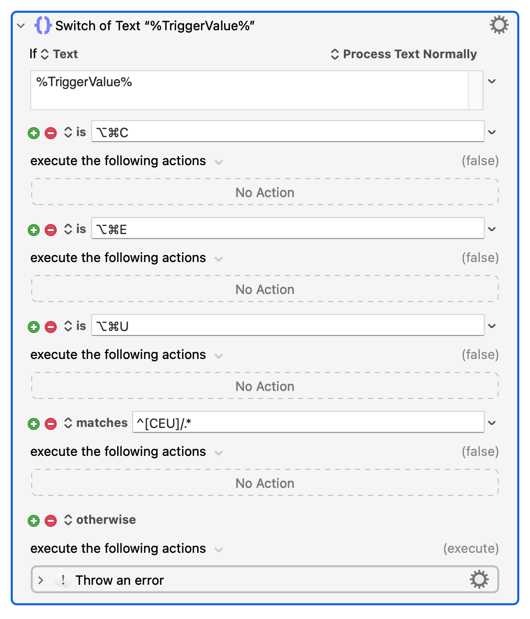
IMO, what you actually want to do is add another trigger method to the existing macro -- I stress "method" because catering for a structured data %TriggerValue% parameter will allow you to not only call this as a sub macro but also by script, by URL, or via the CLI tool. All you have to do is extend the original macro's test that you used to differentiate between C, E, and U to include your parameter data structure (I've gone with the c/path/to/file version here):
You can return a value (a single value but, again, that could be complex structured data) directly rather than via a Global or Instance variable and, importantly, the "Execute a Subroutine" Action explicitly shows the parameters to use -- no digging through the sub macro trying to work out what's needed!
There are probably some low-level optimisations when using subroutines but, really, go with whatever makes sense to you.
I will use @griffman's suggestion and your suggested implementation of it to condition the Step. 1 test of whether %FinderSelections% is empty because this is only needed when triggered as a macro (i.e. as opposed to a sub-macro).
Awesome idea!
I wish I could or would have thought of that. I will try to implement tomorrow and revert back.
Appreciated and understood.
I am -- that said -- going to do with your approach as i) I don't not have build a separate triggering macro when in Finder and ii) it gives me the ability to run asynchronously for large files which may be beneficial.
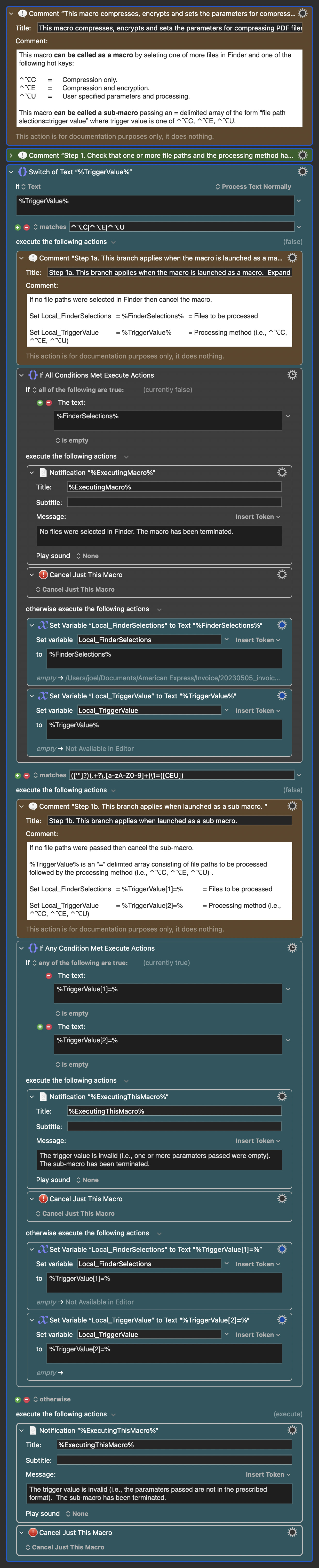
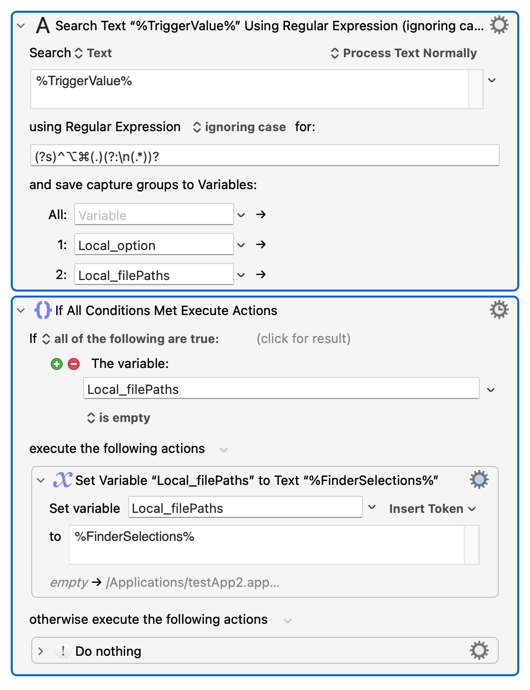
In reviewing Image 1, the teal coloured actions are new actions located at the start of the macro noting:
I have followed @Nige_S ' suggestion of adding a "new trigger method" through structured data to be passed as the %TriggerValue% when called as a sub-macro.
The %TriggerValue% will be an "=" delimited array of the form "file paths to be processed=processing method" where processing method will be one of ⌃⌥C, ⌃⌥E or ⌃⌥U. I know this could be simplified to one of C, E or U but I wanted the matching symmetry.
The location / position of the "new trigger method" through structured data is different from @Nige_S' suggestion of placing it within the case statement where C, E or U determines the processing method. The reason for the different location / position is noted in Image 2 below where the case statement where C, E or U determines the processing method is
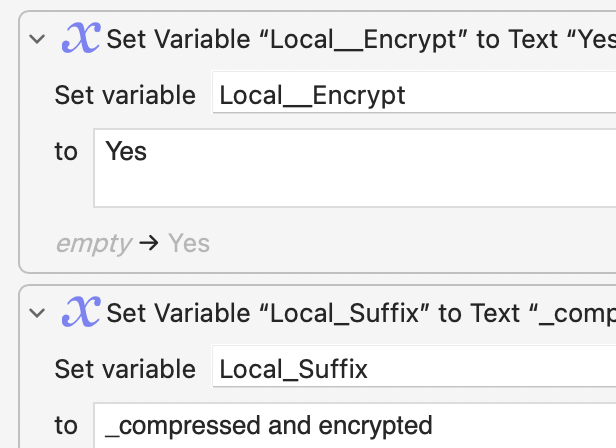
a) Embedded within a FOR LOOP which is used to process each file within the file path selections (i.e., there can be more than 1 file) meaning there is a need to parse the %TriggerValue% into its components before the case statement where C, E or U determine the processing method to get the file path selections so that each file path can be processed. See Step 2 in Image 2.
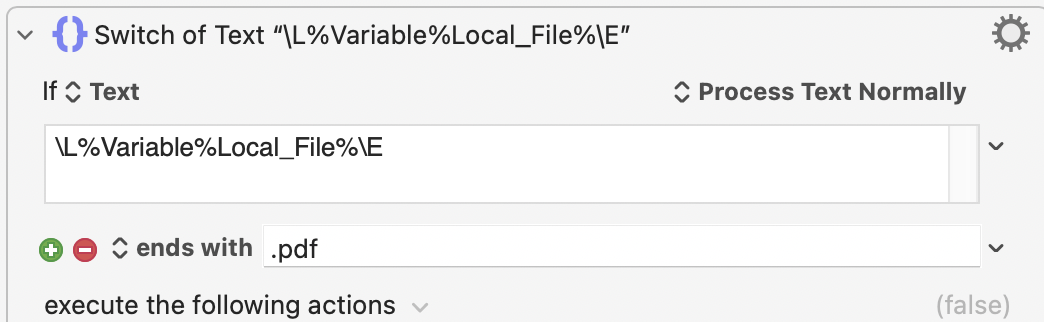
b) Embedded with a case statement that tests whether the selected file path within the file path selections is a pdf file meaning there is again a need to parse the %TriggerValue% into its components before the case statement where C, E or U determine the processing method to test whether the file path is a pdf file so that the file path can / will be processed. See Step 3 in Image 2.
Is there a better location / position for the "new trigger method" than at the start of the macro (where I have positioned it) and, if yes, a) where would that be and b) how would it be implemented given the restrictions noted above?
Is there a better method or way to implement the "new trigger method" than how I did it and, if yes, what would that be?
Is there a simpler RegEx statement for identifying the structured data that will be passed than what I am using?
[UPDATE: I have simplified the RegEx expression to =⌃⌥[CEU] ]
That sounds wrong in a few ways. One of which is that an "=" is not only valid path character but one that easy to use in all file/folder naming contexts (compare that with, say, the tab character). Another is that going against convention increases mental load -- think of all those shell commands that are command option(s) file(s), yet you've decided to do the opposite.
You didn't include in your comment how multiple file paths will be encoded, but it looks from later Actions that it will be a Return- or LineFeed-delimited list to match the Finder Token format -- why not just use that as your delimiter? Then the first line will be your option, the rest your file path(s). And, again, \n is much less likely to be used in a file/folder name!
That would also mean that the "Switch/Case" earlier would still cover all options, even if you were determined to use ⌥⌘ in your sub macro parameter -- just change the "match" to ^(⌥⌘C|⌥⌘E|⌥⌘U)\n/.*
I think you'll also find it easier to set options variables at the beginning of the macro -- get all your setup done in the "setup section" instead of referring back to %TriggerValue% half-way down a very long macro.
Considering all the above, there should be a more concise way of doing things since:
Whether run as a sub macro or standalone (you've removed the subroutine option), %TriggerValue% will always start with ⌥⌘ and one of C, E, or U
When run as a sub macro there will text after that, when run standalone there won't be
One potential problem is that you could trigger as a sub macro but only send ⌥⌘C with no line feed or file path(s) -- processing the current Finder selection by mistake (you have the same issue in your version). That's why I'd prefer to differentiate the triggers by not including the ⌥⌘ when calling as a sub macro.
Whether or not you make the changes -- are you ready for the next extension? How would you include the ability to trigger this by URL
It makes sense to set up all your "starting" variables at the beginning of the macro -- it makes them easier to find if they're all in one place, you can easily see the triggers and parameters you might draw from, and if nothing else that's the point at which you're thinking "How will my macro start, and with what values?".
For longer macros like this I'd also put %FinderSelections% into a variable so the value is fixed at the beginning of the macro -- otherwise there's a chance that, by the time you come to use the Token later on, the Finder selection has changed.
I don't know whether you have noticed but I tend to go one step further, I put teh variables in alphabetical order to make it even easier to find variables (and their values).
It will be done in the next iteration, just finishing up at the office!
Changes made include:
a. Delimiter is now \n
b. Processing method in the parent macro is now C, E and U
c. Structured data trigger is "processing method\nfilepaths"
d. Variables initialization at start of the macro
Extensive commenting has benn added. Look for comments which include the words "Expand for details" where opening the comment action will reveal extensive detail.
It took far longer than expected, likely because (as you will see) I added a lot of error handling and user messaging.
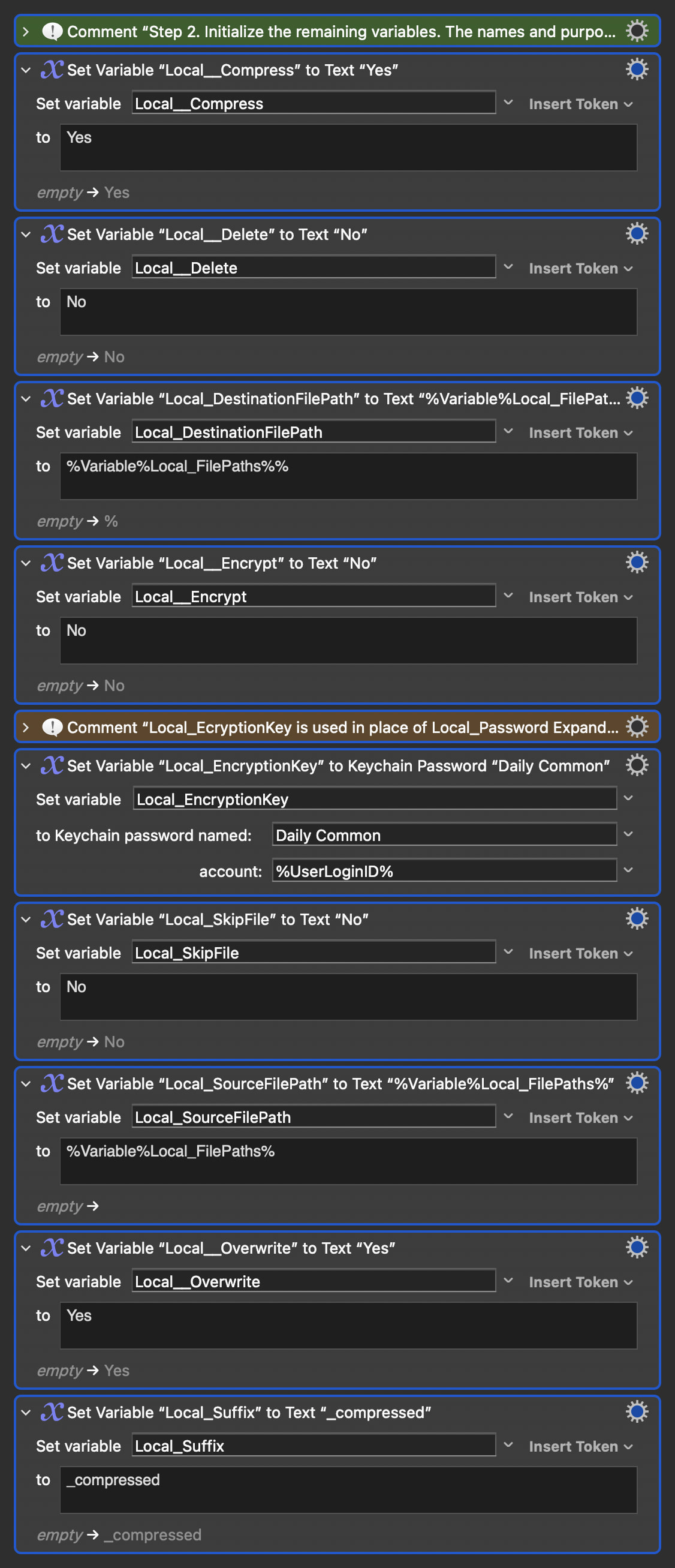
In terms of the variable initiation I book it up into Step 1 (%TriggerValue% related variable Local_TriggerValue and Local_FilePaths) and Step 2 (All other variables). I did this to manage the "focus" and size of the Steps. Though not to my liking, I have added colours to teh different Step 1 sections to make it more readable.
In terms of the result, Step 1's image (where the bulk of your suggested changes were made) and and the macro are below:
But there comes a point when you should cry "Enough!" and get on with using the damn thing
The URL Trigger is documented on the Wiki. But the "challenge" is more a demo of the advantages of separating out the Trigger and parameter processing from the main body of the macro -- it makes it easy to drop in another Trigger, another parameter format, with its own processing routine to produce the needed inputs for the main body.
The URL Trigger is a good demo of that because you are going to have to URL encode your parameter (or make it similarly "web safe") before sending, so your macro will need to a) determine that a URL Trigger was used and b) decode then process the parameter to your start variables.