G'day
Would it be possible to create a trigger with a key sequence with one special key, like the control key and say, three ordinary keys, for example, control key down, a, d, v, control key up?
Cheers
Keith
G'day
Would it be possible to create a trigger with a key sequence with one special key, like the control key and say, three ordinary keys, for example, control key down, a, d, v, control key up?
Cheers
Keith
Not really, no.
The hot key allows a single key, with modifiers as the trigger.
So you could have a trigger on Control-A, and then you could enable a macro that detects Control-D, and then it could enable a macro that detects Control-V, but regardless the Control-A, being a hot key, would be swallowed.
Generally better than this is to use Control-A as a hot key to a bunch of related macros and then use the Conflict Palette to resolve the conflict and select the desired macro to trigger.
Can the Conflict Palette items have normal keys assigned to them - or can they be navigated by arrow keys?
If I remember correctly, @_jims is the expert on very sophisticated palette systems. He has posted examples in this forum. You can really do a lot with them.
But may I ask, is it really necessary to have a three-letter “shortcut”? What looks “well organized” at first glance quickly turns into chaos. What exactly are you trying to achieve? Maybe there are easier ways.
When a Conflict Palette is triggered, it displays all available macros "in conflict" (that share the same hotkey). You can THEN select the desired macro by TYPING A CHARACTER that NARROWS the list down UNTIL ONLY ONE MACRO REMAINS, at which point that macro is automatically triggered.
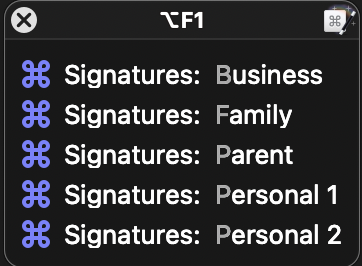
Let's say you have five macros that share the ⌥F1 hotkey. When you press ⌥F1 (and all other conditions are met, such as the macros being active and available in the current application/window), a Conflict Palette will appear like this:
The Conflict Palette lists each macro with a highlighted character. This character indicates what you need to type to narrow the list. In the example above, the first and second macros have unique highlighted characters ('b' and 'f'), so you only need to type "b" or "f" to trigger them, respectively.
If multiple macros share the same highlighted character, typing that character will filter the list to show only those macros.
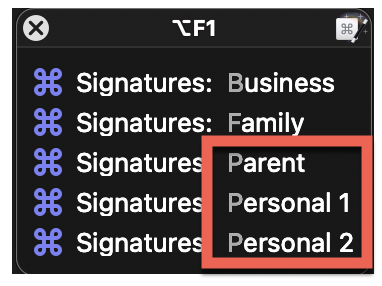
In the example above, the third, fourth and fifth macros have 'p' highlighted. Pressing 'p' narrows the palette to any macro that has 'p' highlighted:
Characters are HIGHLIGHTED by scanning the macro names from left to right. The KM finds the first character position where there are at least TWO different characters among the listed macros and highlights them.
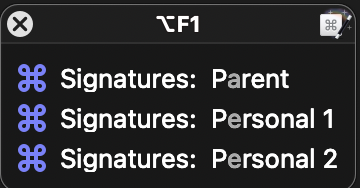
As shown in the image above, after typing 'p', the next differing characters are 'a' and 'e'. Since there are at least TWO options, those characters are highlighted. You can press 'a' to trigger the "Parent" signature macro, but what would be the next character highlighted if you press 'e' to narrow down to the "personal" signatures? Think about it and then expand the image below:
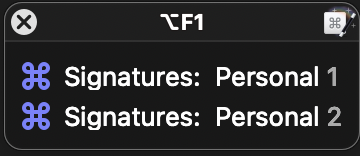
As you can see, if all macros share the same characters at the same position, those characters will be bypassed UNTIL KM finds a position where there are at least TWO different characters. In the example above, after typing 'e', the next "different" characters between the listed macros are the numbers '1' and '2', which you can type to trigger them.
As you can see, naming macros that share a trigger with a consistent structure makes navigating the Conflict Palette much easier.
In this case - yes.
I work with FileMaker a lot and FileMaker hides a lot of menu items layers deep. Some menu items are not even shown unless you right click on something.
My memory is good - but I'd like the option of using a Control key with some other key to open a menu like thing that I can select with a key or arrow keys and maybe enter to bring up the next set if need be.
So I'm looking for a way to remember one thing - to remember a few other things - and so on.
Cheers
Keith
@csmu Okay, I don't know FileMaker, but I think I understand the problem. Maybe it can be solved in part this way.
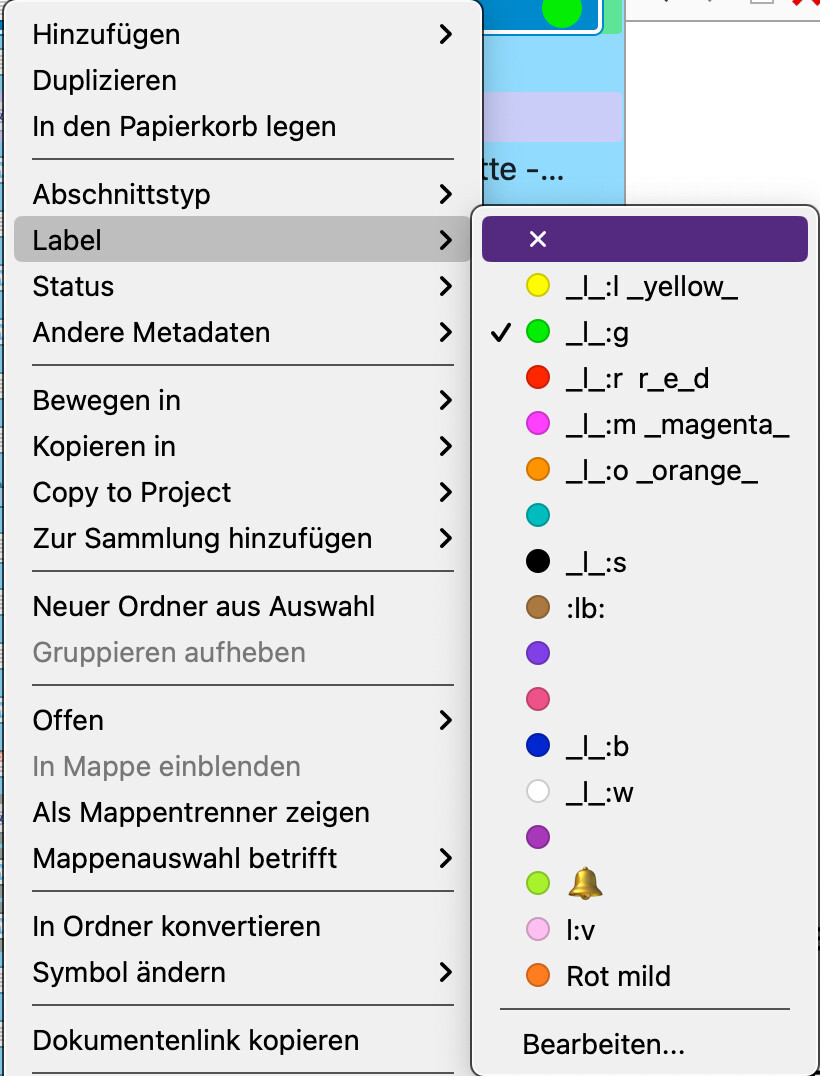
In an app, I need colors to mark certain things. I could assign a shortcut to each color. Instead, I only have one shortcut that opens this menu (submenu).
Now I can select a specific color using the arrow keys and Enter. Or I can type the name. This may not be particularly elegant, but it does what I want without me having to set up anything complicated