It would help if you showed your not-working attempt.
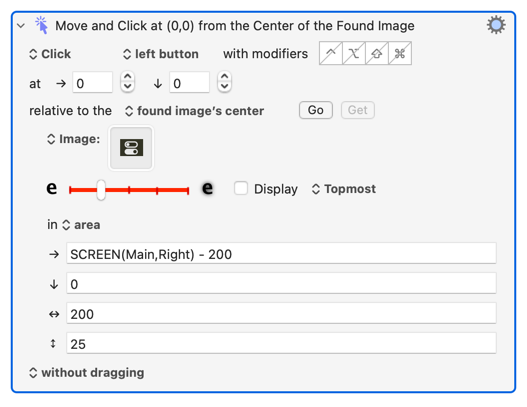
This works for me, though using an image may be problematic if you are using macOS 26's see-through menu bar. Note how the search area is constrained to a)speed things up and b) reduce false positives:
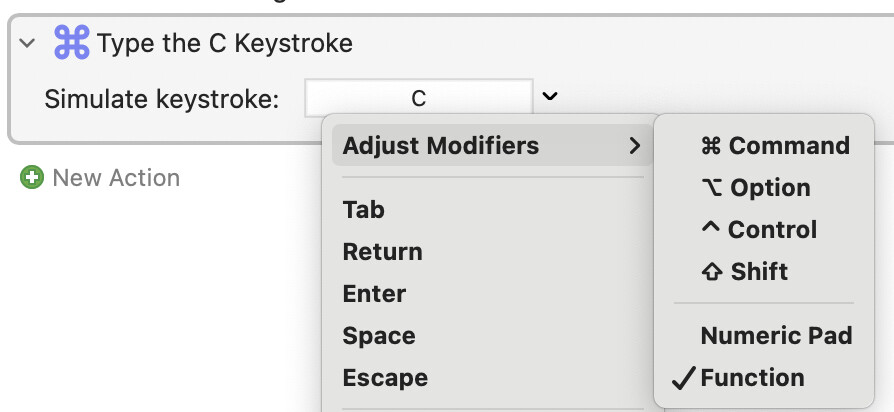
Better still, Control Centre can be opened by keystroke -- Fn + C. The modifier doesn't show in the keystroke field so use the dropdown menu:
If neither of the above work for you, try AppleScript. We covered this in one of your other threads but, for completeness:
tell application "System Events"
	tell process "Control Centre"
		tell menu bar 1
			tell item 1 of (every menu bar item whose description is "Control Centre")
				click
			end tell
		end tell
	end tell
end tell
You may want to use AppleScript anyway, since you'll likely need it for subsequent actions in Control Centre.