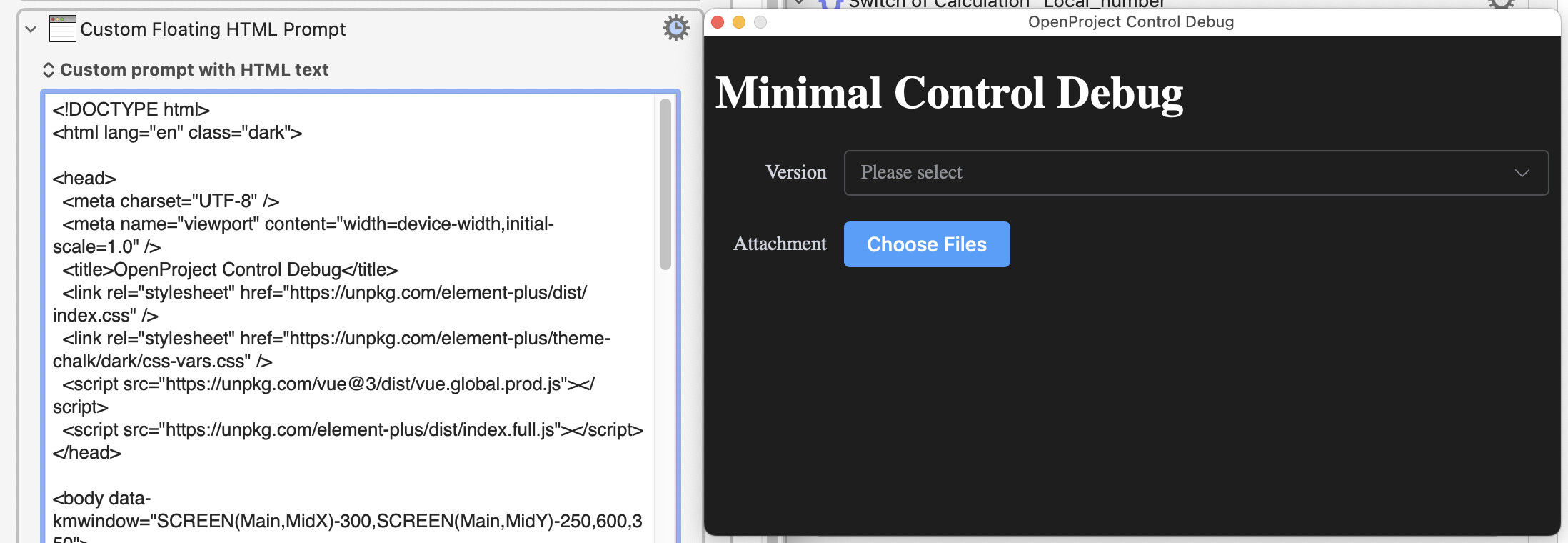
When I enable the "<el-upload" control in the above HTML, the entire pop-up window will not appear.
<el-form-item label="Attachment">
        <el-upload
It works perfectly when I access it in the browser, but when I trigger the Custom HTML Prompt popup via Keyboard Maestro, there's absolutely no response. I can't even troubleshoot it—I have no way to "Inspect Element," and I don't see any error outputs.
I hope to receive help, as well as assistance on how to troubleshoot such issues
I plugged your code into the website: (which lets me plug in any HTML code and view the result)
And I got the same result that I get when I plug it into the KM Custom HTML action.
I'm not sure if that's what you are expecting because I don't know how to interpret advanced HTML code. So I cannot tell if what I'm seeing is what you expect. Perhaps it would help if you show an image of what you expect to see.
That's with macOS Sequoia -- WebKit does change, so let us know what version of macOS you are running. You should also upload a minimal macro, or even just the "Custom HTML Prompt" action in this case, that shows the problem and lets people see what options and so on you may have set.
Have a good read of the "Custom HTML Prompt" wiki page for more info about the Prompt and ways you can interact with it. There's a link near the bottom to a Forum thread about turning on "Inspect Element" but, in short, you run the following command in Terminal:
What I expect is that when using , it should at least pop up the file selection dialog normally. From your example, I can see the results are completely different, so it looks like there's a version or system environment issue here."
But what you haven't done is upload your macro -- the simplest way is to export it from KM Editor to your Desktop, make sure your Forum post editor is in MarkDown mode and not the new Rich Text Editor:
...then drag the exported macro into the Forum's editor window.
Without the macro it's just random guessing as to what the problem might be.
Ok. Obviously I'm a second rate support guy, because I didn't spot (and remove) the comment in your code. But now that I do spot it, I should report that when I remove the comment characters, your code does produce the appropriate button in KM 11.0.4 on Tahoe 26.1.
Works fine on Sequoia (and @Airy says on Tahoe too).
Which suggests a WebKit version issue. Which browser were you testing with? If it wasn't Safari then try in Safari and see what happens.
Even if you can get the dialog to display, I don't know if it'll help. WebKit as used by the Custom HTML Prompt is pretty-well sandboxed and I'm not sure it'll let you pop an OS file browser, never mind actually access any files on disk.
On my macOS Monterey 12.7.6, when I access the page using Safari, the component works completely fine. The Safari version shown in About is: Version 17.6 (17618.3.11.11.7, 17618).
However, when I check the version through Terminal with the following command:
I notice a very subtle difference in the build number (or the displayed version string is slightly different). I’m not sure if this minor discrepancy could actually affect anything. Does this tiny version difference potentially cause issues with certain web features or Element Plus components? Thanks!
But I don't think you'll be able to do what you want, even if the HTML did render properly. The file picker, the upload -- these are things done by the browser app, not the WebKit rendering engine -- I don't think you'll be able to do any of that through a KM "Custom HTML Prompt" dialog (and I'd be very happy to be proven wrong!).
Why do you want to use the custom prompt? Might it be easier to write the required HTML to file then open that in your browser of choice?
That's part of what you want. What about the rest? Is the HTML static, or dependent on KM variables? Does the choice in the "Version" field then alter form options, or is it input data only? After you've chosen some files, what then?
The Custom HTML Prompt will not give access to the OS file picker (again, I'll be happy to be proven wrong on this). Try this simple HTML, which works as expected in a browser and displays but does nothing in a Custom Prompt:
You might (I haven't tried) be able to have the "Choose Files" button trigger another KM macro which executed "Prompt for File" and returned the paths, but what then?
I suspect that, after the first run, a browser window will be ready at least as quickly as a Custom HTML Prompt -- rendering time will be roughly the same, but the Prompt has to redownload your script libraries each and every time you run it while your browser should cache them.
Thank you very much for your suggestion . I used "Prompt for File" to configure an additional macro, which enables the selection of the file path to be obtained