Our company uses Office 365 (Office apps in the browser window) as well as Remote Desktop (Web). At least in Safari, all of these MS web apps “eat” the Command-` (backtick) and do not pass it on to the Safari interface, and thus does nothing. I’d really like for it to cycle windows as is the default Safari/macOS behavior.
I have proven that KM receives the Cmd-` (and can System Beep, for example), but don’t know what the Action(s) is/are that I should use which will cause the next window in the rotation to come to the front.
MS riding rough-shod over platform conventions and not giving the user the option to turn off such behaviour -- who'd have thunk it?
Simplest solution is to get your company to spring for desktop app licenses so you get proper behaviour. Explain the cost will soon be recouped through higher productivity as you'll be able to properly automate things in KM, use standard shortcuts, run AppleScripts and VB macros, and so on.
Not so good is to change the OS's window switching shortcut to something that doesn't conflict with the Office web apps -- but you'll have to retrain yourself and it'll be global. Yuck! System Settings -> Keyboard -> Keyboard Shortcuts... then Keyboard from the list on the left.
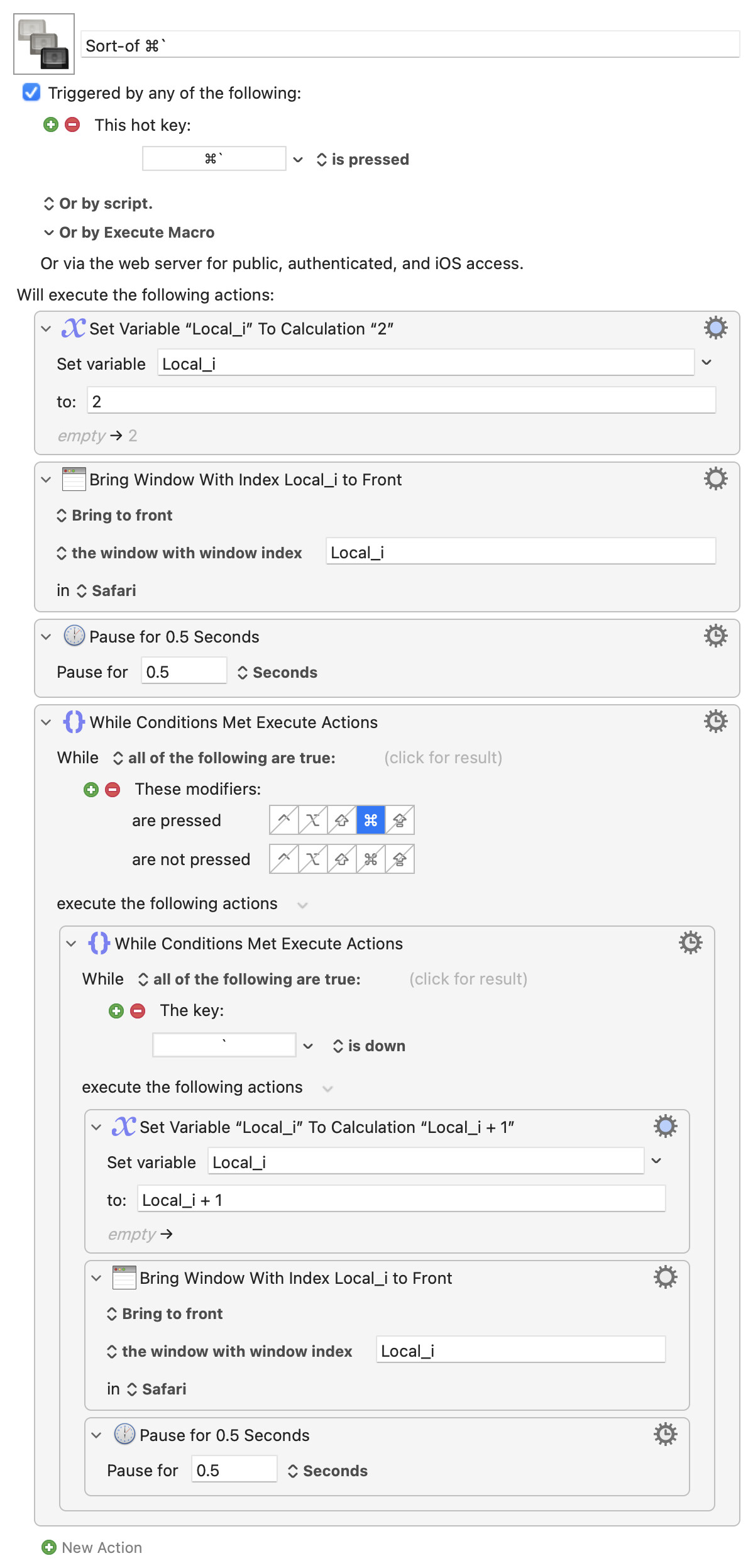
Otherwise, it's difficult to exactly reproduce the behaviour of ⌘` because bringing windows to the front with "normal" KM Actions changes the stacking order -- using OS shortcut doesn't do that. And most apps, including Safari, don't have an actual "Cycle through Windows" menu command. This macro gets you close:
...but I find it's different enough to be really annoying... Put it in a Macro Group that's only available when Safari is frontmost to minimise your distress and reduce the "Pause" durations to something your more comfortable with once you see what it's doing.
Individual Office-aimed web apps are a PITA, breaking Single Sign-On so you have to log in and MFA in every app. And a change in context, eg click a link in Excel that opens a Word doc, spawns another window in the app -- you end up with a web app called "Excel" that's got Excel and Word windows, another called "Word" that's got Excel, Powerpoint and Word windows, one called "Outlook" that's an unholy mess, etc.
A single Office web app does at least allow SSO but (as with the above) runs into OP's original problem -- each Office app will spawn its own window in the web app and you can't consistently ⌘` between them.
I love workrounds -- but this is one place where I'd not even mention them and go straight to the "If you want me to be productive, buy me a desktop app licence".
Thank you. I did fear there would be difficulties! I’ve never had to use Office 365.[1] Yes, of course it makes sense that the applications would be integrated.