Database list into a Prompt with List

I am hoping to be able to automate the inclusion of a list of records, one field only, from an Airtable base that automatically updates a variable field in Keyboard Maestro from which a prompt with list could be offered.

Any tips on how to get a database into KM would be appreciated. I'm comfortable with using an API key to get the data into Keyboard Maestro (I think), but I'm unclear on where I go from there to populate a field variable from which the prompt with list can work off.

I’m certain that someone will be able to help, but it will save lots of back-and-forth questioning if the advice from the Forum page of the Keyboard Maestro wiki is followed closely, including these tips:

If you are having trouble with a macro and want help, then please post:

  • Your question with as much detail as you can
  • If it involves processing data, provide real world (not madeup) examples of:
    • Your source input data
    • How you want the data to appear after processing by your macro

"Prompt with List" just needs a list, one item per line (and KM is line-ending agnostic for that).

Your Airtable data will come as...? Probably JSON. If you're lucky you'll be able to select CSV or tab-delimited instead, and the parsing will be easy.

So I suspect you'll need to use the "Execute Shell Script" Action so you can curl (with your API token included) to get the data, saving the JSON output to a variable. You'll then need to parse that JSON, which will be a dictionary containing an array of records, each record containing a dictionary of fields with just one element -- the field you want the value from.

If you are comfortable with the Airtable API then the shell script action shouldn't be a problem. If you need help with the parsing you'll need to upload sample output here -- make sure there's more than one record returned, and put the output in a code block so it doesn't get mangled.

Sure. I’ll try and formulate some specific questions. I think this is a case of you don’t know what you don’t know but I’ll nut out some specifics (or better, the answers). Thanks

1 Like

Thank you. I’ll follow these leads and report back on any stumbles.

As a start, what is the format of your data?

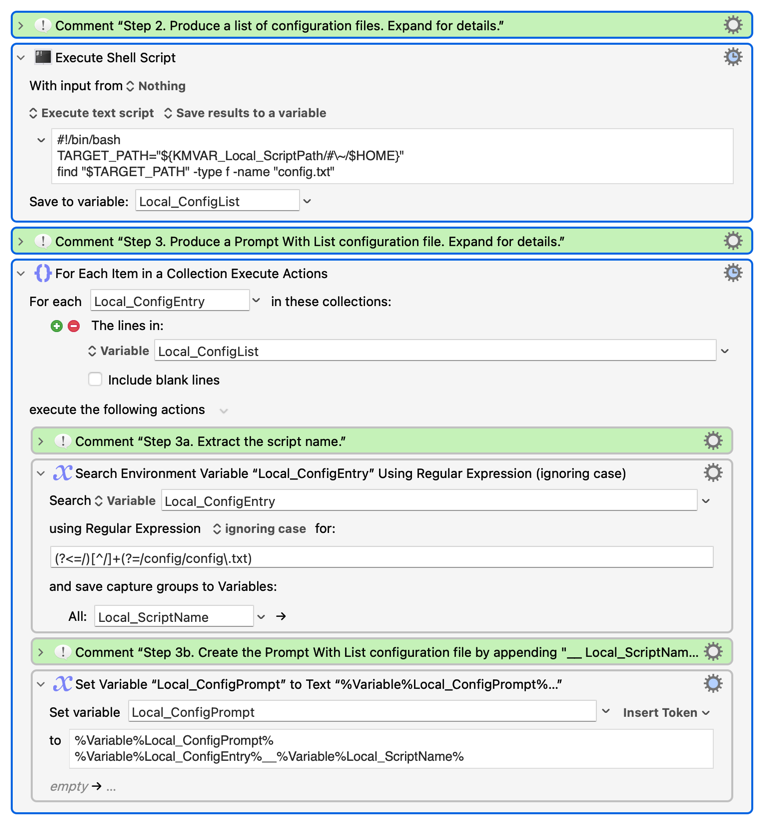
Once we know that we can figure out how to get it into the proper Prompt With List Format. While not exactly the same, I created a macro that list all config files by looking for files called config.txt in the project folders as demonstrated below. This will give you an idea of what is needed (though others will certainly improve on what I built):

Per the above, you needed to find something equivalent to "config.txt" (or something else like file array format) that is common to every record so that you can create a dynamic list.

I hope this helps.

@Joel Thank you.

I discovered that simply highlighting the column in Airtable, copying it and pasting it into a Prompt With List, with the list ‘from text’, easily produced what I was after in the short term. Obviously, this is not dynamically linked to the Airtable database, and that would be good to have. It looks like there's quite a bit of work to achieve this, and I would like to tackle it, but will probably have to put that on hold for now due to some other priorities at the moment.

The steps you have set out will be most helpful when I tackle it. Thanks again!

A pleasure and understood on conflicting priorities.

If you need help when you have time, let us know as I would be happy to help (as would others here far more talented than me).

Great that you were bale to get it going!

Unfortunately, they won't be helpful at all. It's a good way to generate a prompt that lists the (filtered) contents of a folder on your machine, but you want to get data from an online database.

If you're comfortable with the Airtable API you can easily get the data you want into a KM variable -- that's just an "Execute Shell Script" Action containing the curl command you'd normally run to get "field x of all the records" (or a found set of records, if that's what you want).

Then it's just a case of getting the data you want out of the data the curl command returned. That'll depend on the JSON, and if you post an example of that here (suitably anonymised) someone will be able to help.

<obDisclaimer>
I've been an Airtable user for all of half an hour, and everything I know about JSON has come from the KM Wiki, so there's probably better ways to do this. A large number (100s) of returned records would be better processed in a JXA Action and not one-by-one in a "For Each", for example.
</obDisclaimer>

Anyone who wants to play along at home can set up a free Airtable account at https://www.airtable.com -- AFAIK, API keys are available with a free account, but I got bumped on first sign-in to an Enterprise that I didn't even know my organisation had!

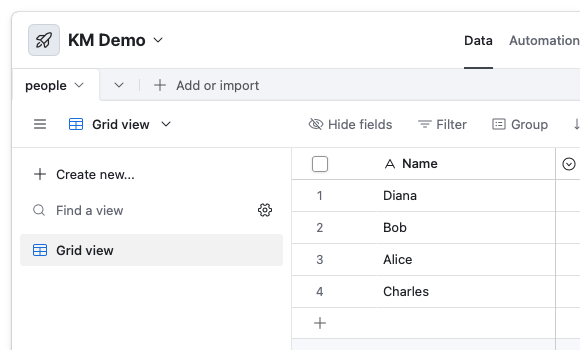
This demo assumes you have an Airtable app (mine's called "KM Demo") with a table called "people", and you want to get the value of the field "Name" for all records:

The easiest way to get the values needed for the curl command is to go to Airtable Web API, where you can select your app and see example commands complete with table and field IDs for that app.

You can create your API token at https://airtable.com/create/tokens.

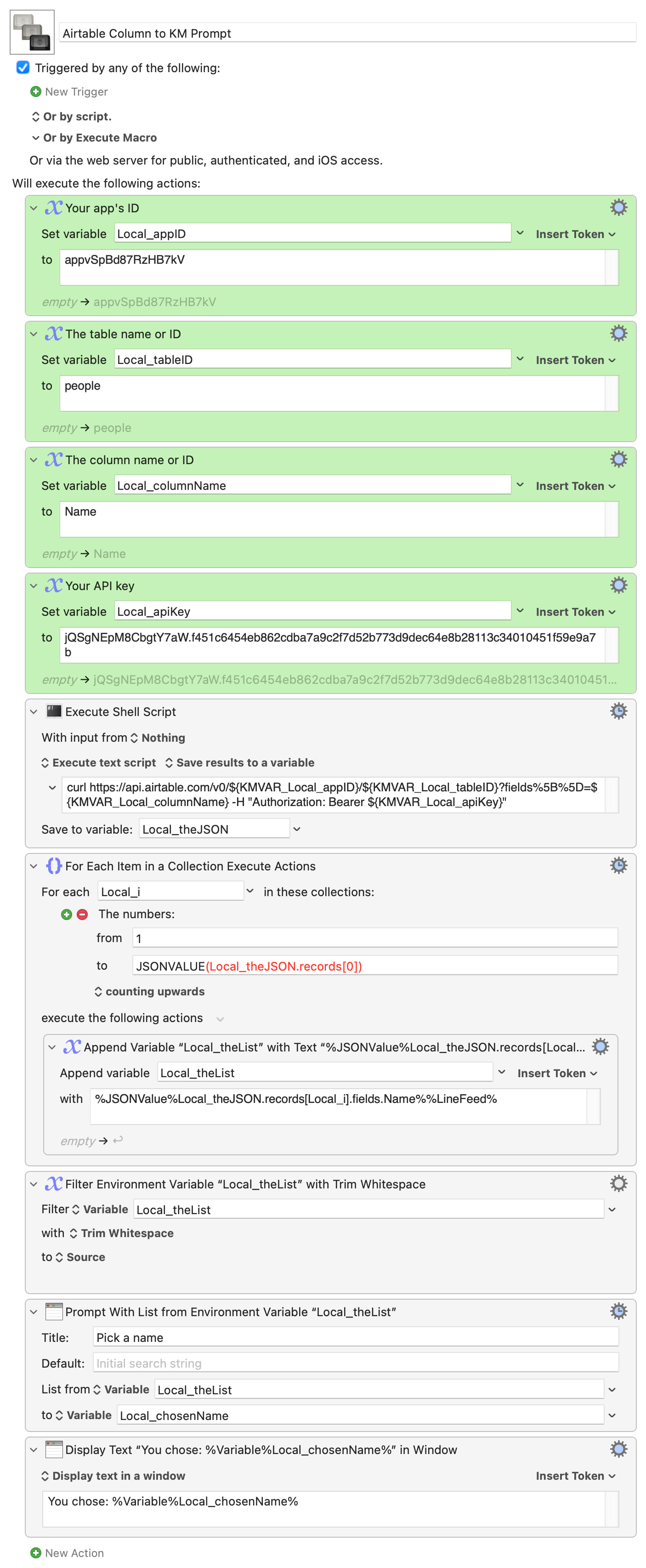
For convenience the app ID, table, field and API keys are set in the first four, green, Actions of the demo macro and those variables used in the shell script. Copy the values from the app's API page and they'll be URL encoded for you if needed -- that saves us from having to do it in the macro :wink:

The JSON returned will be the "compact" version of:

{
  "records" : [
    {
      "createdTime" : "2026-07-16T10:27:55.000Z",
      "fields" : {
        "Name" : "Alice"
      },
      "id" : "rec5Lw3wZxDkRedb9"
    },
    {
      "createdTime" : "2026-07-16T10:27:55.000Z",
      "fields" : {
        "Name" : "Bob"
      },
      "id" : "recalqPAiFXhZeo41"
    },
    {
      "createdTime" : "2026-07-16T10:27:55.000Z",
      "fields" : {
        "Name" : "Charles"
      },
      "id" : "recddQpdWORjHwHZR"
    },
    {
      "createdTime" : "2026-07-16T10:27:55.000Z",
      "fields" : {
        "Name" : "Diana"
      },
      "id" : "recivuyTfj3oTYvtp"
    }
  ]
}

...but the "pretty" format should help you see how:

%JSONValue%Local_theJSON.records[Local_i].fields.Name%

...extracts the value of Name for each increment of i.

Enough! Demo:

Airtable Column to KM Prompt.kmmacros (6.9 KB)

Image