I think exempting the app worked. I even split the rcw group into 2 so I could get the macros with the text strings to fire in the Adobe apps.
Thanks for all your help
I think exempting the app worked. I even split the rcw group into 2 so I could get the macros with the text strings to fire in the Adobe apps.
Thanks for all your help
No, they aren't -- which is why your macros aren't working.
The menu items vary depending on the last operation. So if you cut some text, "Undo" becomes "Undo Cut". Do the "Undo" and "Redo" becomes "Redo Cut".
You should have got a Notification from KM telling you that the macro failed because the menu item wasn't found -- KM does its best to tell you of any problems, so it is a good idea to make sure Notifications are turned on, if only when you are troubleshooting. That same error message will also be in the Engine log, which I described how to access earlier.
You're going to have the same problem in any app that has contextual menu items. What you can do is change the text in the "Menu Item" field so it matches menu items that start with eg "Undo" and can have other text following that:
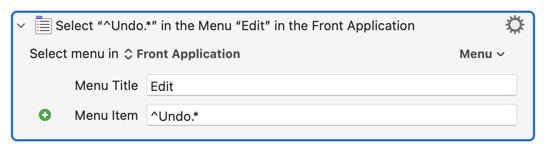
...but watch out for apps that have multiple versions of the same command available, for example InDesign's "Paste", "Paste Into" etc.
None of that explains why your "Cut" macro wasn't working, though -- AFAIK that item doesn't vary. Again, Notifications or the Engine log will help you if you want to fix that.
You're right, the Undo isn't working. The Cut macro is fine.
In Adobe Illustrator its own keystroke shortcuts can handle the contextual keystokes. Nothing seems to make the Undo work in Text Edit. I tried using just the keyboard shortcuts in the OS. It also failed with Undo.
I'll turn on Notifications.
Did you edit your macro as shown above? Because that works fine in TextEdit for me.
For clarity, the field's content is:
^Undo.*
...where ^ both indicates that this should be treated as a regular expression and "starting at the beginning of the text", Undo is the literal text "Undo", and .* means "followed by any character" (the .) "zero or more times" (the *).
The .* isn't actually necessary, but it makes it more obvious what's going on.
That seems to work. I also used the ^ and the* on Redo and it works too.
Again, thanks for all your help!