I created a macro which centers the next created engine window on the currently active window. Nothing too fancy; it only requires a few actions to do so. The solution I came up with might not be the most elegant (shortest), but it works.
To make this code segment (the sequence of the few actions required for centering) reusable, I then tried to shift the actions into a (sub macro) which can easily be called by all macros requiring this functionality (centering next engine window relative to the currently active window).
I was surprised to see different behaviors. For me, the "direct execution" method works as expected (engine window is correctly centered). However, when I place everything but the creation of the engine window itself in a sub macro, the engine window is no longer centered.
Is there a difference between executing a sequence of actions all in one single macro and executing the same sequence of actions but having some of these actions "outsourced" to a sub macro?
Any support is greatly appreciated!
[Please note: it seems that Keyboard Maestro somehow remembers the position of the last created engine window and uses the same position when the next engine window is created. Therefore, when testing the macros attached, I suggest to manually move the engine window away from the centered position before closing it (or simply move the active window which is used for centering). Otherwise, everything might work as expected in both cases because Keyboard Maestro simply reusing the same position.]
So a subroutine, executed with the Execute a Subroutine action, will be part of the same execution instance. As would an Execute a Macro action as long as it was not executed asynchronously.
However, the parameters specified in the Set Next Engine Window Position are not evaluated until the window is actually positioned. This allows context sensitive functions like WINDOW to be used. And since your variables are Local variables, they no longer exist at the time they are actually used to position the window.
So it you change the X and Y variables to Instance variables instead of Local variables, they will remain valid and the subroutine version will work.
However, the parameters specified in the Set Next Engine Window Position are not evaluated until the window is actually positioned. This allows context sensitive functions like WINDOW to be used.
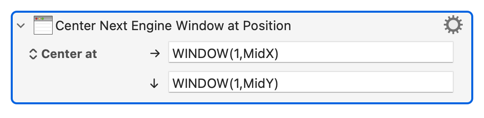
So if you want to centre the next Engine window on the currently-active window it's just one Action:
Thanks for chiming in. With your compression of all my actions into one single action, the original question of using a sub macro or subroutine becomes obsolete. Of course, this is an even better solution compared to my original approach and it does not require any consideration of variable scope.
Thank you very much for this useful practical hint! As Peter's reply was more directed towards my actual initial question (also in respect to the title of this thread) and might be therefore more relevant to people stumbling upon this thread, I keep his reply being marked as the solution.