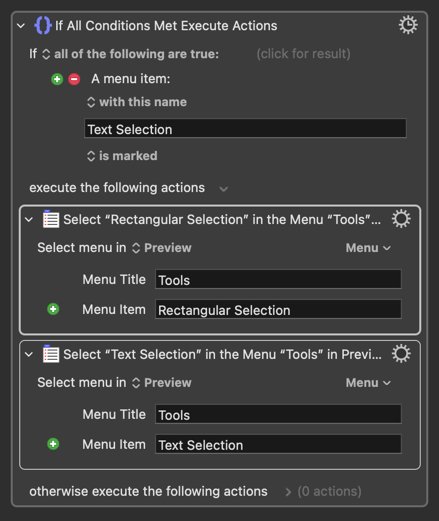
Is there a method to either 1) deselect selected text in Preview or 2) extract all text from a pdf document into a Keyboard Maestro variable?
I want to copy the entire text from a pdf in order to then change the filename of the same pdf depending on whether the pdf contains certain keywords or not.
Currently, my macro simply opens the pdf in Preview, presses Cmd + A twice (first time to select all text on the currently displayed page, second time to extend the text selection to all pages of the pdf) and copies the selected text to a KM variable. At this point in time, I would like to deselect the text (= remove the text selection completely). Is there any way to do so in Preview?
An alternative to my approach using Preview would be, of course, to somehow extract the text from the pdf file directly using another option such as AppleScript. However, I also could not find any method to achieve this so far.
One additional information (might be relevant): The pdf files contain scanned text pages. I do not OCR these pages in a dedicated process as the text is anyway selectable once the pdf is opened in Preview.
Just use the Click Mouse action to click anywhere inside the preview window. It works for me.
Did you know that macOS's Automator can extract text from a PDF file? I don't use Automator, but it should be pretty easy to write a one line Automator workflow that extracts the text and returns the text to your KM macro.
As an alternative solution that wouldn't involve opening and then manipulating the PDF, if you use Brew or MacPorts, you can install pdfgrep (i.e. brew install pdfgrep), and then search for matching text with a one-line Terminal command:
/opt/homebrew/bin/pdfgrep 'text to find' "Name of File.pdf"
Put that in a Keyboard Maestro shell script action, and then act on the results containing or not containing your search string.
Yes, it requires a third party tool, but it would make your macro incredibly simple and fast.
Thank you @Airy and @griffman for putting me on the right track here!
@Airy : I was looking for some kind of hidden UI command or a small AppleScript to deselect text. The mouse click is the most obvious workaround. Maybe too obvious so I did not immediately thought about it myself.
@griffman : Your solution is much more elegant than mine. However, in the macro that I am planning, the user anyway has to interact with the text inside the pdf (by selecting several text segments for further processing). So in my specific case, as I anyway have to open the pdf in Preview, extracting the text by selecting and copying it is probably easier.
Absolutely. I meant "When I was searching the web for a solution, I was only focusing my search on some kind of hidden UI command or a small AppleScript to deselect text."
As this seems not possible, no wonder I could not find any existing solution online.
I already implemented your mouse-click solution and it works fine.