In Logic Pro, the space bar toggles Play/Stop, but unfortunately some plugins steal the keyboard focus - so you have to click away from the plugin window to start/stop playback.
My plan is to work around this by getting a Stream Deck button to transmit the start/stop command via MIDI (MMC), but unfortunately MMC only has separate commands for Start and Stop, so in order to reliably make this a start/stop toggle, I would have to set a variable showing whether Logic was currently playing or stopped.
So I need to set up a couple of macros that are triggered by Logic starting or stopping playback, which can then set that variable.
How can I get Keyboard Maestro to listen for started/stopped playback in Logic? I think I have to set up a MIDI message in Logic’s Controller Assignment window but it’s bamboozling me!
(Or if there’s a simpler way to achieve a stream deck start/stop toggle that works without keyboard focus, even better!)
Out of curiosity, which plugin(s) are intercepting the space bar? The only time I've come across that is when the preset browser is open for IK and UAD plugins (terrible design oversight, in my opinion).
There is a key command toggle called Play or Stop, which you can assign to a simple MIDI CC message, using Keyboard Maestro or a Stream Deck MIDI plugin.
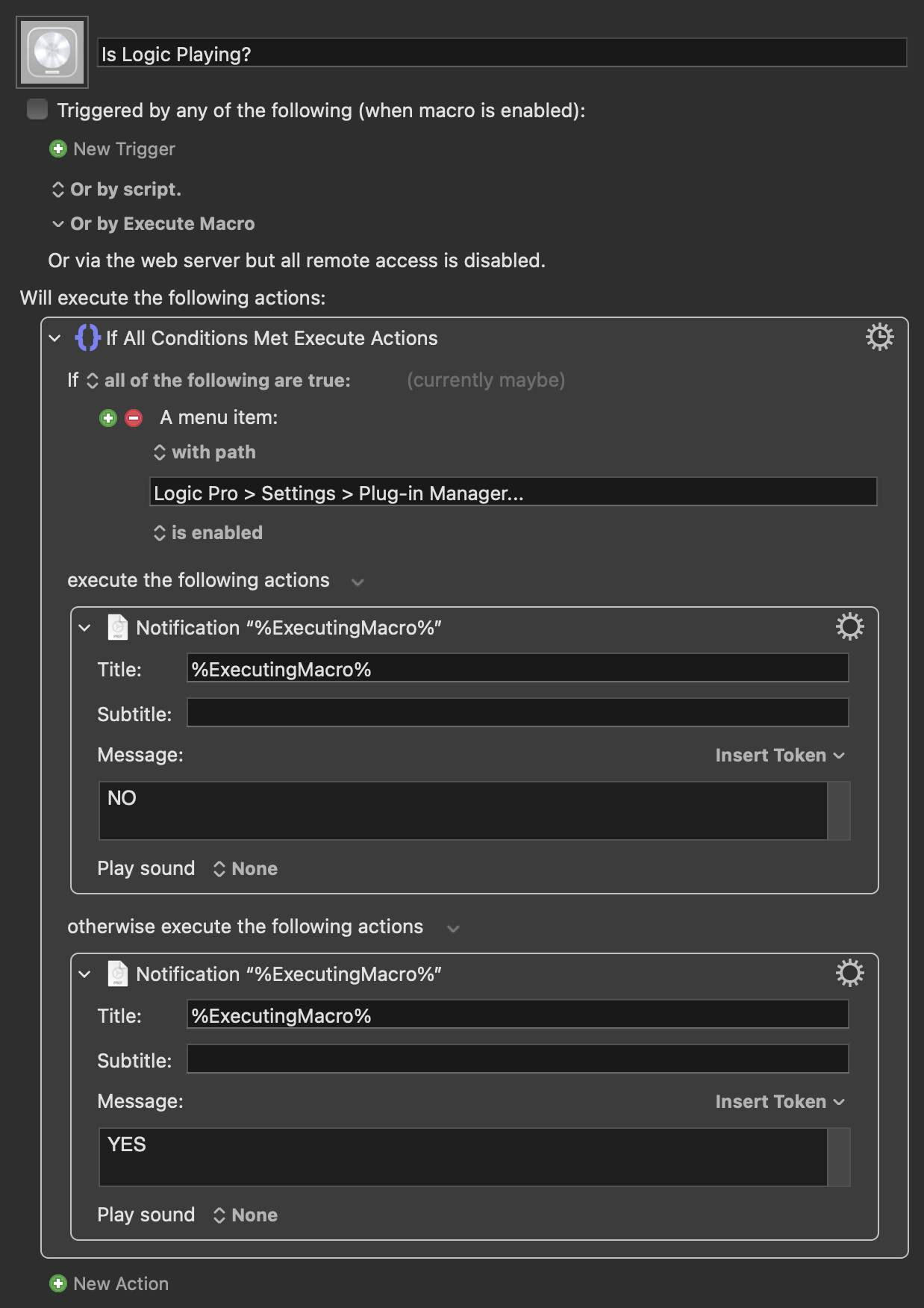
For completeness, to detect playback in Logic Pro, you can do this:
There are a few (e.g. Spitfire Labs) but by far the worst offenders are the UAD plugins. Not only do they steal keyboard focus, they also close the presets window when you click elsewhere. So starting or stopping playback while going through presets is a real chore.
I did think of assigning start/stop to a MIDI command, but most of the time I still want it to be the space bar. The stream deck button is just a workaround for those times when the keyboard focus is stolen.
That is an extremely clever solution! I wouldn’t have thought of looking for menu items that become inactive during playback. Unfortunately it’s not working for me - it returns “YES” every time.
Yay - assigning a MIDI CC to the start/stop command worked! Hopefully nothing else will need that particular CC
Much simpler than what I was originally planning. Thanks for the suggestion!
On a side note, when I loaded up a random UAD plugin to test it, the space bar works fine - it turns out some of their plugins steal the space bar focus, while others don’t.
There shouldn't be any conflicts, as you will be using the StreamDecktoDAW MIDI device and you can dedicate an unused MIDI channel to things of this nature if you need added isolation.