Wondering if someone can help point me in the right direction on how to program in this behaviour. In my project files I’ll name them like this: “Project Name 26-01-27 1” and what I’d like to do is have Keyboard Maestro automatically duplicate and increment the last number by 1, so the next one would be “Project Name 26-01-27 2” and so on. If it can detect when the end of the filename just has the date in the YY-MM-DD format and know to add a 1 and then make the duplicate 2, that’d be optimal as I’ve been naming files ending in just the date for many years now and I’ll surely forget to add a 1 on the end of the first file myself.
I’m not a power user/coder but I’ve had success a couple times getting some actions built myself and a couple times with the help of chatGPT, but this one seems to have me and chatgpt stumped. The closest I got was “Project Name 26-01-27 1” then “Project Name 26-01-27 1 1” and “Project Name 26-01-27 1 1 1” which obviously isn’t too great.
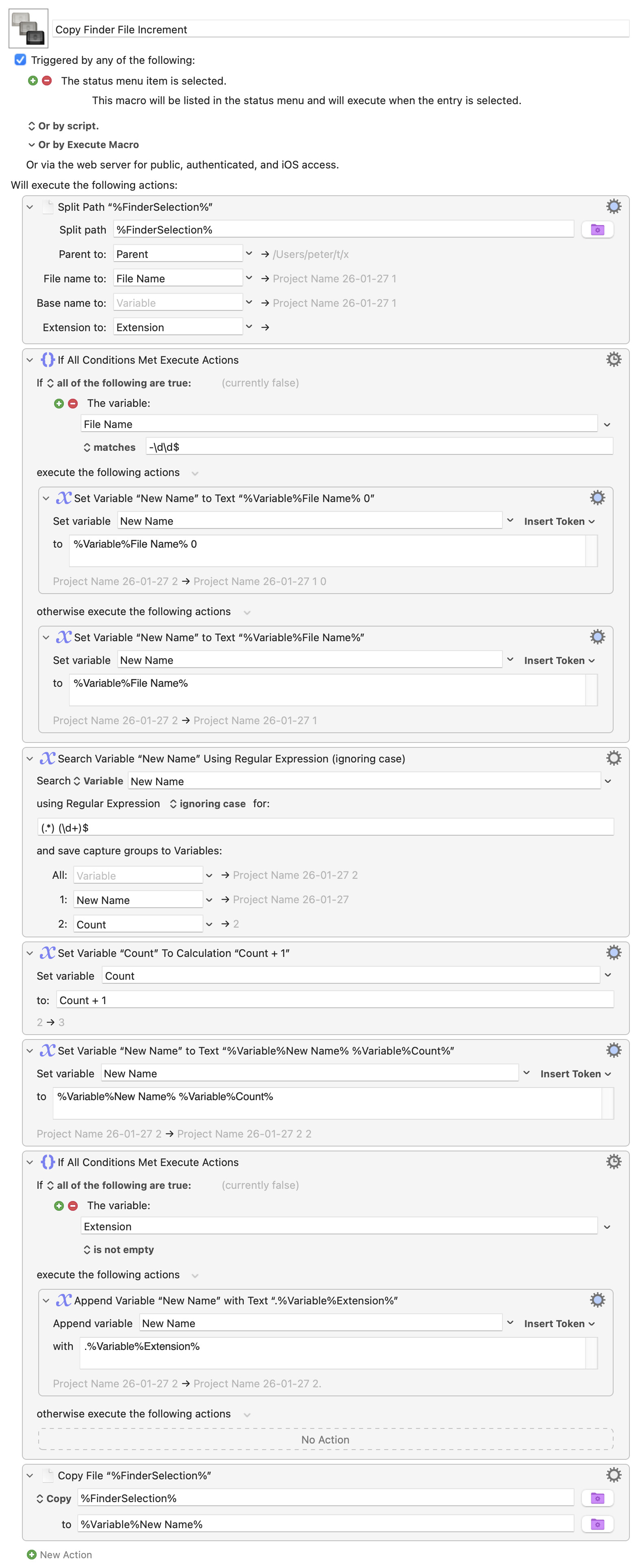
It's a bit complicated - splits up the finder path into its components, checks if it has a number or date at the end, if a date, essentially adds " 0". Then strips the number, adds one, puts it back on, adds back the extension, and then copies the file.
I brought it in and at first it didn’t work for me, so after some poking around, it seemed like it was missing a variable, so I updated the Base name to ‘Files Name No Ext” and then added that in the two action options right after to replace “%Variable%File Name%” with “%Variable%File Name No Ext%” and then it works!
That’s gotten me well on the path now on how to move forward with it, I’ve figured out how to make it rename the original file to keep the 0 so the files display in order in the finder and then if I trigger it again, it’ll increment it… but I’m sure if I poke around some more I’ll figure out how to do that all at once. I’ll chime back in if I get stuck again. For now, I need to get some other work done.