Hi @bocciaman - there are many ways to do this. But I have long ago stopped worrying about how to transfer Keyboard Maestro Macros onto new computers as I have syncing enabled in Preferences.
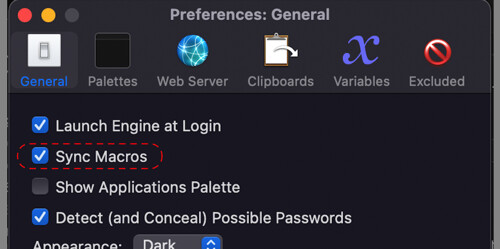
Syncing works with either iCloud or Dropbox. You basically just check the option on the Mac that has all your current Macros, set a path to store your Macros in iCloud or Dropbox. Then on the new Mac, again check the option and point it at the same file. That's it. Not only a good way to transfer your Macros to a new machine but also if you have more than one Mac you are using, a way to have the same Macros on each current Mac.
I've been using this syncing method for at least 10 years (I've lost track of how long I've been using Keyboard Maestro) with absolutely no issues. And as I use Dropbox I have the added bonus that I can restore the file that stores the Macros to an earlier version if I really mess something up... and I've used that function several times.