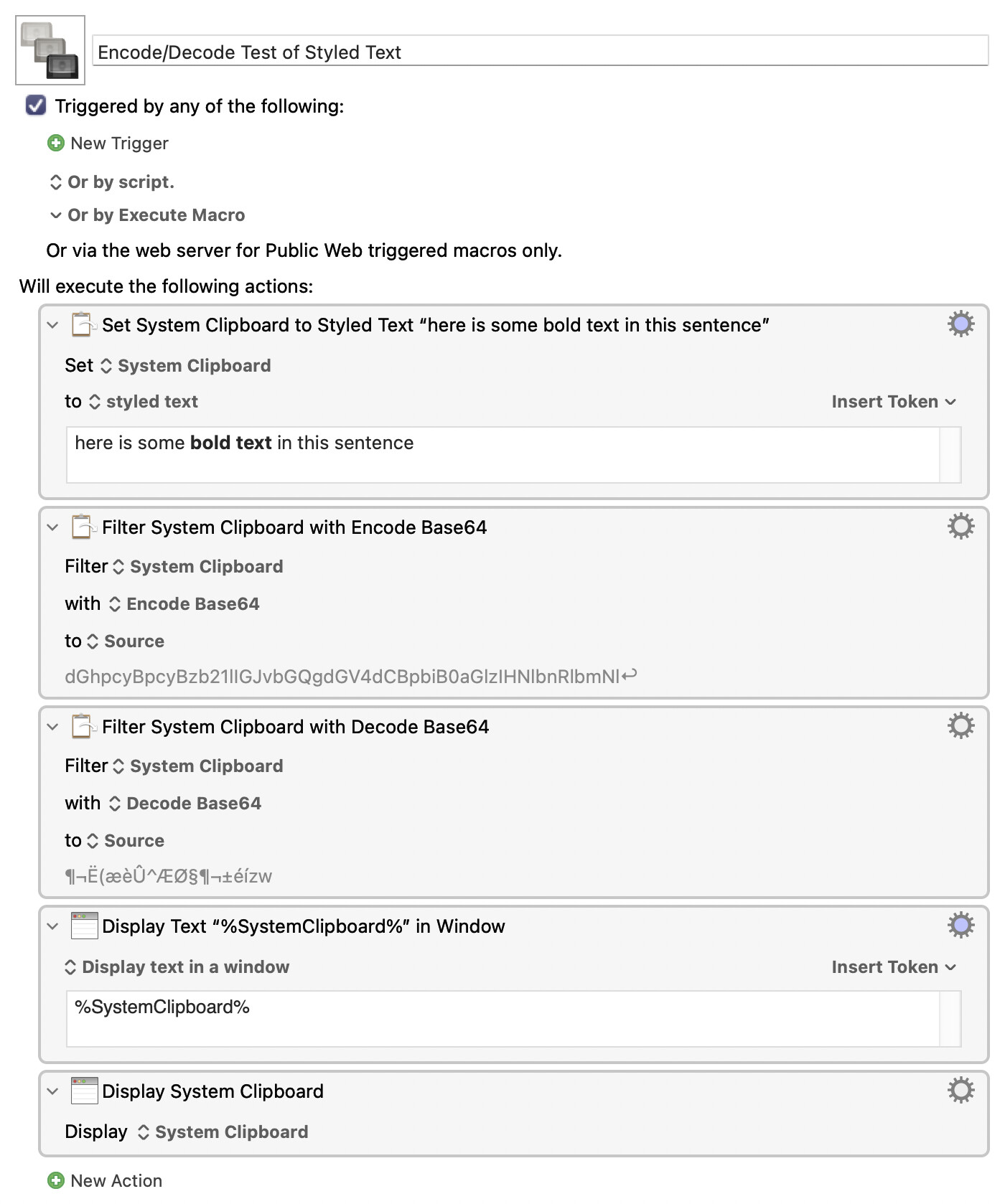
Here's a macro that's not doing what I want. I have styled text in the system clipboard, and then I use base64 filters to encode and decode it, but then I lose the styled text. My inference is that the first filter action that I use (Encode) is ignoring the fact that my clipboard contains styled text, which is, by my way of thinking, a mistake.
From my perspective, this macro should leave the original clipboard unchanged. The Encode/Decode filters should negate each other, but they aren't doing that here. I would infer that the Encode filter is doing the wrong thing (i.e., not what I expect.)
P.S. I displayed the clipboard using two different actions at the end of my macro above, just in case one of these actions was not displaying the output properly, but they agree that the output is different. I.e., the styled text has been removed.
P.S. The documentation for these filters (indeed, most filters) is not "defined" in the wiki....
IMO this is a Clipboard/KM interaction issue -- whether that's Clipboard only making plain text available to KM or KM only taking plain text from the Clipboard is moot. But it makes sense -- how would the encode action include the Clipboard metadata that marks the text as RTF and not just some plaintext with RTF formatting symbols in it?
You'll see the same if you copy some formatted text, run this in Terminal:
pbpaste -Prefer rtf | base64 | base64 -d | pbcopy
...then paste into a TextEdit rich text document.
If you want to base64 some rich text, the easiest way would be write it to a temporary text file then encode that. If you want to skip the file then take a look at @ComplexPoint's Clipboard Viewer macro for an idea on how to extract the RTF code from the Clipboard for encoding (and I have no idea how you'd decode without using a temp file...).
How? Exactly how I did it in the following thread. I placed the result into a folder with some files inside it, but it would also be possible to zip up the folder into a single zip file, prior to encoding it, which would then be passed to the "decode" stage which reverses everything and puts the clipboard back the way it was. I thought that the base64 app would be able to handle folders. But now that I look into it, base64 can handle only files, (sadly) not folders. So maybe that would mean a few extra steps of work.
Now that I know how to save flavours in a clipboard, and now that I know that base64 doesn't support folders, I can see that it's not as easy as I thought. It might require a second line of code!
I see your point, but I believe there are ways around it, like I explained above.
The Clipboard contains both data and metadata, for what we're interested both the {\rtf1\ansi\ansicpg1252... that you see when you open an RTF file in, for example, BBEdit and the metadata that identifies the format, public.rtf as string and so on.
If you only encode the data then, when you undecode it, you've no way of knowing if it should be interpreted as RTF or as plain text that includes funky characters.
You can see the same with a file -- the same data will be treated differently, depending on the file extension. Save a new RTF file with TextEdit, duplicate it in Finder, change the extension to txt, open it with TextEdit...
I'm sure there are ways round it, and I'm sure you'll find something! But the easy way is to use what we've got -- that a text file with a .rtf extension will, in most cases, be interpreted as Rich Text Format.
My apologies. I see you've already, of course, done what I referred to--in Swift.
Well, if you're interested in an AppleScriptObjC version (I'll be modifying Shane Stanley's in-memory version), which will essentially end up being drawn out version of what you have done already, I'll get that ready when you're ready.
The Filter action generally works on plain text only, unless it is manipulating styled text and where it attempts to retain the styles as much as possible.
In this case, the output is plain text, it cannot preserve the styling as styled text, so only the plain text is used as input.