MacBooks have backlit keyboards built-in. It would be helpful if we could automate switching them off, when using an external keyboard for example. There doesn’t appear to be any actions for controlling the backlight.
Generally for this sort of problem you should search for an AppleScript solution to toggle the MacBook keyboard backlight.
But the best I could find for this is Toggle keyboard backlight ON/OFF using applescript.
Ok, thanks.
Nice work by the way. Keyboard Maestro is one of my favourite apps. I’ve got a couple of Cherry G84-4700 programmable keypads, and Keyboard Maestro makes it easy to do all sorts of cool stuff with them too.
Hey Carl,
It looks like there’s a command-line program to do this.
It would appear there’s a downloadable binary, and it’s available from Macports and Homebrew.
brightness
-Chris
https://njr.sabi.net/2006/06/20/setting-display-brightness-updated-tool/
Cheers Chris. Nice one.
Unfortunately, that only affects the screen brightness, not the backlight on the keyboard, which was the OQ.
But there is another Homebrew-available utility, mac-brightnessctl, which could do this (and more -- flashing keyboards, anyone?).
Not something I've tried myself, so information rather than recommendation!
At least since Sequoia the keyboard backlight can be set to go off after 5 seconds of inactivity (Settings > Keyboard). That seems like an almost meaningless amount of time if an external keyboard will be used in stead.
Peter @peternlewis answered this question in another thread in 2019.
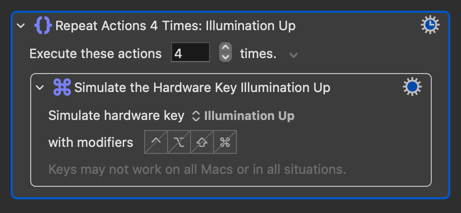
I was difficult for me to find answers about this setting because I kept searching for "keyboard brightness" and "keyboard backlight" when the key term turns out to be "keyboard illumination".
1 Like