I’d like to request an option for the Prompt for User Input window to appear near the mouse cursor, similar to the existing “Place palette under mouse” feature for palettes. This would make prompts easier and faster to use, especially when working away from the center of the screen.
1 Like
This feature is already added through the Set Next Engine Window Position action. In its calculation fields you can use the MOUSEX() and MOUSEY() functions to specify the current mouse x- and y-coordinates for the position
Promp for user input under the mouse .kmmacros (v11.0.4, 16 KB)

5 Likes
Very nice solution. And just realised you can add in a + or - offset to get a certain part of the prompt exactly under the mouse (for example, the Enter button).

2 Likes
Thanks a lot, your solution worked perfectly and was really helpful!
1 Like
That's really great. I just wish there was a way to save another click and automatically open a menu with a mouse click, so that a few keystrokes on the arrow keys would be enough to select an entry.
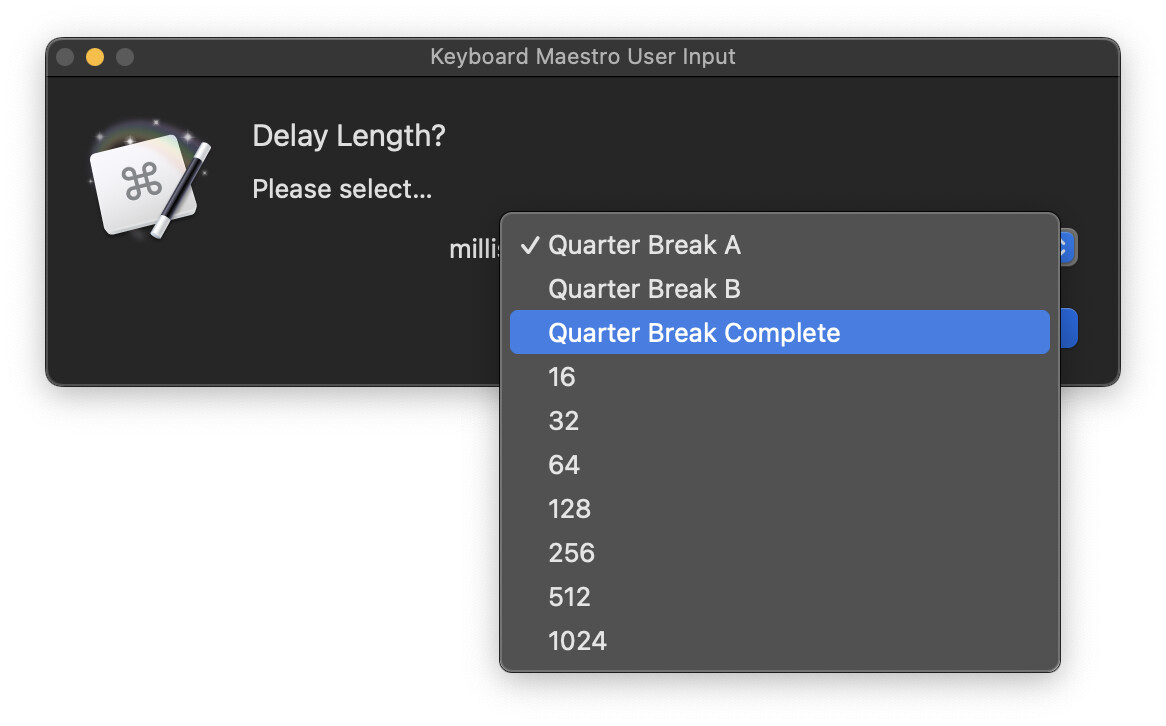
At least I haven’t found a way to make it work.
If you have the ‘Full keyboard Access’ setting enabled on your mac, the first menu will be highlighted and you can arrow through the options in a Prompt window.
2 Likes
What @Evan_Mangiamele proposes above, or have an Execute an AppleScript action, asynchronously call the following AppleScrip, right before the Prompt action:
delay 0.2
tell application "System Events"
	tell process "Keyboard Maestro Engine"
		set frontmost to true
		set focused of pop up button 1 of window "Keyboard Maestro User Input" to true
	end tell
	key code 125
end tell
This also opens the menu, but if you were to want it only to set focus to the menu, you can simply delete the key code 125 line (that simulates a key press of the down arrow).
For more complex prompts, there will probably be more buttons, so you might have to change the button 1 to another number if the menu you're interested in is not the topmost.
ㅤ
Macro example:
Defaultly open drop-down menu of Prompt for User Input (with delay).kmmacros (v11.0.4, 17 KB)
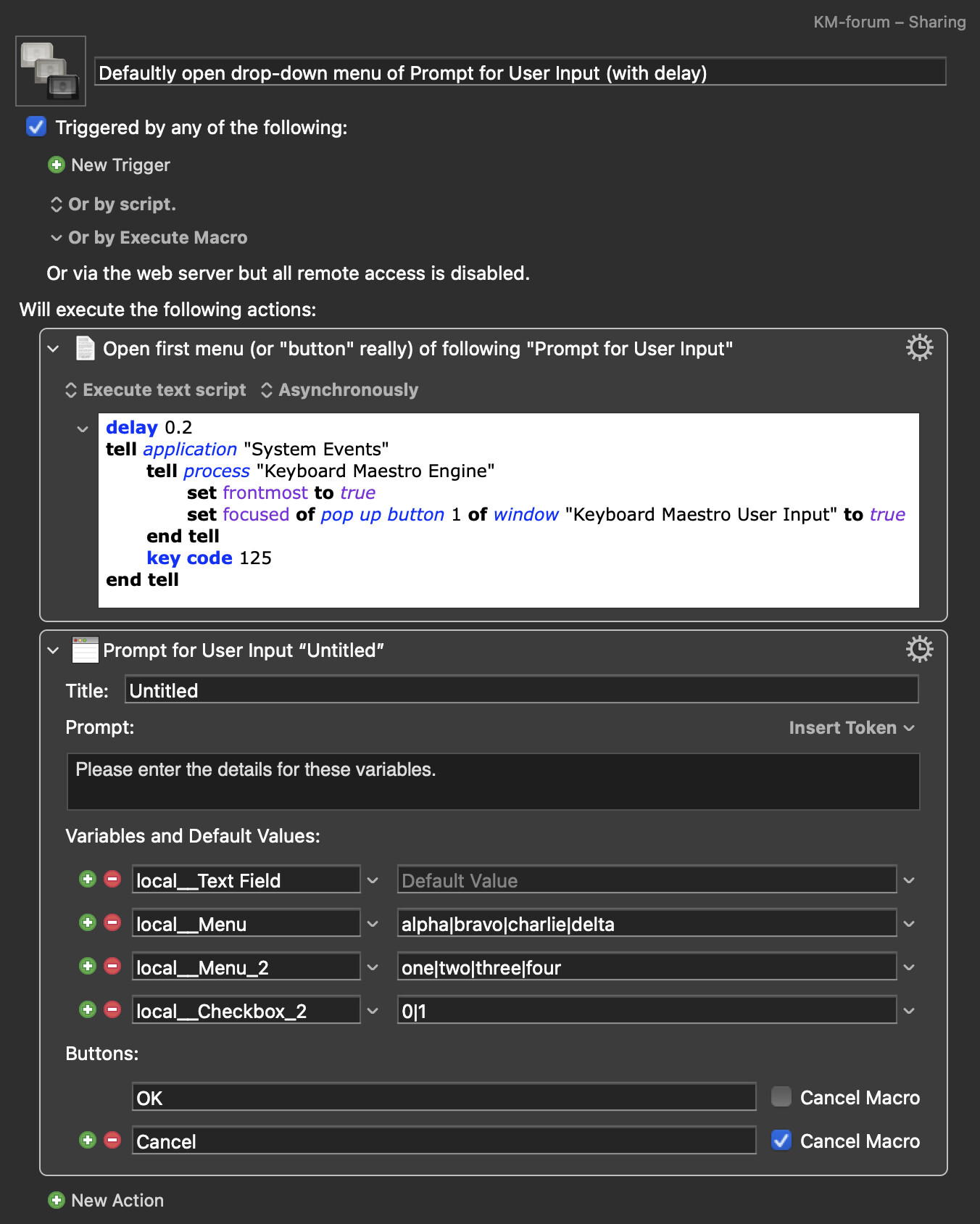
Edit: Updated script with small delay
1 Like
Thank you both so much @Evan_Mangiamele & @Alexander for your help.
I tried changing the system settings but these have other consequences that I’m not used to.
So I tried the Apple Script but this results in the following error:
“2026-01-25 19:16:55 Execute an AppleScript failed with script error: text-script:99:177: execution error: “System Events” received an error: “window 'Keyboard Maestro User Input' of process 'Keyboard Maestro Engine'” cannot be set to “true”. (-10006). Macro “1b | Test Macro” cancelled (while executing Execute AppleScript).” 
I suspect it will work if you add a line with a small delay at the top of the script: delay 0.2
Full script with delay
delay 0.2
tell application "System Events"
	tell process "Keyboard Maestro Engine"
		set frontmost to true
		set focused of pop up button 1 of window "Keyboard Maestro User Input" to true
	end tell
	key code 125
end tell
I tested the setup on my system and it worked, even with a 0.1s pause in-between the Execute an AppleScript action and the Prompt for User Input action. Therefore, I thought it safe to leave the delay out. But the delay makes sense, and I've also updated my post above with this.
Edit: Did you try, my example macro? If that runs without an error, but the script does not work with your prompt, you might have to experiment to find the correct numbered "pop up button" (set to pop up button 1 in my posted script) to set focus to
1 Like
Sorry, i noted the wrong preference. Full Keyboard Navigation does enable this but has other annoying quirks. There’s another preference called just “Keyboard Navigation” that lets you just tab between UI controls. Without the other unnecessary behavior.
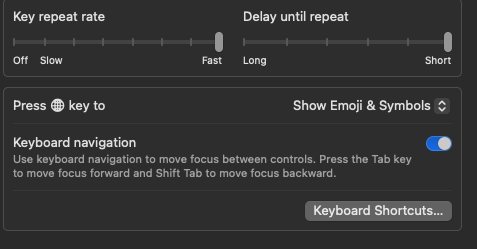
1 Like
Thanks a lot again @Alexander.
I have to apologise that I overlooked the script setting “Asynchronously” which led to the error.
Today I downloaded your macro and it worked fine so I compared your and my settings which brought my attention to my mistake.
Works great now in my own macros! This is something I’ve been looking for quite some time now. Again thank you so much for your help! Much appreciated. 
1 Like
Thanks again @Evan_Mangiamele. I will take a look at these settings.
It will use the script for these specific macros but I think I might like the changed system setting even in other situations. 
1 Like
Additionally, I’d like to move the default Window → Icon Chooser(⌘+3) window to the current mouse cursor position when it opens. Is there a simple way to do this with Keyboard Maestro and/or AppleScript? If possible, could you provide a concrete example macro or script?
That window is a floating window of the Keyboard Maestro Editor. Though not targetable through the Move a Window action (correct me if I am wrong), this window can be targeted, as a named window of the process "Keyboard Maestro", through AppleScript. So what you ask for could be achieved with something like this:
Place Icon Chooser Window Under Mouse Pointer [Swallows original Hot Key].kmmacros (v11.0.4, 3.8 KB)
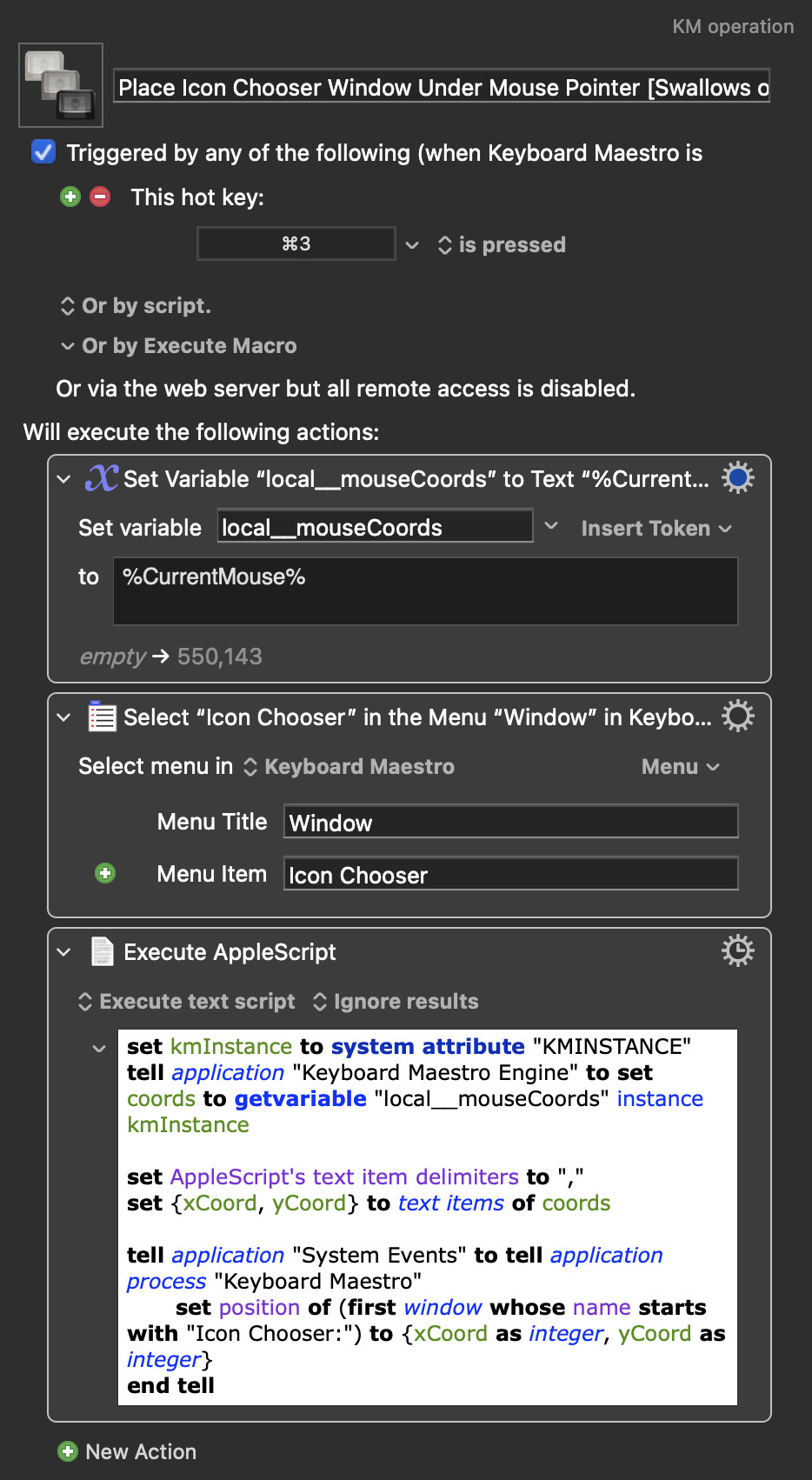
This macro swallows the ⌘3 Hot Key, so it is important to have this macro in a macro group only targeting the Keyboard Maestro application (so as not to swallow this hot key from other applications).
Edit: Changed AS to target first window whose name starts with "Icon Chooser:"
2 Likes
Thank you so much for sharing this macro.
At first, I downloaded it and tried to run it, but it didn’t work for me. I’m using Keyboard Maestro version 11.0.4.
In the “Execute AppleScript” action, the window name was set to "Icon Chooser: Character". However, I had previously used "Applications" there, so the window was named "Icon Chooser: Applications" and the script couldn’t find it.
To make it work with any Icon Chooser window, I changed the script so it looks for any window whose name starts with "Icon Chooser:", like this:
set kmInstance to system attribute "KMINSTANCE"
tell application "Keyboard Maestro Engine" to set coords to getvariable "local__mouseCoords" instance kmInstance

set AppleScript's text item delimiters to ","
set {xCoord, yCoord} to text items of coords
set xCoord to xCoord as integer
set yCoord to yCoord as integer

tell application "System Events" to tell application process "Keyboard Maestro"
	set iconChooserWindows to {}
	repeat with w in windows
		set wName to name of w
		if wName starts with "Icon Chooser:" then
			set end of iconChooserWindows to w
		end if
	end repeat

	repeat with w in iconChooserWindows
		set position of w to {xCoord, yCoord}
	end repeat
end tell
Now the macro works perfectly. Thank you again for your helpful example.
1 Like
This change makes allot of sense! Good that you got it working
Edit: Changed the AppleScript in the uploaded macro above to target first window whose name starts with "Icon Chooser:", as you proposed
I wrote a shortcode and AppleScript based on your macro, replacing the app and window title with the Shortcuts app and the title of its “Ask for Input” window, but it didn’t work. I’d like to know if there’s a way to make this approach work with Shortcuts, or if the “Ask for Input” dialog simply can’t be moved to the mouse cursor position using Keyboard Maestro and/or AppleScript.
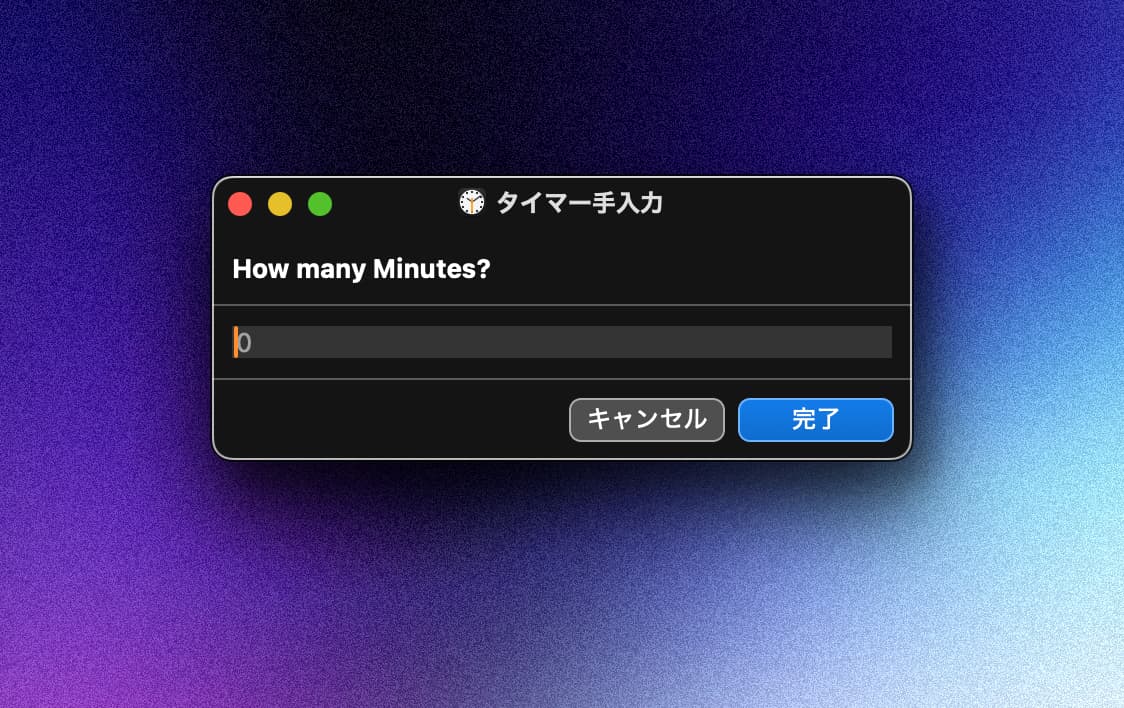
Try targeting the ShortcutsViewService process, and note that the window name has a path following what we see as the name so you'll need to continue using the starts with construct in @Alexander's script.
tell application "System Events" to tell process "ShortcutsViewService"
	name of window 1
end tell

--> "KM Test  —  /Users/username/Library/Containers/com.apple.WorkflowKit.ShortcutsViewService/Data/~"
On my machine, running:
tell application "System Events" to tell process "ShortcutsViewService"
	name of window 1
end tell
returns:
タイマー手入力 — ~/Library/Containers/com.apple.WorkflowKit.ShortcutsViewService/Data/~
So I confirmed that the window title has the same structure (the visible name followed by the path), and based on that I used the starts with approach in the AppleScript I mentioned earlier, targeting windows whose names start with "タイマー手入力".
However, when I actually try to move that window under the mouse cursor from Keyboard Maestro, the behavior is inconsistent.
I’m doing the following:
- I store the current mouse position in a KM variable (for example,
local__mouseCoordswith%CurrentMouse%) just before running the AppleScript. - In the AppleScript, I read that variable, split it into
xCoordandyCoord, and then searchSystem Events→process "ShortcutsViewService"for a window whose name starts with"タイマー手入力". - When I find it, I set the window’s position to
{xCoord, yCoord}(or with a small offset).
Sometimes the window moves, but it doesn’t consistently land under the mouse. Even with the same logic, if I move the cursor before the script runs, the window jumps to a different place rather than tracking the current mouse position as expected. It doesn’t look like a simple timing issue, because I’m capturing %CurrentMouse% right before calling the AppleScript and I’ve experimented with different pause timings.
So at this point:
- Targeting
ShortcutsViewServiceworks. - The window title pattern is as expected, and
starts with "タイマー手入力"matches correctly. - But using those mouse coordinates with
set position of won the Shortcuts “Ask for Input” window gives offset or inconsistent results.
I’m wondering if there’s something specific about ShortcutsViewService windows (their coordinate system, how they’re hosted, or how position is applied) that could explain this, or if there’s a more reliable pattern you’d recommend for positioning this particular dialog under the mouse.
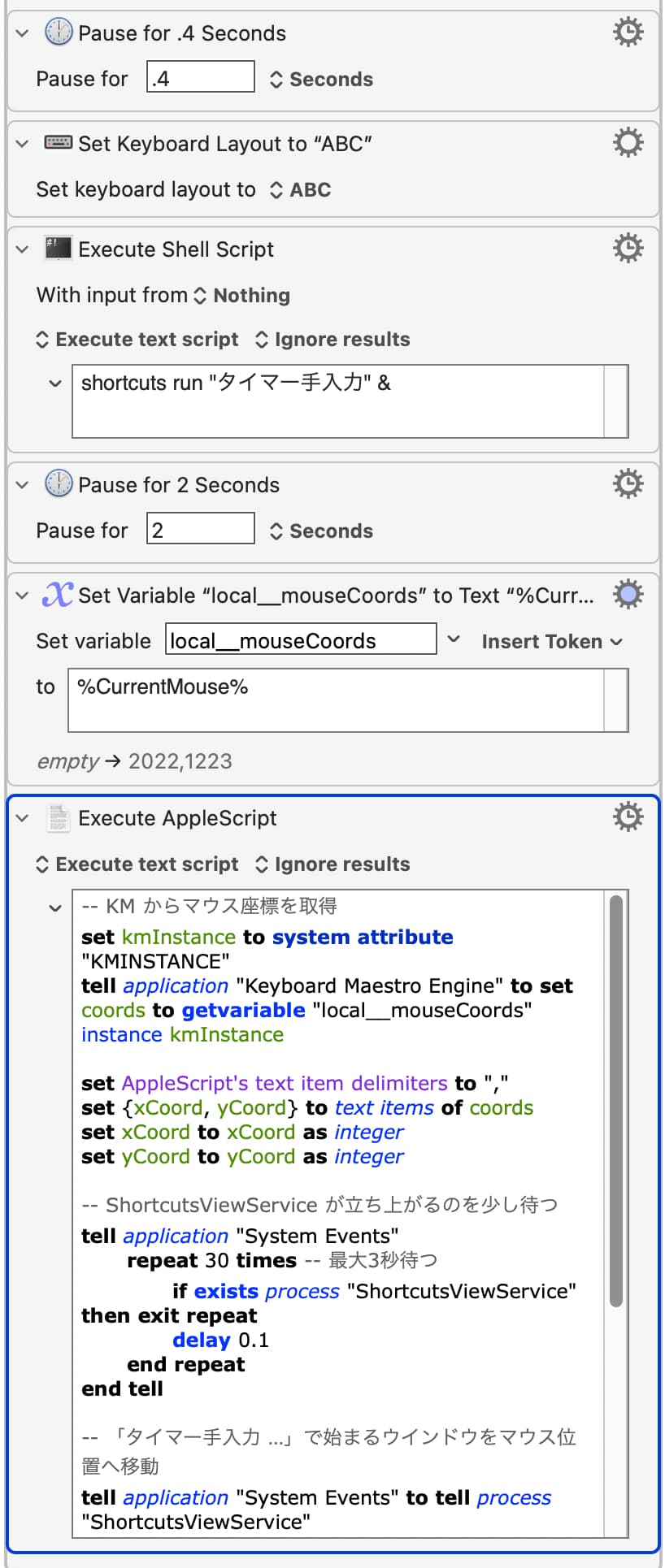
-- KM からマウス座標を取得
set kmInstance to system attribute "KMINSTANCE"
tell application "Keyboard Maestro Engine" to set coords to getvariable "local__mouseCoords" instance kmInstance

set AppleScript's text item delimiters to ","
set {xCoord, yCoord} to text items of coords
set xCoord to xCoord as integer
set yCoord to yCoord as integer

-- ShortcutsViewService が立ち上がるのを少し待つ
tell application "System Events"
	repeat 30 times -- 最大3秒待つ
		if exists process "ShortcutsViewService" then exit repeat
		delay 0.1
	end repeat
end tell

-- 「タイマー手入力 …」で始まるウインドウをマウス位置へ移動
tell application "System Events" to tell process "ShortcutsViewService"
	set targetWindows to {}
	repeat with w in windows
		set wName to name of w
		if wName starts with "タイマー手入力" then
			set end of targetWindows to w
		end if
	end repeat

	repeat with w in targetWindows
		set position of w to {xCoord, yCoord}
	end repeat
end tell
Additionally, I have another, slightly related question.
When I first launch Keyboard Maestro, the Icon Chooser window sometimes takes a while to appear.
In my macro, I’d like to use a “Pause Until” action so that it waits until the Icon Chooser window is actually visible before continuing.
What is the best way to configure “Pause Until” for this?
For example, should I use a condition like “the window whose name starts with Icon Chooser: exists”, and if so, how exactly would you set that up in Keyboard Maestro?