There's nothing obviously wrong with the code -- this, for example, works as expected for me:
set inst to system attribute "KMINSTANCE"
tell application "Keyboard Maestro Engine"
	set mouseCoords to getvariable "Local_mouseCoords" instance inst
end tell

set AppleScript's text item delimiters to ","
set mouseX to text item 1 of mouseCoords as number
set mouseY to text item 2 of mouseCoords as number

tell application "System Events" to tell process "ShortcutsViewService"
	set position of window 1 to {mouseX, mouseY}
end tell
Due you, by any chance, have System Settings... -> Displays set to something other than "Default"? That issue cropped up on the Forum a month or so ago -- if you aren't set to "Default" then the macOS "get" APIs appear to have a different coordinate system to the "set" APIs. My guess is that "get" coords are scaled bet "set" are native.
So if that is the case for you and your scaling remains fixed you should be able to work out a "fiddle factor" to apply to the coordinates to bring the two systems into line.
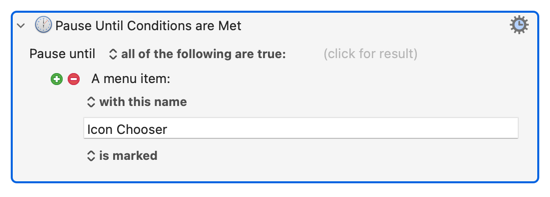
When you have Icon Chooser open the menu item gets a tick mark -- use that!
For a Custom HTML Prompt, what’s the correct way to move its window to the current mouse cursor position? I tried using “Set Next Engine Window Position” and the variable %CurrentMouse%, but I couldn’t get it to work.
Add a few pixels to MOUSEY() if you want to account for the title bar and remember that the edge of your screen is a limit -- the window will spawn as close to your pointer as it can while remaining entirely on screen.