Forgive me for harping on this topic @peternlewis and the rest of the people who have been here for a long time. I know this has been discussed before on this forum.
But I really wish I could put this group at the very top. It bothers me to have it sandwiched between the other macro groups, as if it were just another macro group.
It's a special group (the only special macro group), so why not differentiate it and put it at the top?
What would you think if users could choose between sorting this group alphabetically, as is currently the case, or having it anchored to the top of the list?
A drop-down menu could be added on the "Global Macro Group" page to select one of the two options. Or in the Preferences window.
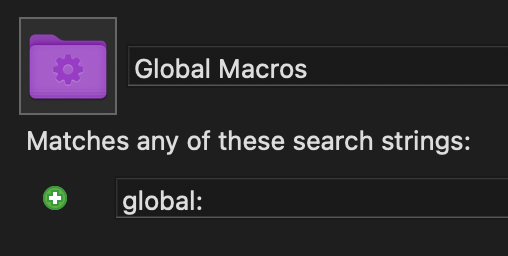
Althought it is not the same, you can create a Smart Macro Group that includes all "Global" Macros by including the search string "global:" or just "gl:" ("Match any macro within any macro group that is globally active")
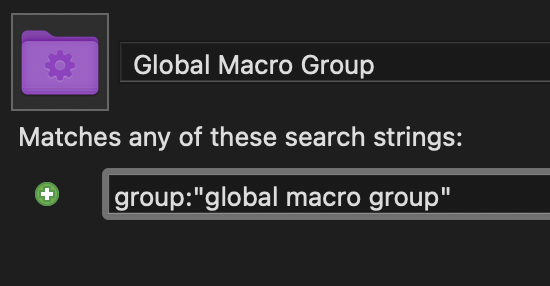
I never noticed this before. As a workaround, you could make a smart folder and name it Global Macro Group (with a space in front) to put it at the very top of the group list.
I'm not sure I understand how the position of "All Macros" is relevant? ⌘F will search the group you're currently in, and ⌘⌥F will search "All Macros" whether it's at the top or not, or am I missing something? Personally, I don't often do much with smart groups either way, but @jordikt did ask for how to put the global group "at the very top", and that's how I would do it if I were solving this for myself.
Thanks for all the ideas you give me. If this request is not implemented, they will be of great help to me.
Unfortunately, none of these solutions will prevent the group from always being mixed alphabetically among the other groups. What bothers me is precisely that, having it sorted alphabetically among the other groups.
Since it cannot be renamed and cannot be deleted, I hope to at least have the option to put it at the top, I think it is an option that many users would use.
To be clear, I FIRST provided my proposed solution to what he requested.
THEN, in another post, I shared my opinion on a related point, which is a valid contribution to the discussion. I offered MY PREFERENCE and REASONING, not a directive.
It wasn't my intention to suggest otherwise, apologies for any misunderstanding: I wasn't challenging your contribution(s); I was just confused how the position of the All Macros smart group might have an effect on searching because to my knowledge there is no effect.
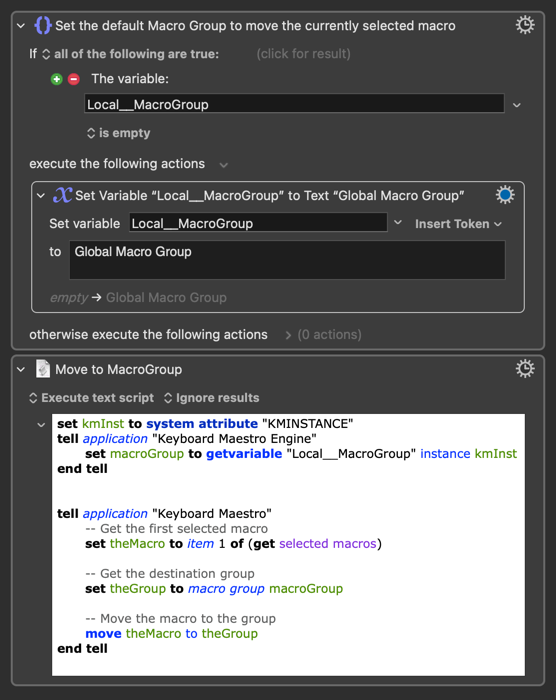
One situation where I find myself wanting the "Global Macro Group" to be "at the top" is when I want to move macros into it. If you feel the same, here's a macro that moves the currently selected macro to the "Global Macro Group" (if you use this as a subroutine, you can easily specify a different group to move the macro to):
But the original global group would still be there, wouldn't it? It would just be empty. If I understand correctly, the OP wants the ability to pin groups such that they only appear once. Such a feature could be useful, though a lifetime of manually organising file systems has conditioned me to using special characters for assigning priority/importance.
Ok, sorry about being wrong twice in one day. I want to punish myself for being wrong by not accessing this site for 24 hours. That should teach me a lesson, not to be wrong again.
Do you know if there are any special characters that would be sorted after the "G" of "Global Macro Group" being transparent and thin/small? If that doesn't exist, which characters are the smallest ones that can be sorted after the "G"?
The smallest character that I know of that will sort below Z is
ٴ
I promise there's a character in there; it's Arabic, but I don't know its name. You can use the code block copy button. It doesn't display in the preview for the forum post, but it does display in the KM editor — and note that because it's Arabic it goes from right-to-left. It's quite fiddly to use, which is why I generally prefer Greek letters to sort to the bottom and most often use Ω or Ξ depending on the context.
In trying to find the name of the above character, I found another
ۦ
Again, it changes the text direction and is fiddly to use, but in KM it's at the bottom of the line, whereas the first character floats at the top.
If you don't like any of these options, you can use the macOS Character Viewer and experiment with characters that better appeal to you. And if you start with the Latin characters, those are handily sorted in alphabetical order already, so you can see everything that will come after G and take your pick.
I've been pretty happy using spaces or Greek characters to sort groups I want to get at regularly to the top and bottom of the list. "Home" or "End" keys get me to the neighborhood and I can view all of the relevant groups without further scrolling.
The Global group is of course the exception. But the notion of creating a smart group proxy had not occurred to me before. Brilliant. Thanks!
I think the possibility of "pinning" groups (or something that would make them "top of the list" withought having to rename them) would be a nice idea...

 , I would like to modify the feature request.