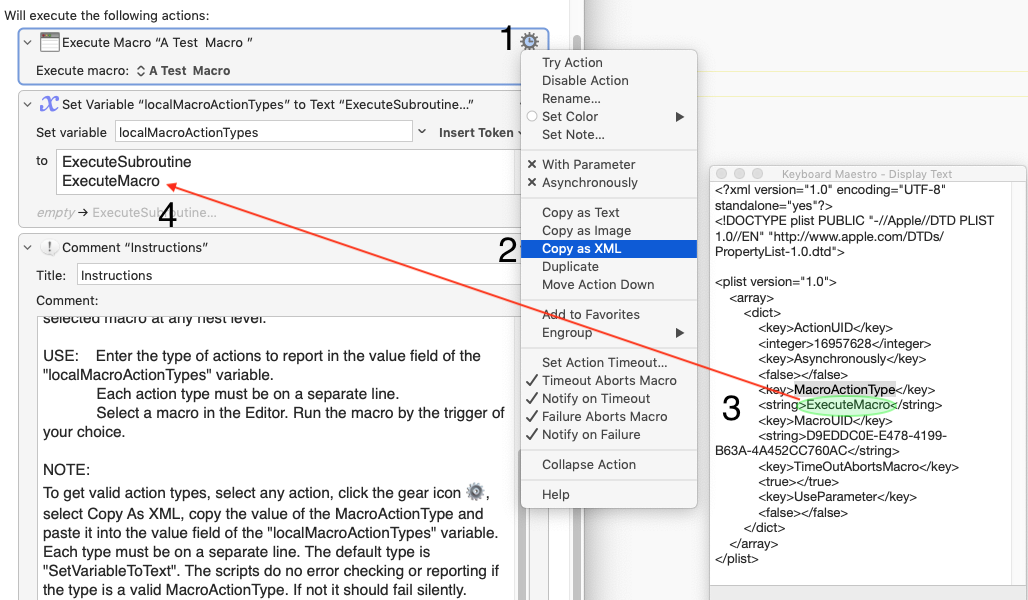
It is nice to have a second option in extending scripting actions to lists of nested actions.
It returns a nice, complete list of resolved action objects at any level, free of verbose, arcane AppleScriptObjC.
In this case, filtering on type of action is done on all actions manually with regex, after the actions are output--unless the handler is modified for each type of filter.
AppleScript
https://github.com/kevin-funderburg/AppleScripts/blob/master/Keyboard-Maestro/Recursively-Get-Every-Action.applescript
https://forum.keyboardmaestro.com/t/feature-request-to-include-the-macro-group-of-the-target-macro-besides-its-name-in-the-execute-macro-macro/10885/15

global allActions
set allActions to {}
tell application "Keyboard Maestro"
	set m to first macro whose selected is true
	set end of allActions to my getAllActions(m's actions)
end tell

tell application "Keyboard Maestro"
	set theMacroID to item 1 of (get selectedMacros)
	set macroGroup to macro group of macro id theMacroID
	repeat with eachAction in allActions
		set theXML to the xml of eachAction
		if theXML contains ">ExecuteMacro<" then
			tell application "Keyboard Maestro Engine"
				set subUUID to search theXML for "(?s).*([:xdigit:]{8}(-[:xdigit:]{4}){3}-[:xdigit:]{12}).*" replace "$1" with regex
			end tell
			if macro group of macro id subUUID = macroGroup then
				set color of eachAction to "Green"
			else
				set color of eachAction to "Red"
			end if
		end if
	end repeat
end tell
on getAllActions(actionList)
	local actionList
	tell application "Keyboard Maestro"
		get class of actionList
		if (class of actionList = list or ¬
			class of actionList = action list) and ¬
			(count of items of actionList) > 0 then

			repeat with act in actionList
				my getAllActions(act)
			end repeat

		else if class of actionList = case entry then

			if (count of actionList's actions) > 0 then
				my getAllActions(actionList's actions)
			end if

		else if class of actionList = action then

			--set end of allActions to actionList
			set end of allActions to a reference to contents of actionList

			-- groups
			try
				if (count of actionList's actions) > 0 then
					my getAllActions(actionList's actions)
				end if
			end try
			-- switch statements
			try
				if (count of actionList's case entries) > 0 then
					my getAllActions(actionList's case entries)
				end if
			end try
			--if then actions
			try
				if actionList's thenactions ≠ missing value then
					my getAllActions(actionList's thenactions's actions)
				end if
			end try
			-- if else actions
			try
				if actionList's elseactions ≠ missing value then
					my getAllActions(actionList's elseactions's actions)
				end if
			end try

		end if

	end tell
end getAllActions
Filtering
I would note that XPath input offers structurally filtered action nodes before paths are calculated.
Action paths are already only ExecuteMacro actions, so once resolved, the above code can be used without the: if theXML contains ">ExecuteMacro<". The in/out group filter could also be perform upstream.
Using regex to filter on a single xml key or even multiple keys is doable: MacroActionType, option values:MacroUID, Path etcetera.
Filtering on combinations of keys, values and values of properties gets trickier.
FWIW, the handler using xpath is about 2x as fast on exceptionally large macros or groups of macros.
Beyond filtering
The recursion handler requires an AppleScript macro object.
Input for NSXMLDocument is xml string.
It can from a macro object or clipboard or stored plist.
(Yes, the handler will process action nodes from xml loaded directly from the Keyboard Maestro Macros.plist)
This means getting filtered actions from multiple macros's xml.
Beyond read-only:
Structured xml editing is also a plus for anyone trying to edit action options programmatically.
Paths don't have to come as string; they as a key on an edited action's xml, which is easily removed when no longer needed.
FWIW, NSXMLDocument will ensure proper encoding for xml.
I didn't expect too much interest in this handler and may be the only one who ends up using it.
I wouldn't be the first time--and probably not the last. 
 )
)

 , select Copy As XML, copy the value of the "MacroActionType" key and paste it into the value field of the "localMacroActionTypes" variable. Each type must be on a separate line. The default type is "SetVariableToText". The macro will do nothing if the specified MacroActionType is invalid.