Log - “Last message repeated 3 times
2025-11-12 12:40:30 Execute macro “Rename Date Files” from trigger Editor
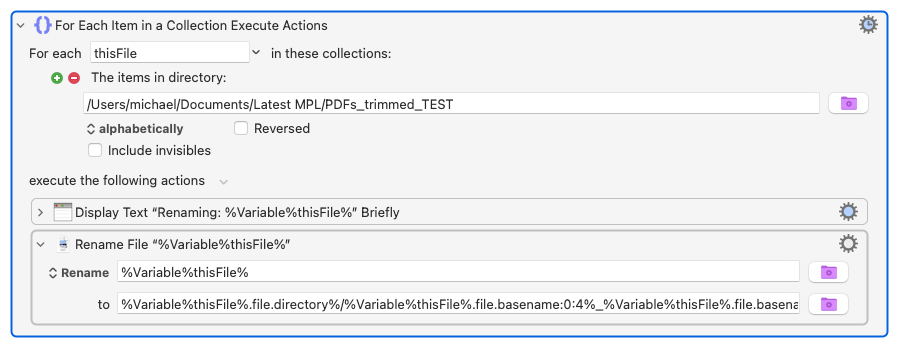
2025-11-12 12:40:30 Action 100084763 failed: File Rename action failed because destination “%Variable%thisFile%.file.basename:0:4%%Variable%thisFile%.file.basename:4:2%%Variable%thisFile%.file.basename:6:2%.%Variable%thisFile%.file.extension%” is not just a file name (perhaps use Move or Rename option?)”
Because you don't have a valid "destination" for your rename operation.
The "Rename" option only renames the file or folder -- it doesn't move it -- and the "to" field must be a valid file name. You have a / in there so you're providing a path rather than a name.
The rest of it looks a bit of a mess, and I suspect some AI nonsense. Let's break it down, assuming the first item in the directory is "File1.txt"...
thisFile contains the full path of the item: /User/micheal/Documents/Latest MPL/PDFs_trimmed_TEST/File1.txt
Cheers! Will check this out. AI gave up and resorted to getting KM to run a terminal script which is all well and good but doesn’t help me learn. Though if requested, just one step at a time AI can be helpful at walking through slowly to get a much better understanding of creating a macro for non techie. But thanks as this will be helpful.
So went back to AI. Please explain error.
This was my (AI) error - I had the filter syntax wrong from the start. The forum person spotted this immediately! So brownie points to KM forum.
Run, don't walk, to the Wiki page for the "Split Path" action -- that's what the AI was trying to do with its .file.basename:0:4 nonsense.
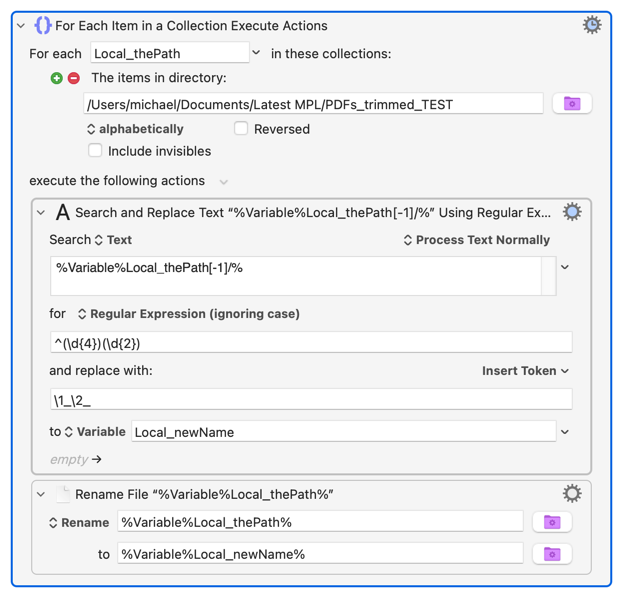
The :0:4 is probably the substring of the name, starting at index 0 and 4 characters long. I'll take a punt -- are your file names dates in yyyyMMdd format and you want to make them yyyy_MM_dd? If so, then the simplest way is something like:
It's a bit of a cheat, but instead of the "Split Path" action this uses pseudo array notation to get the complete file name -- everything in the file path after the last / character: %Variable%Local_thePath[-1]/%. Then a quick search and replace regex on the name to add the _s before using the new name in the "Rename" action.