For Each loop only writing one line to file instead of all matching lines


The question: Why does our For Each loop only write one line to CleanTOC.txt instead of all matching lines?

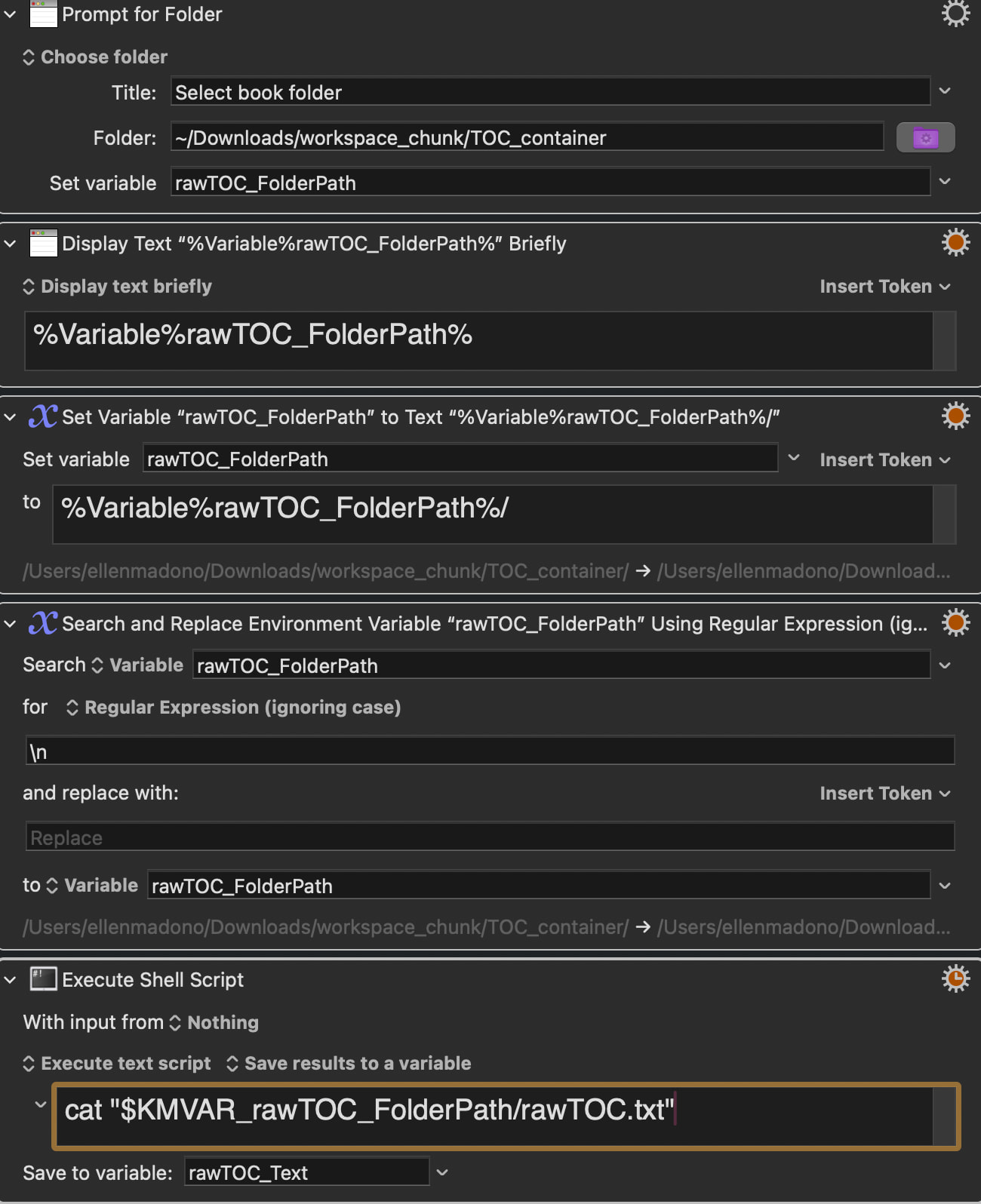
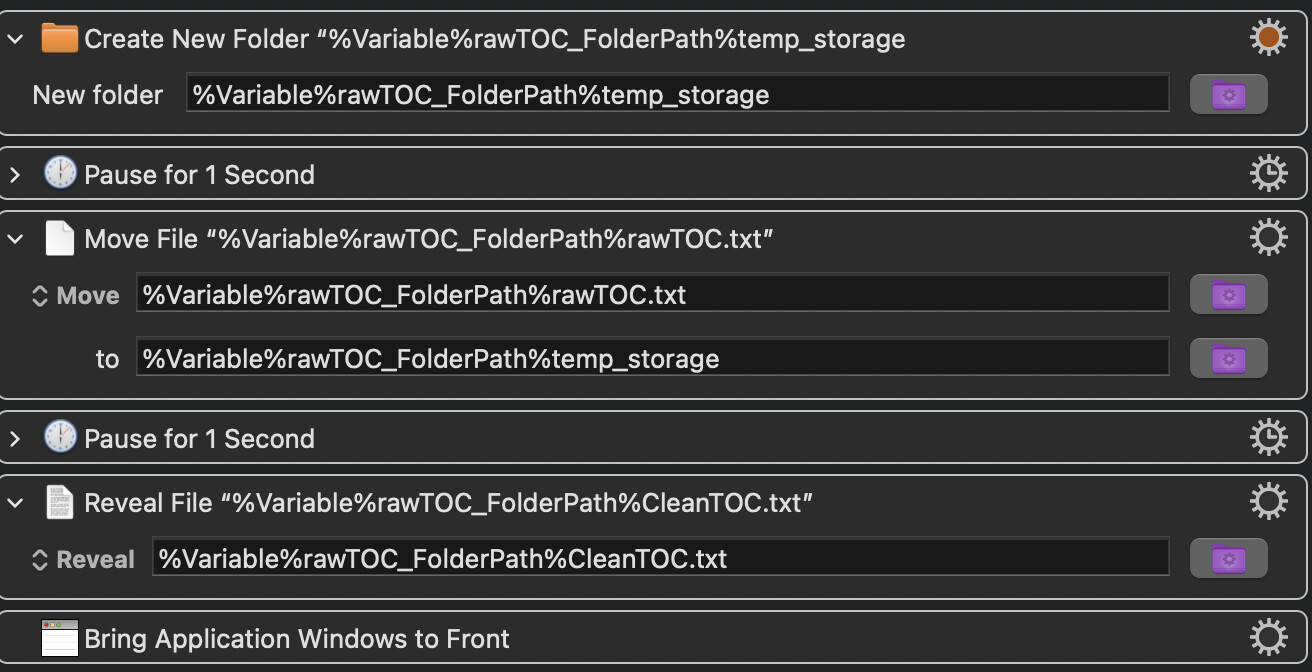
What we are trying to do: A macro that reads a marked TOC text file (rawTOC.txt) line by line, extracts lines marked with #title @pagenumber, converts them to wiki format [[title]] ((pagenumber)), and appends each matching line to CleanTOC.txt in the same book folder.

The macro logic:

  1. Prompt for Folder → rawTOC_FolderPath

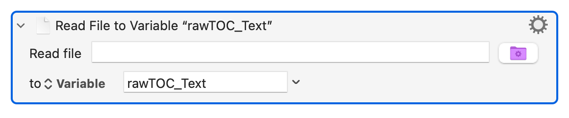
  2. Read rawTOC.txt → rawTOC_Text

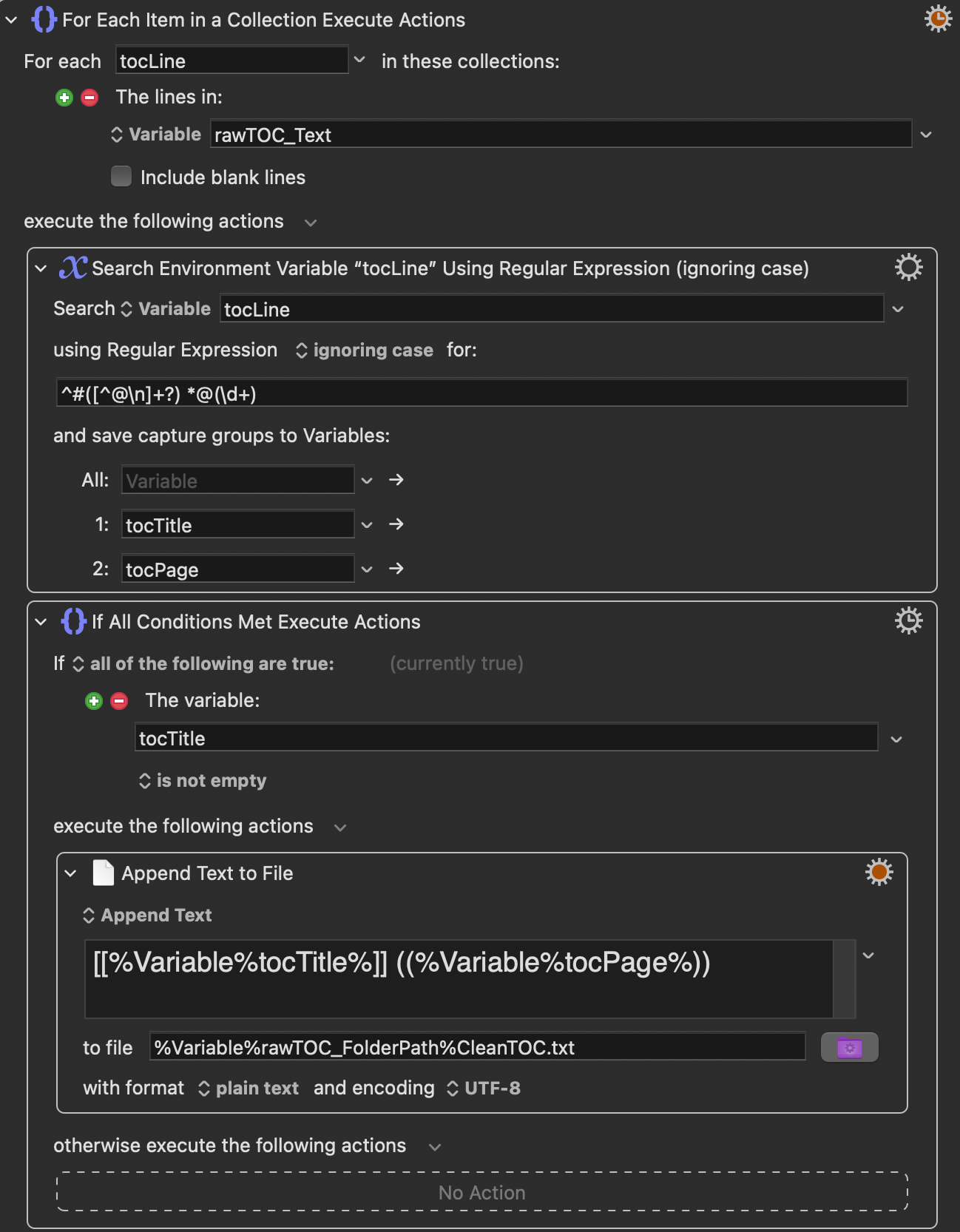
  3. For Each line in rawTOC_TexttocLine

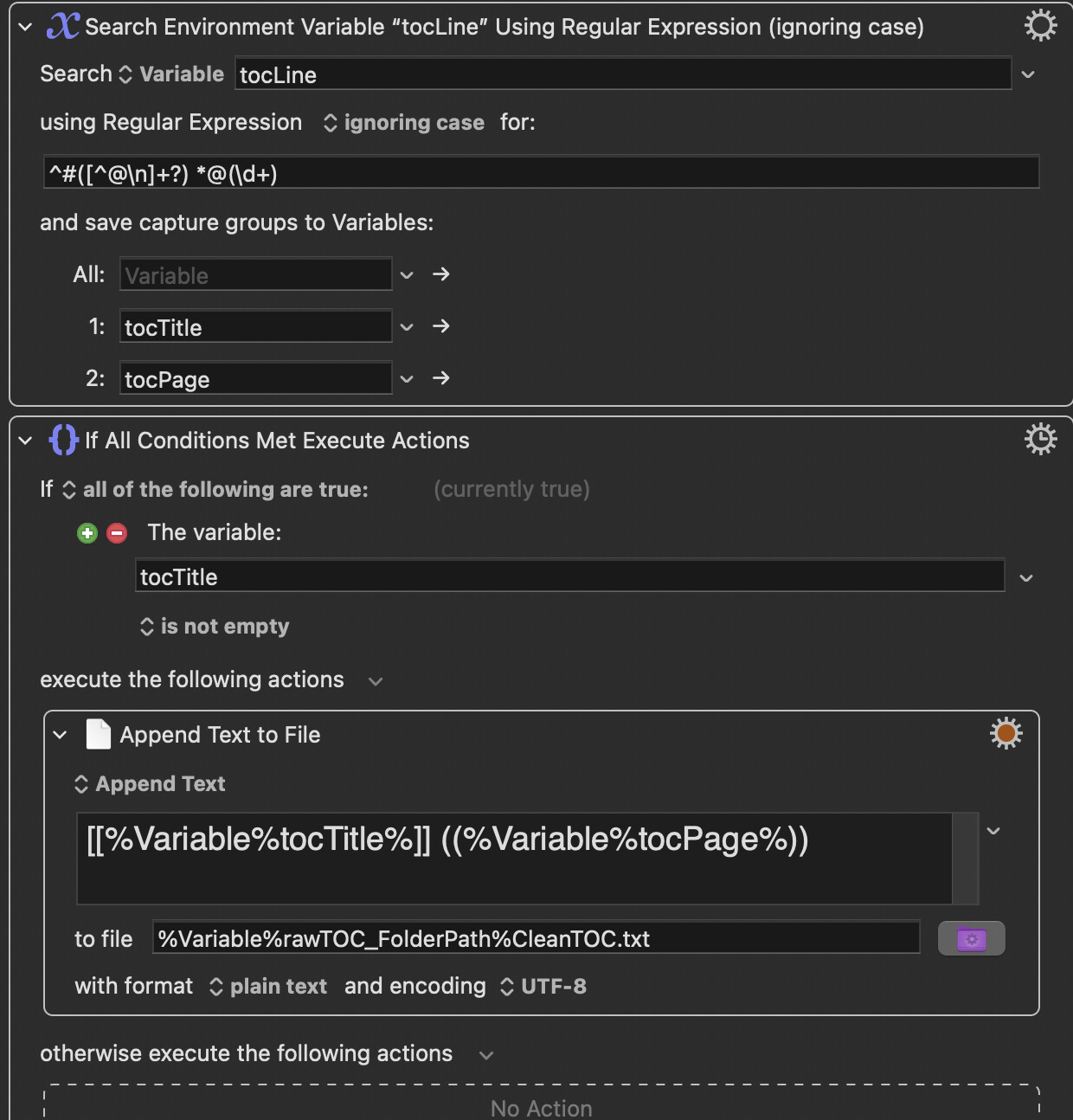
  4. Search tocLine with regex ^#([^@\n]+?) *@(\d+) → captures tocTitle and tocPage

  5. If tocTitle is not empty → Append [[tocTitle]] ((tocPage)) to CleanTOC.txt

The problem: CleanTOC.txt is created in the right folder but contains only one line — the first matching entry — instead of all matching entries from rawTOC.txt.

The question again: Why is the Append Text to File action inside the For Each loop only executing once instead of for every matching line?

Problem action:
01 sanitation of TOC .kmmacros (10.2 KB)

Engine log:

The log suggests that the regex is incorrect

2026-04-04 15:24:29 Action 100976430 failed: Search Regular Expression failed to match ^#([^@\n]+?) *@(\d+)
2026-04-04 15:24:29 Search Regular Expression failed to match ^#([^@\n]+?) *@(\d+). Macro “01a sanitation of TOC copy” cancelled (while executing Search Environment Variable “tocLine” Using Regular Expression (ignoring case)).
2026-04-04 15:26:28 Execute macro “01a sanitation of TOC copy” from trigger The Global Macro Palette
2026-04-04 15:26:32 Action 100976421 failed: Read File action failed because source is not a full path (null)
2026-04-04 15:26:32 Read File action failed because source is not a full path (null) in macro “01a sanitation of TOC copy” (while executing Read File to Variable “rawTOC_Text”).
2026-04-04 15:26:33 Action 100976430 failed: Search Regular Expression failed to match ^#([^@\n]+?) *@(\d+)
2026-04-04 15:26:33 Search Regular Expression failed to match ^#([^@\n]+?) *@(\d+). Macro “01a sanitation of TOC copy” cancelled (while executing Search Environment Variable “tocLine” Using Regular Expression (ignoring case)).

My suggestion is to write the value tocLine to the logs before the regex.

Then also write the values tocTitle and tocPage to the logs after the regex.

In there you should see that one tocLine is logged but the tocTitle and tocPage are not.

Next step is to focus on the failing line and test your regex against it separately.

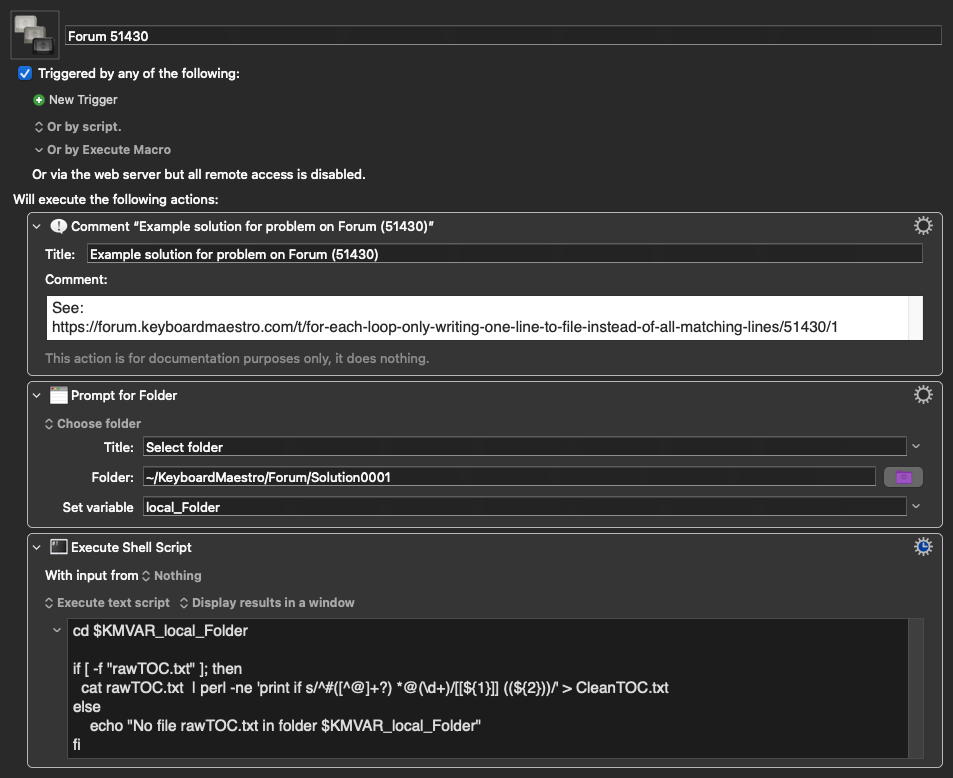
You are probably not interested in other way solution, because I see that you are focused on implementation in pure KM Macro, but here is macro solving your problem using perl language (which is standard part of MacOS).

The macro get folder name, go there, check if file rawTOC.txt exists and convert them to CleanTOC.txt (in the same folder). If file not exists, display message in the window.

Test file in my case:


#Title 001 ABC @10
#Title XYZ   @1
##Title Winni The Pooh    @18
# #Title #Winni The Pooh    @18

Result file:

[[Title 001 ABC]] ((10))
[[Title XYZ]] ((1))
[[#Title Winni The Pooh]] ((18))
[[ #Title #Winni The Pooh]] ((18))

Because Perl process file line by line, I removed \n (new line character) from regular expression.


Forum 51430 Macro (v11.0.4)

Forum 51430.kmmacros (3.9 KB)

Because you've set the "Search" Action to "Abort on failure":

...so the first time the regex fails to match your macro will exit.

There's an error in either your logic or your regex because:

...but tocTitle can never be empty -- if it is then the ^#([^@\n]+?) part of your regex won't match the line since the title "field" must have at least one (+?) character in it.

If you want help with regex (or any text processing) you must provide a representative sample of the input text. You can't assume that we've remembered your previous posts, and we can't assume that the text you are processing now is the same as you were processing then.

You're also getting errors because this Action:

...doesn't have a path defined.

Problems with sanitizing text to be used later to chunk books.

Title: Two problems with a For Each loop macro that cleans a text file

What we are trying to do: We have a text file called rawTOC.txt that looks like this:

#ABSINTHIUM @6
Some random text
#ALCOHOLUS @14
More random text
#ARANEA IXOBOLA @25

We want a macro that reads this file line by line, finds only the lines that start with # and have @pagenumber, converts them to [[ABSINTHIUM]] ((6)) format, and saves them to a new file called CleanTOC.txt in the same folder.


Problem 1 — Prompt for Folder always returns the wrong folder When the macro runs, we navigate into a subfolder called Clinical Guide Klein and click OK. But the variable rawTOC_FolderPath always contains the parent folder TOC_containerinstead of Clinical Guide Klein.

Problem 2 — For Each loop only writes one line The Append Text to File action inside the For Each loop only writes the first matching line to CleanTOC.txt instead of all matching lines.

Our text results look like this:

/Users/ellen/Downloads/workspace_chunk/TOC_container/Clinical Guide Klein/[[ABSINTHIUM]] ((6))

This particular book is named Clinical Guide, but the macro is to be used with to chunk many different books. So the macro avoids the name of the specific book file.

The computer files look like this:

image

01 sanitation of TOC 2.kmmacros (10.0 KB)

The shell script was used because pasting into read text disappeared as soon as I took the cursor out of the action box. I have been having this problem in other cases as well.

Not here.

But this is bad UX design anyway -- better to have the user select the TOC file to process because "Select the file to process" requires less thought from them than "Select the folder that contains the file to process". It also means less work in the macro for you :wink:

This was explained above. And the "For Each" approach is probably the wrong method to use anyway.

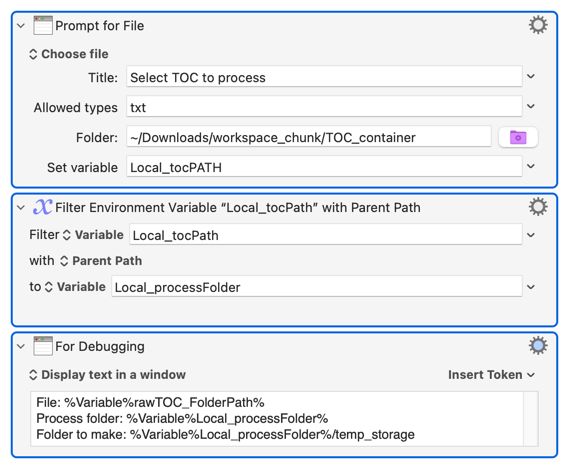
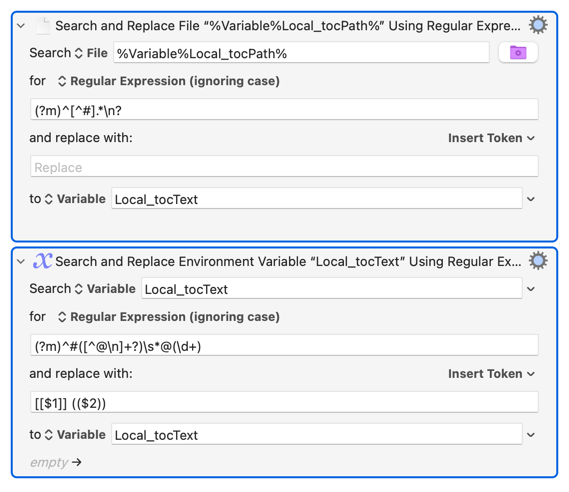
If you can guarantee that the lines you don't want never start with # then the quickest way to extract your text is to:

  1. Delete the lines that don't start with #
  2. Process the lines that remain

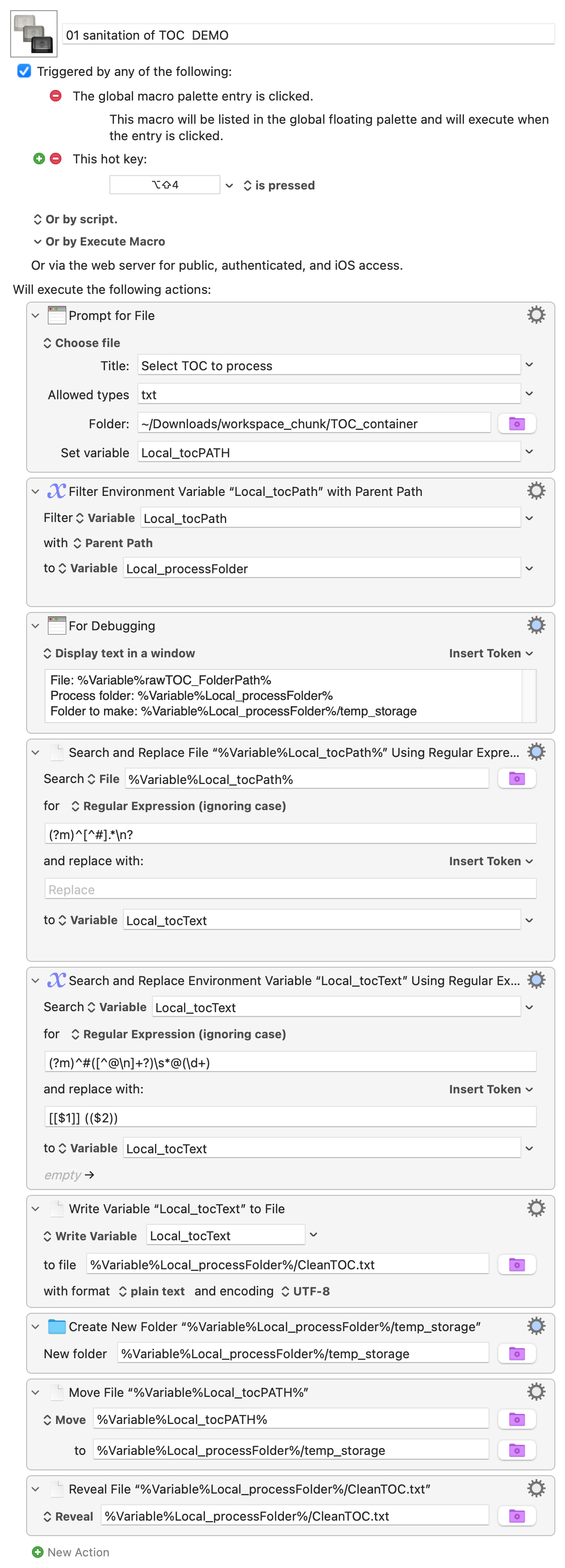
Putting those together and adding the other Actions you need for the workflow gives:

01 sanitation of TOC DEMO.kmmacros (6.5 KB)

A simpler macro than a "For Each" requires, and a lot faster to execute.

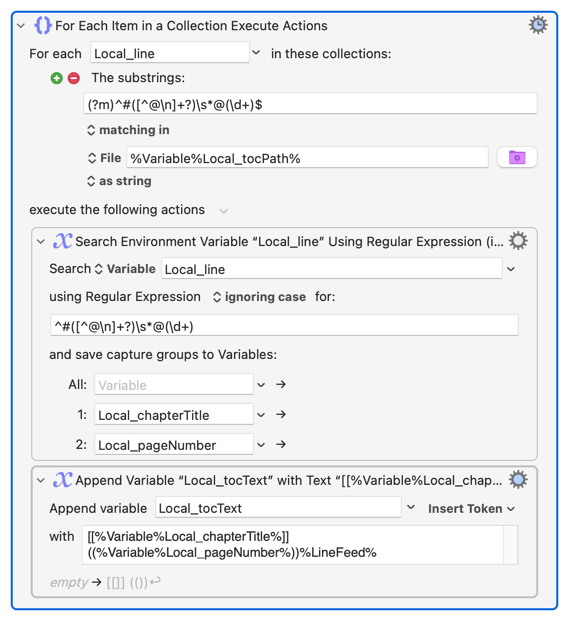
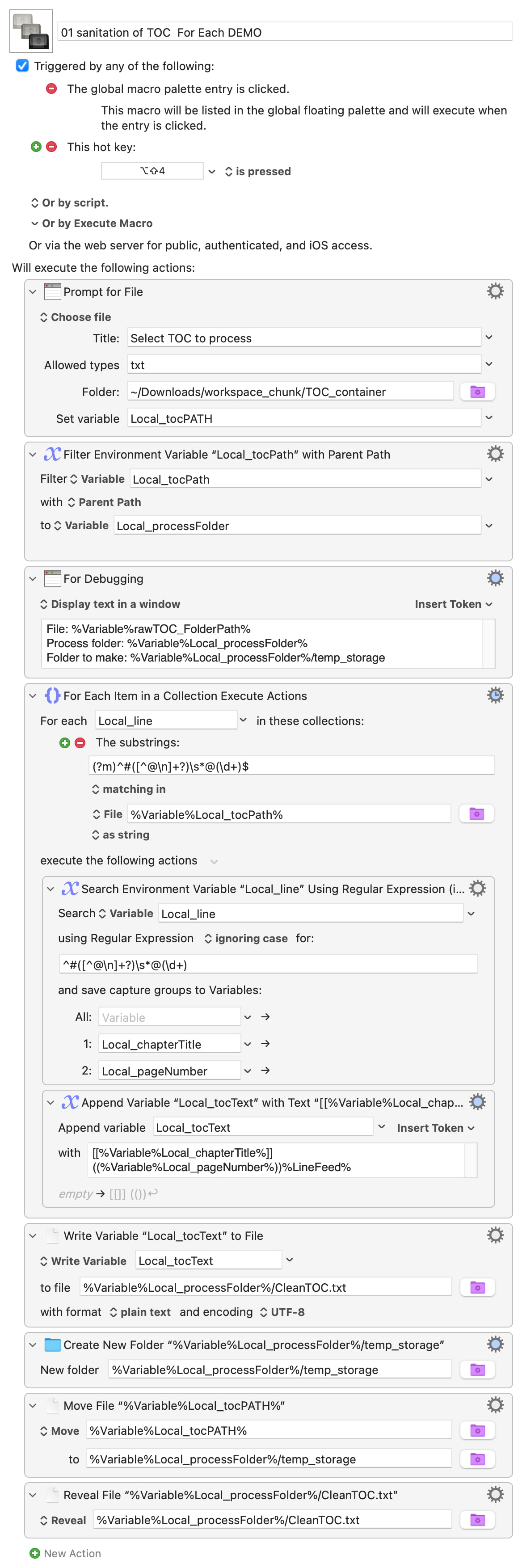
If you can't guarantee the your unwanted lines don't start with # then the best approach is probably to "For Each" through a Collection of strings that match your #Chapter Name @pageNumber format -- that's what "For Each: substrings" is for:

The rest of the macro is similar to before:

01 sanitation of TOC For Each DEMO.kmmacros (7.1 KB)

Image

There will be other ways to do this -- I look forward to what others suggest! -- but the two above are simple, efficient and, importantly, very maintainable without you having to learn a bunch of weird scripting commands. All you need is the KM Wiki, regex101 or similar, and some logical thought...

1 Like

@Nige_s Thank you for all your help. I did not see the macro that you already built so I struggled trying to find the actions that you used. I tried using all the words in the title of the action that you suggested, but nothing came up. Finally I showed Claude and Claude understood where the action was hidden. With experience I am seeing more patterns in the way the actions are built on the screen.

So, the whole thing worked the way you said it would. I am now telling Claude who is helping me with the chunking macro, so we do not repeate the same mistakes that we made with the sanitization macro. No doubt, we will have more problems. Unfortunately, I do not fully understand the process fully. If I don’t understand, we will almost certainly get lost. I will quiz Claude and come back for more help understanding if Claude cannot explain the process to me.

Part of the problem is emotional. (I used to feel this way learning long division in grade school.) I get freaked out before I understand even the process of discussing problems online. So, I let your response sit for a week and came back. After a week, even I get calmer. This is the nature of the beast, so I hope you understand.