I'd like to create an action that does a gesture, triggered by a hotkey.
I see where you can use gestures as triggers and I see suggestions about using gestures as actions using better touch tool - the BTT suggestions are fairly old and am wondering if there is something in KM today that will work.
Extra details on this use case: I have an iPad app running on MacOS - Blink. Blink requires a left gesture to show a trash can to delete a video. Since this is an iPad app running on iOS, there are no alternate ways (keyboard) to delete the video. I'd like to use KM to delete a video. (Note - if I click the video and it plays, a trash can appears at the end. I can click that and delete but it takes 10+ seconds)
Did you try using the “move or click mouse action” in keyboard maestro using the “click and drag left” feature of that action? I suspect that will do what you want.
Thing is, this is a gesture so no click. Manually, I use the track pad - two finger swipe left.
Blink isn't a common app. Safari has a similar gesture feature - left swipe goes to previous page. In safari there is an alt way of doing that. In bing there isn't.
If I (or others) can figure out how to do a left two finger swipe in safari, I think that will also work in Blink
When I record, I get a "Simulate Wheel left 60" but when I play it back - nothing
You're on to something there. This is an iPad app running on MacOS so no keyboard interface however... The left arrow DOES do a left swipe but only on the list item in the middle of the the window. I shrink or expand the window and it switches which list item it swipes - always the row in the middle of the window. Doesn't matter which item is selected. Right swipe resets the row. (Left swipe shifts the row left and shows a trash can. Right swipe resets the row). Modifier keys don't have any affect. Will experiment some more but I think I can work with this. Thanks @Airy !!
More generally - anyone - is there a utility do the swipe that I can trigger with KM (or a key)?
You are welcome. I still have some faith that the KM action which moves/drags the mouse might work, but this sort of approach may require some finagling with the timing.
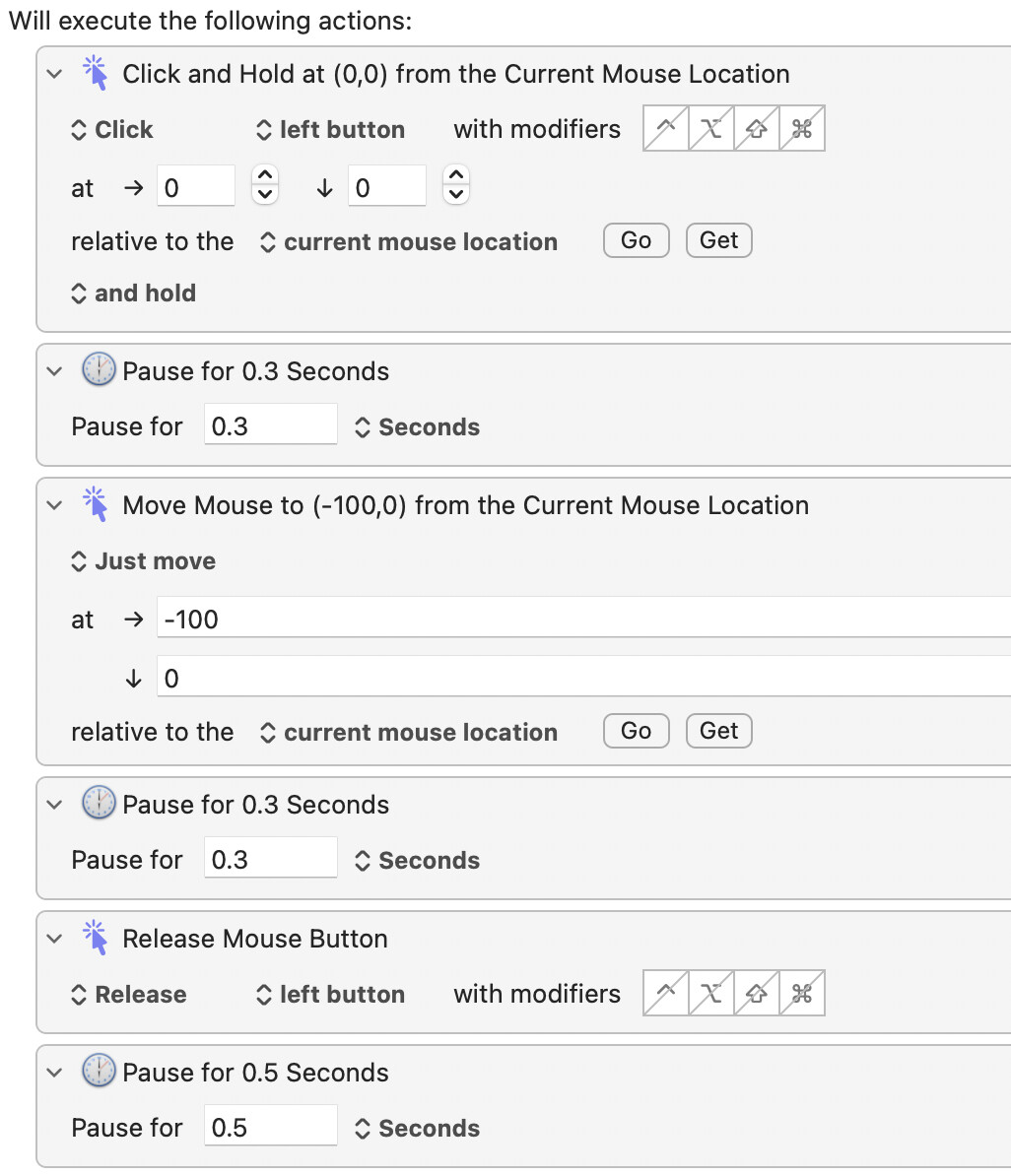
It’s hard to explain, but for example, you may need to click and hold THEN pause THEN drag.
Stepped away from it, come back to it and got it working. @Airy - Your last sentence did it with some pauses. I'll paste a screen shot here for others.
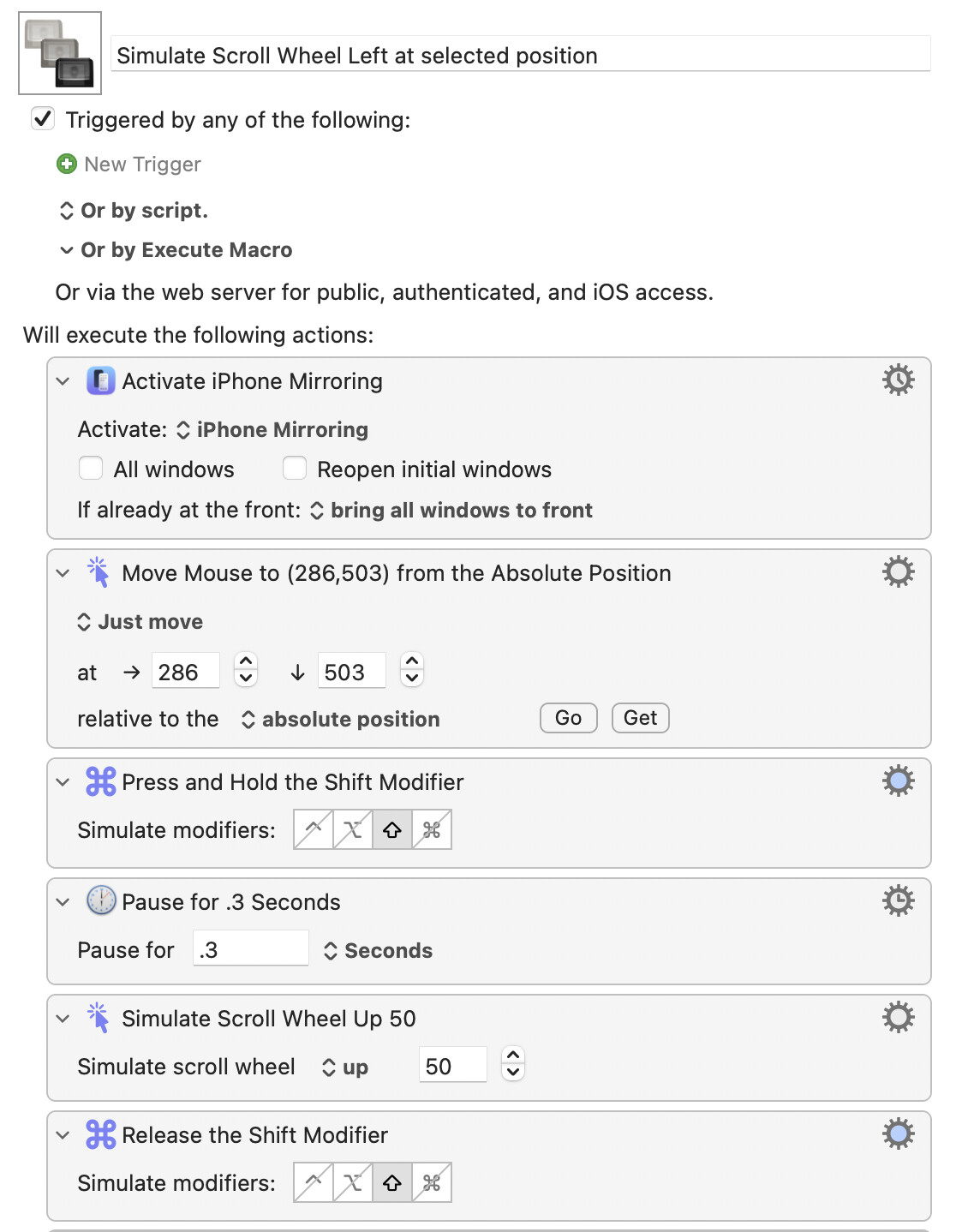
I thought this was what I was looking for to allow swipe only gestures as actions (not click and scroll) which is needed in iPhone Mirroring to do certain actions. I have figured out a way to to this with Keyboard Maestro for anyone else that might want to automate iPhone Mirroring. Apparently Shift + Scroll Wheel (which is not present on a Magic Mouse) is the same as swiping left.
I did try the simulate scroll wheel action earlier without success but will try again.
In my case, I downloaded an iPad app from the App Store and am running it on my Mac. It may be simulating an iPad but I may be running the app natively - I haven’t kept up on this. I also simulate iPhone and iPad apps in Xcode. I have the blink app running on my phone - I'll try mirroring it and see how it works with KM. Thanks for the reply