Get Variable Name

Recently I started using the ability to have user friendly names for variables. For example I have a variable called “ParameterType” and the following values:

00__Transmit Channel

01__Receive Channel

I use the “Prompt for user input” to set the variable. Now I’d like to paste a certain string that contains not only the typical %Variable%ParameterType% but also the names like “Transmit Channel”.

Currently I use the way to kind of translate it back using “Switch of Environment Variable” but this has to be done for each and every variable separately.

Is there an easy way to get back from the variable itself to the “user friendly” name? I searched a lot but didn't find a solution.

Thanks in advance.

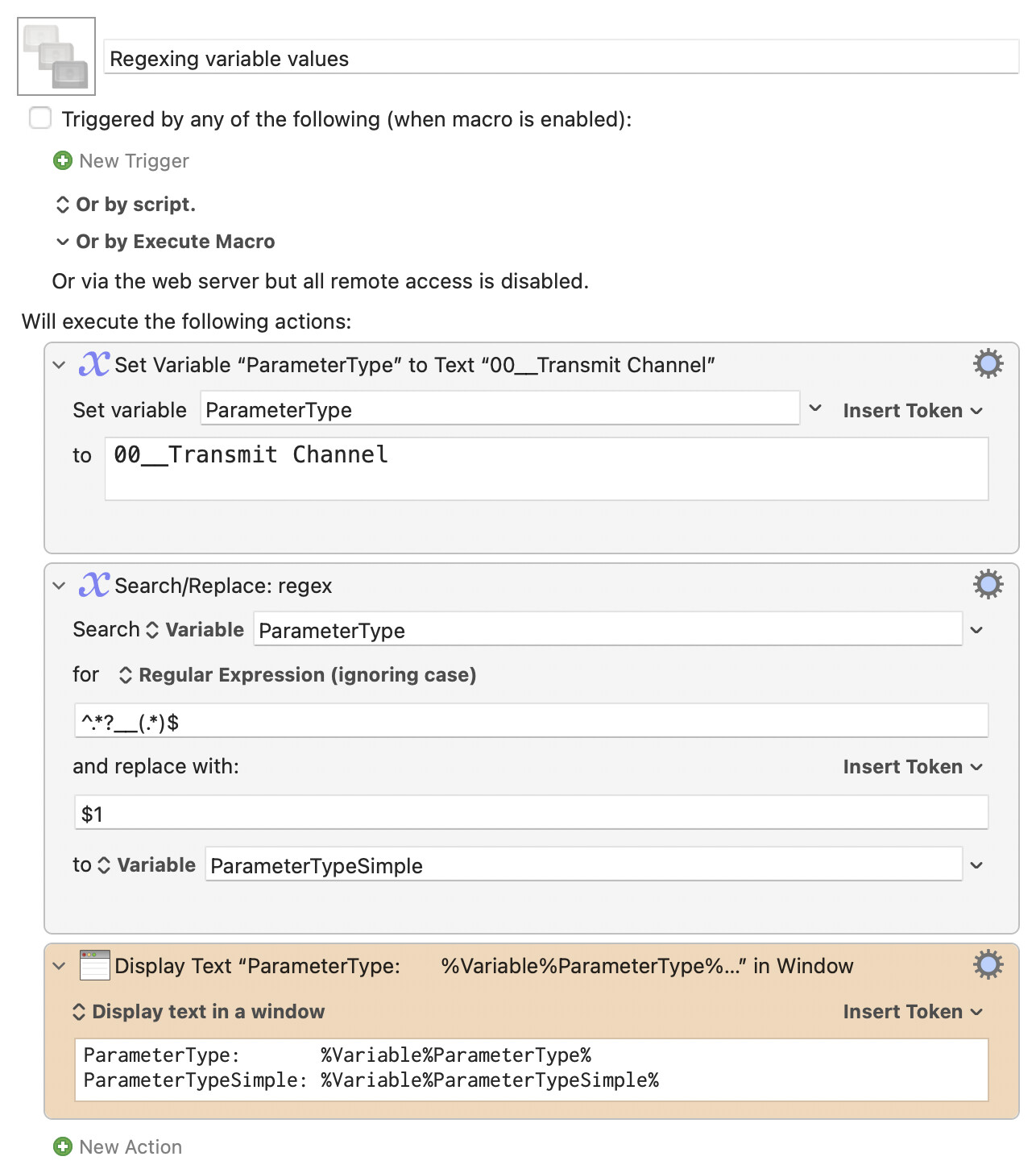
If I understand correctly, and if this is something you always want to have available, you could just set a second variable when you set the first variable:

Download Macro(s): Regexing variable values.kmmacros (3.4 KB)

Macro screenshot

Macro notes
  • Macros are always disabled when imported into the Keyboard Maestro Editor.
    • The user must ensure the macro is enabled.
    • The user must also ensure the macro's parent macro-group is enabled.
System information
  • macOS 15.7.3
  • Keyboard Maestro v11.0.4

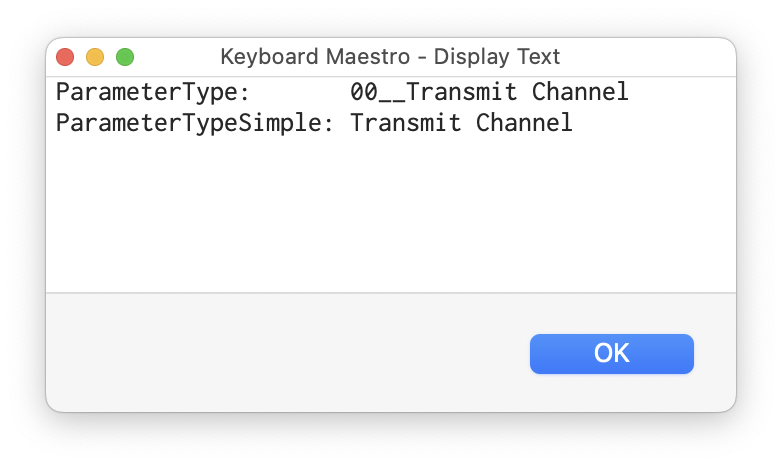
Run that, and the output is:

Obviously, I set a fixed value for ParameterType, but you would just set the second variable whenever you set the first variable.

Note that this is very dependent on the format of ParameterType—the regex searches for "anything, followed by two underscores," and throws all of that away, then keeps everything after that point and sets it as the second variable.

Is that what you're trying to accomplish, or have I misunderstood (quite possible, it's early and I'm not 100% positive I understand the question)?

-rob.

1 Like

Thanks so much @griffman for your help.

I am sorry that I obviously didn’t describe it well enough. The “ParameterTypeSimple” is basically the only thing I need. Maybe let me give you an example that hopefully describes my request better.

I created myself a lot of macros where I can build certain strings like…

Device = Range from 0-10, Transmit Channel = 0-15, Parameter = Cutoff, Cutoff value = 64

These values are created by variables that I select during my prompt. The result looks like:

Send data (5, 7, 74, 64)

As a result I have a lot of these lines and the structure of each line can be totally different, depending on the data being sent. To reproduce what each line is doing in “real terms” (even after months of not being able to work on that particular project) I used my above mentioned method to put a kind of description line above each of these data lines like:

Description line: (Device Name, Transmit Cannel = 7, Parameter = Cutoff, Cutoff value = 64)

Data line: Send data (5, 7, 74, 64)

My goal was to simply use what you called “ParameterTypeSimple” in the description line without the need of extra effort like my approach or your idea to set two variables only to refer to an already existing name. Maybe I don’t understand all this correctly but I sometimes wonder why I am the only one for such a thing. Sorry. :man_shrugging:t3:

But thanks again. I will see if I can optimize my workflow in the future using your method.

So by way of a proxy definition, you would want to automatically create a Comment action that contains the "real name" of each of the parameters being sent? If so, that's way beyond my skill level, and would require (I believe) the use of AppleScript to modify the macros on the fly.

I will admit, I'm still fuzzy on the issue, though, so perhaps that's wrong. The fact that every variable name can be different, and changing every time you use the macro seems to make this a near-impossible task. But again, I still don't fully understand what you're trying to describe—sorry!

Hopefully someone else with better reading skills than I will offer some solutions.

-rob.

Thanks again. I think the problem is more on my end since I’m neither a native speaker/writer in English nor a real KM specialist for everything above mouse moving and window positioning macros. :wink:

Maybe some screenshots as an excerpt of my workaround help to describe better what my problem or goal is.

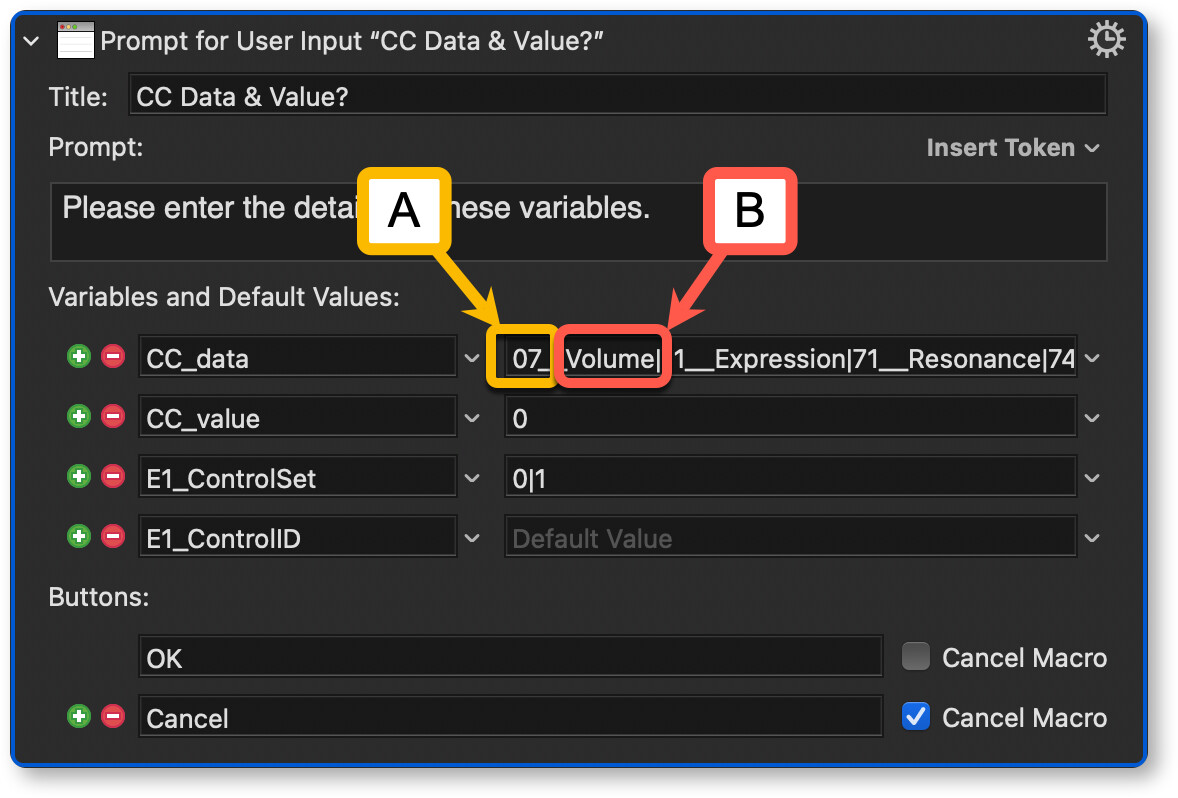
My prompt looks like this for example:

This means I am only asked about the “B” part and don’t have to think about “A” which is written into the variable “CC_data”.

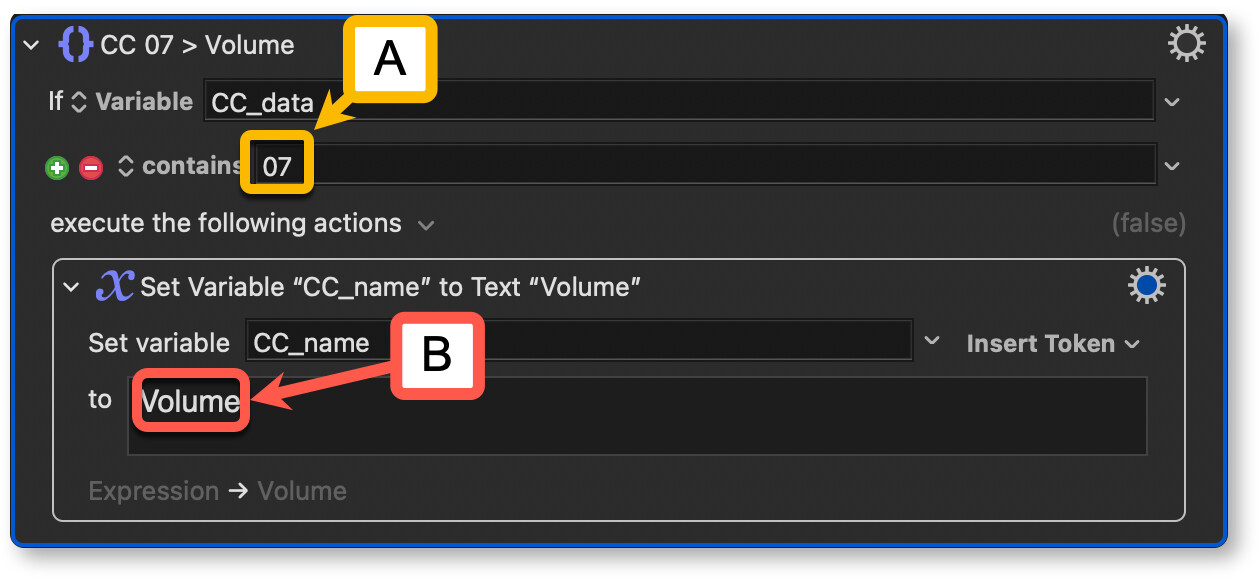
To reach my goal I use the following routine to kind of do it the other way around - the system knows what the “A” part is and provides “B” as a result for me. Again without the need for me to think about it.

The connection between A & B is fixed and not dynamic, right? Maybe my skills aren’t just sufficient to know how to do it better but I wonder if there is a way to avoid the second step and just use the term “B”. If it’s impossible or my description is still not good enough please don’t invest any more time to answer. Apologies and thanks a lot again.

The way you've done it, it is dynamic, I'm afraid.

KM only "knows" that Volume is the friendly label for the value 07 within that text field of your prompt -- no other Actions are aware of that.

What you could do is double up, including both the value and label on the left side of the double-underscore and just the label on the right:

07,Volume__Volume

.and then, if that item is selected in the prompt, CC_data would be set to:

07,Volume

Because you've used a comma, the default delimiter for a KM pseudo array, you can easily extract the two items latter:

Description: %Variable%CC_data[2]%
Value: %Variable%CC_data[1]%

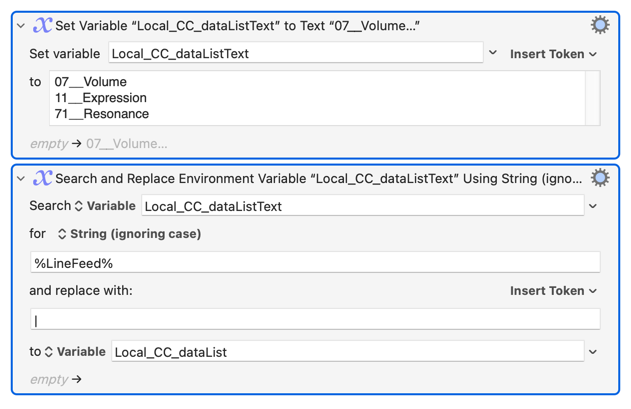
Another way to do it would be to keep your list in a variable -- usually a per-line version you can edit and a | delimited one generated at execution:

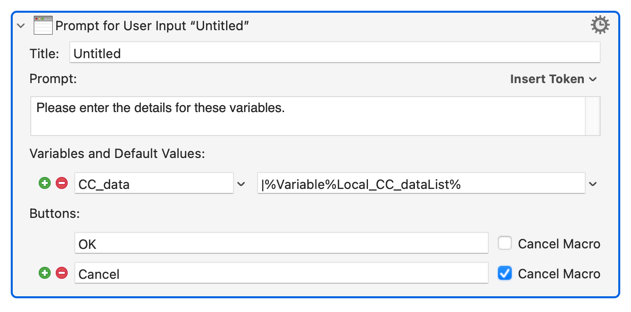
...which you can later use in the prompt:

(Note the extra | at the beginning of the text field, which says "here comes a list from a variable")

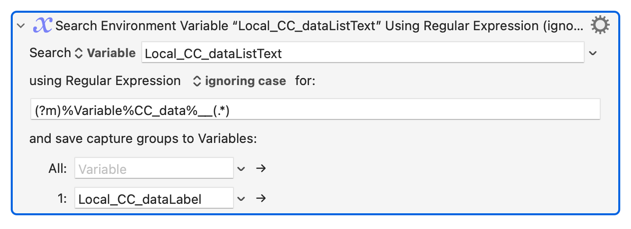
That means you'll only get the value, for example 07, stored in CC_data, but you can later get the label by searching Local_CC_dataListText for "the bit after the double-underscore of the line beginning with value":

Have a go with those methods and see how you get on. If you need more then we could look at either Dictionaries or JSON, both of which allow for "proper" key-value pairs like you want but are a few more steps up in complexity.

2 Likes

Thanks so much @Nige_S!

These are the information I’ve been looking for. My thinking is probably always too simple since like you mentioned KM “knows” the friendly label for the value - without saying “only” :wink: - I believe it could just let me know as a user later on in a workflow.

So my simple idea was: let the user choose a term, connect a value in the background and provide the ability to restore only the term later on based on the already stored value (again in the background).

This simple and obviously wrong thinking includes that the connection between the value and the friendly label is fixed. As already mentioned I often wonder why - despite of my bad knowledge - only I seem to have this kind of questions. But probably it’s just because… :joy:

I will go for one of your workarounds. Just the first example looks really good and is probably the fastest way to use.

Thanks again so much. I’ll mark this as “Solution”.

I'm having trouble understanding both the real purpose and how your attempted solution works. For example, is it required that you use something like this:?

Send data (5, 7, 74, 64)

Oro could you instead do something like this:?

Send data (%Variable%Device Name%, %Variable%Transmit Cannel%, %Variable%Parameter%, %Variable%Cutoff value%)

Please pardon me if this is naive. I'm just not envisionisng the goal.

Thank you @August for your reply and the given example.

I apologize that my explanation seems to be so unclear. I'll try again now with a Google Translate translation. Perhaps that will help.

To be honest, I can't quite grasp the meaning behind the different colors in your example. But I think I'm doing it this way.

My topic is the user-friendly naming of variables. Let's assume "V" stands for the variable and "UFN" stands for User Friendly Name. "V" is the value that KM works with. "UFN" is the term I'm working with. For me, working with "UFN" when prompted by "Prompt…" allows for more convenient operation. I can work with terms while the corresponding values ​​are used in the background—without me having to think about those values ​​at all. However, the string resulting from the „Prompt…“ ultimately contains only the values ​​that I'm - let’s say - "too lazy" to remember. Now, a few weeks or months later, I look at this string and think: what exactly did "71" stand for again?

That's why I eventually started customizing my macros when inserting the string so that I get a description directly above it, which—in the example above, "71"—tells me that the value is "Resonance".

I prepare the "Prompt..." accordingly and use the combination "V"__"UFN". So we have two parts of the variable: the value on the left and the name I want to work with on the right. I've fixed "V"__"UFN" for each variable once, and I'm not aware of any circumstance that could change that. Except, of course, myself… :wink:

In my—probably overly—oversimplified view of this situation, both parts of the variable—left and right of the two underscores—are fixed and known to KM. So I wondered how I could easily insert not only the left part, but also the right part, "UFN", into a string I'm going to insert. I don't understand why I need to go to extra lengths to use a term that has already been defined and is established. Wouldn't it be possible to automatically provide the separation described by Nige_S into [1] for "V" and [2] for "UFN"? Are this idea and my workflow really so far-fetched? Ultimately, it's simply a matter of wanting to see the convenience of "UFN" in the query and then automatically apply it later in a different context.

I hope this description clarifies things a bit. If not, please don't waste any more time replying. I can live with Nige_S's recommendations, even though they do require some additional effort.

Hello Hans-Peter,

I hope that Google translate helps in this process, but I am skeptical. You say:

But I did not mention any colors. So I think Google translate has its own ideas. Nevertheless, let us try…

You say that you are trying to use user-friendly names for variables. I think that I understand what you are talking about because I always use user-friendly names for variables. For example, here are some of my variable names: "InputString", "InputNoSpaces", "NumberOfAllSpaceNames", "local_myDSIWMenuPrompt", ... .

You say:

My thought is, why do you need "V" at all? Why not just use "UFN" in the first place and in all places? Keyboard Maestro has no problem working with "UFM" in its calculations, logic, etc. So why is "V" required?

I suspect, and I may be wrong (I often am), oh that you have often seen examples like:

for i in $files do...

And, I suspect, you have gotten the idea that variables for some reason need to have very short names. This has been common in the history of mathematics when complex equations were being drawn on chalkboards and using single letters for variables, often with additional superscripts and subscripts, allowed complex things to be written quickly and in a small amount of space. With computers, that is no longer a limitation. Keyboard Maestro goes beyond many languages and even allows spaces within variable names, allowing for even greater human readability.

So I am asking the question, is it possible that you are making an assumption that is not actually necessary? Or am I misunderstanding the nature of your problem?

Thanks again @August, let me try to explain even more details. But first:

You didn’t mention colours but your example contains parts in yellow. At least on my screen.

That's why I was wondering about colouring.

Back to my example. In my "Prompts…", I want to use regular parameter names, some of which have already been mentioned—for example, "Cutoff", "Resonance", "Expression", etc. The corresponding controller numbers are "74", "71", and "11". I also include information about the MIDI channel on which the data is being sent and the value. My inserted string (simplified somewhat) looks like this:

sendMIDIdata: "01", "94", "32" (MIDI channel, parameter, value)

There are over 100 possible controller numbers. After inserting several hundred lines of this type (not only for controllers, but also for SysEx data with even longer and more complex strings), if I want to continue working on it a few months later and change a value, it becomes difficult to understand exactly which string controls what.

That's why I started using a single macro to insert the corresponding regular parameter names as comments directly from a single "Prompt…". The result looks something like this:

-- ___ DX > FM Jam 1 (DX) > Cutoff = 41 __

midi.sendControlChange(PORT_1, 10, 74, 41)

This way, I have the explanation of the "UFN" directly above each of these command lines completed with "V". I have no idea how to implement this...

… and get the same result like shown above. Sorry. :man_shrugging:t3:

Ah, OK. That was code that I formatted using the

>   ```
>   Markdown code-fence syntax: Three backticks before and after
>   specify a block of code that is presented verbatim, in mono-space font.
>   Any markdown notation is ignored and presented exactly as written.
>   ```

I think some of my other misunderstandings are due to no knowing MIDI command syntax. In the followig, have I understood correctly? In your example, you are sending the command on MIDI channel 1. Do you need a UFN for that? You are sending a new value for parameter number 94 and you mentioned over 100 parameters, so I imagine you reallty want a UFN for that. And the new value setting for parameter number 94 is 32, and that has its own meaning, which can be different depending on which parameter is being changed, so you want a UFN for that too, but the same UFN will not always apply to a value of 32, depending on which parameter is being changed. If tha parameter is Volume the value is the new Volume value but other parameters may have totally different meanings to the various values, it may be arbitrary and not on a scale, so the UFN translation of the values is different for each parameter choice.

Is that close?

Thanks @August and…

… I think yes. In my opinion, however, it's independent of whether I'm working with MIDI or other data.

Whenever the "V" part of a variable consists of a number or letter/number combination whose meaning (UFN) isn't immediately obvious, it's convenient or even necessary to work with the separate "UFN" part.

My approach is to work exclusively with the UFN as much as possible—when querying via "Prompt…" and later when the variables are used elsewhere. That's precisely what the UFN feature is designed to enable.

Does that make sense to you?

It isn't -- that is possibly Google Translate confusing things.

Variables have names -- the "label on the box that holds something".

The variables in your prompt screen shot are named CC_data, CC_value, and so on.

It's the data being stored in those variables, particularly that in CC_data, that you want to have "normal" and "user friendly" versions of. You've done that in your list by using the "double_underscore" structured data format, and I've shown you a couple of ways to use that format outside of the text field so you can do what you want.

If this was an object-based language you could do things the way you think you should be able to -- you could define an object class with the properties name and userFriendlyName, and when you pick "Volume" from the list an object will be created with name set to 07 and userFriendlyName set to Volume and that new object stored in the variable CC_data. You would later get whichever property of that object you wanted. You can get close to that in Keyboard Maestro, but it is a lot more work than the "searchable list in a variable" method shown earlier!

1 Like

Thanks and yes. Of course you’re right. It should have been “…user-friendly naming of values” or “data” like you wrote.

I tried both methods you recommended and recognized that the first one works best for me. I even created myself a prompt to create that entire string with the comma-separated variable name, the underscores and for the lists or menus even the “|” as a separator.

That works great now. So thanks again so much for your help. :+1:

2 Likes