I have two Macmini M4s, an older one still running the latest Sequoia and the new one, just acquired, where I did a fresh install of the latest Golden Gate Mac OS 27.0.1 I do all my KM development on the M4 Sequoia machine.
I'm experimenting with this new machine. After a reformat and the fresh Golden Gate OS install and a fresh KM install (11.1.1), I used AirDrop to move my /user/Library/Application Support/KeyBoard Maestro folder from my Sequoia M4 to replace the same in the new Golden Gate M4 machine. I gave KM all the permissions requested and needed.
At first, all seemed fine. But macros that I run daily involve pasting a command or even a python script into Terminal that works fine on Sequoia M4 all break on the M4 Golden Gate. I pasted the Terminal output of these broken scripts for Claude to review and it says that the pasted script became cut off mid way or as it put it, "the paste was shredded". This is true with python paste in scripts and Bash scripts with the system installed Bash 3.2x
Since I've use this "Paste into Terminal" approach for years, I've become adept at including pauses, external carriage returns, and "wait until window title contains "xxx" or "a file named xxx exists, until proceeding with the KM macro. Timing can be everything in a KM macro. Unfortunately, years of successful code is not working in Golden Gate on basically the same machine as running it on Sequoia. I've been a KM user for years and no system upgrade has ever broken things this way.
I know I can probably rewrite everything to execute as external scripts but I'm trying to avoid what would be likely days/weeks/months of rewrites and debugging.
Has anyone else experienced this? Should I wait until 27.1 or 27.2 of Golden Gate? Is there anything that Peter has found with Golden Gate that he is working on to explain the issue?
Any thoughts or suggestions would be appreciated. Thank you.
Can you paste a simple example macro that works in pre Golden Gate and fails in Golden Gate? That way, those of us who also have both systems can test and see if we get the same results.
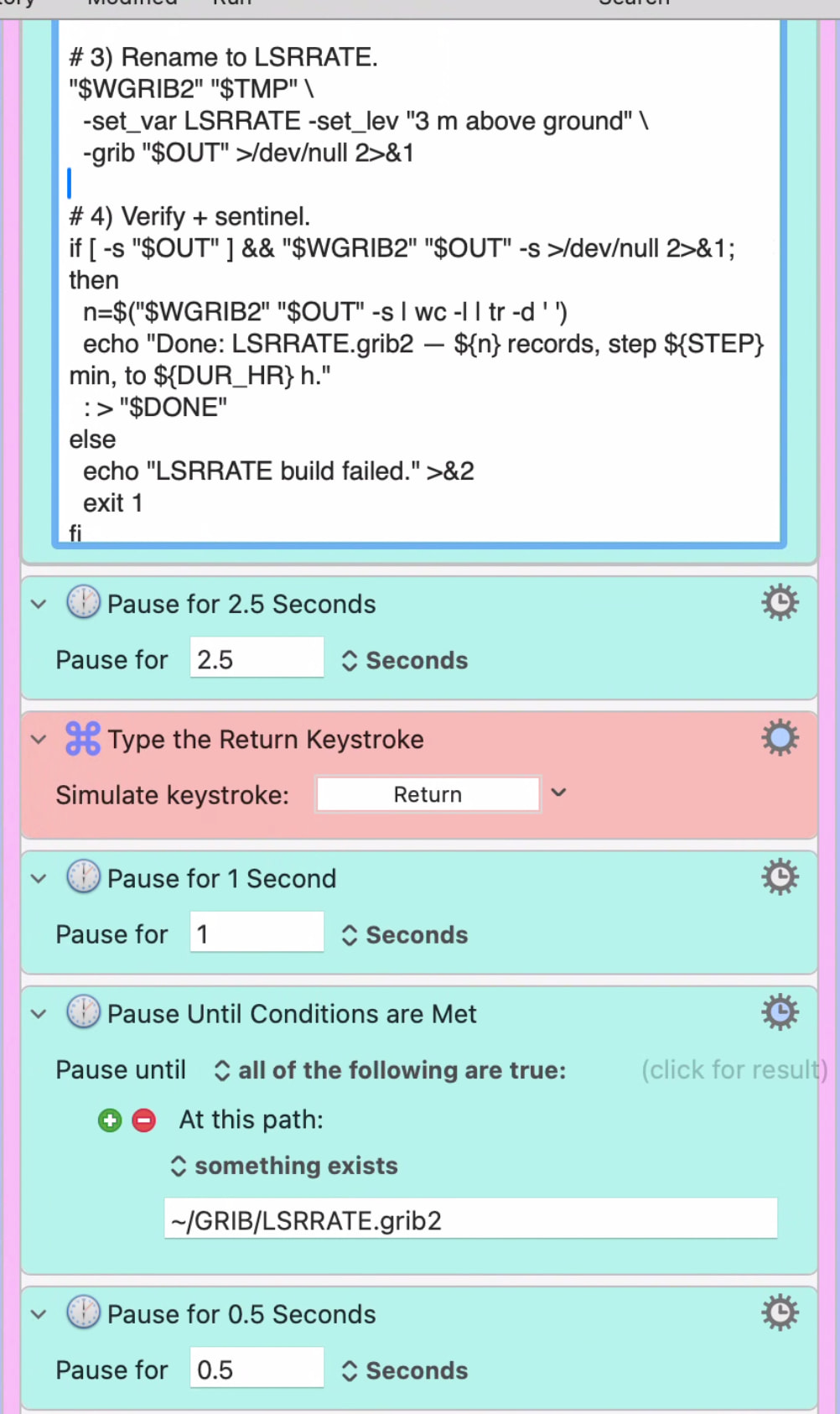
Here's a sample that works perfectly on Sequoia that fails in Golden Gate. Same M4 macmini machines. It's a weather script that calculates total rainfall. The Python script paste into Terminal gets cut off and mangled in Golden Gate or it executes too fast. The Terminal output shows it. I guess I can make the python script an outside script that is called by Terminal, but I'm going to have to alter innumerable macros.
The screenshot isn't much help - can you upload the actual macro, so we can install and test it? Select the macro, click the Share button, select Upload to Forum. Then cut-and-paste from the new post into a reply in this thread.
Hi Rob,
I understand your request.
The code I have is something I've put together over years, long before AI. It's proprietary to some extent and I can't share the actual python code. But using KM to run it as I do has always worked until now.
I imagine with the many users of KM, there must be others that paste scripts into Terminal that now have them failing on Golden Gate.
Or perhaps not (?)
That was what I was interested in knowing. Basically, are others having macros that fail with Golden Gate that worked previously?
That's why I asked if you could create a simple demo macro that fails in one and runs fine in the other, then you could share that. I have not heard of anyone else having issues with Python scripts in Keyboard Maestro in Golden Gate, and I haven't seen any myself. I've had one other oddity in Golden Gate, related to local variables in AppleScripts, but that appears to be a one-off on my local Mac.
If you can write a simple demo macro that works for you on one, but not on the other, then others can test it to see if we get the same errors you see.
If the paste is garbled, can you not see the script in the Terminal window and see what is wrong with what is pasted?
Also, have you considered moving the script to a file, and then just pasting the path of the script? That seems like a safer thing to do generally anyway.
Or even running the script via the Execute a Shell Script action instead unless there is some reason it has to be done in a Terminal window.
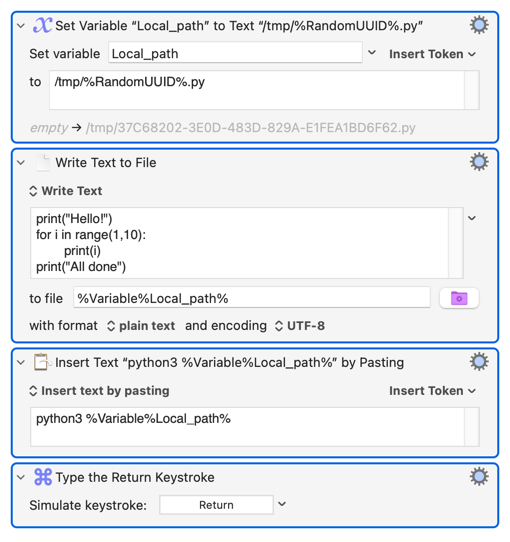
I'm guessing that's an "Inset Text by Pasting" Action?
For a test, change that macro so it does the Token evaluation and puts the generated script into a "Display Text" window. Click in that, ⌘A, ⌘C, Paste into Terminal and see what happens.
You're jumping from Sequoia to GG, skipping over Tahoe -- and Tahoe was when Apple introduced Paste protection to the Terminal. I wonder if you're running foul of that...
Very interesting thought. I looked at the list of criteria that the paste block is contingent on and since I use this daily, several times a day, I don't think KM is being blocked from pasting. I'm still trying to figure out what is going on in my setup. Thank you for that interesting possibility, though.
Thank you, Peter. I'm working with Claude AI to convert all my paste-in scripts to just pasting in the path of the script.
One more thing. Claude AI told me that "Paste into Terminal" will work if the size of the text being pasted is less than 1K. According to Claude, it's the size of the Terminal buffer. (I don't know if that is really true.) If it exceeds that size (mine are 3-5 K), Terminal will start executing before the complete text has completed pasting. Then everything looks garbled with pasted text interspersed with the running script. Again, that didn't happen with Sequoia. And I skipped upgrading to Tahoe because of all the bad press.
I guess I got spoiled with simple paste-in-Terminal commands over the years.
While I'm at it, I want to thank Peter for having created KeyBoard Maestro. I can't imagine using my Mac without it. It's invaluable!
It'll be a lot quicker -- and easier -- to do the test I described. It'll let you eyeball the code that's being pasted to make sure nothing weird is sneaking in, it'll let you test the Paste operation itself, and because you aren't immediately following up with a Return key press it'll give you a chance to see any error messages you might be missing.
Probably not true.
There's a 1024 character limit for a single line. But you aren't Pasting a single line, and that limit has been there for many years so isn't something that changed between Sequoia and Golden Gate. That's why I'm tending towards the Paste protection -- that itself may be limiting how much can be Pasted in one go, and even if it doesn't the chance of a "false positive" will increase with the number of characters being Pasted. Again, manually Pasting the same code should show if that's what is happening.
You'll probably find that writing the file to disk (even if that's every time you run the macro -- does the script text include evaluated KM variables?) and then Pasting the path into Terminal is quicker than the way you've been doing things. And it's certainly simple enough to do: