I'm feeling frustrated about the sparseness of documentation for the Music actions. Most of the Music actions are documented on the Wiki page action:Play a Specific Track.
Unfortunately, <rant=on> this whole page looks it was created by someone who didn't test anything and was being paid by the Action — most actions are "explained" by repeating the words of the action name and changing "track" to "song". There are no hints of what the presumptions or side effects are or what happens in the Music app after the particular action. If Music was already playing a playlist, does "Play a Specific Track" continue the playlist from where it was interrupted, or does Music stop at the end of that track? Enquirig minds want it documented!<rant=off>
For instance, I was looking through the doc trying to figure out if there was an action that would put a playlist into Shuffle mode. Is that what "Play a Random Track from a Specified Playlist" does, or does it just play one song? If I want to specify the very next song after that, do i need to insert a KBM Pause action of the exact length of the first, random song, or will one Play... action after another play songs to completion in the order specified.
The doc is sparse and today I don't have time to experiment. If you have explored this, please let me know what you have discovered.
On occasions, I too have been impeded by the brevity of some entries in the Wiki, but I think we have to remember always that there are many bases that a one-person software “house” has to cover and that, because KM offers so many features, expanding and maintaining the Wiki could be a job in itself (or so it seems to me; you would be a better judge of that!). Also, not everyone loves writing documentation… and opinions (outside the specialism, at least!) about what constitutes good documentation varies a lot, I have found.
It has been my experience that Peter will always consider suggestions for changes to the documentation if one emails him. There is also the Wiki category in this forum, which can be useful (at least in theory) for when wider discussion is wanted.
Neither do I. I only had time to reply in the forum to your post.
I just tried the action and it… played a random track from the specified playlist.
I created a playlist (which Music.app did its best to hide from me) and then made sure that shuffle mode was off (I did that via the menu, because it seems that the “Shuffle” button, which never changes appearance, is just for turning shuffing on!).
I played track 1, skipped to track 2 and then skipped to track 3. Then I ran my test macro, which contained just the Play a random track from a specified playlist action. A random track started to play. I skipped it and Music.app resumed the non-shuffled play order, playing track 4.
So, the action did what its name indicated.
Music.app remains a UI design disaster (I even had to keep switching back to the “Songs” view to see the track numbers—and I have to use a macro to force that view!) and I’m glad I only use it for simple playback of albums and not for my music library, which is entrusted to Swinsian (but yes, Music.app has to be used for synchronisation with iPhones, so I’m not telling other people what to do[1]).
Should the playback behaviour of Music.app after the use of that action be documented in the Wiki? I would say not, because what Music.app does after a macro has run is not KM’s responsibility and Apple could change the behaviour (silently) at any time.
My frustration is primarily with Music.app <rant=on> and the abusurd assumptions about it that are deliberately built into MacOS and which cannot be turned off or made reasonable. For instance, with Music.app closed, after watching and listening to a video, I close VLC and I turn my bluetooth headphone off, which is the OS's prompt to start playing Music.app through the system speakers, on some random track based on something unconfigurable.<rant=off>
I have used that route many times, however, this is a public thread and it never hurths to share reminders.
Thanks for the reminder of how straightforward that prcess can be. Unfortunately, it requires a level of concentrated thinking that "ranting" or even calm, considered converstation does not.
Yes, the Music.app UI and built-in MacOS assumptions can be profoundly annoying. Yes, KBM provides some useful tools for using it anyway. Yes, the doc on those tools could be better and it is not the job of the KBM doc to annotate Music.app's shortcomings.
And yes, if I took the time to experiment carefully and write up my results, I could contribute to making that doc better. I would probably enjoy doing that, but it's down around #20 on my to-do list. That's why my question asked if anyone had previously explored the subject. I would be happy to edit and format someone else's notes into enhancements to the current doc.
As for the project that inspired my original rant, maybe I'll try VLC. It's supposed to be highly scriptable with AppleScript, which KBM can access. Swinsian is outside my budget for something non-essential.
You should read some of my feedback to Apple. After all, someone should…
Apple knows best.
Yes, I totally understand.
Are you sure you’re not missing some zeros there? #modernLife#computers
Perhaps the worst thing about Music.app is that… for some purposes, it’s still the best option—especially when used with Keyboard Maestro, EventScript and so on. Every so often I try third-party audio players and am dismayed by how lacking in functionality most of them are (or perhaps more fairly: by how the creator’s priorities are not the same as mine?). VLC has many strengths but for audio file playback it strikes me as basic compared to Music.app. Of course, that might well change—as Apple continues to make Music.app worse.
Maybe not... As @kevinb says, KM's interaction with Music is at best dependent on what Music is doing at the time. At worst, the polite description is "flakey" -- for which I completely blame Music! "Play a Specific Track", for example, will always work for one track of an album but never for another -- and I've never been able to find out the difference is between them.
It's not restricted to KM. Using AppleScript (which is what I suspect KM is doing):
tell application "Music" to return name of selection
--> {"Problem Child"}

tell application "Music" to return (every track whose name is "Problem Child")
--> {file track id 8367 of library playlist id 62 of source id 61 of application "Music"}

tell application "Music" to return name of selection
--> {"Dirty Deeds Done Dirt Cheap"}

tell application "Music" to return (every track whose name is "Dirty Deeds Done Dirt Cheap")
--> {}
Seriously? Same playlist, same original album, added at the same time, both in the cloud, etc, etc.
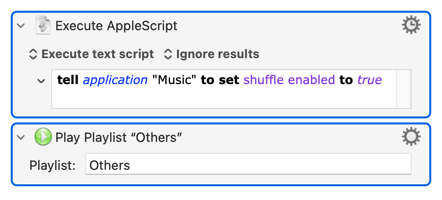
Shuffle is an app-level attribute, not a Playlist's. So to play the Playlist "Others" in shuffle mode: