Help: Execute AppleScript Action with variable

I'm not sure I understand the use of global variables inside the action to execute an applescript.

Let's say I want to use the global variable "App_FrontmostAppName" inside the script.
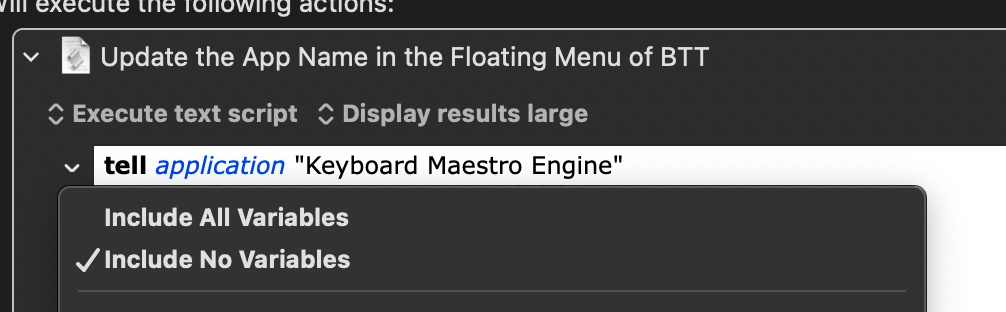
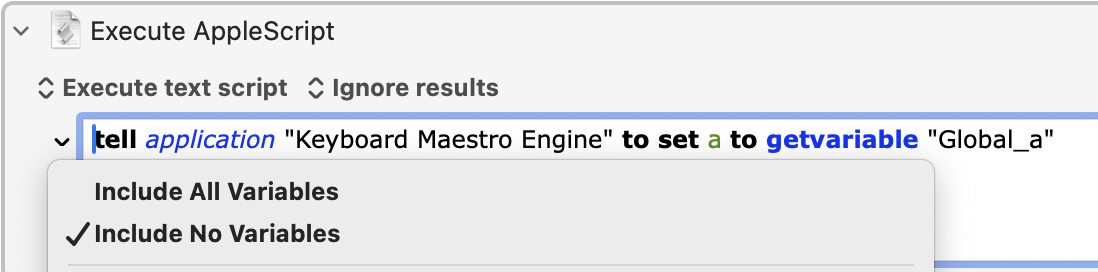
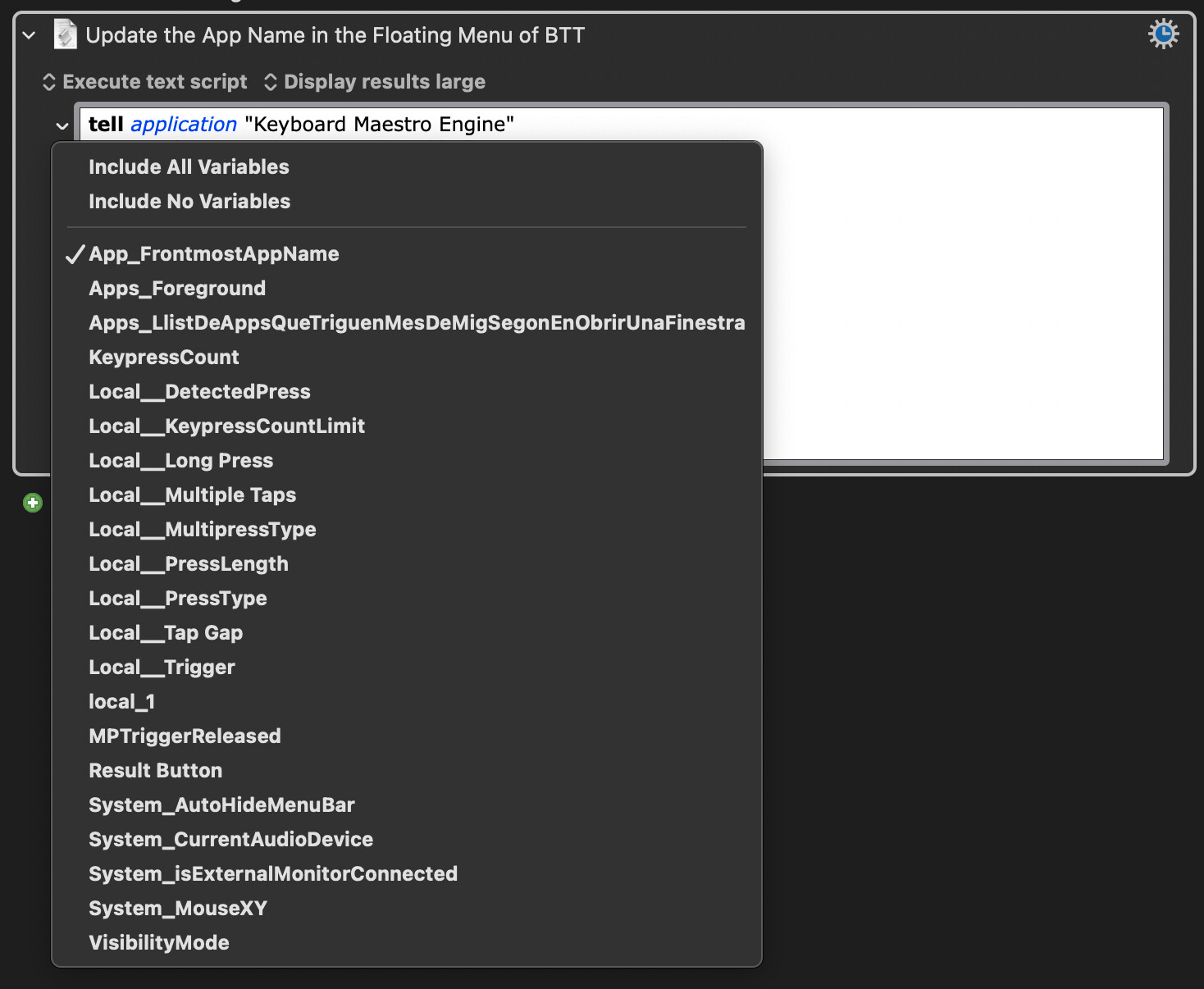
I select it from the menu:

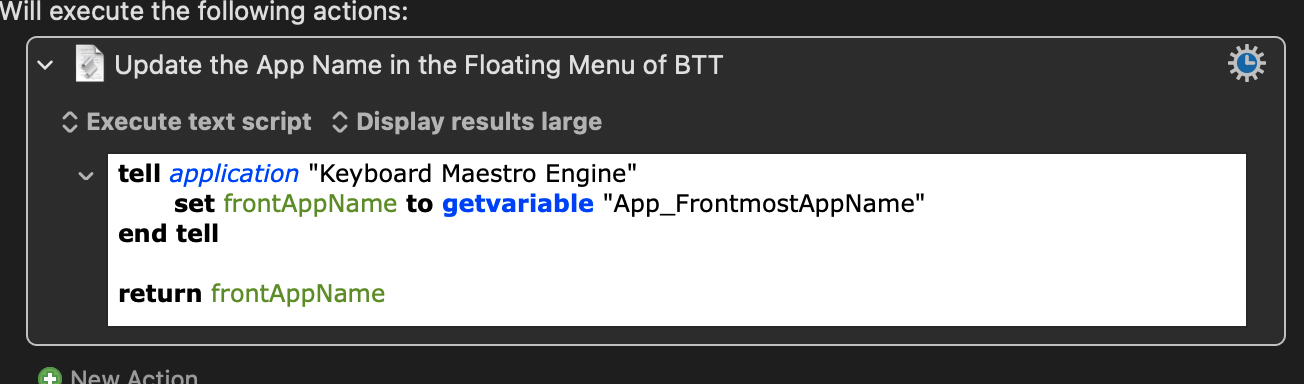
Using this code the script works fine, without problems:

Is this the correct code that I should always use, or would it be better to use the formula "KMVAR_App_FrontmostAppName"?

If it is better to use "KMVAR_App_FrontmostAppName" can you tell me what the applescript code should be like? I can't understand how to make it work this way.

Thanks a lot!

The 6-character string "KMVAR_" is used when obtaining KM variables in a shell script. I don't think it's ever used when obtaining variables in an AppleScript.

If you read the following page, you will see there is no mention of "KMVAR_" anywhere on that page.

https://wiki.keyboardmaestro.com/AppleScript

But you can find 25 occurrences of that string on this page:

https://wiki.keyboardmaestro.com/action/Execute_a_Shell_Script

In short, the string "KMVAR_" is used when passing variable to a shell script, not to an AppleScript.

1 Like

My question is related to what is posted on the page that explains the "Execute AppleScript Action" action:

https://wiki.keyboardmaestro.com/action/Execute_an_AppleScript

In this page there is the following paragraph:

"Keyboard Maestro sets the environment variables for the script to include all (by default) your variables, using a prefix of KMVAR_ and your variable name with spaces changed in to underscores (_). For example, your Keyboard Maestro “File Name” variable will be available as the environment variable KMVAR_File_Name . By default, all variables are included, but you can limit which variables are included by using the popup menu next to the script (v11.0+). Note that these provide a readonly copy of the value of the variables when the script starts."

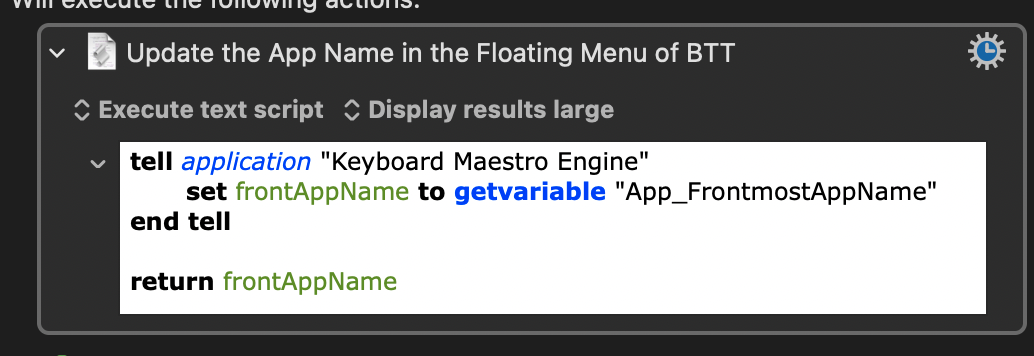
If I select "Include No Variables" in the variables drop-down menu and run the following script, the script gets the correct value of the variable, displaying the value in large:

It seems to me that this drop-down menu is related to the exclusive use of variables with the "KMVAR_" prefix within the applescript, but I can't find any example on the wiki that documents it, and I don't really know how it works.

You will note that the topic there is environment variables.

Keyboard Maestro sets the environment variables for the script to include all (by default) your variables, using a prefix of KMVAR_ and your variable name with spaces changed in to underscores (_). For example, your Keyboard Maestro “File Name” variable will be available as the environment variable KMVAR_File_Name .

i.e. copies of Keyboard Maestro made available to shell scripting, rather than immediately to the AppleScript evaluation context.


@peternlewis the inclusion, on the Execute an AppleScript wiki page, of a passage on environment variables, appears to be risking some confusion. Perhaps that could be eased by a bit more bracketing, of some kind ?

@ComplexPoint thanks for your answer, but I don't understand it.

Do you know how to use the dropdown to include all/some/none of the user variables in the action to execute applescripts?

If I use tell application "Keyboard Maestro Engine" to set myVar to getvariable "myVar" I get the value of the variable regardless of what I put in the dropdown.

As I said before, I think that you should be able to get the value of the variable using "KMVAR_" inside the applescript and not have to use any tell application "Keyboard Maestro Engine". That's what I think from the info on the wiki.

You would use:

use scripting additions
set myVar to system attribute "KMVAR_myVar"

which is faster than getvariable, BUT

is "broken" for reading international variables.

This :ghost: will come out as mojibake: 👻

The scripting page in the manual says this:

"Variables can be accessed from shell scripts via the environment variables in the form $KMVAR_Variable_Name where KMVAR_ is prefixed, and spaces are converted to underscores. AppleScripts can also access the environment variables using the system attribute command, but note that system attribute is not safe for international characters. "

Executing Scripts

A discussion with the developer can be found here.

2 Likes

The popup menu affects the inclusion of variables as environment variables when executing scripts (shell scripts or AppleScripts).

Those variables are included as environment variables, and are referenced as KMVAR_App_FrontmostAppName.

From AppleScript, you can read the environment variables with

set myVar to system attribute "KMVAR_App_FrontmostAppName"

As noted, this is not safe for non-ASCII text because of bugs in AppleScript.

AppleScript can alls read and write variables by talking to the Keyboard Maestro Engine. This is independent of the environment variables and thus the popup menu selection.

Perhaps, but the behaviour is consistent across Execute actions.

2 Likes

Thanks @CRLF and @peternlewis , I finally understand how it works!

I think it would be useful to include an example like this on the "Execute AppleScript Action" page along with an explanation of the character limitation:

https://wiki.keyboardmaestro.com/action/Execute_an_AppleScript

Now that I've seen the other answers, I can see that your question was deeper than I had realized. So thanks for educating me about aspects of variables that I didn't understand myself. I actually had no idea that AppleScript could access environment variables.

Why would you want to access an indirect copy of a KM variable especially when it is "broken" for certain types of values. Can you explain the value of doing that? I see no value to that feature, and I don't see why any feature with no value should be documented.

From what I understand from the wiki documentation and various forum posts, the "KMVAR_" method is faster than getting variables using apple script/shell script code.

@peternlewis , can you confirm if what I'm saying about speed is correct?

One place this bug in AppleScript can make a difference is in how you access the "KMINFO_" prefixed variables to get information about the executing macro into AppleScript. These are, I believe, always available and the only way(?) to get this info from KM directly into the AppleScript.

KMINFO documentation

Execute_a_Shell_Script

Because the unique ID of the currently executing macro is ASCII you can do this:

set execMacroID to system attribute "KMINFO_MacroUUID"

However, to correctly render hotkey modifier symbols like, ⌃⌥⇧⌘P, use this:

use AppleScript version "2.4" -- Yosemite (10.10) or later
use scripting additions
set triggerValue to do shell script "echo $KMINFO_TriggerValue" --> ⌃⌥⇧⌘P

NOT:
system attribute "KMINFO_TriggerValue" --> ⌃⌥⇧⌘P

FWIW AppleScriptObjC provides this for getting multiple values at once:

use framework "Foundation"
use scripting additions

tell (current application's NSProcessInfo's processInfo)'s environment
set {trigger, triggerValue} to (its objectsForKeys:{"KMINFO_Trigger", "KMINFO_TriggerValue"} notFoundMarker:"") as list
end tell


Accessing KMINFO_ variables.kmmacros (3.6 KB)

1 Like

That's an excellent point, or at least an excellent question.

Did you think about testing this by creating a loop and a timer? You could provide some very useful observations.

1 Like

Probably. Speed of such things is not something I measure or control.

4 Likes

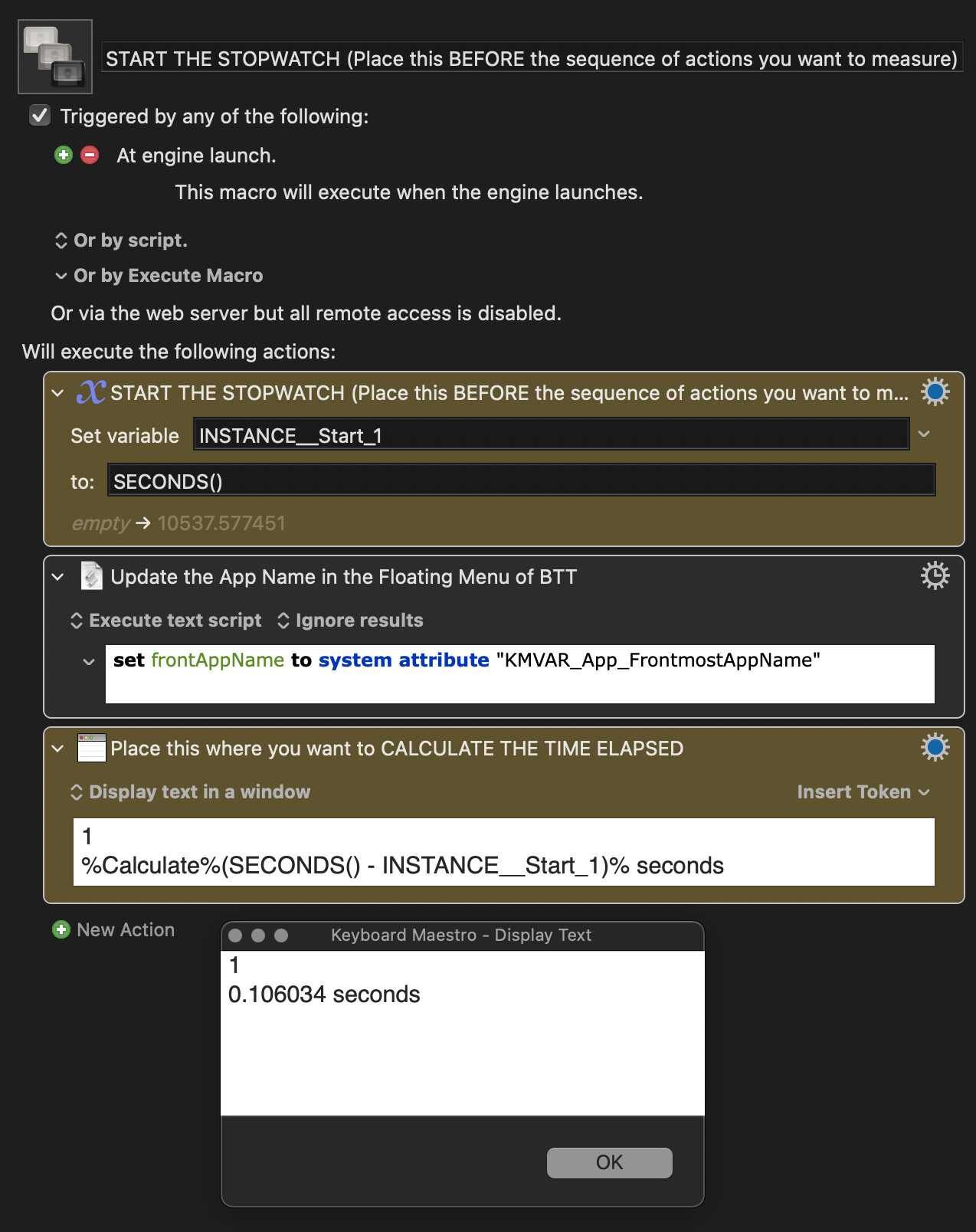
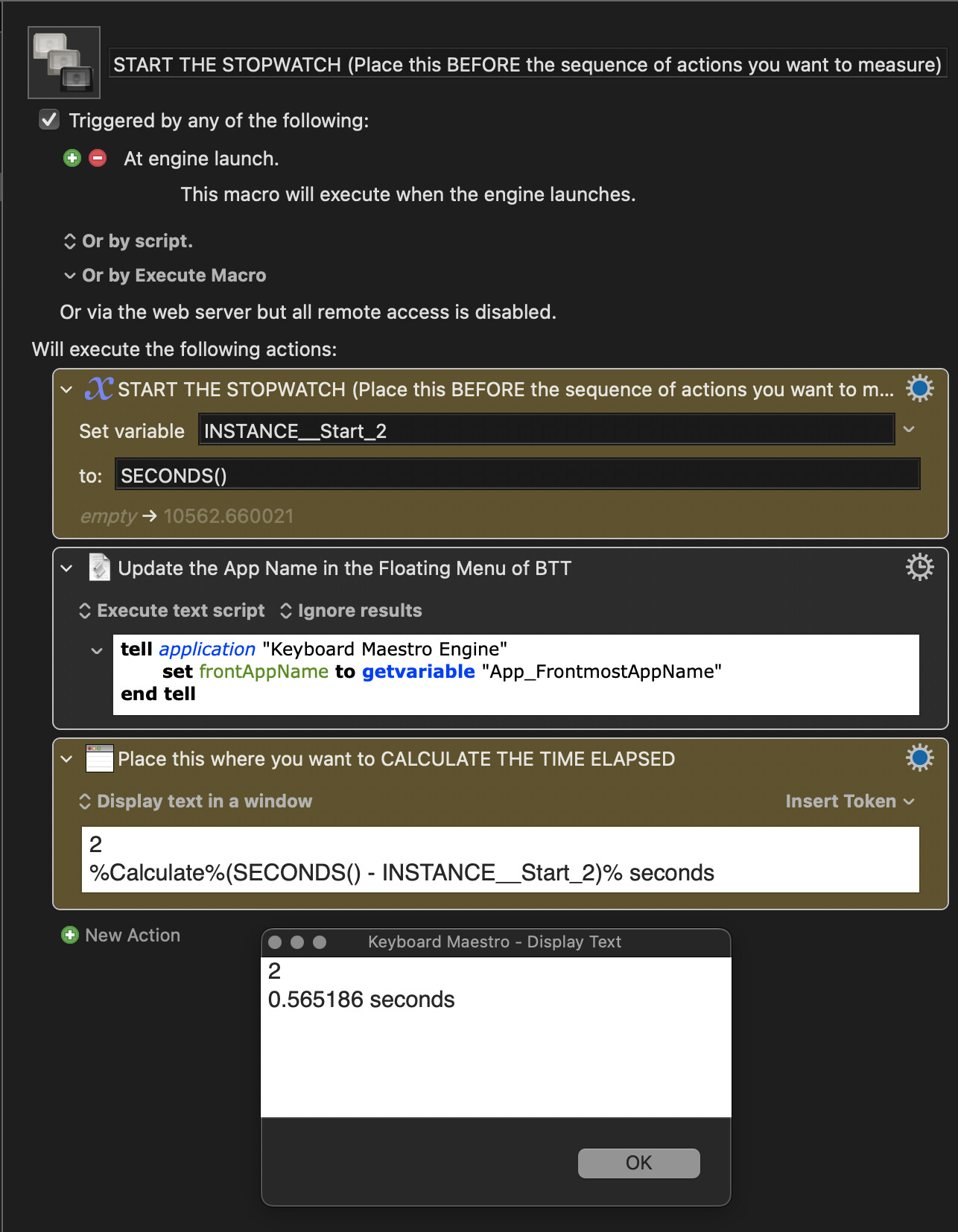
Test done.

Results executing both methods at the same time:

KMVAR_ method: 0.10 sec
TellApplication method: 0.56 sec

Results executing only KMVAR_ method: 0.10 sec

Results executing only TellApplication method: 0.15 sec

1 Like

That's very much appreciated and also informative. Thanks.

Those numbers look surprisingly large. You might be able to get more accuracy if you put the middle action in a loop (say 100 repetitions). That might eliminate any overheads that occur for the first occurrence of some action.

AS environment instantiation time.

You could try putting the loops inside the AppleScripts, to discount instantiation time, but I suspect you'll get overly low times instead because of caching.

@jordikt -- Given that it takes 50-ish milliseconds to instantiate the AS environment in both cases and the script will surely do more than get the value of a variable, the time saved as percentage of total action time seems hardly worth the risk of bumping into the non-ASCII text problem.

Indeed, the best balance of safety and speed is probably to use the Engine call while passing no variables to the environment:

...especially since the important KMINSTANCE system attribute is still available, so you can access local variables.

1 Like

After a few days of doing a lot of testing, I have completely abandoned the KMVAR_ option due to the problems with the characters.

Indeed, it is much more reliable to use the classic tell application form of applescript to obtain the value of a variable, disabling all variables from the drop-down menu as advised by @Nige_S

Your inquiry is not for naught as it still applies to the KMINFO_ prefixed variables.

As far as I know, they are only way to get the macro/group environment info directly into the script and, like KMINSTANCE, are always available so you don't have to choose them in the environment variables chooser.

The AppleScript bug making "system attribute" not safe for international characters is a gotcha :cactus: in particular with KMINFO_Trigger and KMINFO_TriggerValue and KMINFO_ vars that get names of executing macro and group.

If you don't need the hotkey modifier glyphs, and, for example, just want to know if "long press" is contained in the KMINFO_Trigger, use:

set isLongPress to ((system attribute "KMINFO_Trigger" as text) contains "long press") as boolean

otherwise use:

set triggerDescription to do shell script "echo $KMINFO_Trigger"

That will get you the modifier glyphs correctly rendered or any parameter passed via KMINFO_TriggerValue that might contain international characters.

The following is safe here because ASCII characters are returned:

system attribute "KMINFO_MacroUUID"
system attribute "KMINFO_ThisMacroUUID"

If names of the macro or group contain international characters you'll want to go with the "do shell script" access:

set thisMacroName to do shell script "echo $KMINFO_ThisMacroName"
set macroName to do shell script "echo $KMINFO_MacroName"
set thisGroupName to do shell script "echo $KMINFO_ThisMacroGroupName"
set groupName to do shell script "echo $KMINFO_ThisMacroGroupName"

And FWIW:

If you are already loading the:

use framework "Foundation"

You can bypass "do shell script" and AppleEvent calls and get any number of variables via environment variables into your script in one line, albeit horribly verbose, with safely rendered international characters like this:

use framework "Foundation"

tell (current application's NSProcessInfo's processInfo)'s environment
set {trigger, triggerValue,thisMacroName,myVar} to (its objectsForKeys:{"KMINFO_Trigger", "KMINFO_TriggerValue","KMINFO_ThisMacroName",""KMVAR_App_FrontmostAppName""} notFoundMarker:"") as list
end tell

Now you can use the variables "trigger", "triggerValue", "thisMacroName", "myVar" as usual.

:eye: Note that you can mix any number of KMVar_ in there too, provided you specify them in the environment variable chooser.

So if you're already loading:

use framework "Foundation"

and can stand the verbosity:

4 variable values, zero AppleEvents.
3 Likes

Thank you very much @CRLF!
Your post was packed with great information!
Really appreciate you sharing!

2 Likes