Here are some of my suggestions to manage and use thousands of macros:
-
Trigger by Name is your friend! Either to search all your macros or to search within a specific predefined collection (groups or with a "prefix" or using search keywords).
-
Make your shortcuts and macros context dependent so they are only available or enabled in the right situations.
-
Use conflict palettes to handle overlaps.
-
You can also use tools like Karabiner Elements to create new “modifiers” (similar to a Hyper-key, but with other keys, like “Tab-mode,” “Esc-mode,” "z-mode", etc.).
-
And one of my favorites...
JMichaelTX's "Rerun" macro
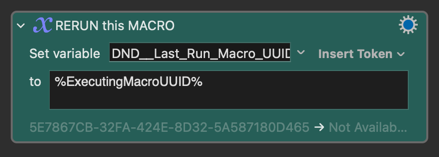
Often, you only need a macro for a specific temporary task. In these cases, you can use a variable like PREFIX__Last_Run_Macro_UUID along with a separate “Rerun” macro that executes the last macro stored in that variable. Here’s the workflow:
-
Create your macro (or record it, if it’s simple). Add a step that sets
PREFIX__Last_Run_Macro_UUIDto%ExecutingMacroUUID%.
-
Trigger your macro using “Trigger by Name” (or any trigger you prefer). This stores the macro’s UUID in
PREFIX__Last_Run_Macro_UUID. -
Use your “Rerun PREFIX__Last_Run_Macro_UUID” macro or AppleScript (bound to an easy shortcut) to trigger the macro you stored in Step 1.
-
Repeat Step 3 as needed. You get the convenience of a shortcut without having to assign one permanently, just for the time you need it.
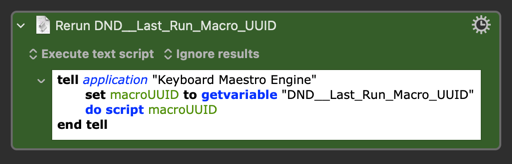
Also, because to rerun it you only need to execute just a little bit of AppleScript, you can use other tools like Karabiner, BetterTouchTool, Alfred, etc. easily.