Hi @Pedro.Carmo, welcome to Keyboard Maestro (KM) and its Forum.
KM is one of the best Mac automation tools available, its Forum is one of the best and friendliest forums on the Internet. Whenever you reach a tough stumbling block trying to use KM, please feel free to post your question/problem here for help.
You will also find this helpful:
Tip: How Do I Get The Best Answer in the Shortest Time?
~~~~~~~~~~~~~~~~~~~~~~~~~~~~~~~~~~~~~~~~~~~~~~~~~~~~~~~~~~~~~~~~~~~~
It is much better to provide real-world data for both your input and output results.
Instead of checkboxes, I'd suggest using the Prompt With List action where you can select multiple items.
Here's an example Macro:
Example Output
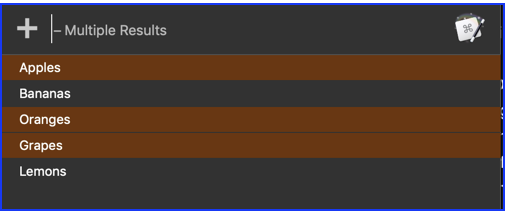
Example Results
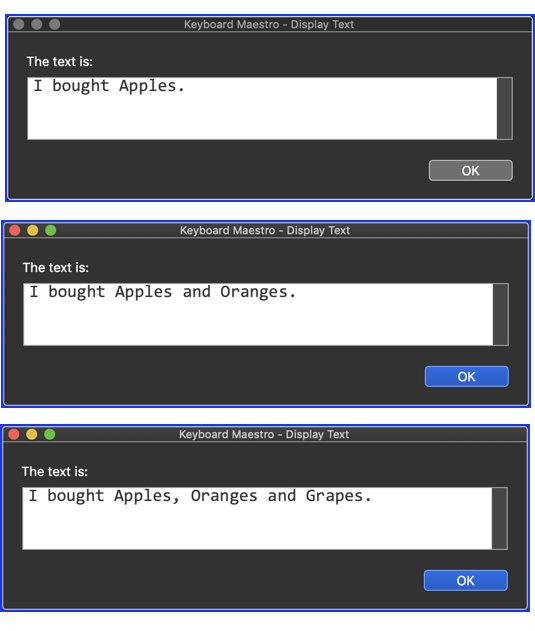
Below is just an example written in response to your request. You will need to use as an example and/or change to meet your workflow automation needs.
Please let us know if it meets your needs, or if you have follow-up questions.
~~~~~~~~~~~~~~~~~~~~~~~~~~~~~~~~~~~~~~~~~~~~~~~~~~~~~~~~~~~~~~~~~~~~
MACRO: Select Multiple Items from a List [Example]
-~~~ VER: 1.0 2020-11-19 ~~~
Requires: KM 8.2.4+ macOS 10.11 (El Capitan)+
(Macro was written & tested using KM 9.0+ on macOS 10.14.5 (Mojave))
DOWNLOAD Macro File:
Select Multiple Items from a List [Example].kmmacros
Note: This Macro was uploaded in a DISABLED state. You must enable before it can be triggered.
