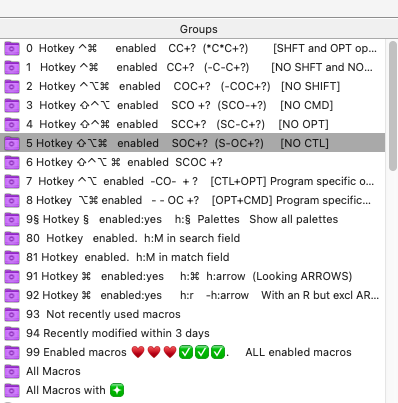
I have tried pieces of paper, crib-sheets, spreadsheets and KeyCue.
This simple solution stays up to date and works very well.
This uses SmartGroups in the KM Editor.
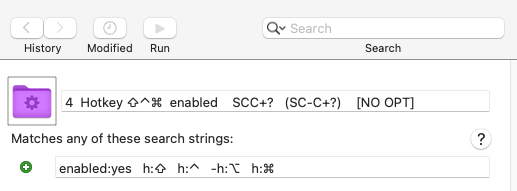
I have these standard SmartGroups setting with the Match/Filter field having the filter criteria
The SearchField (top right) is blank
SCOC is SHFT+CTL+OPT+CMD etc. ? is any single character
Matches any of these strings Description
0 enabled:yes h:⌃ h:⌘ 0 Hotkey ⌃⌘ enabled CC+? (CC+?) [SHFT and OPT optional]
1 enabled:yes -h:⇧ h:⌃ -h:⌥ h:⌘ 1 Hotkey ⌃⌘ enabled CC+? (-C-C+?) [NO SHFT and NO OPT]
2 enabled:yes -h:⇧ h:⌃ h:⌥ h:⌘ 2 Hotkey ⌃⌥⌘ enabled COC+? (-COC+?) [NO SHIFT]
3 enabled:yes h:⇧ h:⌃ h:⌥ -h:⌘ 3 Hotkey ⇧⌃⌥ enabled SCO +? (SCO-+?) [NO CMD]
4 enabled:yes h:⇧ h:⌃ -h:⌥ h:⌘ 4 Hotkey ⇧⌃⌘ enabled SCC+? (SC-C+?) [NO OPT]
5 enabled:yes h:⇧ -h:⌃ h:⌥ h:⌘ 5 Hotkey ⇧⌥⌘ enabled SOC+? (S-OC+?) [NO CTL]
6 enabled:yes h:⇧ h:⌃ h:⌥ h:⌘ 6 Hotkey ⇧⌃⌥⌘ enabled SCOC +?
7 enabled:yes -h:⇧ h:⌃ h:⌥ -h:⌘ 7 Hotkey ⌃⌥ enabled - CO - +? [CTL+OPT] Program specific only
8 enabled:yes -h:⇧ -h:⌃ h:⌥ h:⌘ 8 Hotkey ⌥⌘ enabled - - OC +? [OPT+CMD] Program specific only
Some others:-
10 enabled:yes 10 All enabled macros 

11 group: 11 All Macros with (useful when exporting a selection or
flagging your current working set)
12 enabled:yes mod:3d 12 Recently modified in last 3 days
13 enabled:yes -used:12m 13 Not recently used (in last 12 months)
14 enabled:yes h:r 14 All macros with an R
15 enabled:yes h:r -h:arrow 15 All macros with an R excluding "ARROW" keys
USAGE
Choose appropriate SmartGroup.
Then click on triangle in the macros column to sort by Hotkey.
IMPLEMENTATION
AFAIK you cannot export or import SmartGroup definitions.
The SearchField is blank in the above definitions
REFERENCE