I want to make copies of Files and Folders sitting in my iCloud Drive to one of my Thunderbolt Drives. The issue is that I don’t have enough free space on my internal SSD of my iMac so I need to download, copy the File over and remove the downloaded files one at a time so that I always have enough space on my SSD.
I avoid iCloud as much as possible so you may wish to wait for ideas from an expert..! However…
I gather that you have no choice but to copy the files from the iCloud drive to just one location, i.e. the Downloads folder, and that you then wish to move the files to an attached Thunderbolt drive.
You could set up a macro to move files whenever they have been fully downloaded. The macro could be triggered by a periodic trigger or a folder trigger.
However, it would probably be better to address the underlying issue of lack of space and bypass the internal SSD and download directly to the Thunderbolt drive. If it is not possible to set an alternative download location in iCloud (and that would not surprise me at all!), then you might be able to replace the Downloads folder on the internal SSD with a symlink that goes to a folder on the Thunderbolt drive. Maybe.
That’s a trick that I remember I used for a while many years ago. These days, MacOS is perhaps nailed down so much that this technique is no longer possible (and testing on the version of MacOS that I am running might not guarantee the results that you would get from yours), but if you want to look into the idea of using a symlink to relocate the Downloads folder, it looks as though this article and the last post here will tell you more.
Thanks for your suggestions - but unfortunately this kind of stuff isn’t very new to me … was using these tricks some time ago.
But my situation is quite different since I try to create a One to One Backup Copy for the sake of having my own local copy that I can even access when I need to any time (if e.g. my internet connection is missing or I disabled it).
I know about Parachute Backup but it’s in accessible for situations where I work with macOS Versions older than it’s released for. The same also for Offloader.
I am also far from an iCloud expert (I actively hate about 90% of its features), but why couldn't you just copy the files from the command line directly to the Thunderbolt drive? I just did a quick test, and this seemed to work for me:
My guess is that these are "online only" file/folders. Any copy will involve downloading the full file, replacing the stub in the local iCloud folder, then copying the full file/folder to the external.
That, of course, leaves the original still on the local drive. Even if they are eventually purged and replaced with a stub to return it to "online only" (Dropbox does that, I don't know about iCloud), that's too slow for @Nr.5-need_input and they're running out of volume space.
And targeting each item's Contextual Menu item "Remove Download" is going to get annoying...
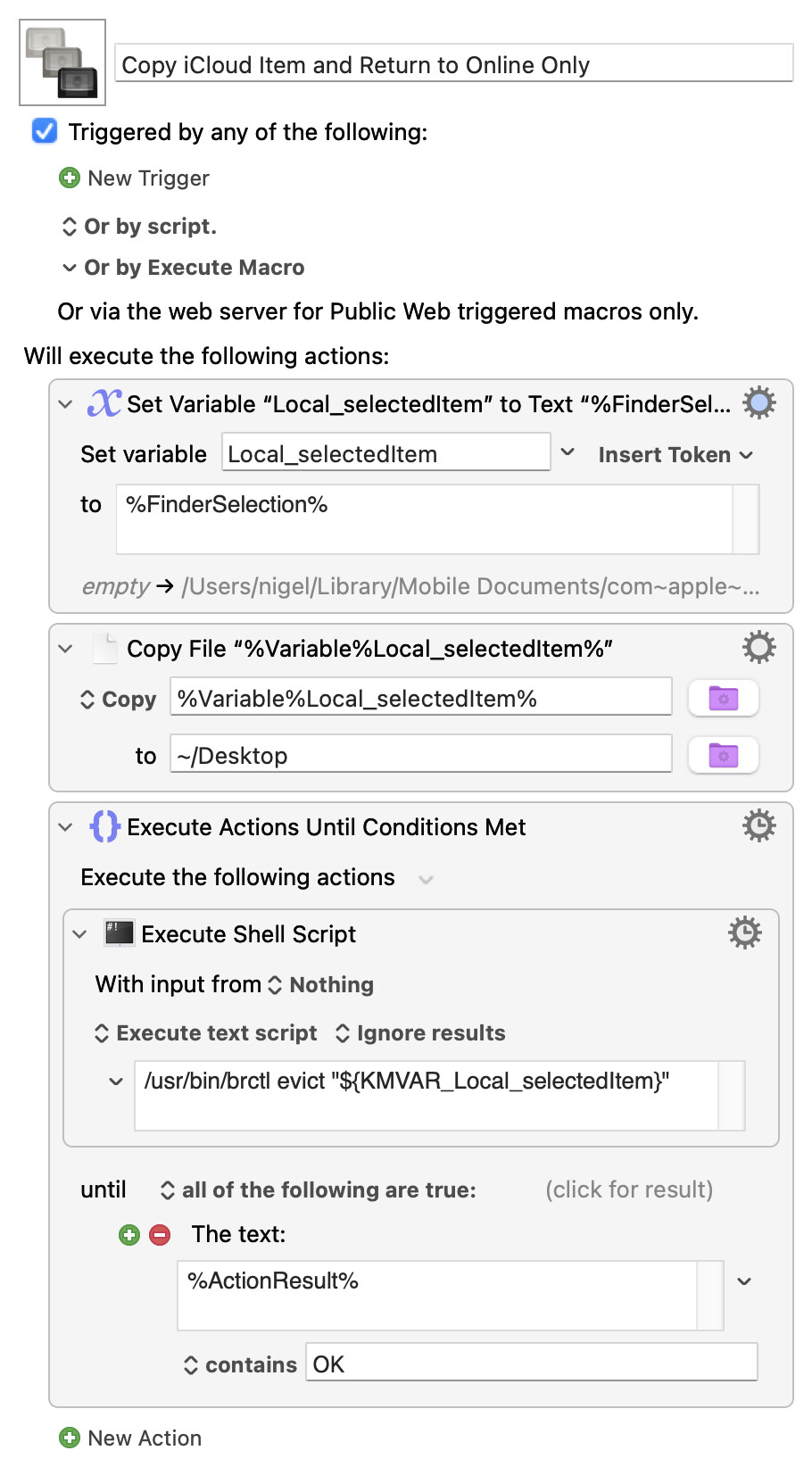
@Nr.5-need_input -- take a look at the built-in brctl utility, the evict option should do what you want. Demo, copying an iCloud item to the Desktop then resetting the original:
I always get a "file is locked" error for (at least) the first run of the shell script, hence the rather hacky brute force "Until..." structure. I'm sure you'll come up with a cleaner method!
You’re right about this - they’re just online only Files and Folders - at least most of the time.
I looked at the man page of brctl seems like a great utility. Thanks for mentioning this. I even searched for it online and found this article. It seems to exist for years now, why does nearly nobody know about this?!
Another thing - is there maybe a way to use its download option before copying the Files/Folders and then using the evict option to revert them to online only ?! I believe this will be even quicker. I have to built a comparing Method with tracking system using SQLite anyway which I tend to do using AppleScript with Shane Stanley’s SQLite Libraries. Is there probably a way for my idea doing it nearly completely in AppleScript incorporating just Classes and Methods from the Foundation Framework?!