During a Zoom call, with the main Zoom window open, I want to open up two Chrome windows via Keyboard Maestro and load two specified URLs (same ones every time). Then I want to arrange the windows (I have two big monitors). My problem is, if Chrome is already running in some other Space (not the one Zoom is in) my two new windows don’t open into the Space with Zoom. Instead they open where Chrome already is. I don’t want to quit Chrome first. I am not a frequent Spaces user so my problem may be a misunderstanding of how Spaces work and not a Keyboard Maestro issue.
From the FAQ:
How can I move an application or window to a particular Desktop/Space?
Unfortunately, Apple have provided no control or API over the Spaces system, so Keyboard Maestro cannot help you control which Space an application or window is in. The only option is to control the UI to perform the required changes.

Yes, and thank you. I’d seen that in the FAQ but I thought maybe someone would have an idea… I can combine technologies if there’s a way to do it in AppleScript, for example. UI scripting is way down on the list. The reason I don’t want to quit Chrome first is it may be in its own Space for a reason… I know I can re-open the windows that were open when I quit Chrome but that just sounds clunky.
The only way you'll be able to do this is via some sort of UI scripting, or by finding one of the increasingly-rare apps out there that can still negotiate Spaces—last I heard, though, that requires disabling SIP to work. Yabai is one such app, but I'll leave finding it as an exercise for you (it's not hard to find, though).
But disabling SIP is a very dangerous thing to do, and I don't know anyone who runs their Mac with it disabled. If you don't want to disable SIP, BetterTouchTool has some degree of ability to work with Spaces.
As a simpler suggestion, though, it sounds like there are two sites you always have to have open on your Zoom call. Instead of worrying about where Chrome is or what state it's in, pick any other browser, and use that exclusively for those two windows when on Zoom. This should be easy to control, and you don't have to use the browser for anything else.
This is a useless suggestion, of course, if there's some corporate site you're loading that only loads in Chrome, or other similar Chrome-dependency.
-rob.
Yes of course; I was suggesting, in passing, that you might want to quit using Chrome entirely (non-Google Chromium browsers include Brave). The underlying issue about Spaces would remain, though! 
I think your suggestion would still be useful in such a use case, since, with a choice of Chromium-based (Blink engine) browsers, one could reserve one of them just for the purpose of accessing that one site.
Could you make those sites into Chrome "Progressive Web App"s instead? That might (I haven't tried) allow you to launch them in the "active" Space rather than Chrome's current one.
Spaces are an automation headache... But clever people on this Forum have come up with some neat workarounds, have a search for more info.
All very interesting and helpful stuff. I think I could use another browser for this, yes. I’ll try that. Thank you.
Hi, @christianboyce, this is easier than you might think.
Assuming you have not assigned Chrome to a specific space, i.e., like this...
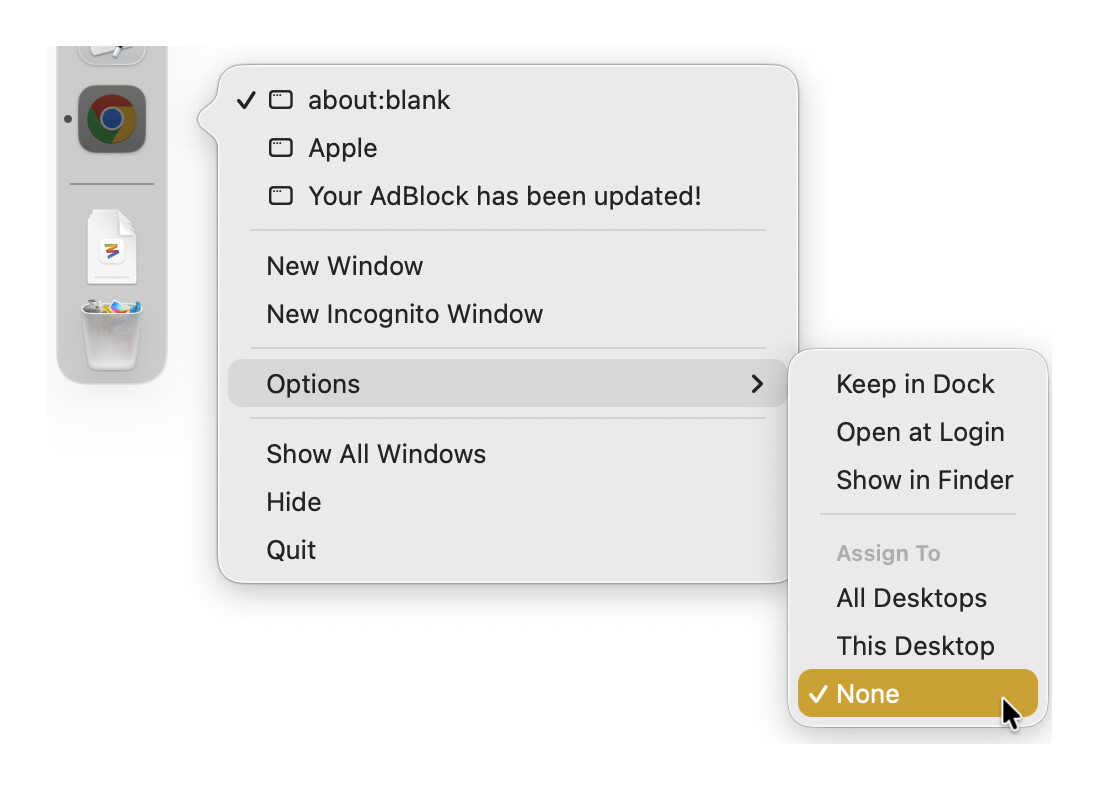
There are two methods:
If Chrome is your default browser, them you can use the Open a URL action.
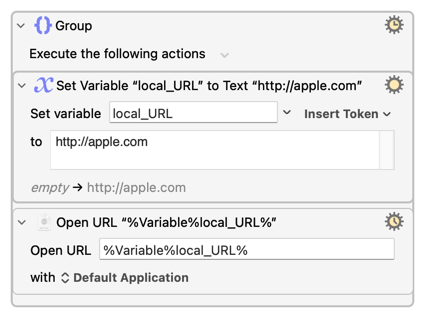
If Chrome is not your default browser, you can use AppleScript.
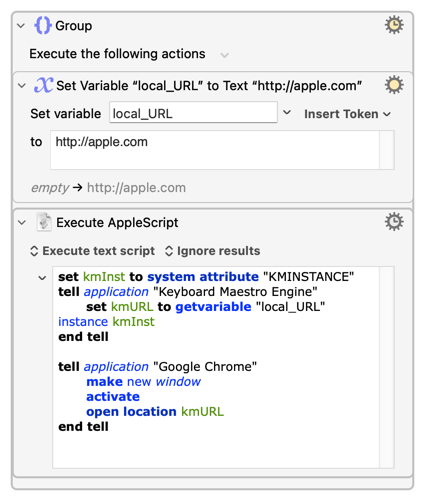
set kmInst to system attribute "KMINSTANCE"
tell application "Keyboard Maestro Engine"
	set kmURL to getvariable "local_URL" instance kmInst
end tell

tell application "Google Chrome"
	make new window
	activate
	open location kmURL
end tell
On a tangential note, if you are big user of Mission Control Desktop Spaces, you might find this thread useful: Desktop Spaces • Macros to Improve Navigation and Window Management