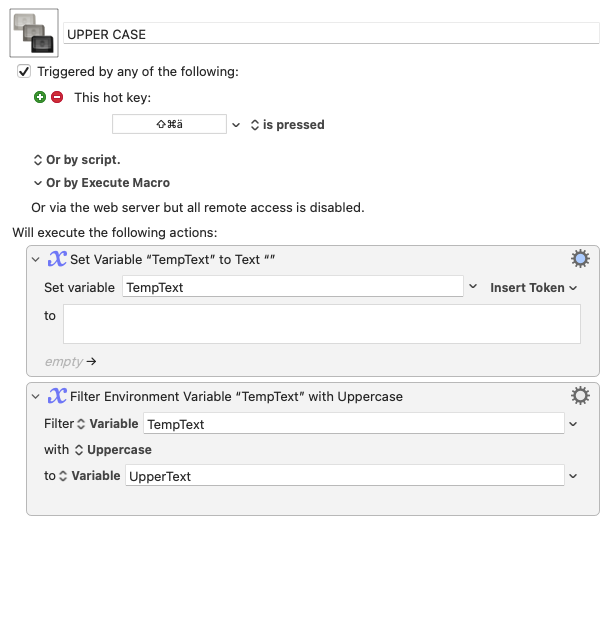
I have some problems understanding how to manipulate text with KM, without using the clipboard (I don’t want to change the current content of the clipboard).
In this case I want to convert the selected text to UPPER CASE. I don’t want to use AppleScript, but the power of KM. That should work with the Filter action right?
But what do I do before and after the Filter action? This, of course, assumes that some text is selected:
The problem is that you have to get your original text from the application somehow, then put the transformed version back in. If you won't use AppleScript (which many apps don't support anyway) then the System Clipboard and KM's "Copy" and "Paste" Actions (or the app's menu item equivalents) is the way to go.
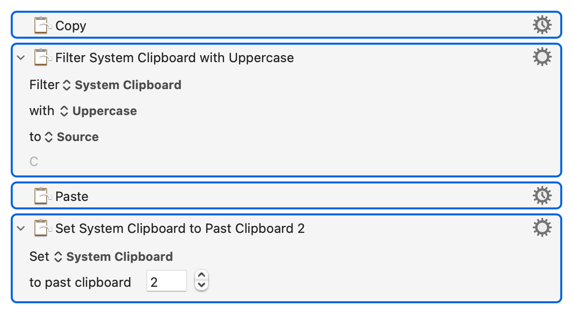
What you can do, since you know how many times you'll be changing the System Clipboard, is restore it to its pre-macro state -- either with a "Set System Clipboard to Past Clipboard" Action or by deleting current Clipboard twice (the transformed text then the Copied text).
So this will transform the currently-selected text, restoring the Clipboard:
You may need to add a "Pause" -- some apps are very slow to Paste and, without a "Pause", you'll sometimes restore/delete before it completes and end up Pasting some previous Clipboard contents.