This is the first sentence.
This is the second sentence.
This is the third sentence.
This is the fourth sentence.
This is the fifth sentence.
The variable Local_targetSegments contains:
Dit is de eerste zin.
Dit is de tweede zin.
Dit is de derde zin.
Dit is de vierde zin.
Dit is de vijfde zin.
The variable Local_alignedSegments should contain:
<tu><tuv xml:lang="en-US"><seg>This is the first sentence.</seg></tuv><tuv xml:lang="nl-NL"><seg>Dit is de eerste zin.</seg></tuv></tu>
<tu><tuv xml:lang="en-US"><seg>This is the second sentence.</seg></tuv><tuv xml:lang="nl-NL"><seg>Dit is de tweede zin.</seg></tuv></tu>
<tu><tuv xml:lang="en-US"><seg>This is the third sentence.</seg></tuv><tuv xml:lang="nl-NL"><seg>Dit is de derde zin.</seg></tuv></tu>
<tu><tuv xml:lang="en-US"><seg>This is the fourth sentence.</seg></tuv><tuv xml:lang="nl-NL"><seg>Dit is de vierde zin.</seg></tuv></tu>
<tu><tuv xml:lang="en-US"><seg>This is the fifth sentence.</seg></tuv><tuv xml:lang="nl-NL"><seg>Dit is de vijfde zin.</seg></tuv></tu>
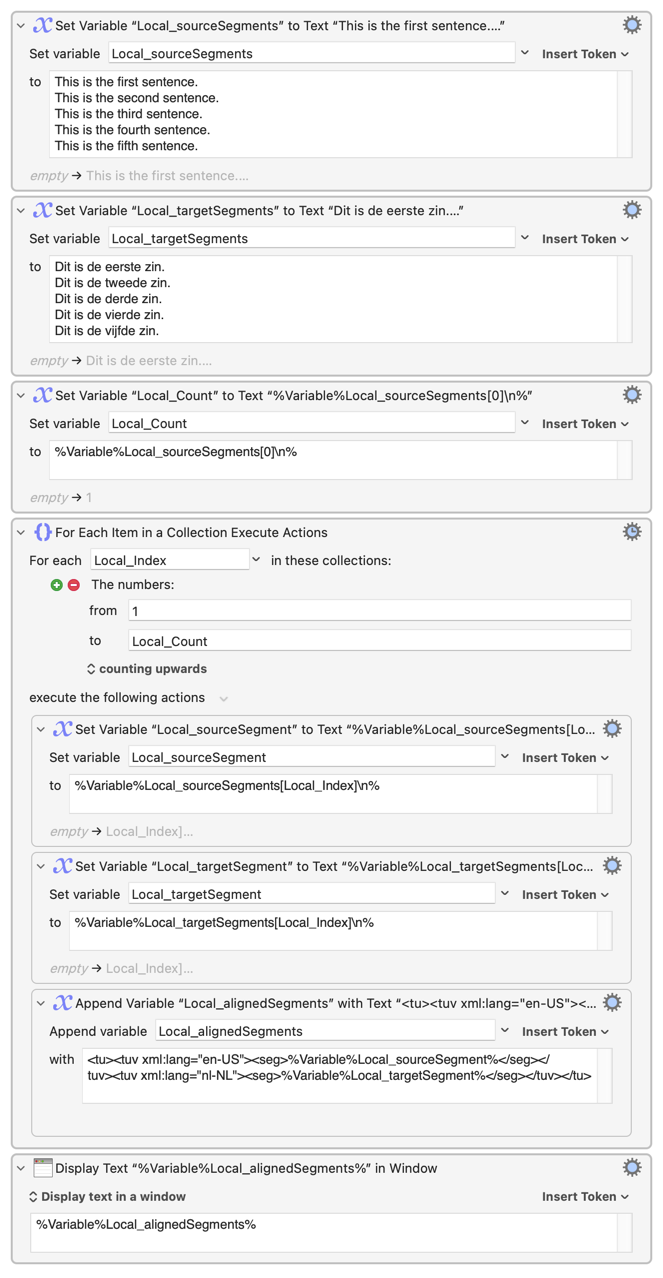
How can I align every line in Local_sourceSegments with the corresponding line in Local_targetSegments?
Use the new ability in Keyboard Maestro 11 to index variables with linefeed separators. Use [0] to get the count, and then a For Each action with Number Range collection to index over them.
Note that you don't really need the two Set Variable actions inside the For Each, that is just for clarity - the tokens could be inserted directly into the Append Variable action.
Peter, I downloaded Keyboard Maestro Actions.kmactions. I see that it is an action, but where do I find it/how do I run it? (I cannot see it in KM at all.) Thank you.
Hum, I had never tried dragging them into a macro, but then again I rarely use drag-and-drop because, in general, I avoid the mouse due to ergo pain caused by years of mouse overuse.
I do, however, (in the Finder) select and open (⌘+o) action files which inserts the actions below the selected actions or at the end of the selected macro (if no actions are selected in the Keyboard Maestro Editor).



 I do!
I do!