[If the mods want me to stop posting as I learn, I am happy to oblige.]
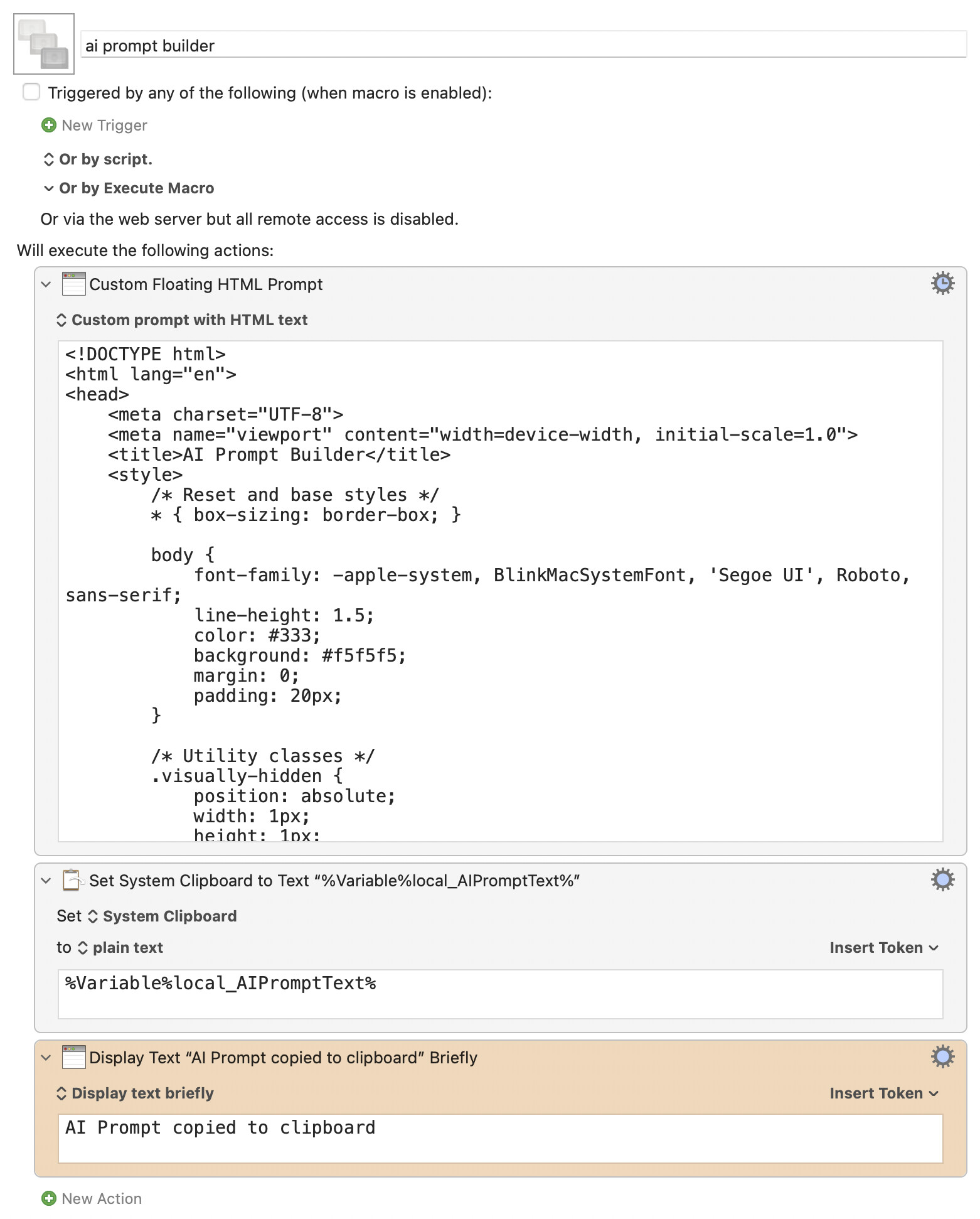
I got something working in Claude that I have tried to turn into a .kmmacros file without success. I want to understand the workings of Keyboard Maestro more, anyway. Hopefully this HTML shows what I'd like to accomplish!
<!DOCTYPE html>
<html lang="en">
<head>
<meta charset="UTF-8">
<meta name="viewport" content="width=device-width, initial-scale=1.0">
<title>AI Prompt Builder</title>
<style>
/* Reset and base styles */
* { box-sizing: border-box; }
body {
font-family: -apple-system, BlinkMacSystemFont, 'Segoe UI', Roboto, sans-serif;
line-height: 1.5;
color: #333;
background: #f5f5f5;
margin: 0;
padding: 20px;
}
/* Utility classes */
.visually-hidden {
position: absolute;
width: 1px;
height: 1px;
padding: 0;
margin: -1px;
overflow: hidden;
clip: rect(0,0,0,0);
white-space: nowrap;
border: 0;
}
/* Layout */
.container {
max-width: 800px;
margin: 0 auto;
background: white;
padding: 30px;
border-radius: 10px;
box-shadow: 0 2px 10px rgba(0,0,0,0.1);
}
h1 {
margin: 0 0 20px;
font-size: 24px;
}
/* Warning banner with transitions */
.warning-banner {
background: #fff3cd;
border: 1px solid #ffeaa7;
color: #856404;
padding: 10px 15px;
margin-bottom: 20px;
border-radius: 5px;
font-weight: 500;
max-height: 0;
opacity: 0;
overflow: hidden;
transition: all 0.3s ease;
}
.warning-banner.show {
max-height: 100px;
opacity: 1;
padding: 10px 15px;
transition: all 0.3s ease-in-out;
}
/* Form sections */
.form-section {
margin-bottom: 25px;
}
label {
display: block;
margin-bottom: 8px;
font-weight: 600;
color: #555;
}
/* Textarea */
.prompt-input {
width: 100%;
min-height: 300px;
padding: 12px;
border: 2px solid #e0e0e0;
border-radius: 6px;
font-family: 'Menlo', 'Monaco', 'Courier New', monospace;
font-size: 14px;
resize: vertical;
transition: border-color 0.2s;
}
.prompt-input:focus {
outline: none;
border-color: #4a90e2;
}
/* Variable section */
.variable-section {
background: #f8f9fa;
padding: 20px;
border-radius: 8px;
}
.options-group {
display: flex;
flex-wrap: wrap;
gap: 20px;
margin-bottom: 15px;
}
.option-set {
display: flex;
gap: 15px;
}
.radio-label, .checkbox-label {
display: flex;
align-items: center;
gap: 6px;
font-size: 14px;
cursor: pointer;
}
input[type="radio"], input[type="checkbox"] {
cursor: pointer;
}
.input-group {
display: flex;
gap: 10px;
margin-bottom: 10px;
}
.text-input {
flex: 1;
padding: 10px;
border: 2px solid #e0e0e0;
border-radius: 6px;
font-size: 14px;
transition: border-color 0.2s;
}
.text-input:focus {
outline: none;
border-color: #4a90e2;
}
/* Buttons */
.btn {
padding: 10px 20px;
border: none;
border-radius: 6px;
font-size: 14px;
font-weight: 600;
cursor: pointer;
transition: all 0.2s;
white-space: nowrap;
}
.btn:disabled {
opacity: 0.6;
cursor: not-allowed;
}
.btn-primary {
background: #4a90e2;
color: white;
}
.btn-primary:hover:not(:disabled) {
background: #357abd;
}
.btn-secondary {
background: #6c757d;
color: white;
}
.btn-secondary:hover:not(:disabled) {
background: #545b62;
}
.btn-success {
background: #28a745;
color: white;
font-size: 16px;
padding: 12px 30px;
}
.btn-success:hover:not(:disabled) {
background: #218838;
}
/* Helper text */
.helper-text {
font-size: 12px;
color: #666;
margin-top: 5px;
}
/* Preview with progressive disclosure */
.preview {
font-family: 'Menlo', 'Monaco', 'Courier New', monospace;
font-size: 12px;
color: #495057;
background: #f8f9fa;
border: 1px solid #dee2e6;
border-radius: 4px;
margin-top: 10px;
max-height: 0;
opacity: 0;
overflow: hidden;
transition: all 0.2s ease;
}
.preview:not(:empty) {
max-height: 60px;
opacity: 1;
padding: 10px;
}
/* Recent variables */
.recent-section {
margin-top: 15px;
max-height: 0;
opacity: 0;
overflow: hidden;
transition: all 0.3s ease;
}
.recent-section.show {
max-height: 200px;
opacity: 1;
}
.recent-title {
margin: 0 0 10px;
font-size: 14px;
color: #666;
}
.variable-chip {
display: inline-block;
background: #e9ecef;
padding: 5px 12px;
border-radius: 20px;
margin: 3px;
font-size: 13px;
cursor: pointer;
transition: background-color 0.2s;
border: none;
}
.variable-chip:hover {
background: #dee2e6;
}
/* Action buttons */
.actions {
display: flex;
gap: 15px;
justify-content: flex-end;
}
/* Loading state */
.loading {
opacity: 0.6;
pointer-events: none;
}
/* Media queries for responsiveness */
@media (max-width: 600px) {
.options-group {
flex-direction: column;
gap: 15px;
}
.actions {
flex-direction: column;
gap: 10px;
}
.input-group {
flex-direction: column;
}
.btn {
width: 100%;
}
}
</style>
</head>
<body>
<div class="container">
<h1>AI Prompt Builder</h1>
<div id="warningBanner" class="warning-banner" role="alert" aria-live="polite">
⚠️ REMEMBER TO INCLUDE MENTIONED ATTACHMENTS
</div>
<form id="promptForm">
<div class="form-section">
<label for="scratchpad">Prompt Composition</label>
<textarea
id="scratchpad"
class="prompt-input"
aria-describedby="scratchpad-help"
placeholder="Enter your prompt here..."
required></textarea>
<div id="scratchpad-help" class="helper-text">
Press Cmd+Enter to copy to clipboard
</div>
</div>
<div class="variable-section form-section">
<fieldset>
<legend class="visually-hidden">Variable Generator Options</legend>
<div class="options-group">
<div class="option-set" role="radiogroup" aria-label="Tag type">
<label class="radio-label">
<input type="radio" name="tagType" value="opening" checked>
<span>Opening tag only</span>
</label>
<label class="radio-label">
<input type="radio" name="tagType" value="both">
<span>Opening & closing tags</span>
</label>
</div>
<div class="option-set">
<label class="checkbox-label">
<input type="checkbox" id="appendToBottom">
<span>Also append as block at bottom</span>
</label>
</div>
</div>
<div class="input-group">
<label for="variableName" class="visually-hidden">Variable name</label>
<input
type="text"
id="variableName"
class="text-input"
aria-label="Variable name"
aria-describedby="variable-help preview"
placeholder="e.g., textbook_contents"
autocomplete="off">
<button type="button" id="insertBtn" class="btn btn-primary">
Insert Variable
</button>
</div>
<div id="variable-help" class="helper-text">
Spaces → underscores, special characters removed
</div>
<div id="preview" class="preview" role="status" aria-live="polite"></div>
<div id="recentSection" class="recent-section">
<h3 class="recent-title">Recent Variables (click to reuse):</h3>
<div id="recentChips" role="group" aria-label="Recent variables"></div>
</div>
</fieldset>
</div>
<div class="actions">
<button type="button" id="cancelBtn" class="btn btn-secondary">
Cancel
</button>
<button type="submit" id="submitBtn" class="btn btn-success">
Copy to Clipboard
</button>
</div>
</form>
</div>
<script>
// State management
const state = {
recentVariables: [],
isSubmitting: false
};
// DOM references
const elements = {
form: document.getElementById('promptForm'),
scratchpad: document.getElementById('scratchpad'),
variableName: document.getElementById('variableName'),
preview: document.getElementById('preview'),
warningBanner: document.getElementById('warningBanner'),
recentSection: document.getElementById('recentSection'),
recentChips: document.getElementById('recentChips'),
insertBtn: document.getElementById('insertBtn'),
cancelBtn: document.getElementById('cancelBtn'),
submitBtn: document.getElementById('submitBtn'),
tagTypeRadios: document.querySelectorAll('input[name="tagType"]'),
appendCheckbox: document.getElementById('appendToBottom')
};
// Utility functions
function formatVariableName(name) {
return name.trim()
.toLowerCase()
.replace(/\s+/g, '_')
.replace(/[^a-z0-9_]/g, '');
}
function setCursorPosition(textarea, position) {
textarea.focus();
textarea.setSelectionRange(position, position);
}
function updatePreview() {
const formatted = formatVariableName(elements.variableName.value);
const tagType = document.querySelector('input[name="tagType"]:checked').value;
if (formatted) {
const previewText = tagType === 'both'
? `<code><${formatted}></${formatted}></code>`
: `<code><${formatted}></code>`;
elements.preview.innerHTML = `Preview: ${previewText}`;
} else {
elements.preview.innerHTML = '';
}
}
function checkAttachments() {
const text = elements.scratchpad.value.toLowerCase();
const hasAttachment = text.includes('attached') || text.includes('see attached');
elements.warningBanner.classList.toggle('show', hasAttachment);
}
function insertVariable(variableName = null) {
const rawName = variableName || elements.variableName.value.trim();
if (!rawName) {
elements.variableName.focus();
return;
}
const formattedName = formatVariableName(rawName);
const tagType = document.querySelector('input[name="tagType"]:checked').value;
const appendToBottom = elements.appendCheckbox.checked;
const textarea = elements.scratchpad;
const start = textarea.selectionStart;
const end = textarea.selectionEnd;
const text = textarea.value;
// Determine what to insert
const insertText = tagType === 'both"
? `<${formattedName}></${formattedName}>`
: `<${formattedName}>`;
// Build new text
let newText = text.substring(0, start) + insertText + text.substring(end);
if (appendToBottom) {
if (!newText.endsWith('\n\n')) {
newText += newText.endsWith('\n') ? '\n' : '\n\n';
}
newText += `<${formattedName}>\n\n</${formattedName}>`;
}
textarea.value = newText;
setCursorPosition(textarea, start + insertText.length);
// Update recent variables
if (!state.recentVariables.includes(formattedName)) {
state.recentVariables.unshift(formattedName);
if (state.recentVariables.length > 5) state.recentVariables.pop();
updateRecentVariables();
}
// Clear input
if (!variableName) {
elements.variableName.value = '';
elements.preview.innerHTML = '';
}
checkAttachments();
}
function updateRecentVariables() {
if (state.recentVariables.length > 0) {
elements.recentSection.classList.add('show', true);
elements.recentChips.innerHTML = state.recentVariables
.map(v => `<button type="button" class="variable-chip" data-var="${v}" aria-label="Insert ${v}"><${v}></button>`)
.join('');
}
}
async function handleSubmit(e) {
e.preventDefault();
if (state.isSubmitting) return;
let promptText = elements.scratchpad.value.trim();
if (!promptText) {
elements.scratchpad.focus();
return;
}
state.isSubmitting = true;
elements.form.classList.add('loading');
// Add attachment reminder if needed
if (elements.warningBanner.classList.contains('show')) {
promptText = 'REMEMBER TO INCLUDE MENTIONED ATTACHMENTS\n\n' + promptText;
}
try {
window.KeyboardMaestro.SetVariable('AIPromptText', promptText);
window.KeyboardMaestro.Submit('OK');
} catch (error) {
console.error('Error submitting to Keyboard Maestro:', error);
} finally {
state.isSubmitting = false;
elements.form.classList.remove('loading');
}
}
// Event listeners
elements.variableName.addEventListener('input', updatePreview);
elements.tagTypeRadios.forEach(radio => {
radio.addEventListener('change', updatePreview);
});
elements.scratchpad.addEventListener('input', checkAttachments);
elements.insertBtn.addEventListener('click', () => insertVariable());
elements.variableName.addEventListener('keypress', (e) => {
if (e.key === 'Enter') {
e.preventDefault();
insertVariable();
}
});
// Event delegation for recent chips
elements.recentChips.addEventListener('click', (e) => {
if (e.target.classList.contains('variable-chip')) {
insertVariable(e.target.dataset.var);
}
});
elements.form.addEventListener('submit', handleSubmit);
elements.cancelBtn.addEventListener('click', () => {
window.KeyboardMaestro.Cancel();
});
// Global keyboard shortcuts
document.addEventListener('keydown', (e) {
if (e.key === 'Enter' && (e.metaKey || e.ctrlKey)) {
e.preventDefault();
handleSubmit(e);
}
});
// Initialize
elements.scratchpad.focus();
checkAttachments();
</script>
</body>
</html>