In TextExpander (TE), you can create a formatted snippet to store things like a rich-text hyperlink (like KM Forum). Since KM variables can only store plain text, the only way I know to store rich-text is in a Named Clipboard.
However, I just discovered that you can "Insert Styled Text by Pasting":
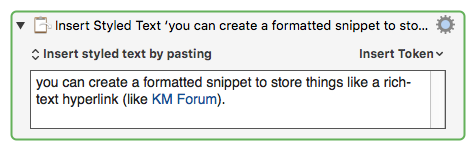
To get this KM Action, goto KM Editor > Actions > Text > Insert Text by Pasting.
Then change the popup to "Insert Styled Text by Pasting"
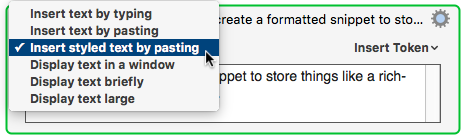
So you could use this KM Action in a text-expansion Macro.
You would have to create the rich-text hyperlink in another app, or in another KM Macro, and then paste into the above Action.
Here is a complex Macro that creates rich-text hyperlinks:
Macro: Set Clipboard to RTF Hyperlink & Plain Text MD Link
It may be more complex than you need, but you could use parts of it, include the script that actually creates the hyperlink, in a much simpler macro.
Hope this helps. Please feel free to ask any follow-up questions.