Also check out the "Prompt with List" Action's "friendly values" section for how to have "easy" names in the prompt with "self-documenting" names in the Switch/Case.
If you want to do it somewhat dynamically you can use AppleScript, which will be slower:
set inst to system attribute "KMINSTANCE"
tell application "Keyboard Maestro Engine"
	set groupID to getvariable "Local_choice" instance inst

	do script "<dict>
		<key>DisplayToggle</key>
		<true/>
		<key>MacroActionType</key>
		<string>MacroGroupToggle</string>
		<key>MacroGroupUID</key>
		<string>" & groupID & "</string>
		<key>ToggleMode</key>
		<string>TogglePalette</string>
	</dict>"
end tell
For a truly dynamic solution you'll need a way to also generate the prompt list. That's not too difficult if the Editor is open:
tell application "Keyboard Maestro"
	set theList to {id, name} of every macro group
end tell
set promptList to ""

repeat with i from 1 to count of item 1 of theList
	set promptList to promptList & item i of item 1 of theList & "__" & item i of item 2 of theList & linefeed
end repeat
...which you could also filter by the Macro Groups' enabled property.
Otherwise you'll have to do something like parsing out Macro Group UIDs and names from the XML returned by:
tell application "Keyboard Maestro Engine"
	getmacros with asstring
end tell
Since my testing is limited (Mojave, KM 11.0.4), I hesitate to add this hack to @Nige's comprehensive rundown of strategies.
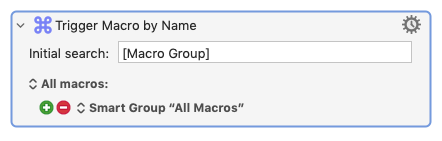
Among the macro names in Trigger Macro By Name, there are entries that end with: [Macro Group] These entries are, I believe, the ToggleMacroUID of hot key activated macro groups--those whose activation option is set to other than: Always Activat.e Selecting an entry like this toggles the macro group in accordance with its activation setting.
So you could set the initial search term of a Trigger Macro By Name action to:[Macro Group]+space.
(If you do go down the getmacros or gethotkeys route, it can be a bit slower--or faster if you have a lot of macros--than Trigger Macros By Name. It can also be technical and, depending on the implementation, involved. Shout if you give it a try.)
For now here's the Trigger By Name hack.
USAGE:
Open Test Macro Group.
Enable the group, the main macro and the subroutine macro.