Very nice tutorial, @JuanWayri. Thanks so much for sharing.
At the risk of stating the obvious, let's not forget the Execute a Subroutine action. One downside of that action, however, is that the subroutine macro cannot be spawned asynchronously.
This risk, of course, can be significantly minimized by delimiting with unicode characters that are very unlikely to appear in sequence in the parameters. For example:
In the Execute a Macro With Parameter: ABC●⎹●JKL●⎹●XYZ
Within the called macro:
%TriggerValue[1]●⎹●%
%TriggerValue[2]●⎹●%
%TriggerValue[3]●⎹●%
More information can be found in the wiki: Variable Arrays
Of course, in some situations this is an advantage. I use this approach often in macros that have settings that I want to retain between macro executions.
I shared my approach in another tutorial: Store Macro Settings in a Dictionary for Reuse
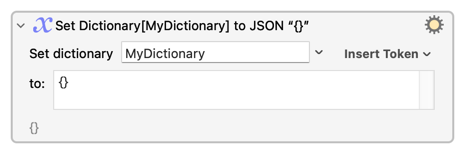
A dictionary can be deleted using the Set Dictionary to JSON action with {}.
Lastly, whenever dictionaries are discussed, I like to mention Variable Inspector Prompt and Dictionary Editor by @DanThomas. With this essential macro, dictionaries can be deleted with the delete key or the wastebasket icon in the macro toolbar.