Is it possible to expand my text macro in such a way as to tell it to paste the system-clipboard (always) to a specific row (row84) in an existing BBEdit file?
Usage: the latest entry will always be at top and the procedure would simplify the process.
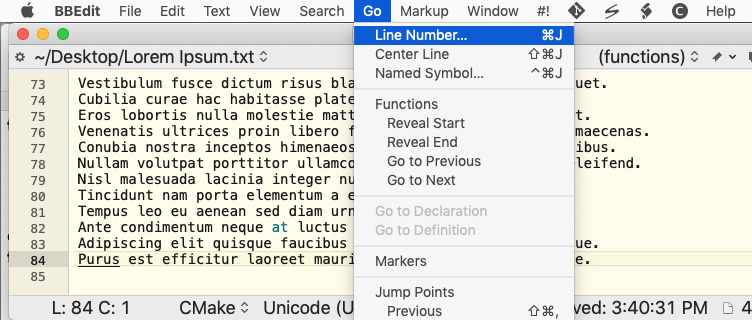
You could use Select or show a menu item to trigger the menu item Go > Line number… (or, if you prefer, use the Type a keystroke action to type the shortcut, ⌘ J).
document 1 is the frontmost document, the one that's currently active.
If you want to target a document by its properties (name, file path, or similar) you can filter every document with the appropriate whose clause then use the first item of the resulting list:
tell application "BBEdit"
	tell item 1 of (every document whose name is "Solo A1.kmmacros")
		return (count characters)
	end tell
end tell
You'll want to include error checking etc, but that's the basics.
tell application "BBEdit"
	tell item 1 of (every document whose name is "MYFILENAME.php")
		return (count characters)
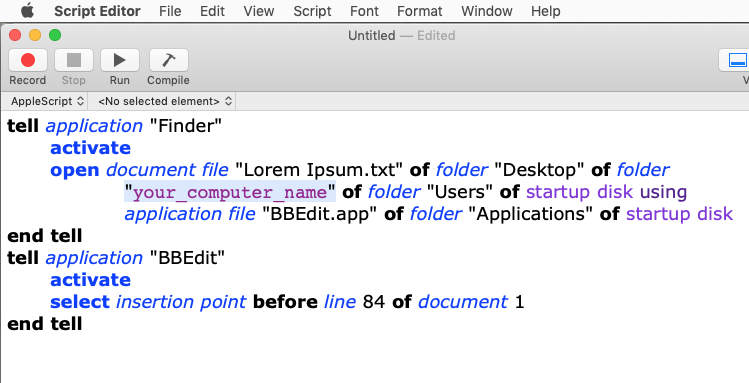
		select insertion point before line 84 of document 1

	end tell
end tell
...is setting the target of the next command(s) to be BBEdit.
Similarly,
select insertion point before line 84 of document 1
...makes the target of select insertion point to be document 1, even if you are already targeting a different document.
Your code also includes a return statement -- your script will exit there and not even execute the select insertion point line.
You want something like:
tell application "BBEdit"
	tell item 1 of (every document whose name is "MYFILENAME.php")
		select insertion point before line 84
	end tell
end tell
...although you still need to insert your Clipboard text in some way.
Why do you need a path, specifically?
What you need is some way to distinguish "the document I want to add text to" from all the other documents you might have open in BBEdit. If it will always be the frontmost document then use document 1. If it will always have a certain name and that name will be unique amongst your open documents then you can use the form item 1 of (every document whose name is "MYFILENAME.php"). If you want precise targeting you can use the file path, remembering that BBEdit expects a Mac-style path and that you can't use whose so have to check each document in turn to find your match:
tell application "BBEdit"
	repeat with eachDoc in (get every document)
		if (file of eachDoc) as text is "Macintosh HD:Users:nigel:Desktop:For Forum:Solo A1.kmmacros" then
			select insertion point before line 84 of eachDoc
			exit repeat
		end if
	end repeat
end tell
If you are opening the document too, save a reference at that stage:
tell application "BBEdit"
	set theDoc to (open file "Macintosh HD:Users:nigel:Desktop:For Forum:Solo A1.kmmacros")
	select insertion point before line 84 of theDoc
end tell
As you can see, there are many ways to do things depending on what you actually want to achieve. And, as always in macro writing or programming, the more precise your plan the quicker you'll be able to create a working solution.
...leaves too much to guess-work, so you are either going to have to pick from the various options and make them work for you or write a more complete plan.
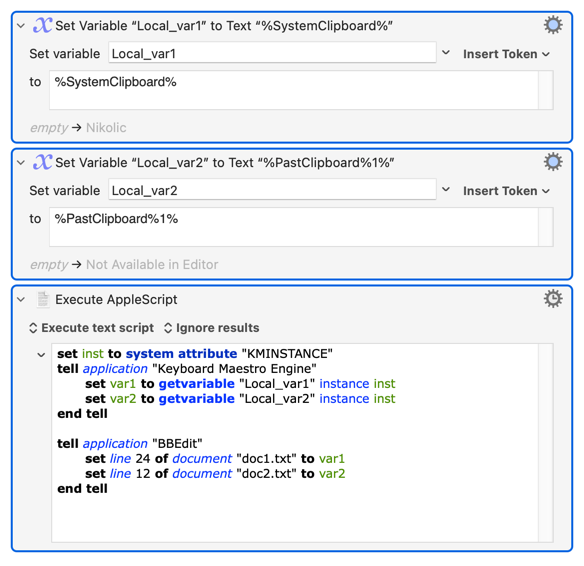
Remember that it is inefficient to alternate AS and KM Actions in one macro because each AS has an instantiation cost in both time and resources (if that's what you are actually doing). So you don't want to:
AS to set insertion point in doc1
KM to Paste
AS to set insertion point in doc2
KM to Paste
...etc
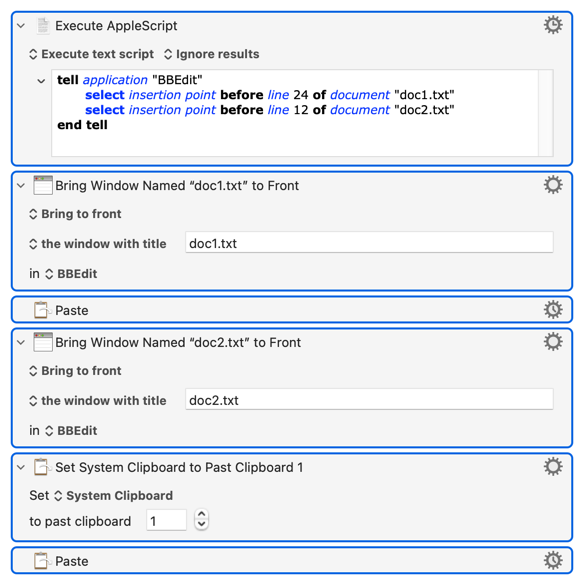
Better, if you can, to either set up all your documents in one go then use KM's "Bring Window to Front" and "Paste" Actions:
Note that you don't need to use the "first item of a list of documents named...." format, which was me incorrectly carrying over similar from Finder. BBEdit is quite OK with you targeting the document by name, even when you have multiple windows open on the same document.