How to quickly select macros within an "expandable" Palette

I'm glad you want more power, but for the record the reason I hardcoded 8 buttons (in two rows) is because that's what you said you wanted. Everything takes time to solve.

P.S. While my macro does contain HTML, it also contains Javascript. I did get a lot of help from AI to write that Javascript. The real point I'm making here is that one doesn't need to learn to code to write code anymore, because AI specializes in being able to write code. However it may always require a skilled hand to guide it, because it still mis-interprets what you request. It usually takes ten questions/answers before I get AI's solution to work.

Coming up with version 2 of my previous macro, retooled with no GUI scripting. Should be available after a bit...

Well, GUI scripting is no good. Surprise me. :wink:

Sorry for the fly in the ointment (something to do with timing, I think) and thanks for the feedback .

No more GUI scripting in this version of my previous macro.

This version of my previous macro has some overlap, so I think you can still use your cursor mover.

It looks like you're clicking the palette item using the with front window coordinates?

Since this macro uses no GUI scripting, there would be no clicks, virtual or manual. The only requirement for the palette is:

  • its window must be at the top in the Z-order.

Hovering on shrunk palettes and clicking on the title bar of titled palettes, or selecting the edges of a palette with no title bar will bring it to the top. (It could even be done with a GUI script--a one-liner).

Otherwise, the palette can be anywhere, in any state, shrunk, with or without title bar.

Yeah, I know. Sorry for that too.

However, we're getting into meta-automation territory, so I'm afraid unfamiliarity is part of the landscape.

I think KM Engine's AppleScript may still have something to offer.

It is built for automating KM and is really a gift with a very friendly, solid programming interface (as much as is possible with AppleScript). It lets users do more with KM than what is possible with its usual WYSIWYG interface--your goal precisely.

Having said that, this version of my previous upload uses one of two the Engine's commands that get the in-memory plists--also gifts. These literally have no interface. Hopefully, some handlers in my AppleScript provide a usable query interface, if crude. They should never have to be "tweaked"-- just used.

It is the best balance of the familiar and unfamiliar I could come up with.

I am proposing using the palette window's name to look up the palette's group via the Engine's AppleScript command gethotkeys. So:

  • Search for the group
  • Get the matching list of macros
  • Get their ids
  • Get their indexes

Assuming...

  1. there is a unique match ofwindow name to group
  2. the order of the gethotkeys list and palette items is the same

...we should be able to get a list of macro ids that matches the palette list.

Then, just select a macro id by index (ie, the numeric single key trigger that was imported to the AppleScript) and trigger the macro at the corresponding index.

So the design of the macro and its script's interface (accepts numeric input) is the same as the previous one. The only change is the AppleScript. Its macro triggering method is now completely programmatic. No clicks, virtual or manual.

(Sorry. Couldn't get the color formatting to work).

AppleScript
use AppleScript version "2.4" -- Yosemite (10.10) or later
use framework "Foundation"
use scripting additions
property author : "@CRLF"
property ghkGroups : missing value
set paletteName to ""

set kminstance to system attribute "KMINSTANCE"
tell application id "com.stairways.keyboardmaestro.engine"
	set paletteIndex to (getvariable "PaletteIndex")
	set paletteNameToSearch to getvariable "localPaletteName" instance kminstance
	if paletteIndex = "" then set paletteIndex to 0
end tell

if name of current application is not "osascript" then
	set paletteIndex to 1
	set paletteNameToSearch to "Palette - Launcher"
end if

--zero-based indexing for NSArray
if paletteIndex ≠ 0 then
	set paletteIndex to paletteIndex - 1
end if

set uncloseablewindows to {}
tell application id "com.stairways.keyboardmaestro.engine"
	if paletteNameToSearch is "" then
		set uncloseablewindows to name of windows whose closeable is false and name is not "Keyboard Maestro"
		if uncloseablewindows is {} then return "no palette windows found"
	else
		if paletteNameToSearch is not in name of windows then
			return "\"" & paletteNameToSearch & "\"" & " was not found in KM Engine windows"
		end if
	end if
end tell
set thePaletteGroupDict to missing value

if uncloseablewindows is not {} then
	repeat with aWindowName in uncloseablewindows
		set thePaletteGroupDict to my groupWhoseNameIs(contents of aWindowName)
		if thePaletteGroupDict is not missing value then
			exit repeat
		end if
	end repeat
else
	set thePaletteGroupDict to my groupWhoseNameIs(paletteNameToSearch)
	if thePaletteGroupDict is missing value then return paletteNameToSearch & " not found in gethotkeys."
end if


if thePaletteGroupDict is not missing value then
	set thePaletteName to (thePaletteGroupDict's objectForKey:"name") as text
	set theMacros to getMacrosFromGroupDict(thePaletteGroupDict)
	(theMacros's valueForKeyPath:"name")'s componentsJoinedByString:linefeed
	set theMacroDict to (theMacros's objectAtIndex:paletteIndex)
	set theMacroName to (theMacroDict's objectForKey:"name") as text
	set theMacroID to (theMacroDict's objectForKey:"uid") as text
	
	tell application id "com.stairways.keyboardmaestro.engine"
		ignoring application responses
			do script theMacroID
		end ignoring
	end tell
	
end if
return thePaletteName & "(group)" & linefeed & theMacroName & "(macro)"
--===========HANDLERS==================
--gethotkey's plist and plist query handlers
on GHK()
	if ghkGroups is not missing value then return ghkGroups
	tell application id "com.stairways.keyboardmaestro.engine" to set groups to current application's NSPropertyListSerialization's propertyListWithData:((current application's NSData's dataWithData:(gethotkeys with getall))'s |data|()) options:2 format:(missing value) |error|:(missing value)
	set ghkGroups to groups
	return ghkGroups
end GHK

--returns missing value if no matches found
on groupWhoseNameIs(groupName)
	set groups to GHK()
	set matches to groups's filteredArrayUsingPredicate:(current application's NSPredicate's predicateWithFormat:"%K == %@" argumentArray:{"name", groupName})
	return matches's firstObject()
end groupWhoseNameIs

on getMacrosFromGroupDict(groupDict)
	set theMacros to groupDict's valueForKeyPath:"macros"
	set theMacros to theMacros's filteredArrayUsingPredicate:(current application's NSPredicate's predicateWithFormat:"NOT %K CONTAINS %@" argumentArray:{"sort", ")"})
	return theMacros
end getMacrosFromGroupDict

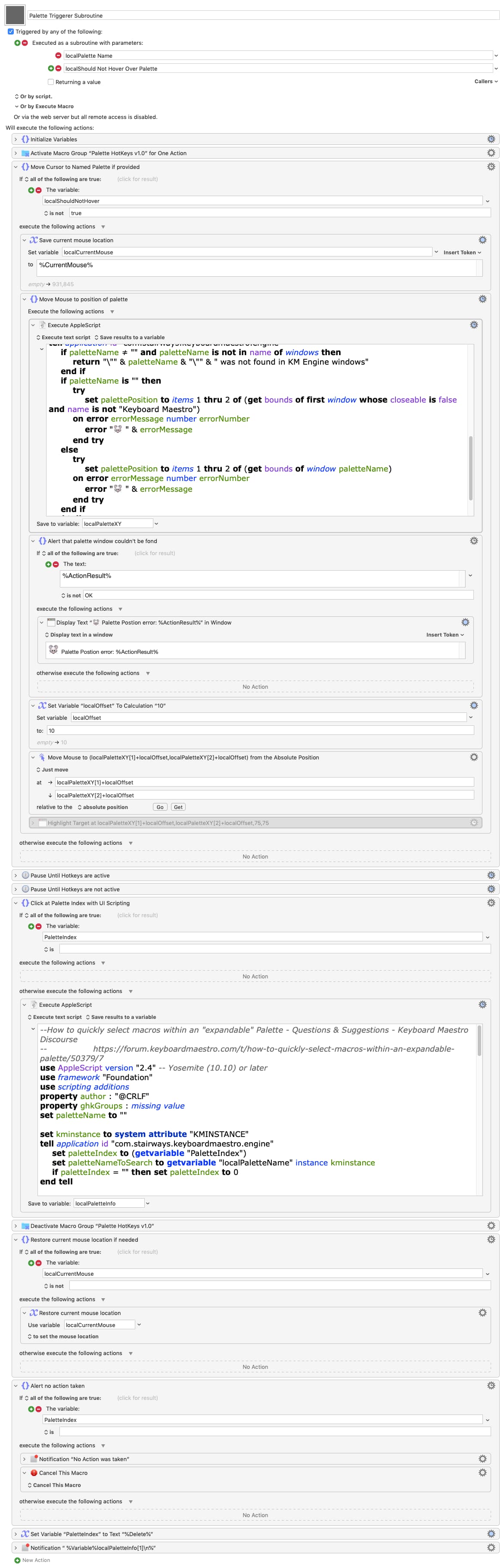
Macro Image


Requirements:

  • the target palette window is top of the Z-order
  • groups must be uniquely named
  • the getmacros plist order and the palette item order match.

This last one seems to hold up under my limited testing.

Delete the old version before importing this version or the group references may get mixed up.

FIX APPLIED. Should not error on 2nd run.

  • Moves cursor over palette before user clicks.
  • Main macro is a subroutine.
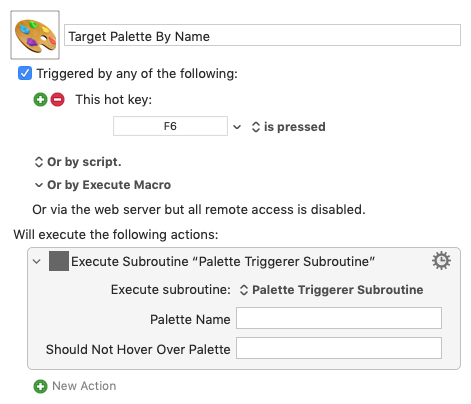
  • Calling macros can specify a palette to target.
  • It defaults to targeting the currently focused palette.
  • Fixed Escape macro to deactivate its macro group.

Palette Triggerer and Palette HotKeys v1.0.kmmacros (34.1 KB)

Yeah, 8 buttons were what I had in mind at first, but I was still figuring out the best way to do it and still am, so changes are inevitable, that’s why I try to avoid using stuff that I have no idea how it works or I can’t easily modify it by myself because asking you to remake or tweak something over and over would be a big waste of your time.

I actually tried using AI to help me make some more complicated macros, and it loves spitting out AppleScript or shell scripts that never work for me. It’s either not accurate or misinterprets what I requested like you said! And since I don’t understand AppleScript, I don’t even know what might have gone wrong in the script or even just what the next right question to ask! It’s pretty frustrating, but that’s what I get for not knowing stuff haha. :sweat_smile:

No Thank You! I will try this one out later!

Aha!

This, I think, is the offending line in version 1:

set paletteName to name of window 1

Delete It.

Just below:

use scripting additions

Place this:

tell application id "com.stairways.keyboardmaestro.engine"
	set paletteName to name of first window whose closeable is false and name is not "Keyboard Maestro"
end tell

I'll get around to updating the original in while...

Lot's of possibilities for both scripts, I think, but that's for another day.

UPDATED : Palette Clicker and Palette HotKeys v1.kmmacros

Delete the previous version before installing.

(Above)

I tried the 2nd version a few dozen’s time but the situation is similar with the 1st version.

2nd version testing:

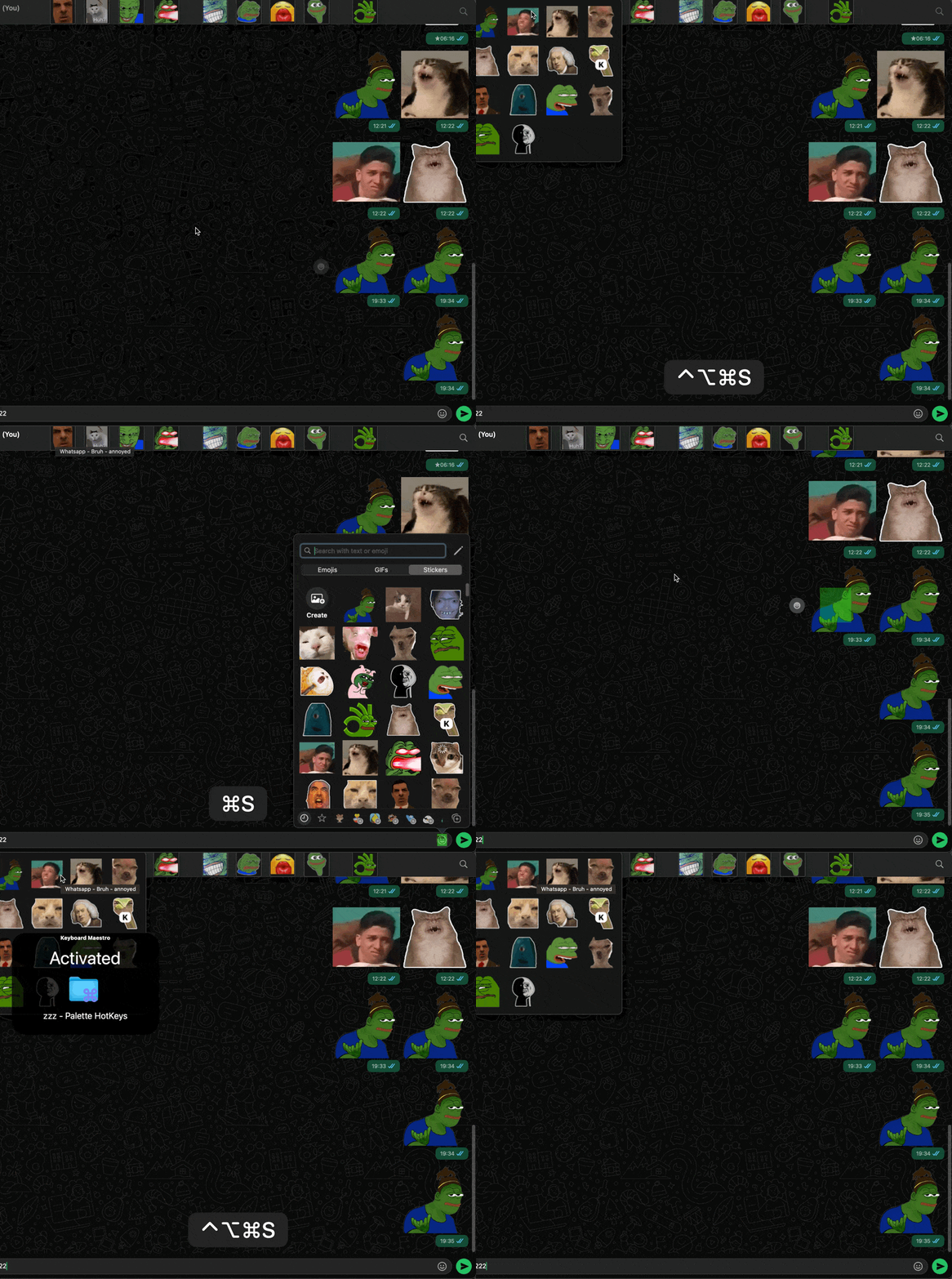
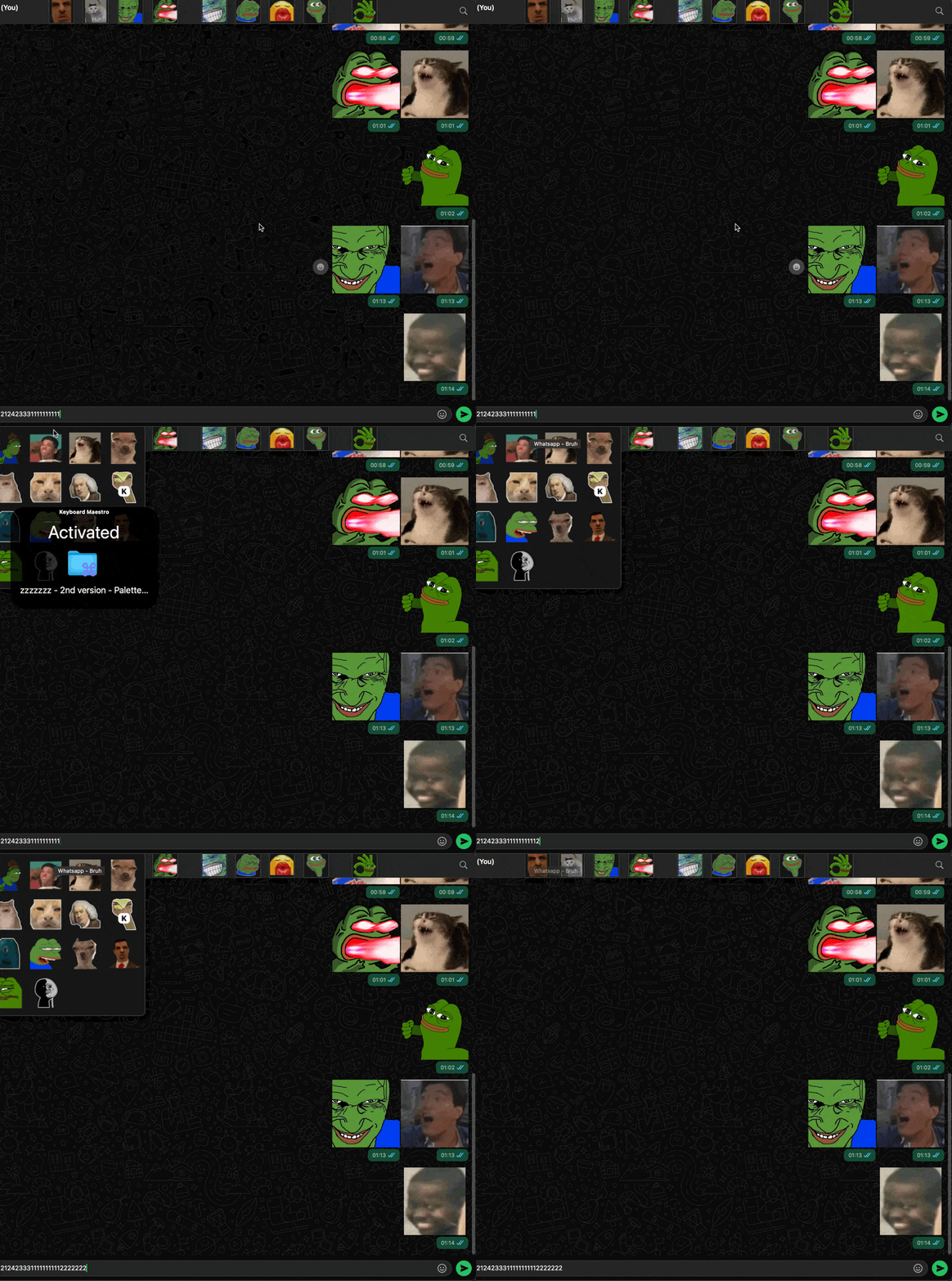
CleanShot 2025-10-18 at 19.35.28

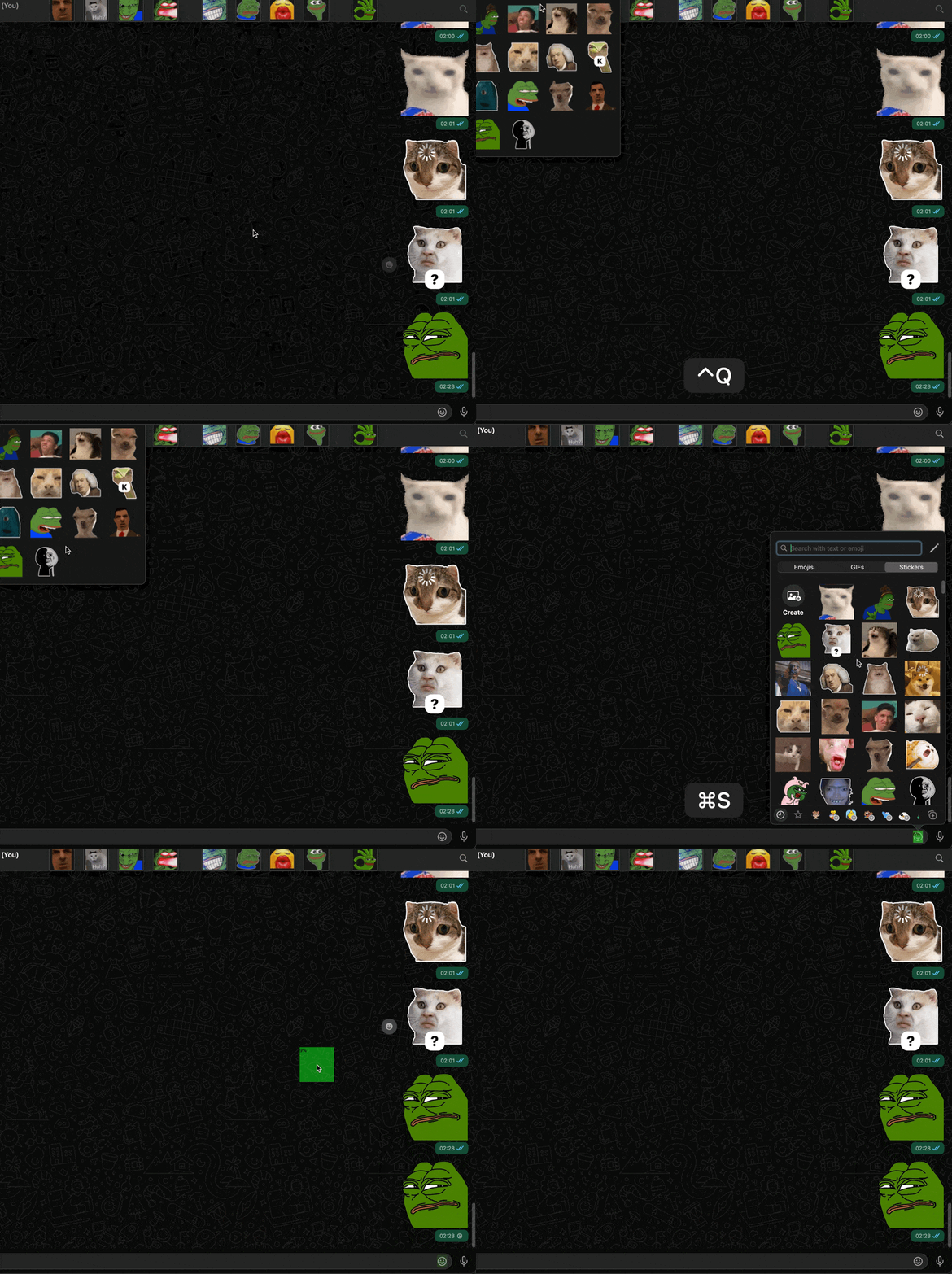
I did not click on any palette item; I simply hovered the cursor over the palette and activated the “Palette Hotkey“ macro groups with a hotkey then I pressed 1 to trigger the first macro in the palette (i.e. sending the first sticker). I repeated the same steps but pressed 2 the next time, which returned “Window not Found“ error message.

I am not entirely sure what that means? Palette items must be ordered in A-Z or 1-9 order??.

I don’t really get this either? Could you explain very simply what that means so I can make sure it actually meets the requirements you laid out? :smiling_face_with_tear:

Yeah I think using a one-line script to hover over a shrunk palette would be nice. I’d like that after the issue is fixed. Thx.

Yeah I have seen people (including you) use AppleScript to build some amazing macros for me. It is definitely on the list of things I will learn. Right now, I think my priority is HTML/CSS/JS → AppleScript → Shell Script

Thank you Thank you :folded_hands:

Yes Yes, each Palette’s group has a unique name

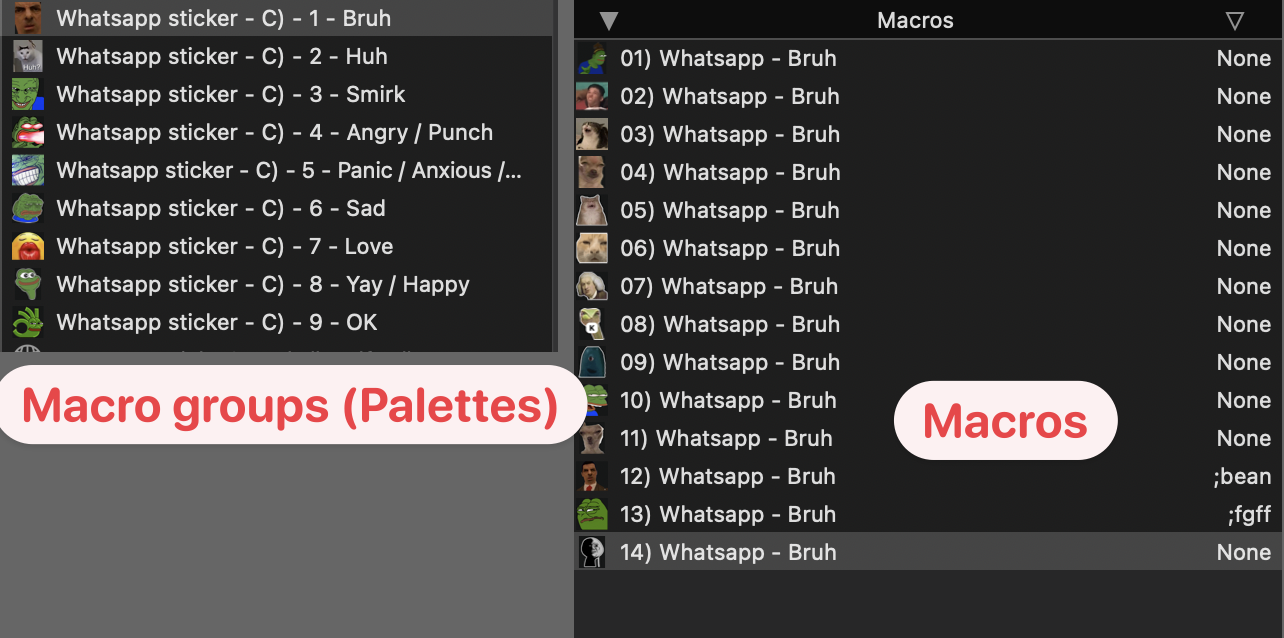
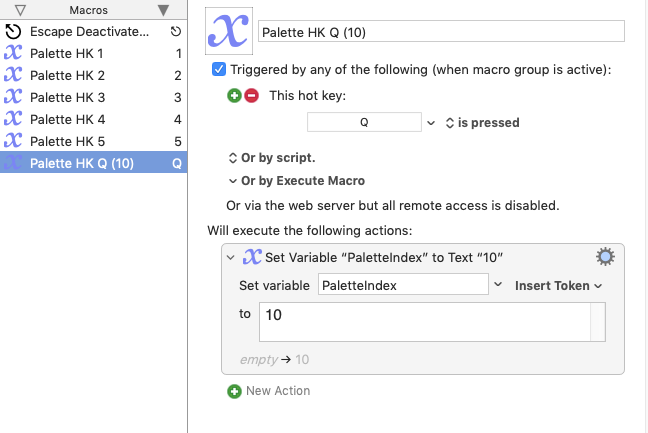
FYI this is what the palette and the macros of the 1st palette looks like, they all follow the same type of naming system. I hope this is not what causes the problem?

Yes, I deleted the old version before doing tests on the 2.0 version

I think you have updated the 1st version? (since I can't find the line use scripting additions you told me to delete). It works now!

If it’s ok, I have something to request (See that’s what I mean when I said I prefer to use KM actions alone when possible, now I have to ask you to do stuff for me and I feel bad! :smiling_face_with_tear: )

  1. At the same time when the palette is activated, hover the cursor over to the corresponding palette (so that that it expands)

  2. Have these 3 ways to deactivate the palettes:

    • Pressing the keystroke Spacebar (rather than Escape)
    • Set an Action time out (5 seconds)
    • A Mouse left click (anywhere on the screen)
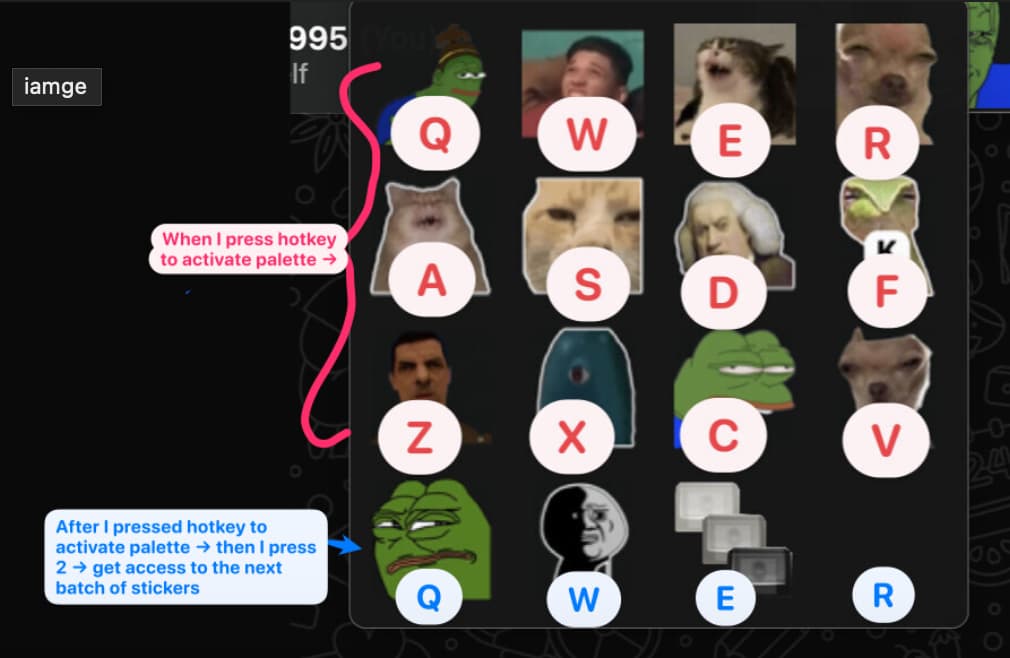
  3. When the palette is activated, I have these 12 hotkey trigger for the top 12 macros (sticker) (see below), I want to press the number key “2” (which will activate another palette that let me get access to the next 12 macros (13–24th stickers) of this palette) and I can now use the same set of hotkeys to trigger the next 12 macros (since it is on a different palette). I don’t know if this makes sense to you or if it’s possible but I managed to do that with two separate palettes that uses mouseclick actions, maybe it’s not feasible for this method.

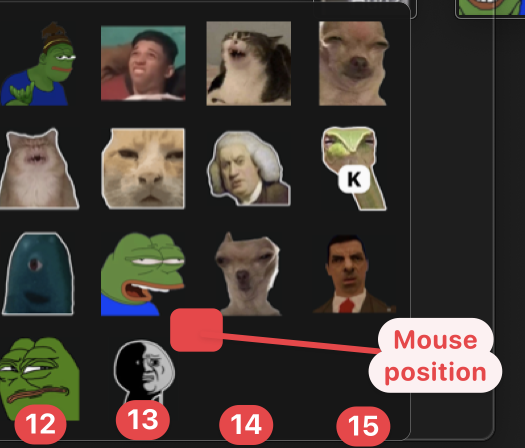
Kind of like this (When I press 2 the cursor move to the upper border of the next 12 stickers (only 3 here tho), thats helps me visiually see I now have access the next 12 stickers):

CleanShot 2025-10-19 at 02.28.51

It’s totally ok if you want to leave it at that! I’m actually working on my dumber less efficent way to do these things I said above. So far I managed to do all these with just KM actions except for the action time out thing and mouse click to deactivate the palette!

:clinking_beer_mugs:!

Bizarre--and intriguing.

If the fixed first version works so should the second one. I really wish is knew what was going wrong. (If you don't mind doing some testing I will upload a tester macro. The second solution is really SO much more flexible.)

But first, let's move on with your requests. They can be easily transferred to the 2nd version if we figure out what is going wrong with it.

Please don't. You'll catch on. I do see what you mean. I would have preferred a solution that stayed within the bounds of KM's UI too, but automating KM itself seemed to lead in this direction. Them's the breaks in suggesting this sort of thing. Nonetheless, these experiments to have other interesting applications...

2nd request.

Gah! I see the The Escape macro in the Palette Hotkeys group is set to Activate/Deactivate, ie. toggle. I should be set to Deactivate. (I'll upload fix, but in the meantime just set it to Deactivate)

It should address your 2nd request. Press it and the group deactivates and the main macro stops waiting and aborts. Also, since the Palette HotKeys group is a single action activation any key press should deactivate it, I think, so I should probably remove the Escape Macro and change make the main macro abort if PaletteIndex is empty.

1rst request.

I built a mouse mover into the the fixed/udpated version that moves the mouse to the target palette's location (only when needed) AFTER a Palette Hot Key is pressed and then returns it to its original position. This ensures the palette is in a clickable state. I think you're asking for something that moves the mouse to the location of the palette BEFORE the key press?

Yes, that can be done with using the same method--AppleScript (cringes) .

I'm still working on understanding the 3rd request...

NOTE: "Palette Clicker" is now "Palette Clicker Subroutine".

This means that any macro can call it with a palette name and it will target that palette. Then, when we implement your first request in the subroutine, the caller can just put in the palette name and the subroutine will raise that palette, even if it is not currently focused.

I hope I've got this right.

UPDATED : Palette Clicker and Palette HotKeys v1.1.kmmacros

Delete the previous version before installing.

(Details above)

Sure sure

Tested the second version again, it still have the same issues mentioned before :thinking:

Yes yes yes, the newest version works like that!

NICE :sparkles:

no no. I want: Key press → Move cursor to the palette position (which the new version do just that! no need to add/changes anything for this)

what cringe is me! U r good! :joy:

Let me try to explain this more clearly and with an example (I know the way I explained previously was really confusing).

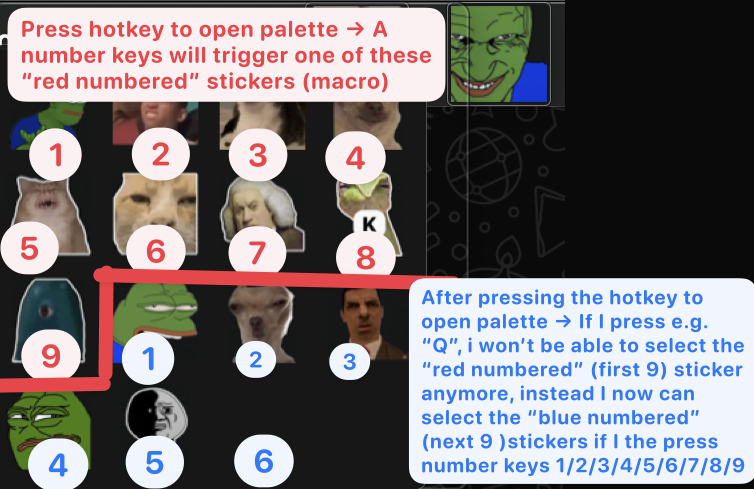
Right now, this is what we have: After a hotkey is pressed, it will open up the palette and Palette hotkeys macro is activated, which allows me to press a number key which will subsequently trigger a macro (sticker) in the palette.

Now for palettes with more than 9 stickers, I will eventually run out of number keys to trigger them, so I want to be able to press a non-number key (e.g. Q) which will let me select the “next” 9 stickers in the palette with the same number keys.

I hope this shitty little illustration will explain a bit better of what I mean:

Ideally, I can change the trigger myself instead of incorprating it into the applescript. Thx!

You are Right ON!

:ok_hand:

Huh! Inconceivable! :rofl:.

Thanks for running it. Well, hopefully we'll get round to removing this fly from the ointment. That script is really so much more flexible or "powerful" if you prefer. If/when he bug is gone, it really should be a matter of plug-n-play.

Anyway. It seems that the updated 1rst version is working so for the time being we'll avoid making the better the enemy of the good enough and go with that.

I think I get the idea this far:

We're running out of single hotkey numeric hotkeys.

To trigger additional items on the same palette? (indulge the obtuseness,please.)

I thought: Q = 10, R= 11, and so on?

But then this the part that threw me:

The script only cares about numbers when clicking items, not hotkeys.

You can have any combination of hotkeys you like so long as they set the variable "paletteIndex" to a number that is within the number of items of the palette. If non-numerics get sent or a number is outside the range of palette items, the script will show a notification like this:

Test Palette
System Events got an error: Can’t get button 10 of list 1 of window "Test Palette" of application process "Keyboard Maestro Engine". Invalid index

So this should do it:

Oh, now with a second read, I see that you've tested the original second version a second time.

I posted an updated second version--without mentioning it.

If it works, you can take your pick.

Each should essentially function the same. Neither care about location or focus of named palettes.

The 1rst version (GUI scripting) will show the palette item (macro) being clicked, the 2nd version (gethotkeys) will not--it doesn't even need the palette expanded. The 2nd version is likely a slight bit faster and not subject to GUI scripting timing issues.

Any Customized Palette Hotkeys will function with either one.

:+1:

So to speak. But I actually lied a little to make it easier for testing. I will explain.

Nahhh Nahhh.

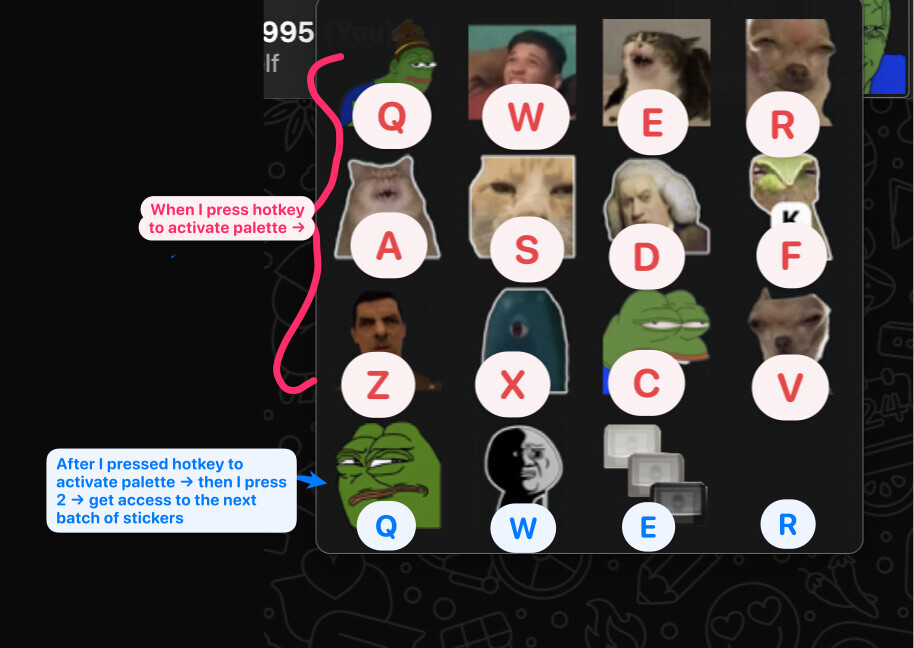
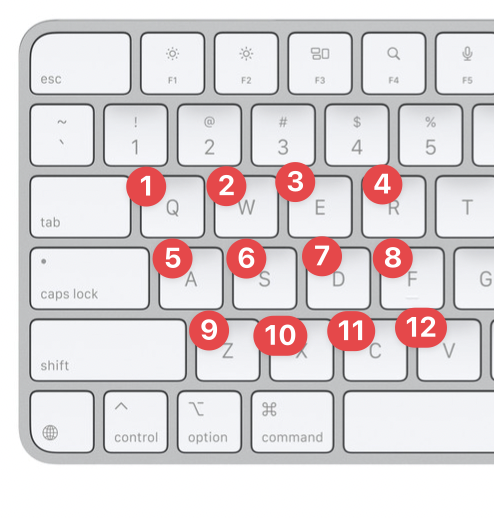
SO! I actually want to use letters to trigger the palette’s items, specifically I only want to use these letters (The reason I chose these keys specifically is because I can press all of these keys with one hand and without looking or spreading my fingers out too wide):

There are 12 total keys, so I can only trigger 12 stickers:

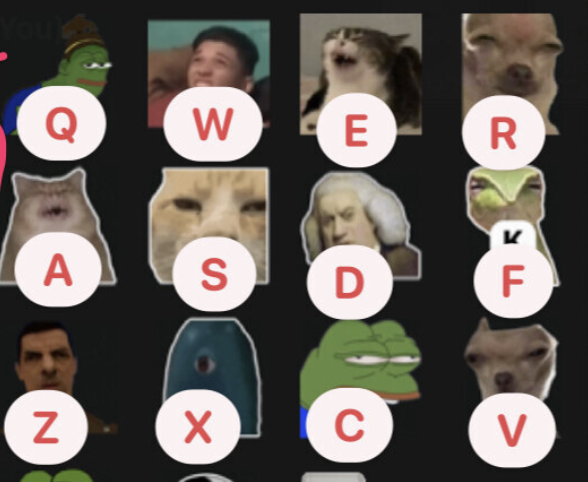
So what about all the other stickers below this palette if there’s more than 12 stickers?? Well! I press the number key “2“! What I hope will happen when I press “2“ is this:

When I press one of the 12 letter hotkeys (Q, W, E, R, A, S, D, F, Z, X, C, V) will no longer trigger the one of the first 12 stickers (red letters in the image below)! Instead, the same set of letter hotkey (Q, W, E, R, A, S, D, F, Z, X, C, V), after pressing ‘2‘ will trigger stickers 13, 14, 15, 16, 17, 18, 19, 20, 21, 22, 23, 24 (“the next 12 stickers”) (indicated partly by the blue letters Q, W, E, R in the image below). I hope this might clear up the confusion?:sweat_smile:

The stuff I mentioned above is the reason why simply adding another Palette HK macro won’t do the trick.

OK, I tested this, this version will open up the palette when I press the hotkey but then when I press a number it won’t trigger the macros :smiling_face_with_tear:

Wait what?? the 2nd version DO shows the palette items. But no response at all when i press the number keys (not even a “no window found” error message that the first version has). Here’s what it looks like:

CleanShot 2025-10-20 at 07.04.31

For the most part your descriptions are just fine, but sticker = macro usage is somehow fogging me.

Maybe, just maybe I'm catching on.

We are talking about 1 palette.

With more than 12 macros.

But. We want to restrict trigger keys to a set of just 12?

Which should switch modes. Sort of like function keys?

Standard F1-F12 in function mode do one thing, in multimedia mode another.

A mode toggle, like fn key,accomplishes this with a single digit key press, like 1 or 2?

In mode 1, our keys represent digits 1-12?

In mode 2, 13-24?

In mode 1, Q=1
In mode 2, Q=13

Offhand it sounds like you'll need a macro group for each mode, ie set of 12.

Then, somehow, you'll want 2 macros to activate your modes (or one to toggle them).

And maybe some indicator of which mode is on.

Your current single Palette HotKey Group becomes two: Palette HotKeys 1-12, Palette HotKeys 13-24

Same hotkeys in each Macro Group. Different paletteIndex numbers.

How about: have the subroutine default to activating Mode 1 AND activating a single action Switch to Mode 2 Group, like and entire group corresponding to the fn key, but just for one mode: mode 2?

I don't know. Think on it. I will too.

But at this point, wouldn't it be simpler to just have a Prompt With List or bunch of text expansion macros and bite the bullet and remember names or abbreviations, like some folks do with emojis? Less visual more textual, but I'm starting to feel like managing this is getting like the mission of the Grand Academy of Lagado in Gulliver's Travels to abolish words and use objects to show meaning. It got kind of cumbersome.

Forgive me the nonsense. It's getting late here and I'm a little punchy.

As for the non-responsive macro, I'd really like to get to the bottom of it.

FWIW, it works without a hitch on my setup...

Another day perhaps...

Another thought.

Argh. :man_facepalming:t2: We ALREADY have waiting for key press a single action group: Palette of HotKeys.

Any key press is going to deactivate it, including our so-called mode switch/function key press: 1

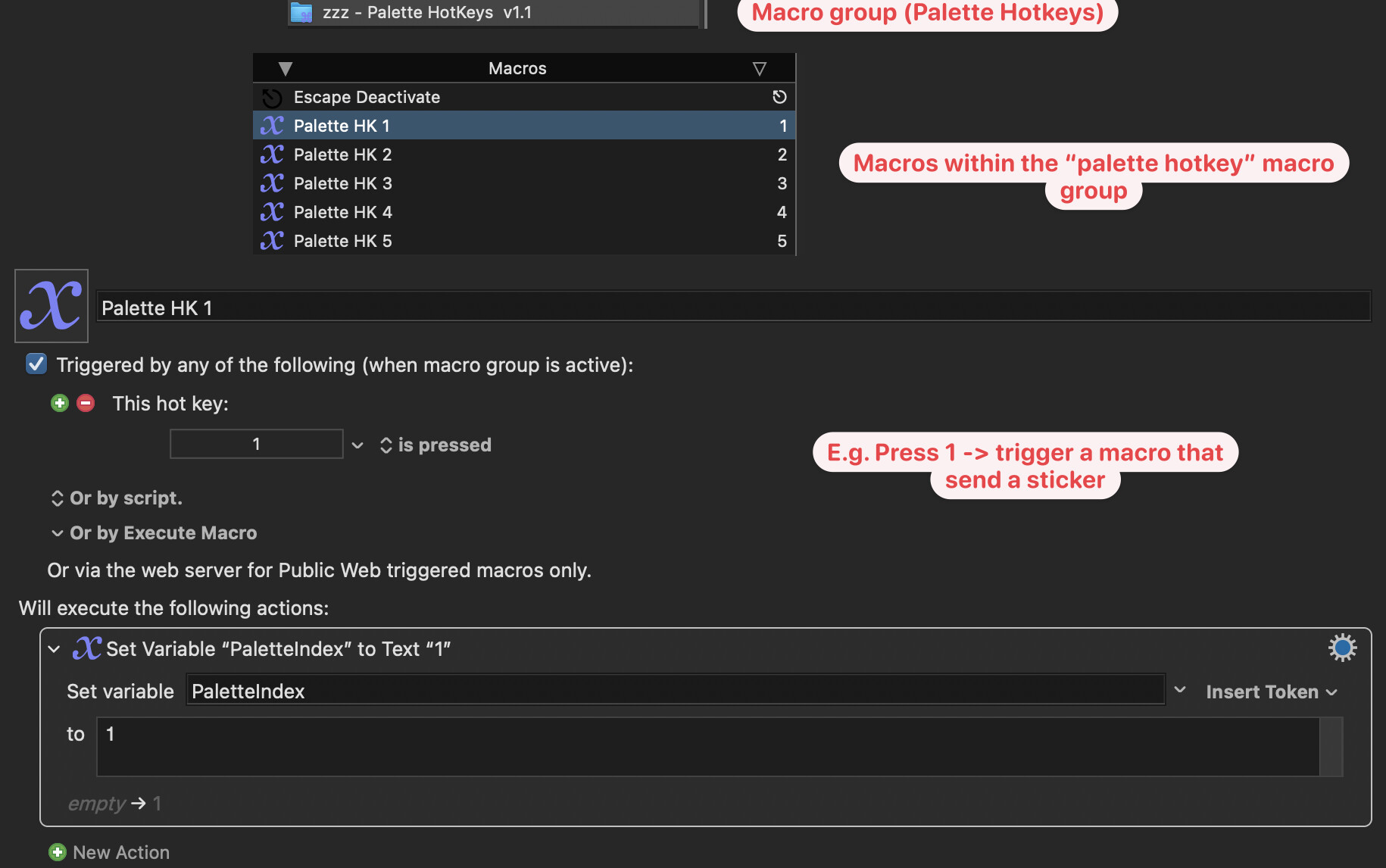
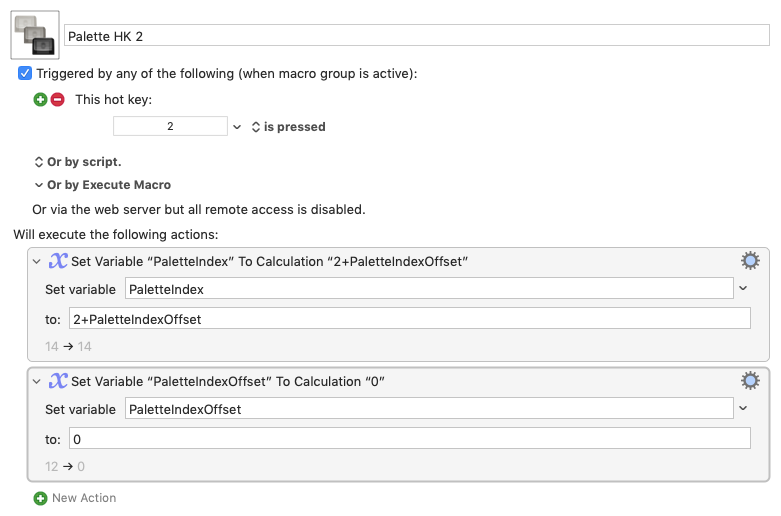
So we put the mode switch key macro (like function key) whose trigger is the single key, 1, to mingle in with the other Palette HotKeys, where its purpose is to toggle a PaletteIndexOffset to 0 or 12. It then sets PaletteIndex to 0, which never exists on a palette.

Before PaletteClicker quits, it checks if PaletteIndex is empty or 0. If empty it exits as usual, restoring the mouse position, because cancelling occurred. If PaletteIndex is 0, it leaves the cursor where it is, resets PaletteIndex to empty, and restarts itself, because the only time PaletteIndex is 0 is when the mode switch macro has set it. The restart will mean a small increase in wait time. When it restarts a PaletteIndexOffset is now 12.

How does this change the mode?

Each Palette HotKey macro sets the value of PaletteIndex to the sum of its base digit, 1-12 plus PaletteIndexOffset. Before it exits, it resets PaletteIndexOffset to 0. That way, the next time Palette Clicker starts, the Palette HotKeys sum their base digits with 0, ie. the default is Mode 1.

I'll give it a try in the upcoming days.

1 Like

I referred to macros as stickers here because what all those macros do are find the stickers in the sticker pack and send it in the chat (whatsapp app). It’s confusing for anyone other than me when I say it like that! So I will stick to calling it macros from now on!

Yes! I think you got it! 1, 2 are the “mode toggles”, which is a much better term than all the jibber jabber I spilled!:sweat_smile:

Yes I believe I need two palettes if there’s more than 12 stickers.

The cursor moving to the “top border” of sticker 13-16 would be a nice indicator for me!

(Opps wrong numbers in the pic below, but I hope you got the idea)

That’s exactly what I have in mind! default Mode 1 (macro 1-12), then if press 2 → Mode 2 (macro 13-24).

Well I actually do have text expansion for the most used macros (stickers) to go along with this (about 30 of them now). But for the less-used stickers, I will have to have a visual cue of what they look like to pick the right one (there are hundreds of them so it wouldn’t be practical to memorize all of them). In terms of prompt with List, I think it’s the same story unless I can actually see the image of the sticker in that list (which I don’t think it can)

:rofl:

Maybe I did something wrong! I pretty much set it up the same way I did with the 1st version, just put the name of the macro groups into the subroutine parameter and give the macro a hotkey trigger…

:ok_hand:

I think I understand what you are saying to a degree but I can’t be sure.

Thank you so much! Take all the time you need, I’m in no rush!

Howdy @Willis,

Here's an updated version that should allow dual use of 12 single key hotkeys to click the first 24 items of a focused palette or a named palette.

Palette Clicker with Dual Use Hotkeys contains:

Two macro groups:
Palette Clicker with Dual Use Hotkeys
Palette HotKeys Dual Use

It is currently set for left-hand use: (qwer,asdf,zxcv).

When the macro starts the hotkeys are set to click the first 12 macros.
Pressing a single mode switch hotkey (2) sets the hotkeys to click the next 13-24 macros .

To indicate start of the range of macros that the hotkeys are currently targeting, the macro moves the cursor under the 1rst or the 13th palette item.

If the macro is shrunk, the cursor moves first to the center of the palette and then to the range start.

Whenever modes are toggled, the cursor updates its location.

It can get out of sync if toggle is pressed too quickly.

(I probably should fix that :grimacing:.)

When it is finished, the macro restores the cursor to its original location.

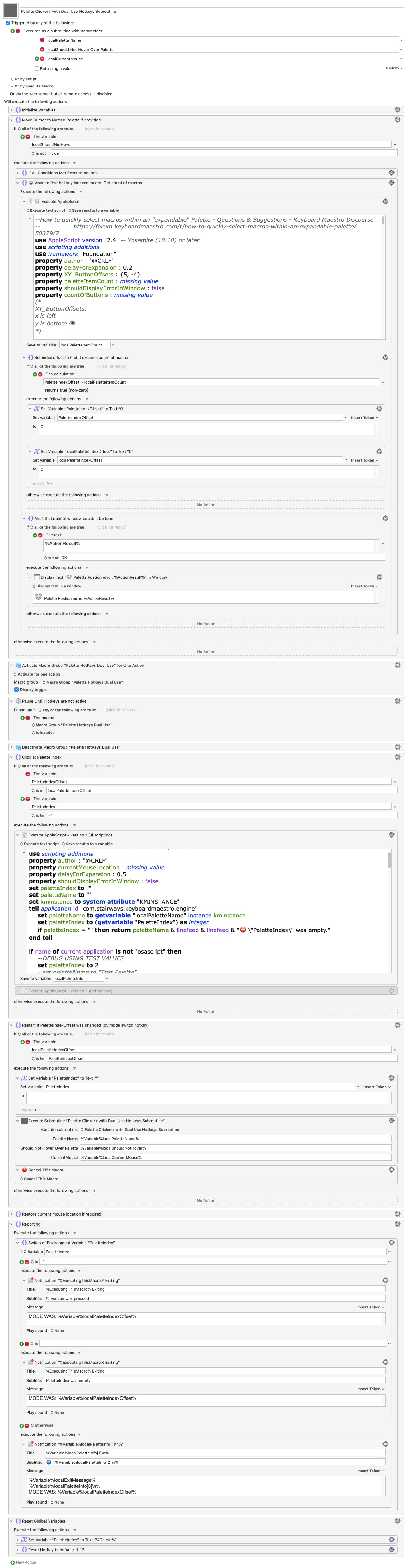
The main macro is a subroutine, Palette Clicker with Dual Use Hotkeys Subroutine.

Used by itself, it defaults to targeting the first focused palette.

Calling macros may optionally specify the name of a macro group of a palette to target.

The macro will make the targeted palette the top window.

Other parameters are for use by the subroutine and should be left blank.

I hope timing and cursor positioning continue working for expanding shrunk palettes on your setup.

To tweak these values adjust the property variables XY_ButtonOffsets, delayForExpansion in the 1rst AppleScript and the delayForExpansion in the 2nd AppleScript, which moves the mouse (via Engine do script and Move Mouse XML).

Version 2 using gethotkeys is included in the disabled action "Execute AppleScript - version 2 (gethotkeys)". The error handling is updated.

To try it disable "Execute AppleScript - version 1 (ui scripting)" action and then enable the Version 2 action.

To enable debugging windows to display all errors, each script has a property variable, shouldDisplayErrorInWindow. Change its value from false to true.

As always delete any previous versions before installing.

Subroutine Image

Palette Clicker with Dual Use HotKeys.kmmacros (72.2 KB)

1 Like

Thank you Thank you! I really appreciate the work you put into it!

I tried using the macro, but unfortunately it’s not working on my setup :sob: . I’m getting the following error message:
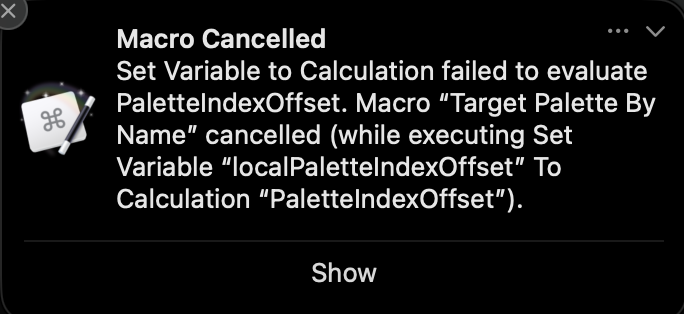
Yes I did that.

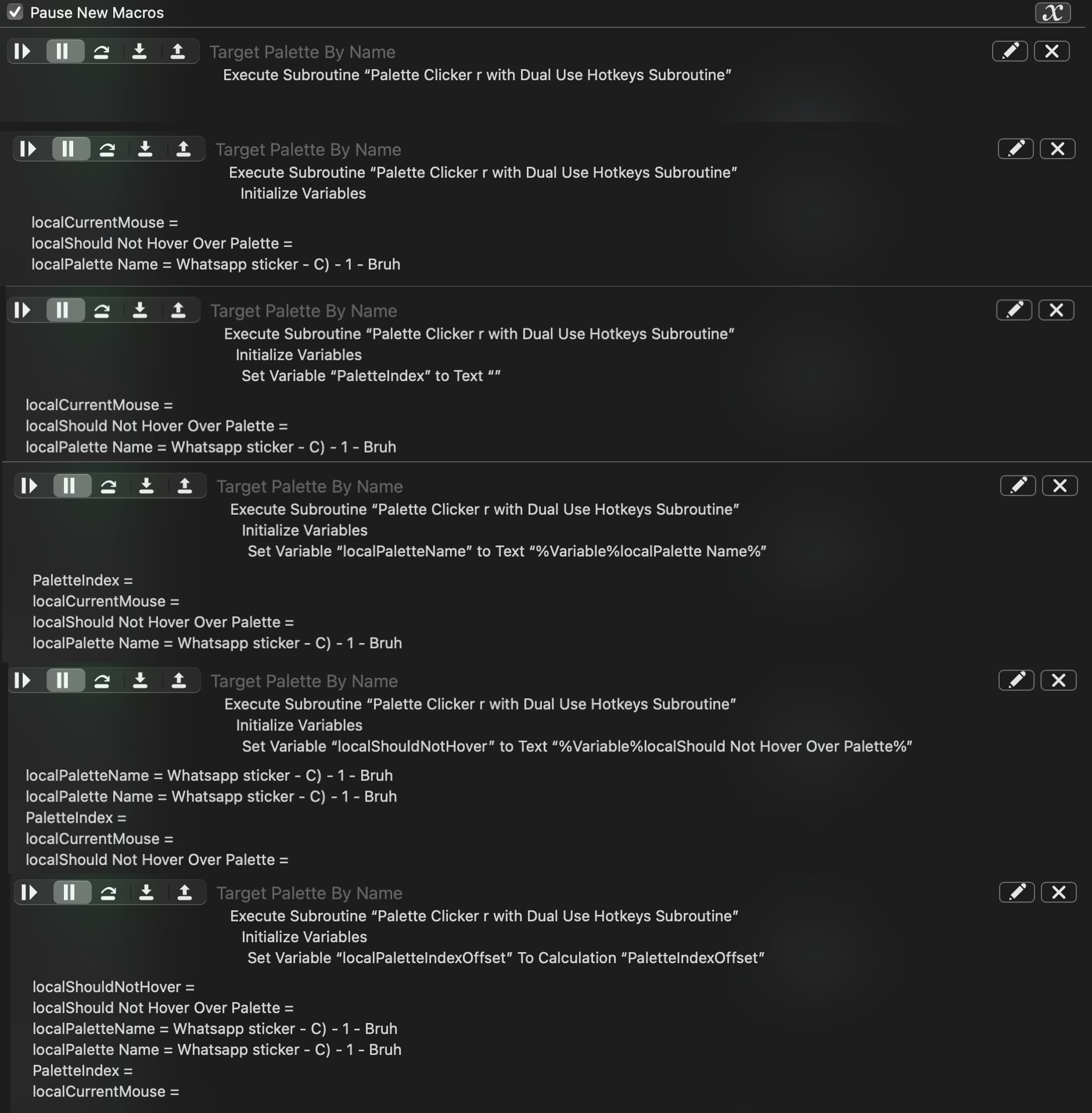
Pardon me for being nosey here, but you could run the debugger and follow this macro step by step to see what the contents of the variable PaletteIndexOffset are just prior to the error message. The chances are pretty high (in my opinion) that the value is empty.

I'm not sure if discovering its value really gives you the answer you need, but it would show initiative. I took a brief look at the macro and couldn't spot the cause of this problem.

Pardon me, too, for being nosey and butting in. I’ve been a KBM user for a few years and I’ve created some relatively complex macros myself, using AppleScript, BSH, RegEx, and also using the Activate for One Action group technique.

My butting in is to say in @Willis’s defense that I have never gotten the hang of using the Debugger and as a result I don’t often even think of using it.

Even though I’m not a WhatsApp user, I’ve been reading through this thread because I got caught by slightly misunderstanding the title (I thought it was creating expandable KBM palettes) and by Nige’s early claim that single, simple keystrokes couldn’t be made to work as triggers, when I had done just that a while ago. (My usage is to pick items in a Prompt With List by single keystrokes where the key is not the first letter in the List item and to automatically add a Return so that the one keystroke can both choose and complete the Prompt With List choice.) Then I got caught up in trying to follow @CRLF’s creativity, looking for idea that I might use.

OK. Here’s are all the steps I saw in the debugger before the error message appears:

Haha it’s certainly not the most intuitive thing (for me). But I’ll admit I haven’t put in the time to learn how to use the debugger properly. It could be a great tool for troubleshooting so I probably should read the debugger wiki page at some point.