I automate KM to make macros now and its annoying I manually have to enable macros.
Is there at least a way to enable macros with code, pragmatically?
Thank you.
I automate KM to make macros now and its annoying I manually have to enable macros.
Is there at least a way to enable macros with code, pragmatically?
Thank you.
Hello Nikita (@nikivi)
Unfortunately there is no setting for that, as far as I know.
But there is a manual way around that if you’re incorporating scritpting using the %RandomUUID% token and save the result for every single Macro into a single Variable the first way and later after the import use the enable Command using the individual saved Variable to enable all macros in sequence after you’ve imported them.
This way is the savest and also the only way to get the Macro‘s UUID you’ve just created.
Greetings from Germany 
Tobias
You say "on import" in your title. It would help to know how you are importing them.
If you are using the Editor's "File" -> "Import Actions Safely..." menu item, have you tried holding down the Option key?
The AppleScript importMacros verb will import the macro with the state it was "exported" with, so if you create your macro (and its Group) enabled then it should import enabled.
IIRC--from the cursory look I took at the github source mentioned in your previous post--you were using the Keyboard Maestro AppleScript "importmacros" command.
In my limited testing, "importmacros" defaults to importing without disabling enabled macros or macro groups.
However, you might try explicitly overriding the disabled option:
tell application id "com.stairways.keyboardmaestro.editor"
	importMacros exportedPlist without disabled
end tell
That should work.
If not another way might be run "importmacros", immediately query macros created seconds ago and then set their enabled properties to true
(I think Keyboard Maestro assigns new uids to imported macros, so tracking them won't get you the newly imported macros.) @Nr.5-need_input explains the correct behavior in the next post.
Delete the CreationDate key for the .kmmacros file's plist.
KM will create the key with the time of import.
Then do something like this:
use AppleScript version "2.4"
use scripting additions

tell application "Keyboard Maestro"
	importMacros plist without disabled
end tell

set oneSecondAgo to appleScriptNowMinusTimeExpression("1s")
tell application id "com.stairways.keyboardmaestro.editor"
	set importedMacros to macros whose creation date > oneSecondAgo
	repeat with aMacro in importedMacros
		set enabled of aMacro to true
	end repeat
end tell

on appleScriptNowMinusTimeExpression(timeExpression)
	if timeExpression is in {"", missing value} then return missing value

	set timeUnit to text -1 of timeExpression
	set nText to text 1 thru -2 of timeExpression
	try
		set n to nText as integer
	on error
		return missing value
	end try

	if timeUnit is "s" then
		set deltaSeconds to -n
	else if timeUnit is "m" then
		set deltaSeconds to -(n * 60)
	else if timeUnit is "h" then
		set deltaSeconds to -(n * 60 * 60)
	else if timeUnit is "d" then
		set deltaSeconds to -(n * 24 * 60 * 60)
	else if timeUnit is "w" then
		set deltaSeconds to -(n * 7 * 24 * 60 * 60)
	else
		return missing value
	end if
	set currentDate to (current date)
	return (currentDate + deltaSeconds) -- deltaSeconds is negative
end appleScriptNowMinusTimeExpression
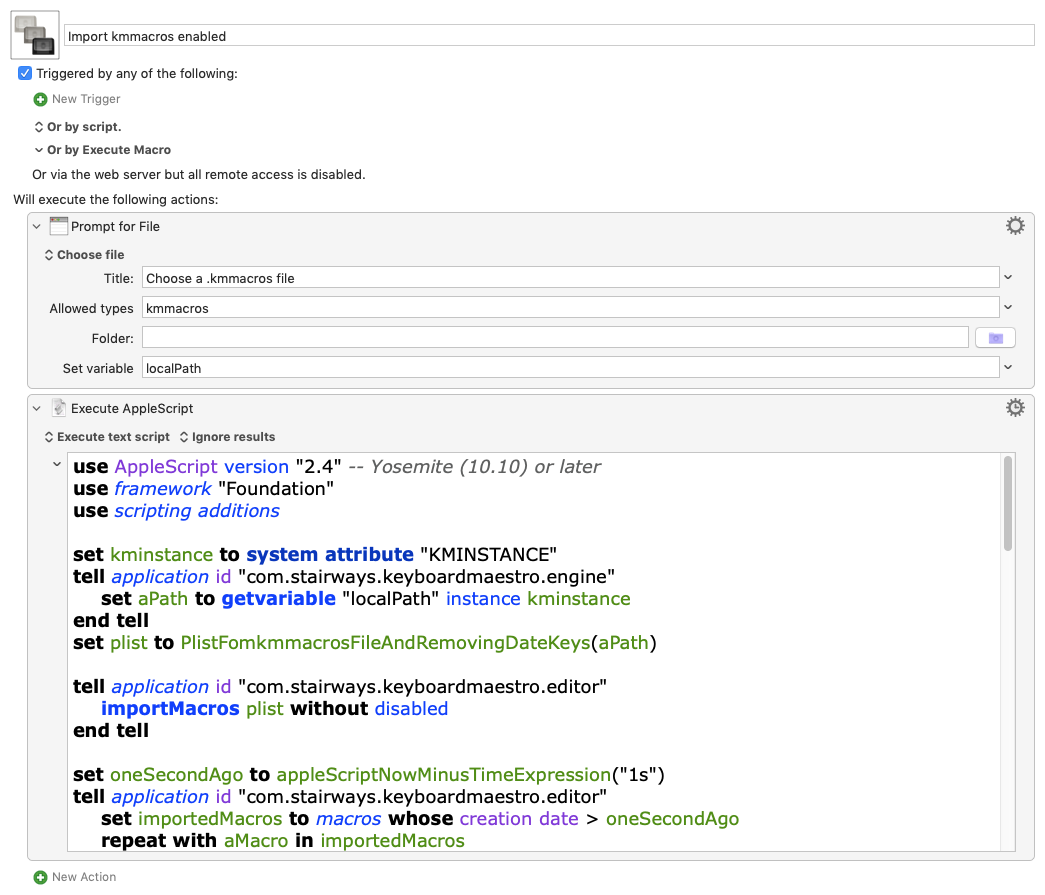
Here's a demo that reads the plist from .kmmacros file, deletes the date keys from it, runs importmacros on the edited plist, queries macros created one second ago, and sets their enabled properties to true
Import kmmacros enabled.kmmacros (4.9 KB)
Hello @CRLF
Thanks for posting such cool stuff … however:
This is quite true but only a few parts of it.
If your using for instance manually created UUID‘s for Groups and Macros and KM doesn’t find them in all other instances of Groups and Macros all ready available within the Application it will just import them as they are without changing their UUID‘s.
If you use the %RandomUUID% Token I mentioned above, KM will never replace your UUID‘s because you’re using something that KM normally uses internally to ensure that your Macros are unique in terms of their UUID‘s.
Greetings from Germany
Tobias
Nitpick:
KM will almost never replace your UUIDs -- random doesn't guarantee uniqueness, though it tends that way when drawing from a very large pool.
Of course, if you do build and maintain your own tracking system (and include every macro in it) you could check for uniqueness before use. At that point I'd maybe consider not using random UUIDs and would think about developing my own schema that included metadata within the UUID.
@nr.5-need_input, many thanks for the correction! I really muddied the waters on this one.
Your suggestion is indeed the way to go to get "importMacros" to import disabled macros.
@Nige_S states the case clearly:
Exporting macros as enabled is the easiest way ensure that importMacros imports enabled macros.
I think the problem then, that your and my posts would address, is how to get enabled macros when running "importMacros" on a .kmmacros plist in which macros are disabled.
In this case, plist editing seems needed.
An {IsActive:false} key value pair is set in .kmmacros plists with disabled macros.
This doesn't seem to change that setting:
tell application id "com.stairways.keyboardmaestro.editor"
	importMacros exportPlist without disabled
end tell
Your solution of assigning new uids, caching a copy and enabling each macro (referenced by cached ids) would get around that.
Use the a %RandomUUID% Token to:
Deleting the {IsActive:false} key value pair before using "importmacos" also works.(Enabled macros don't have the key at all)
Here a AppleScript of that demos both edit and import techniques.
use AppleScript version "2.4"
use framework "Foundation"
use scripting additions

if name of current application is not "osascript" then
	set exportMacrosPlist to "<array>
		<dict>
			<key>Macros</key>
			<array>
				<dict>
					<key>Actions</key>
					<array/>
					<key>IsActive</key>
					<false/>
					<key>Name</key>
					<string>Disabled Macro</string>
					<key>Triggers</key>
					<array/>
					<key>UID</key>
					<string>A99AB9D1-7E2B-47D5-AD7D-D4BBF221E90C</string>
				</dict>
			</array>
			<key>Name</key>
			<string>Tests</string>
		</dict>
	</array>"
else
	set aPath to POSIX path of (choose file with prompt ¬
		"Choose a .kmmacros file" of type {"kmmacros"})
	set exportMacrosPlist to (read aPath)
end if

importMacrosAndEnable(exportMacrosPlist)

importmacrosDeletingDisabledKeys(exportMacrosPlist)

--------------------------------------------------------
--HANDLERS
--------------------------------------------------------
(*
Receives .kmmacros plist xml
Assigns a new uid to each macro
Runs importMacros on the edited plist xml
Sets enabled of each imported macro to true using the new uids
*)

on importMacrosAndEnable(plistXML)
	--deserialize plist to an editable plist object
	set macroGroups to (current application's NSString's stringWithString:plistXML)'s propertyList() --.kmmacros's root is an array of macro groups
	--get references to an array of all macro dictionaries of macroGroups
	set liveMacros to (macroGroups's valueForKeyPath:"@unionOfArrays.Macros")
	--replace potentially existing uids with new ones
	set newUIDs to {} --cache the new uids
	tell application id "com.stairways.keyboardmaestro.engine"
		repeat with aMacro in liveMacros
			set aNewUID to process tokens "%RandomUUID%"
			(aMacro's setObject:aNewUID forKey:"UID") --set the new uid
			set end of newUIDs to aNewUID
		end repeat
	end tell
	--serialize the edited plist object to plist xml
	set revisedExportXML to serializePlistObject(macroGroups)

	tell application id "com.stairways.keyboardmaestro.editor"
		importMacros revisedExportXML
		repeat with aMacroUID in newUIDs
			set mID to contents of aMacroUID
			set enabled of macro id mID to true
		end repeat
	end tell
end importMacrosAndEnable

(*
Receives .kmmacros plist xml
 Removes {IsActive:false} key value pairs from all macros
 Runs importmacros on the edited plist xml
*)

on importMacrosDeletingDisabledKeys(exportMacrosPlist)
	--deserialize plist to an editable plist object
	set macroGroups to (current application's NSString's stringWithString:exportMacrosPlist)'s propertyList() --.kmmacros's root is an array of macro groups
	--get references to an array of all macro dictionaries of macroGroups
	set liveMacros to (macroGroups's valueForKeyPath:"@unionOfArrays.Macros")
	repeat with aMacro in liveMacros
		(aMacro's removeObjectForKey:"IsActive") --delete the {IsActive:false} key value pair
	end repeat
	--serialize the edited plist object to plist xml
	set exportXMLEnabled to serializePlistObject(macroGroups)
	tell application id "com.stairways.keyboardmaestro.editor"
		importMacros exportXMLEnabled
	end tell
	return
end importMacrosDeletingDisabledKeys

on serializePlistObject(plistObject)
	set {theData, theError} to current application's NSPropertyListSerialization's dataWithPropertyList:plistObject format:(current application's NSPropertyListXMLFormat_v1_0) options:0 |error|:(reference) -- don't use binary format
	if theData is missing value then error (theError's localizedDescription() as text) number -10000
	set plist to (current application's NSString's alloc()'s initWithData:theData encoding:(current application's NSUTF8StringEncoding)) as text
end serializePlistObject
Run in Script Editor, each version (in the "importMacros..." handlers) edits a sample of km export plist xml that contains a disabled macro and runs "importMacros" on the edited plist. The macro is imported as enabled.
In either case, the macro, "Disabled Macro", will be imported twice to the macro group "Tests".
Pasted into an "Execute an Apple Script" action and run in the KM Editor, it will prompt for a .kmmacros file as source instead.
That's a different problem -- OP is programmatically creating the macros to import, so should be able to create both Group(s) and macro(s) as enabled. (Or rather, not include the keys that mark them as disabled.)
For another way of solving your "importing previously exported, disabled, macros", what you could do is:
Or, as you suggest, you could edit the plist before import. That should be as easy as deleting every occurrence of the strings
\t\t<key>IsActive</key>
\t\t<false/>
and
\t\t\t\t<key>IsActive</key>
\t\t\t\t<false/>
Yes, it is.
After having figured it out the problem I was addressing, I should said have said that part clearly.
As for the solutions to this different problem of importing as enabled, macros exported disabled, there seems to be no shortage.
Though I'm not sure I follow your first suggestion, I'm sure it works!
As for the second suggestion, as usual I prefer Apple's key-value coding queries for wrangling deserializated plists over using Swiss Army knife search and replace tools on the raw text.
Sometimes it's worth it to use Apple's specialized query tools; sometimes it's too much of a good thing. It looks like that's the case here. 
If you get the disabled items before (set A) and after (set B) import, the newly-imported disabled items will be the complement of A within B.
That could horribly slow to do in AS if you have lots of disabled macros, but I believe JXA can work with sets and you can find the complement by negating the union (see Set operations in JavaScript - 30 seconds of code). But that's way beyond me
I think I would too, if I better understood the method! Another one for the learning todo list...
But this is one area where KM's lack of nested Macro Groups is a help rather than a hindrance. In an exported plist there will always be exactly two tabs before any Group <key>IsActive</key>, four tabs before any for a macro, and six or more for Actions. So we can take a brute force approach that wouldn't otherwise work.
Aha! Now I see:
Get the uids of the difference between Pre-import and post-import snapshots of all disabled groups and macros.
Got it. Thanks, and thanks for the link.
It looks like JS has a native API for sets. Objc has an API for sets as well. So JXA must sport two--no doubt the native, no-bridge version being the faster and easier to use of the two.
Be that as it may, here's what your very clean, plist-wrangle-free suggestion with the ObjC API might look in AppleScript.
use AppleScript version "2.4"
use framework "Foundation"
use scripting additions
if name of current application is not "osascript" then
	set exportMacrosPlist to "<array>
	<dict>
		<key>IsActive</key>
		<false/>
		<key>Macros</key>
		<array>
			<dict>
				<key>Actions</key>
				<array/>
				<key>IsActive</key>
				<false/>
				<key>Name</key>
				<string>Disabled Macro 1</string>
				<key>Triggers</key>
				<array/>
			</dict>
		</array>
		<key>Name</key>
		<string>Test Import</string>
	</dict>
	<dict>
		<key>IsActive</key>
		<false/>
		<key>Macros</key>
		<array>
			<dict>
				<key>Actions</key>
				<array/>
				<key>IsActive</key>
				<false/>
				<key>Name</key>
				<string>Disabled Macro 2</string>
				<key>Triggers</key>
				<array/>
			</dict>
		</array>
		<key>Name</key>
		<string>Test Import</string>
	</dict>
</array>"
else
	set theKMMacrosFile to POSIX path of (choose file with prompt ¬
		"Choose a .kmmacros file" of type {"kmmacros"})
	set exportMacrosPlist to (read aPath)
end if

set shouldEnableImportedItems to true

tell application id "com.stairways.keyboardmaestro.editor"
	-- Set A: disabled items (before import)
	set disabledMacroIDs_A to id of macros whose enabled is false
	set disabledGroupIDs_A to id of macro groups whose enabled is false

	-- Import
	importMacros exportMacrosPlist

	-- Set B: disabled items (after import)
	set disabledMacroIDs_B to id of macros whose enabled is false
	set disabledGroupIDs_B to id of macro groups whose enabled is false
end tell

-- Convert Set A (pre-import disableds) to sets
set disabledMacroSet_A to (current application's NSMutableSet's setWithArray:disabledMacroIDs_A)
set disabledGroupSet_A to (current application's NSMutableSet's setWithArray:disabledGroupIDs_A)

-- Convert Set B (post-import disableds) to sets
set disabledMacroSet_B to (current application's NSMutableSet's setWithArray:disabledMacroIDs_B)
set disabledGroupSet_B to (current application's NSMutableSet's setWithArray:disabledGroupIDs_B)

-- Set C =  B − A
disabledMacroSet_B's minusSet:disabledMacroSet_A
disabledGroupSet_B's minusSet:disabledGroupSet_A

set disabledMacroIDs_C to (disabledMacroSet_B's allObjects()) as list
set disabledGroupIDs_C to (disabledGroupSet_B's allObjects()) as list

-- Enable items in C sets
if shouldEnableImportedItems then
	tell application id "com.stairways.keyboardmaestro.editor"
		--enable groups
		repeat with aGroupID in disabledGroupIDs_C
			set enabled of macro group id aGroupID to true
		end repeat
		--enable macros
		repeat with aMacroID in disabledMacroIDs_C
			set enabled of macro id aMacroID to true
		end repeat

	end tell
end if
return {disabledMacroIDs_C, disabledGroupIDs_C}
When run in Script Editor, the script imports 2 empty disabled macros,"Disabled Macro 1,Disabled Macro 2" into a disabled macro group, "TestImport", and then enables them. Paste it into an Execute an AppleScript action to run it on a kmmacros file of your choice.
Conceptually, I don't think it isn't hugely different than what you already know about the two lighter weight types of AppleScript queries:
tell application "Keyboard Maestro"
	set theMacros to macros whose enabled is true
	set theIDs to id of macros
end tell
Or of using query syntax to batch edit the value of a property on multiple objects:
tell application "Keyboard Maestro"
	set name of macros of macro group "TestImport" to "doppelganger"
end tell
It's Objc's rebarbative syntax that is the main hurdle.
Just converting records and and lists to dictionaries and arrays is a ceremonial hassle.
I believe it didn't have to be this way for AppleScript.
Dynamic bridging in Mojave, lost:
A weird--and I presume undocumented--AppleScript conversion shortcut on Mojave (not on other MacOS as far as I know,  ) makes testing with the Objc calls easier. Just put parentheses after a variable that contains any AppleScript value type and it converts to the appropriate ObjC type. Similar to variable initialization in Swift.
So (on Mojave):
use framework "Foundation"

set s to "hello world"
class of s --> text
class of s() --> NSString
s()'s capitalizedString() --> Hello World
This no longer works on later MacOS I've heard. Alas.
Anyway.
IMO, AppleScript and ObjC use pretty much the same the key-value coding technology. It's the un-AppleScript-like implemention of ObjC in AppleScript, ie. syntax, that makes it seem like such an unfamiliar tool. Too bad, since AppleScript could have done both application scripting and provided for a friendlier scripting environment for ObjC--sort of like Swift playground.
KM makes objects available as both AppleScript objects and Apple's plist xml--which makes some impossible things possible, such as "runtime" actions with Engine's do script. A friendlier --more AppleScript-like--implementation of ObjC in AppleScript sure would make using Apple serialization technology on Apple serializations more fun.
Anyway, todo list permitting, just shout.