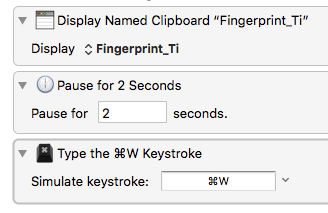
If you display a named clipboard, how do you explicitly close it or is there a time out function?
I think I’ve got the same question. I have a macro that displays a named clipboard. At some point I want to programmatically close this window. I tried using the ‘Manipulate a Window’ action, configured to Close -> the window with the title “Clipboard Entry” -> in the window with the title “Keyboard Maestro”, but the macro throws an error saying that no window could be found. It appears that the clipboard entry window is different that the typical application window and I can’t find an action that recognizes it.
Hey Jason,
Unfortunately Keyboard Maestro doesn’t provide an automated method of closing these windows. It’s fire-and-forget…
Nevertheless there is a means to do it using AppleScript and System Events:
tell application "System Events"
  tell application process "Keyboard Maestro Engine"
    tell (first window whose name contains "clipboard")
      tell button 1
        perform action "AXPress"
      end tell
    end tell
  end tell
end tell
-Chris
Thanks for the quick response. I ended up using Preview to display my clipboard, which is an image, and was able to use the intrinsic control Close window with a particular title in Preview.
Thanks, kindly.
Worked for me. (And I have no idea what I’m doing.)
Much appreciated.
Hey Christopher,
Your solution works perfectly well too for positioning and (re)sizing of these windows:
tell application "System Events"
	tell application process "Keyboard Maestro Engine"
		tell (first window whose name contains "clipboard")
			set position to {500, 50} # OK
			set size to {500, 200} # {477, 172} is the minimal window size
			properties
		end tell
	end tell
end tell
but not for sizing  Why?
Why?
-Alain
I don't think the window design supports resizing.
IOW, its a KM issue, not an AppleScript issue.
Have you tried it manually?
@JMichaelTX you give me the push to the right answer, thanks:
-
{477, 172}is the minimal size of these KM windows. - These KM windows can easily placed and sized (above the minimal size
 of course) by AppleScript: So I will edit the above AppleScript code when I close this reply.
I found "Cmd+W" will close the window so a simple macro like this would do it.